Acura TLX (2019 year). Manual - part 6
 

  Index      Acura     Acura TLX (2019 year) - manual in english


Search            copyright infringement  


Content      ..     4      5      6      7     ..


Acura TLX (2019 year). Manual - part 6


85

uu

Indicators

u

Continued

In

strum

e

nt Pa

nel

Indicator

Name

On/Blinking

Explanation

Message

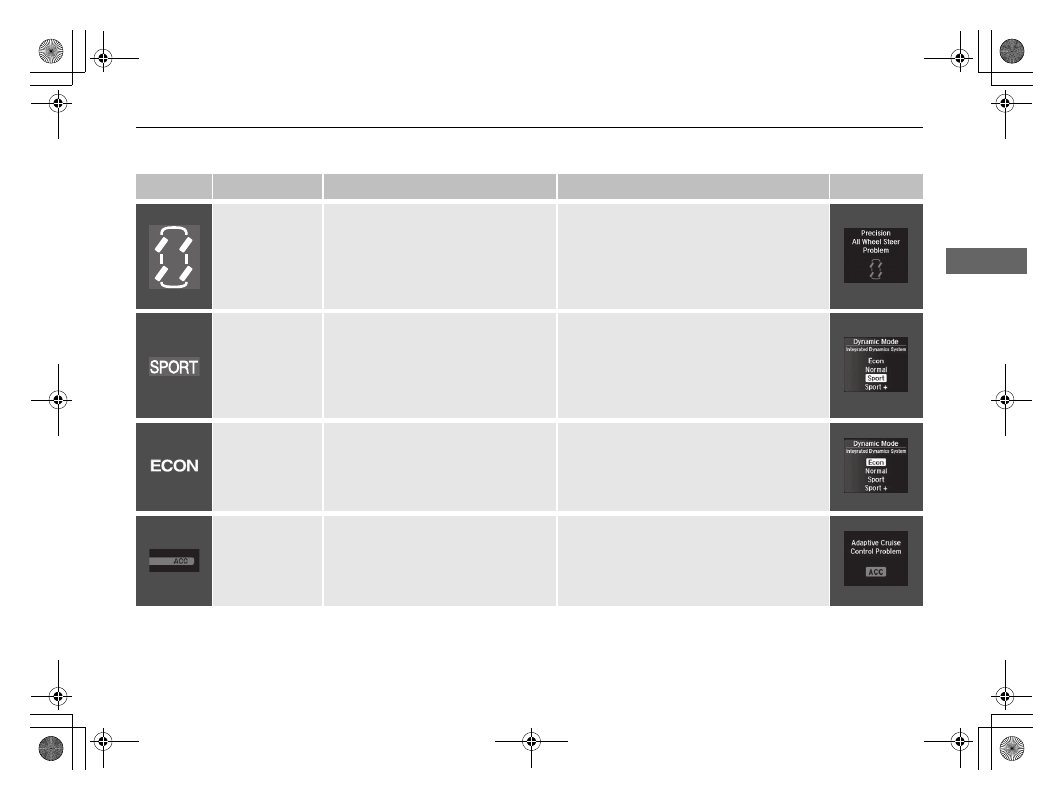
Precision All-
Wheel Steer

TM


(P-AWS®) System 
Indicator

*

Comes on for a few seconds when 
you set the power mode to ON, then 
goes off.

If it comes on at any other time, there 
is a problem with the Precision All-
Wheel Steer

TM

 (P-AWS®) system.

Comes on while driving - Have your 
vehicle checked by a dealer.

The system may limit the vehicle speed to 
50 mph (80 km/h) or less.

SPORT (Sport 
mode) Indicator

Comes on for a few seconds when 
you set the power mode to ON, then 
goes off.

Comes on when you press the 
Dynamic Mode button if the Sport 
or Sport+ mode was selected.

Integrated Dynamics System P. 387

ECON (Econ 
mode) Indicator

Comes on for a few seconds when 
you set the power mode to ON.

Comes on when you press the 
Dynamic Mode button if the Econ 
mode was selected.

Integrated Dynamics System P. 387

Adaptive Cruise 
Control (ACC
with Low Speed 
Follow (LSF) 
Indicator (Amber)

Comes on for a few seconds when 
you set the power mode to ON, then 
goes off.

Comes on if there is a problem with 
ACC with LSF.

Comes on while driving - Have your 
vehicle checked by a dealer.

* Not available on all models

19 ACURA TLX-31TZ36400.book  85 ページ  2018年2月16日 金曜日 午後12時22分

-------------------------------------------------------------------------------------------------------------------------------------------------------------

86

uu

Indicators

u

In

strum

e

nt Pa

nel

Indicator

Name

On/Blinking

Explanation

Message

Adaptive Cruise 
Control (ACC
with Low Speed 
Follow (LSF) 
Indicator (Green)

Comes on when you press the MAIN 
button.

Adaptive Cruise Control (ACC) with 

Low Speed Follow (LSF) P. 390

Comes on if anything covers the 
radar sensor cover and prevents the 
sensor from detecting a vehicle in 
front.

May come on when driving in bad 
weather (rain, snow, fog, etc.)

ACC has been automatically 
canceled.

When the radar sensor gets dirty, stop your 
vehicle in a safe place, and wipe off dirt 
using a soft cloth.

Have your vehicle checked by a dealer if the 
message does not disappear even after you 
clean the sensor cover.

Comes on when ACC with LSF is in 
operation, but the temperature 
inside the front sensor camera is too 
high. ACC with LSF cancels 
automatically. The beeper sounds 
simultaneously.

Use the climate control system to cool down 
the camera.

Goes off - The camera has been cooled 
down and the system activates normally.

Comes on when the area around the 
camera is blocked by dirt, mud, etc. 
Stop your vehicle in a safe place, and 
wipe it off with a soft cloth.

May come on when driving in bad 
weather (rain, snow, fog, etc.)

Have your vehicle checked by a dealer if the 
indicator and message come back on after 
you cleaned the area around the camera.

19 ACURA TLX-31TZ36400.book  86 ページ  2018年2月16日 金曜日 午後12時22分

-------------------------------------------------------------------------------------------------------------------------------------------------------------

87

uu

Indicators

u

Continued

In

strum

e

nt Pa

nel

Indicator

Name

On/Blinking

Explanation

Message

Lane Keeping 
Assist System 
(LKAS) Indicator 
(Amber)

Comes on for a few seconds when 
you set the power mode to ON, then 
goes off.

Comes on if there is a problem with 
the LKAS.

Stays on constantly - Have your vehicle 
checked by a dealer.

Lane Keeping 
Assist System 
(LKAS) Indicator 
(Green)

Comes on when you press the MAIN 
button.

Lane Keeping Assist System (LKAS) 

P. 409

Comes on when the LKAS is in 
operation, or the LKAS button is 
pressed, but the temperature inside 
the front sensor camera is too high. 
The LKAS cancels automatically. The 
beeper sounds simultaneously.

Use the climate control system to cool down 
the camera.

Goes off - The camera has been cooled 
down and the system activates normally.

Front Sensor Camera P. 388

Comes on when the area around the 
camera is blocked by dirt, mud, etc. 
Stop your vehicle in a safe place, and 
wipe it off with a soft cloth.

May come on when driving in bad 
weather (rain, snow, fog, etc.)

Have your vehicle checked by a dealer if the 
indicator and message come back on after 
you cleaned the area around the camera.

19 ACURA TLX-31TZ36400.book  87 ページ  2018年2月16日 金曜日 午後12時22分

-------------------------------------------------------------------------------------------------------------------------------------------------------------

88

uu

Indicators

u

In

strum

e

nt Pa

nel

Indicator

Name

On/Blinking

Explanation

Message

Blind spot 
information (BSI) 
Indicator

*

Comes on for a few seconds when 
you change the power mode to ON, 
then goes off.

Stays on while BSI is turned off.

Customized Features P. 120, 292

Comes on when mud, snow, or ice 
accumulates in the vicinity of sensor.

Comes on while driving - Remove the 
obstacle in the vicinity of sensor.

Blind spot information (BSI) System

*


P. 420

Comes on if there is a problem with 
the system.

Comes on while driving - Have your 
vehicle checked by a dealer.

Super Handling-
All Wheel Drive

TM


(SH-AWD®) 
Indicator

*

Comes on for a few seconds when 
you set the power mode to ON, then 
goes off.

Comes on if there is a problem with 
the SH-AWD® system.

Blinks when the differential 
temperature is too high.

Stays on constantly - The engine drives 
the front wheels only in this state. Have 
your vehicle checked by a dealer.

Blinks while driving - Stop in a safe place, 
put the transmission into 

(

P, and idle the 

engine until the indicator goes off. If the 
indicator does not stop blinking, take your 
vehicle to a dealer.

Super Handling-All Wheel Drive

TM

 (SH-

AWD®)

*

 P. 423

* Not available on all models

19 ACURA TLX-31TZ36400.book  88 ページ  2018年2月16日 金曜日 午後12時22分

-------------------------------------------------------------------------------------------------------------------------------------------------------------

89

uu

Indicators

u

Continued

In

strum

e

nt Pa

nel

Indicator

Name

On/Blinking

Explanation

Message

Auto Idle Stop 
Indicator (Green)

*

Comes on when Auto Idle Stop is in 
operation. The engine automatically 
shuts off.

Auto Idle Stop

*

 P. 382

Auto Idle Stop 
System Indicator 
(Amber)

*

Comes on for a few seconds when 
you set the power mode to ON, then 
goes off.

Comes on when Auto Idle Stop 
System has been turned off by Auto 
Idle Stop OFF Button.

Auto Idle Stop System ON/OFF P. 383

Blinks if there is a problem with the 
Auto Idle Stop System.

Blinks - Have your vehicle checked by a 
dealer.

* Not available on all models

19 ACURA TLX-31TZ36400.book  89 ページ  2018年2月16日 金曜日 午後12時22分

-------------------------------------------------------------------------------------------------------------------------------------------------------------

90

uu

Indicators

u

In

strum

e

nt Pa

nel

Indicator

Name

On/Blinking

Explanation

Message

Collision 
Mitigation 
Braking System

TM


(CMBS

TM

Indicator

Comes on for a few seconds when 
you change the power mode to ON, 
then goes off.

Comes on when you deactivate the 
CMBS

TM

. A multi-information display 

message appears for five seconds.

Comes on if there is a problem with 
the CMBS

TM

.

Stays on constantly without the 
CMBS

TM

 off - Have your vehicle checked by 

a dealer.

Collision Mitigation Braking System

TM


(CMBS

TM

) P. 436

19 ACURA TLX-31TZ36400.book  90 ページ  2018年2月16日 金曜日 午後12時22分

-------------------------------------------------------------------------------------------------------------------------------------------------------------

91

uu

Indicators

u

In

strum

e

nt Pa

nel

Indicator

Name

On/Blinking

Explanation

Message

Collision 
Mitigation 
Braking System

TM


(CMBS

TM

Indicator

Comes on when the CMBS

TM

 system 

shuts itself off.

Stays on - The area around the camera is 
blocked by dirt, mud, etc. Stop your vehicle 
in a safe place, and wipe it off with a soft 
cloth.

Front Sensor Camera P. 388

When the radar sensor gets dirty, stop your 
vehicle in a safe place, and wipe off dirt 
using a soft cloth.

Have your vehicle checked by a dealer if the 
message does not disappear even after you 
clean the sensor cover.

Collision Mitigation Braking System

TM


(CMBS

TM

) P. 436

Stays on - The temperature inside the 
camera is too high. Use the climate control 
system to cool down the camera. The 
system activates when the temperature 
inside the camera cools down.

Front Sensor Camera P. 388

19 ACURA TLX-31TZ36400.book  91 ページ  2018年2月16日 金曜日 午後12時22分

-------------------------------------------------------------------------------------------------------------------------------------------------------------

92

uu

Indicators

u

Multi-Information Display Warning and Information Messages

In

strum

e

nt Pa

nel

Multi-Information Display Warning and Information Messages

The following messages appear only on the multi-information display. Roll the right selector wheel to see the message again with the 
system message indicator on.

Message

Condition

Explanation

Appears when the washer fluid is low.

Refill washer fluid.

Refilling Window Washer Fluid P. 485

Appears when the scheduled maintenance is due soon.

Consequently, Maintenance Due Now and 
Maintenance Past Due follow.

Maintenance Minder Messages on the Multi-

Information Display P. 469

Appears when the transmission system temperature is 
too high. The vehicle does not operate properly.

You may find it difficult to accelerate, or to start the 
vehicle on uphill.

Stop in a safe place in 

(

P.

Let the engine idle until the message disappears.

Appears if you depress the accelerator pedal when the 
transmission is in 

(

N.

Release the accelerator pedal.
After that, depress the brake pedal and change the 
transmission position.

Canadian models

19 ACURA TLX-31TZ36400.book  92 ページ  2018年2月16日 金曜日 午後12時22分

-------------------------------------------------------------------------------------------------------------------------------------------------------------

93

uu

Indicators

u

Multi-Information Display Warning and Information Messages

Continued

In

strum

e

nt Pa

nel

Message

Condition

Explanation

Appears when the engine coolant temperature gets 
abnormally high.

Overheating P. 545

Appears when there is a problem with the sensor on the 
battery.

Have your vehicle checked by a dealer.

Checking the Battery P. 502

Appears along with the battery charging system 
indicator when the battery is not charging.

Turn off the climate control system and rear defogger to 
reduce electricity consumption.

If the Charging System Indicator Comes On P. 547

Appears when the starter system has a problem.

Hold the ENGINE START/STOP button up to 15 
seconds to start the engine.
Have your vehicle checked by a dealer.

U.S.

Canada

19 ACURA TLX-31TZ36400.book  93 ページ  2018年2月16日 金曜日 午後12時22分

-------------------------------------------------------------------------------------------------------------------------------------------------------------

94

uu

Indicators

u

Multi-Information Display Warning and Information Messages

In

strum

e

nt Pa

nel

Message

Condition

Explanation

Appears after the driver’s door is opened when the 
power mode is in ACCESSORY.

Press the ENGINE START/STOP button twice with your 
foot off the brake pedal to change the power mode to 
VEHICLE OFF (LOCK).

Appears when the power mode is in ACCESSORY.

Appears when you close the door with the power mode 
in ON without the keyless access remote inside the 
vehicle.

Disappears when you bring the keyless access remote 
back inside the vehicle and close the door.

Keyless Access Remote Reminder P. 160

Appears when the keyless access remote battery 
becomes weak.

Replace the battery as soon as possible.

Replacing the Button Battery P. 504

19 ACURA TLX-31TZ36400.book  94 ページ  2018年2月16日 金曜日 午後12時22分

-------------------------------------------------------------------------------------------------------------------------------------------------------------

95

uu

Indicators

u

Multi-Information Display Warning and Information Messages

Continued

In

strum

e

nt Pa

nel

Message

Condition

Explanation

Appears if the keyless access remote’s battery is too 
weak to start the engine or the key is not within 
operating range to start the engine.
A beeper sounds six times.

Bring the keyless access remote in front of the ENGINE 
START/STOP
 button to be touched with.

If the Keyless Access Remote Battery is Weak P. 538

Appears three seconds after the To Start, Hold 
Remote Near Start Button
, then To Start Engine 
messages appears sequentially.

Unless you bring the keyless access remote in front of 
the ENGINE START/STOP button, this message does 
not appear.

If the Keyless Access Remote Battery is Weak P. 538

Appears when the power mode is in ACCESSORY or 
ON.

Starting the Engine P. 362

Appears when the engine does not restart automatically 
due to the following reason:

• The hood is open.
• There is a problem in the system that disables Auto 

Idle Stop.

Follow the normal procedure to start the engine.

Starting the Engine P. 362

Close the hood.

Appears when the steering wheel is locked.

Move the steering wheel left and right while pressing 
the ENGINE START/STOP button.

Models with Auto Idle Stop

Models with Auto Idle Stop

Canadian models

19 ACURA TLX-31TZ36400.book  95 ページ  2018年2月16日 金曜日 午後12時22分

-------------------------------------------------------------------------------------------------------------------------------------------------------------

96

uu

Indicators

u

Multi-Information Display Warning and Information Messages

In

strum

e

nt Pa

nel

Message

Condition

Explanation

Appears when you try to change the gear position 
without depressing the brake pedal.

Depress the brake pedal, then select a shift button.

Appears when you try to change the gear position 
without releasing your foot off the accelerator pedal.

Release your foot off the accelerator pedal, then select 
a shift button.

Appears when the 

(

P button is pressed while the 

vehicle is moving.

Appears if you change the gear position to 

(

R while the 

vehicle is moving forward, or to 

(

D while the vehicle is 

reversing.

Make sure that the vehicle comes to a stop before 
operating the select button.

Appears when you set the power mode to ON without 
fastening the driver’s seat belt.

Appears when you change the gear position after 

(

has been automatically selected with the driver’s door 
open, the driver’s seat belt unfastened, then the brake 
pedal is released.

Fasten the seat belt properly before you start to drive.

Shift Operation P. 372

19 ACURA TLX-31TZ36400.book  96 ページ  2018年2月16日 金曜日 午後12時22分

-------------------------------------------------------------------------------------------------------------------------------------------------------------

97

uu

Indicators

u

Multi-Information Display Warning and Information Messages

Continued

In

strum

e

nt Pa

nel

Message

Condition

Explanation

Appears if any door or the trunk is not completely 
closed.

The beeper sounds and the message appears if any door 
or the trunk is opened while driving.

Goes off when all doors and the trunk are closed.

Appears when the hood is opened.

Close the hood.

19 ACURA TLX-31TZ36400.book  97 ページ  2018年2月16日 金曜日 午後12時22分

-------------------------------------------------------------------------------------------------------------------------------------------------------------

98

uu

Indicators

u

Multi-Information Display Warning and Information Messages

In

strum

e

nt Pa

nel

Message

Condition

Explanation

Appears if there is a problem with the cooling system.

Drive slowly to prevent overheating and have your 
vehicle checked by a dealer as soon as possible.

Appears when pressing the Dynamic Mode button.

u

Press again to change the next mode.

Integrated Dynamics System P. 387

Appears when there is a problem with the headlights.

Appears while driving - The headlights may not be 
on. When conditions allow you to drive safely, have 
your vehicle checked by a dealer as soon as possible.

Appears if the automatic brake hold system is 
automatically canceled while it is in operation.

Immediately depress the brake pedal.

19 ACURA TLX-31TZ36400.book  98 ページ  2018年2月16日 金曜日 午後12時22分

-------------------------------------------------------------------------------------------------------------------------------------------------------------

99

uu

Indicators

u

Multi-Information Display Warning and Information Messages

Continued

In

strum

e

nt Pa

nel

Message

Condition

Explanation

Appears if there is a problem with the auto high-beam.

Manually operate the headlight switch.

If you are driving with the high-beam headlights when 
this happens, the headlights are changed to low beams.

Appears if the temperature inside the camera is too high 
and either the auto high beams are in operation or the 
headlight switch is turned to AUTO.

Use the climate control system to cool down the 
camera.

Goes off - The camera has cooled down. To resume the 
system, turn the headlight switch to AUTO.

Front Sensor Camera P. 388

Appears when the area around the camera is blocked by 
dirt, mud, etc. Stop your vehicle in a safe place, and 
wipe it off with a soft cloth.

May appear when driving in bad weather (rain, snow, 
fog, etc.)

Have your vehicle checked by a dealer if the message 
comes back on after you have cleaned the area around 
the camera.

19 ACURA TLX-31TZ36400.book  99 ページ  2018年2月16日 金曜日 午後12時22分

-------------------------------------------------------------------------------------------------------------------------------------------------------------

100

uu

Indicators

u

Multi-Information Display Warning and Information Messages

In

strum

e

nt Pa

nel

Message

Condition

Explanation

Appears when the automatic brake hold system is 
turned off.

Automatic Brake Hold P. 432

Appears when the automatic brake hold button is 
pressed without wearing the driver’s seat belt.

Fasten the driver’s seat belt.

Automatic Brake Hold P. 432

Appears when the automatic brake hold button is 
pressed without depressing the brake pedal while the 
automatic brake hold system is in operation.

Press the automatic brake hold button with the brake 
pedal depressed.

Automatic Brake Hold P. 432

Appears when the parking brake is applied 
automatically while it is in operation.

Automatic Brake Hold P. 432
Parking Brake P. 428

19 ACURA TLX-31TZ36400.book  100 ページ  2018年2月16日 金曜日 午後12時22分

-------------------------------------------------------------------------------------------------------------------------------------------------------------


Content      ..     4      5      6      7     ..