Acura RL (1996-2004 year). Manual - part 669


  Index      Acura     Acura RL 1996-2004 year - service repair manual


Search            


Content   ..  667  668  669  670   ..


Acura RL (1996-2004 year). Manual - part 669


Troubleshooting Guide

NOTE: Circles  in the table indicate which parts to inspect.

'96 - 99 models:

'00 - 01 models:

23-398

23-400

23-401

23-402

23-403

23-404

23-406

23-407

23-408

23-409

Main Menu

Table of Contents
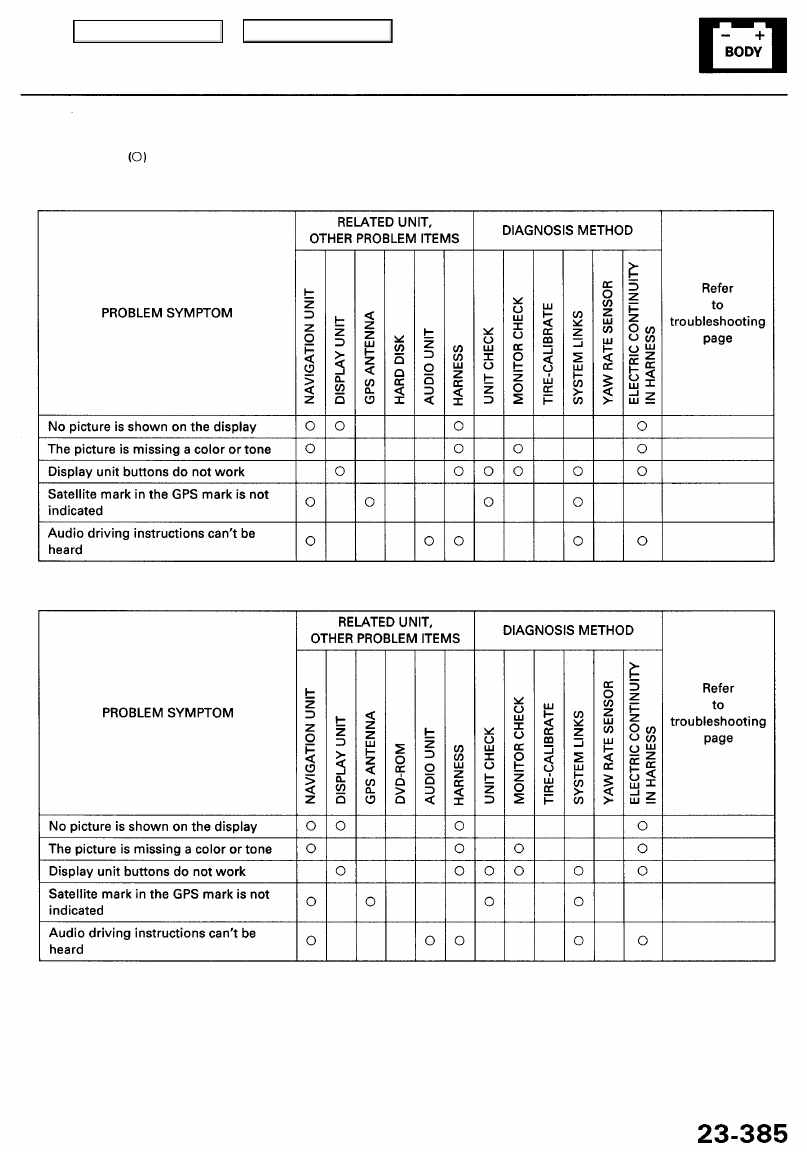
Troubleshooting Guide

NOTE: Circles in the table indicate which parts to inspect.

'96 - 99 models:

'00 - 01 models:

23-398

23-400

23-401

23-402

23-403

23-404

23-406

23-407

23-408

23-409

Main Menu

Table of Contents

Picture Diagnosis

'97 - 99 Models

Start-up procedure

1. Turn the ignition switch to ACC (I), and then press the MENU key on the dis-

play. The main menu screen appears.

2. Press and hold the keys in this order: CAN-

CEL key, and keep them pushed simultaneously for 5 seconds. The display
changes to the diagnosis menu screen.

SYSTEM LINKS

To page 

23-387

MONITOR CHECK

To page 

23-388

UNIT CHECK

To page 

23-389

TIRE-CALIBRATE

To page 

23-387

To page 

23-391

YAW RATE

DIAGNOSIS MENU SCREEN

Touch the item you want to check, and
the check starts.
To return to the previous screen, touch
the "RETURN" switch on the diagnosis
screen.

Main Menu

Table of Contents

SYSTEM LINKS

• During diagnosis, all of the communication lines connecting the compo-

nents are shown in yellow.

• If the system is OK, all of the communication lines connecting the compo-

nents will change to green, the screen will indicate "OK", and a tone will

sound.

• If there is a problem in the system, the faulty communication line will

change to red, the screen will indicate "NG", and a tone will sound.

• The indication on the screen will not change until the ignition switch is

cycled. After repairing the system, turn the ignition switch OFF to reset
the system, then return to the Diagnosis Menu screen, and run System

Links again.

TIRE-CALIBRATE

• The "AUTO TUNING" is factory-set to "ON", and it should remain on. If

you find it has been turned OFF, turn it back ON.

• The "TIRE-CAL TUNING" can be used, but it is not recommended. The

AUTO TUNING function keeps the system in better tune.

• When you touch "TIRE CHANGE," the display will change to the TIRE

SIZE screen. This screen is rarely used because only the standard tire size
is listed.

• If the tire-cal factor has been reset, touching the tire size will return the tuning

value to the standard value.

TIRE SIZE

Main Menu

Table of Contents


Content   ..  667  668  669  670   ..