Acura RL. Manual - part 595
 

  Index      Acura     Acura RL - service repair manual 2005-2008 year


Search            


Content   ..  593  594  595  596   ..


Acura RL. Manual - part 595


Does the screen indicate PASSED?  

YES -If the PCM was updated, troubleshooting is complete. If the PCM was substituted, replace the 
original PCM (see PCM REPLACEMENT ). If any other Temporary DTCs or DTCs were indicated 
in step 39, go to the indicated DTCs troubleshooting. 

NO -If the screen indicates FAILED, check for poor connections or loose terminals at the IMT 
actuator and the PCM. If the PCM was updated, substitute a known-good PCM (see 
SUBSTITUTING THE PCM ), then go to step 38. If the PCM was substituted, go to step 1. If the 
screen indicates NOT COMPLETED, go to step 38. 

THROTTLE BODY TEST 

CARBON ACCUMULATION CHECK 

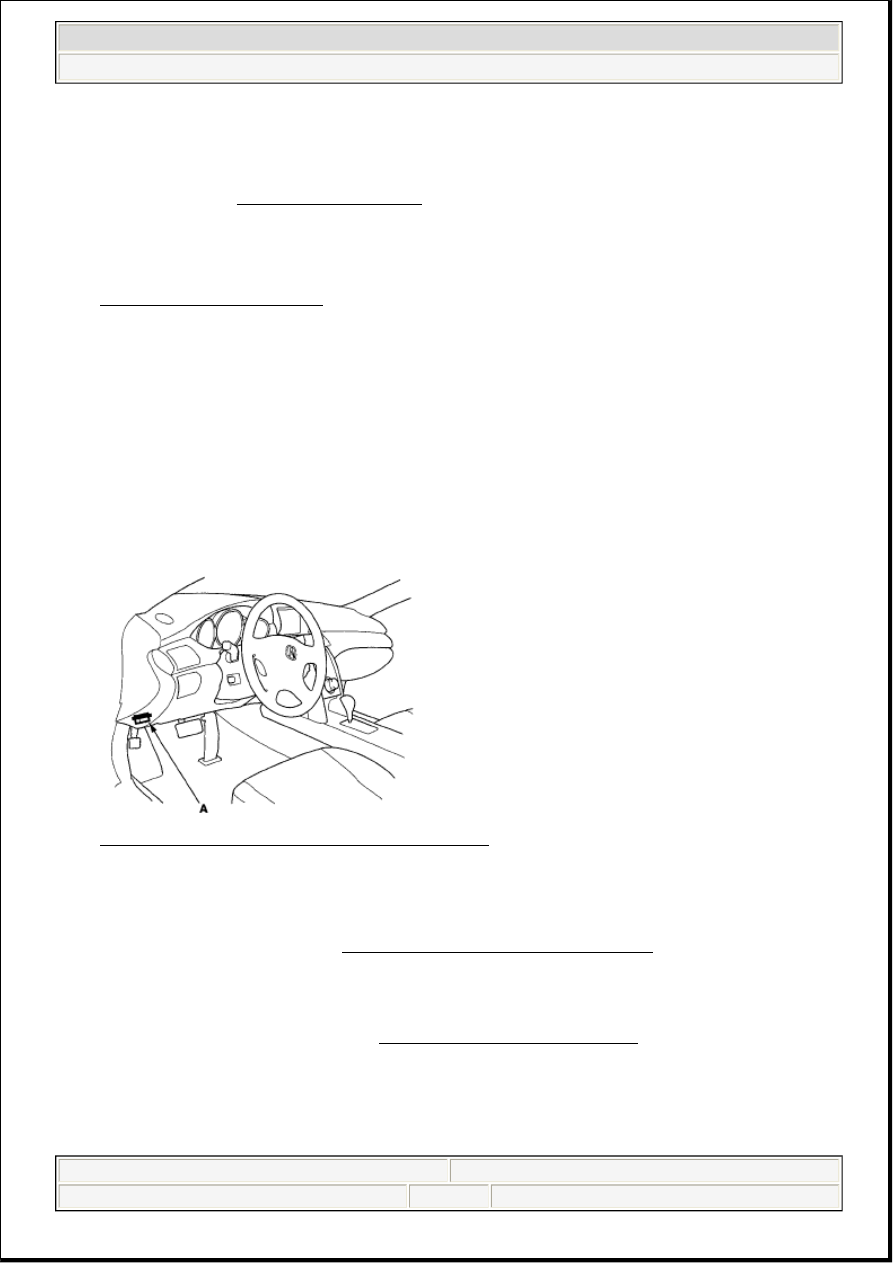
1. Connect the HDS to the data link connector (DLC) (A) located under the driver's side of the 

dashboard. 

Fig. 21: Identifying Data Link Connector Location 
Courtesy of AMERICAN HONDA MOTOR CO., INC. 

2. Turn the ignition switch ON (II).  

3. Make sure the HDS communicates with the PCM and other vehicle systems. If it does not, go to the 

DLC circuit troubleshooting (see DLC CIRCUIT TROUBLESHOOTING ).  

4. Start the engine. Hold the engine speed at 3,000 RPM without load (in Park or neutral) until the 

radiator fan comes on, then let it idle.  

5. Check the REL TP SENSOR in the DATA LIST with the HDS. The reading should be below 2.73 %. 

If it is not, clean the throttle body (see THROTTLE BODY CLEANING ).  

THROTTLE POSITION LEARNING CHECK 

NOTE:

If the malfunction indicator lamp (MIL) was reported on, check for diagnostic 
trouble codes (DTCs).

NOTE:

If the malfunction indicator lamp (MIL) was reported on, check for diagnostic 
trouble codes (DTCs).


2007 Acura RL 

2005-08 ENGINE PERFORMANCE Intake Air System - RL


me 


Friday, June 05, 2009 2:36:38 PM

Page 14 

© 2005 Mitchell Repair Information Company, LLC. 

1. Connect the HDS to the data link connector (DLC) (A) located under the driver's side of the 

dashboard. 

Fig. 22: Identifying Data Link Connector Location 
Courtesy of AMERICAN HONDA MOTOR CO., INC. 

2. Turn the ignition switch ON (II).  

3. Make sure the HDS communicates with the PCM and other vehicle systems. If it does not, go to the 

DLC circuit troubleshooting (see DLC CIRCUIT TROUBLESHOOTING ).  

4. Select the INSPECTION MENU with the HDS.  

5. Do the TP POSITION CHECK in the ETCS TEST. If needed, clean the throttle body (see 

THROTTLE BODY CLEANING ).  

THROTTLE BODY CLEANING 

1. Check for damage to the air cleaner element. If the air cleaner element is damaged, replace it (see 

AIR CLEANER ELEMENT INSPECTION/REPLACEMENT ).  

2. Remove the throttle body (see THROTTLE BODY REMOVAL/INSTALLATION ).  

3. Clean off the carbon from the throttle valve and inside the throttle body with a paper towel soaked in 

throttle plate and induction cleaner. 

CAUTION: Do not insert your fingers into the installed throttle body when you turn 

the ignition switch ON (II) or while the ignition switch is ON (II). If you 
do, you will seriously injure your fingers if the throttle valve is 
activated.

NOTE:

Remove the throttle body to clean it.  

Be careful not to pinch your fingers.  

To avoid removing the molybdenum coating, do not clean the 
bearing area of the throttle shaft (A).  

Do not spray throttle plate and induction cleaner directly on the 
throttle body.  

Use Acura throttle plate and induction cleaner. 


2007 Acura RL 

2005-08 ENGINE PERFORMANCE Intake Air System - RL


me 


Friday, June 05, 2009 2:36:38 PM

Page 15 

© 2005 Mitchell Repair Information Company, LLC. 

4. Install the throttle body (see THROTTLE BODY REMOVAL/INSTALLATION ).  

5. Reset the PCM with the HDS.  

6. Turn the ignition switch ON (II), and wait 2 seconds.  

7. Do the PCM idle learn procedure (see PCM IDLE LEARN PROCEDURE ).  

AIR CLEANER REMOVAL/INSTALLATION 

1. Remove the bolts (A) and clamps (B). 

Fig. 24: Identifying Air Cleaner Clamps And Bolts With Torque Specifications 
Courtesy of AMERICAN HONDA MOTOR CO., INC. 

2. Remove the air cleaner (C).  

Fig. 23: Identifying Throttle Shaft 
Courtesy of AMERICAN HONDA MOTOR CO., INC. 


2007 Acura RL 

2005-08 ENGINE PERFORMANCE Intake Air System - RL


me 


Friday, June 05, 2009 2:36:38 PM

Page 16 

© 2005 Mitchell Repair Information Company, LLC. 

3. Install the parts in the reverse order of removal.  

AIR CLEANER ELEMENT INSPECTION/REPLACEMENT 

1. Remove the lid (A). 

Fig. 25: Identifying Lid With Torque Specifications 
Courtesy of AMERICAN HONDA MOTOR CO., INC. 

2. Open the air cleaner housing cover (B).  

3. Remove the air cleaner element (C) from the air cleaner housing cover.  

4. Check the air cleaner element for damage or clogging. If it is damage or clogging, replace it. 

5. Clean and remove any debris from inside the air cleaner housing.  

6. Install the parts in the reverse order of removal.  

7. If the maintenance minder requires air cleaner replacement, reset the maintenance minder (see 

MAINTENANCE MINDER ).  

RESONATOR REMOVAL/INSTALLATION 

1. Remove the front bumper (see FRONT BUMPER REMOVAL/INSTALLATION ).  

2. Remove the bolts (A) and the intake air cover (B). 

NOTE:

Do not use compressed air to clean the air cleaner element.


2007 Acura RL 

2005-08 ENGINE PERFORMANCE Intake Air System - RL


me 


Friday, June 05, 2009 2:36:38 PM

Page 17 

© 2005 Mitchell Repair Information Company, LLC. 


Content   ..  593  594  595  596   ..