Kia Sedona (2008 year). Manual - part 77


  Главная      Kia     Kia Sedona (2008 year) - Service Repair Manual


поиск по сайту           правообладателям


содержание   ..  75  76  77  78   ..


Kia Sedona (2008 year). Manual - part 77
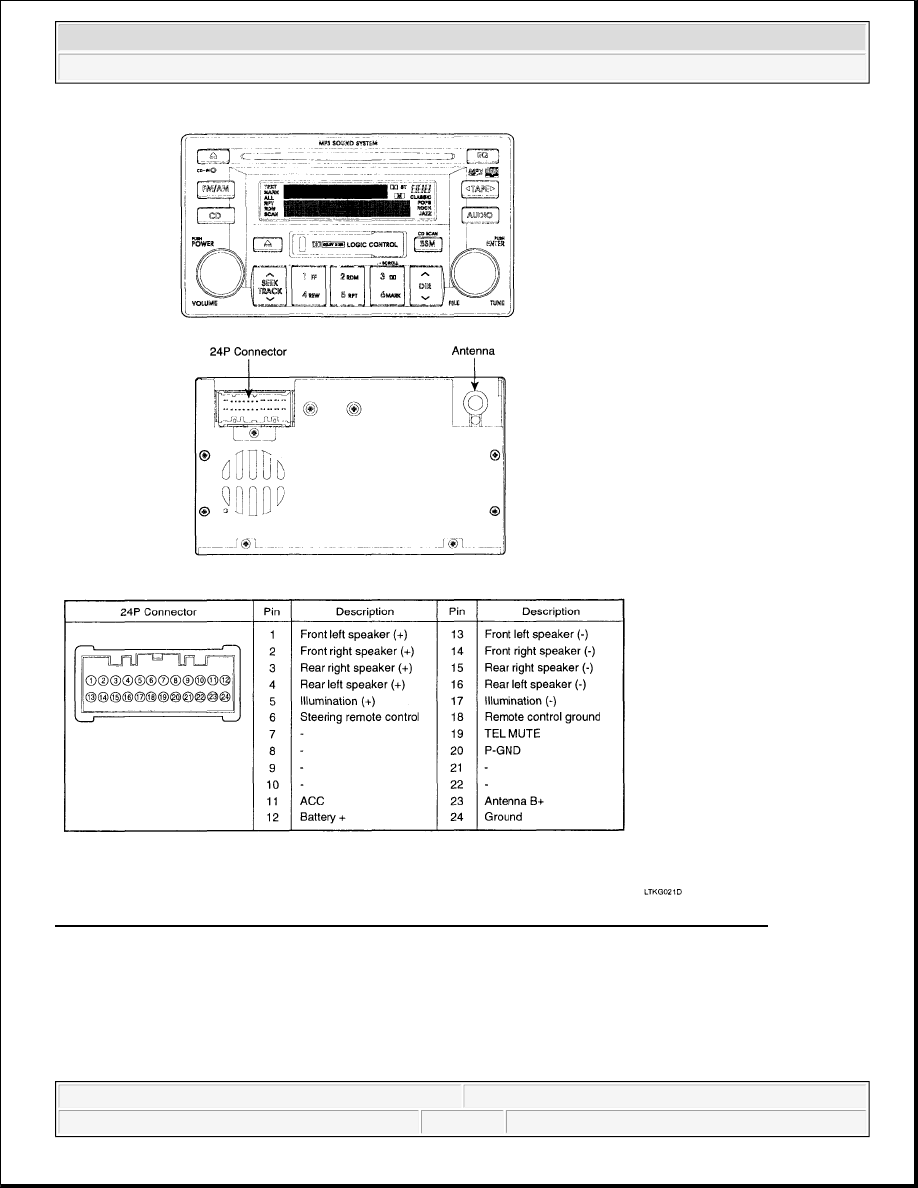


Fig. 3: Identifying Audio Unit (AM/FM/CASSETTE/MP3 - M455) & Terminal Identification 
Courtesy of KIA MOTORS AMERICA, INC. 

AM/FM/CASSETTE/6CDC/MP3 (M465) 


2008 Kia Sedona EX 

2008 ACCESSORIES & BODY, CAB Audio System - Sedona


Microsoft 


Monday, May 24, 2010 4:15:06 PM

Page 4 

© 2006 Mitchell Repair Information Company, LLC. 

Fig. 4: Identifying Audio Unit (AM/FM/CASSETTE/6CDC/MP3 - M465) & Terminal Identification 
Courtesy of KIA MOTORS AMERICA, INC. 

INSPECTION 

TAPE HEAD AND CAPSTAN CLEANING 

1. To obtain optimum performance, clean the head, and capstan as often as necessary, depending on 


2008 Kia Sedona EX 

2008 ACCESSORIES & BODY, CAB Audio System - Sedona


Microsoft 


Monday, May 24, 2010 4:15:06 PM

Page 5 

© 2006 Mitchell Repair Information Company, LLC. 

frequency of use and tape cleanness.  

2. To clean the tape head and capstan, use a cotton swab dipped in ordinary rubbing alcohol. Wipe the head 

and capstan. 

Fig. 5: Cleaning Tape Head And Capstan 
Courtesy of KIA MOTORS AMERICA, INC. 

REPLACEMENT 

1. Disconnect the negative (-) battery terminal.  

2. Remove the center fascia panel, console lower cover, center air vent, switches, tray and heater control 

panel (A). Refer to CRASH PAD . 

Fig. 6: Heater Control Panel 
Courtesy of KIA MOTORS AMERICA, INC. 

3. Remove the mounting 4 screws then remove the audio unit (A). 


2008 Kia Sedona EX 

2008 ACCESSORIES & BODY, CAB Audio System - Sedona


Microsoft 


Monday, May 24, 2010 4:15:06 PM

Page 6 

© 2006 Mitchell Repair Information Company, LLC. 

Fig. 7: Audio Unit And Mounting Screws 
Courtesy of KIA MOTORS AMERICA, INC. 

4. Installation is the reverse of removal.  

VIDEO JACK (DVD ONLY) 

1. Disconnect the negative (-) battery terminal.  

2. Remove the video jack cover (A) and then remove the video jack (B). 

Fig. 8: Video Jack And Cover 
Courtesy of KIA MOTORS AMERICA, INC. 

3. Installation is the reverse of removal.  

REAR SEAT ENTERTAINMENT (DVD ONLY) 

1. Disconnect the negative (-) battery terminal.  

2. Remove the DVD rear monitor cover (A) and disconnect the interior lamp connector. 


2008 Kia Sedona EX 

2008 ACCESSORIES & BODY, CAB Audio System - Sedona


Microsoft 


Monday, May 24, 2010 4:15:06 PM

Page 7 

© 2006 Mitchell Repair Information Company, LLC. 


содержание   ..  75  76  77  78   ..