Kia Sedona (2008 year). Manual - part 52


  Главная      Kia     Kia Sedona (2008 year) - Service Repair Manual


поиск по сайту           правообладателям


содержание   ..  50  51  52  53   ..


Kia Sedona (2008 year). Manual - part 52
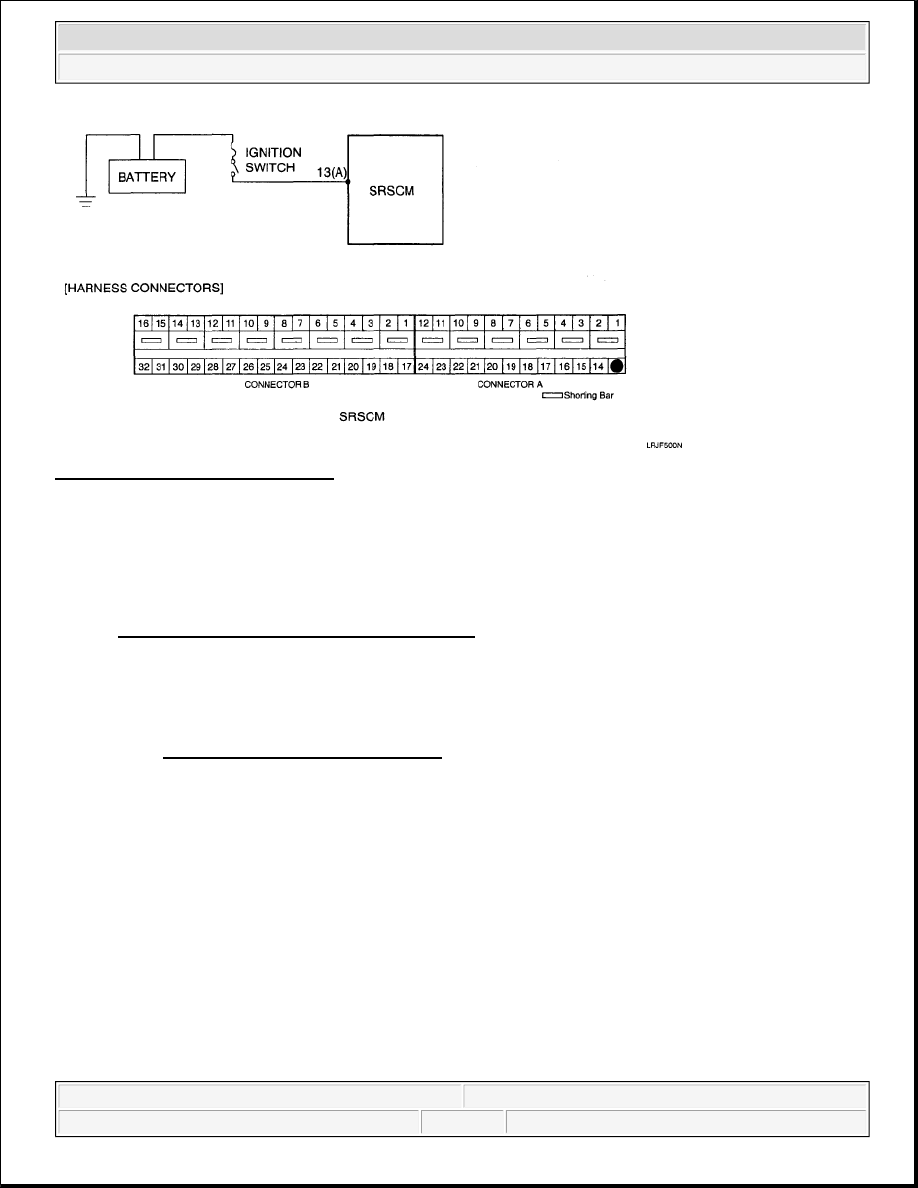


Fig. 7: Battery - Schematic Diagram 

SPECIFICATION 

Voltage: 9.0-16.0 V 

TERMINAL & CONNECTOR INSPECTION 

Refer to TERMINAL & CONNECTOR INSPECTION

INSPECTION PROCEDURE 

1. PREPARATION 

Refer to PREPARATION OF INSPECTION

2. CHECK SOURCE VOLTAGE 

1. Turn the ignition switch to ON.  

2. Measure voltage between the terminal 13 (A) of SRSCM harness connector and chassis ground. 

Specification (voltage): 9.0-16.0 V


2008 Kia Sedona EX 

2008 RESTRAINTS Troubleshooting (Airbag) - Sedona


Microsoft 


Monday, May 24, 2010 3:55:01 PM

Page 11 

© 2006 Mitchell Repair Information Company, LLC. 

Fig. 8: Checking Source Voltage 

3. Is the measured voltage within specification? 

NO  

Check the battery.  

YES  

Replace the SRSCM with a new one, and then check the vehicle again. At this time, if the 
vehicle normally operates with a new SRSCM, the fault may be the SRSCM (Replace 
SRSCM).  

3. CHECK THE BATTERY 

1. Check the battery. 

Refer to BATTERY .  

Is the battery normal? 

YES  

Check generator.  

NO  

Repair or replace the battery. Refer to BATTERY .  

4. CHECK GENERATOR 

1. Check the generator. 

Refer to CHARGING SYSTEM .  

Is the generator normal? 

YES  


2008 Kia Sedona EX 

2008 RESTRAINTS Troubleshooting (Airbag) - Sedona


Microsoft 


Monday, May 24, 2010 3:55:01 PM

Page 12 

© 2006 Mitchell Repair Information Company, LLC. 

Check wiring harness.  

NO  

Repair or replace the generator. Refer to CHARGING SYSTEM .  

5. CHECK WIRING HARNESS 

1. Check the wiring harness between the battery and SRSCM. 

Is the wiring harness normal? 

YES  

Check the DTC again.  

NO  

Repair or replace the wiring harness.  

6. CHECK THE DTC AGAIN 

1. Turn the ignition switch to LOCK and wait for at least 30 seconds. 

2. Install the DAB module and connect the DAB connector.  

3. Connect the connectors of the PAB, SAB, CAB, BPT, FIS and SIS.  

4. Connect the SRSCM connector.  

5. Connect the battery negative cable to the battery.  

6. Connect a Hi-Scan (Pro) to the data link connector.  

7. Turn the ignition switch to ON and check the vehicle again. 

Does Hi-Scan (Pro) indicate any DTC? 

YES  

Perform the troubleshooting procedures associated with those codes.  

NO  

Problem is intermittent or was repaired and SRSCM memory was not cleared.  

DTC B1322 PASSENGER OCCUPANT CLASSIFICATION SENSOR DEFECT; DTC B1324 
PASSENGER OCCUPANT CLASSIFICATION (OC) SYSTEM COMMUNICATION ERROR; DTC 
B1325 PASSENGER OCCUPANT CLASSIFICATION (OC) SYSTEM WRONG ID 

CAUTION: Check again that the battery negative cable is disconnected 

from the battery.


2008 Kia Sedona EX 

2008 RESTRAINTS Troubleshooting (Airbag) - Sedona


Microsoft 


Monday, May 24, 2010 3:55:01 PM

Page 13 

© 2006 Mitchell Repair Information Company, LLC. 

DTC DESCRIPTION 

The passenger occupant classification (OC) system consists of the SRSCM and the OC module. The above 
DTC is recorded when a defect or communication error of the OC module is detected in the OC module circuit. 

DTC DETECTING CONDITION 

DTC DETECTING CONDITION 

SCHEMATIC DIAGRAM 

Fig. 9: Passenger Occupant Classification Sensor - Schematic Diagram 

TERMINAL & CONNECTOR INSPECTION 

Refer to TERMINAL & CONNECTOR INSPECTION

INSPECTION PROCEDURE 

1. PREPARATION 

Refer to PREPARATION OF INSPECTION

2. CHECK POWER TO OC MODULE 

1. Connect the battery negative cable to the battery. 

DTC

Condition

Probable cause

B1322 
B1324 
B1325

OC module Malfunction  

SRSCM Malfunction  

Wiring Harness  

OC module  

SRSCM  


2008 Kia Sedona EX 

2008 RESTRAINTS Troubleshooting (Airbag) - Sedona


Microsoft 


Monday, May 24, 2010 3:55:01 PM

Page 14 

© 2006 Mitchell Repair Information Company, LLC. 


содержание   ..  50  51  52  53   ..