FANUC Robotics SYSTEM R-30iA and R-30iB Controller. KAREL Reference Manual - page 15
MARRC75KR07091E Rev D
A. KAREL LANGUAGE ALPHABETICAL DESCRIPTION
DISCTRL_PLMN Built-In Procedure
----------------------------------------------
TPEXAMEG.TX
----------------------------------------------
$subwin_menu
"Option 1"
$
"Option 2"
$
"Option 3"
$
"Option 4"
$
"Option 5"
$
"
"
----------------------------------------------
TPPLMN.KL
----------------------------------------------
PROGRAM tpplmn
%ENVIRONMENT uif
VAR
def_item: INTEGER
term_char: INTEGER
status: INTEGER
BEGIN
def_item = 1
DISCTRL_PLMN(’EXAM’, 0, 3, def_item, term_char,
status)
IF term_char = ky_enter THEN
WRITE (CR, def_item, ’ was selected’)
ENDIF
END tpplmn
A.5.24
DISCTRL_SBMN Built-In Procedure
Purpose: Creates and controls cursor movement and selection in a sub-window menu
Syntax : DISCTRL_SBMN(dict_name, element_no, def_item, term_char, status)
Input/Output Parameters :
[in] dict_name :STRING
[in] element_no :INTEGER
A-119
A. KAREL LANGUAGE ALPHABETICAL DESCRIPTION
MARRC75KR07091E Rev D
[in,out] def_item :INTEGER
[out] term_char :INTEGER
[out] status :INTEGER
%ENVIRONMENT Group : UIF
Details:
•
The menu data in the dictionary consists of a list of enumerated values that are displayed
and selected from the ’subm’ subwindow on the Teach Pendant device. There can be up to 5
subwindow pages, for a maximum of 35 values. Each value is a string of up to 16 characters. If 4
or less enumerated values are used, then each string can be up to 40 characters.
A sequence of consecutive dictionary elements, starting with element_no , define the values. Each
value must be put in a separate element, and must not end with &new_line. The characters are
assigned the numeric values 1..35 in sequence. The last dictionary element must be "".
•
dict_name specifies the name of the dictionary that contains the menu data.
•
element_no is the element number of the first menu item within the dictionary.
•
def_item is the item that should be highlighted when the menu is entered. 1 specifies the first
item. On return, def_item is the item that was currently highlighted when the termination
character was pressed.
•
term_char receives a code indicating the character that terminated the menu. The codes for key
terminating conditions are defined in the include file FROM:KLEVKEYS.KL. Keys normally
returned are pre-defined constants as follows:
ky_enter — A menu item was selected
ky_prev — A menu item was not selected
ky_new_menu — A new menu was selected
ky_f1
ky_f2
ky_f3
ky_f4
ky_f5
•
status explains the status of the attempted operation. If not equal to 0, then an error occurred.
Example: In this example, dictionary file TPEXAMEG.TX is loaded as ’EXAM’ on the controller.
TPSBMN.KL calls DISCTRL_SBMN to display and process the subwindow menu.
A-120
MARRC75KR07091E Rev D
A. KAREL LANGUAGE ALPHABETICAL DESCRIPTION
DISCTRL_SBMN Built-In Procedure
----------------------------------------------
TPEXAMEG.TX
----------------------------------------------
$subwin_menu
"Red"
$
"Blue"
$
"Green"
$
"Yellow"
$
"Brown"
$
"Pink"
$
"Mauve"
$
"Black"
$
"Lime"
$
"Lemon"
$
"Beige"
$
"Blue"
$
"Green"
$
"Yellow"
$
"Brown"
$
"\a"
----------------------------------------------
TPSBMN.KL
----------------------------------------------
PROGRAM tpsbmn
%ENVIRONMENT uif
VAR
def_item: INTEGER
term_char: INTEGER
status: INTEGER
BEGIN
def_item = 1
A-121
A. KAREL LANGUAGE ALPHABETICAL DESCRIPTION
MARRC75KR07091E Rev D
DISCTRL_SBMN(’EXAM’, 0, def_item, term_char, status)
IF term_char = ky_enter THEN
WRITE (CR, def_item, ’ was selected’)
ENDIF
END tpsbmn
A.5.25
DISCTRL_TBL Built-In Procedure
Purpose: Displays and controls a table on the teach pendant
Syntax : DISCTRL_TBL(dict_name, ele_number, num_rows, num_columns, col_data, inact_array,
change_array, def_item, term_char, term_mask, value_array, attach_wind, status)
Input/Output Parameters :
[in] dict_name :STRING
[in] ele_number :INTEGER
[in] num_rows :INTEGER
[in] num_columns :INTEGER
[in] col_data :ARRAY OF COL_DESC_T
[in] inact_array :ARRAY OF BOOLEAN
[out] change_array :ARRAY OF BOOLEAN
[in,out] def_item :INTEGER
[out] term_char :INTEGER
[in] term_mask :INTEGER
[in] value_array :ARRAY OF STRING
[in] attach_wind :BOOLEAN
[out] status :INTEGER
%ENVIRONMENT Group : UIF
Details:
A-122
MARRC75KR07091E Rev D
A. KAREL LANGUAGE ALPHABETICAL DESCRIPTION
•
DISCTRL_TBL is similar to the INIT_TBL and ACT_TBL Built-In routines and should be used
if no special processing needs to be done with each keystroke.
•
dict_name is the four-character name of the dictionary containing the table header.
•
ele_number is the element number of the table header.
•
num_rows is the number of rows in the table.
•
num_columns is the number of columns in the table.
•
col_data is an array of column descriptor structures, one for each column in the table. For a
complete description, refer to the INIT_TBL Built-In routine in this appendix.
•
inact_array is an array of booleans that corresponds to each column in the table.
— You can set each boolean to TRUE which will make that column inactive. This means the
you cannot move the cursor to this column.
— The array size can be less than or greater than the number of items in the table.
— If inact_array is not used, then an array size of 1 can be used, and the array does not need to
be initialized.
•
change_array is a two dimensional array of BOOLEANs that corresponds to formatted data
items in the table.
— If the corresponding value is set, then the boolean will be set to TRUE, otherwise it is set to
FALSE. You do not need to initialize the array.
— The array size can be less than or greater than the number of data items in the table.
— If change_array is not used, then an array size of 1 can be used.
•
def_item is the row containing the item you want to be highlighted when the table is entered.
On return, def_item is the row containing the item that was currently highlighted when the
termination character was pressed.
•
term_char receives a code indicating the character or other condition that terminated the table.
The codes for key terminating conditions are defined in the include file FROM:KLEVKEYS.KL.
Keys normally returned are pre-defined constants as follows:
ky_undef — No termination character was pressed
ky_select — A selectable item as selected
ky_new_menu — A new menu was selected
ky_f1 — Function key 1 was selected
ky_f2 — Function key 2 was selected
ky_f3 — Function key 3 was selected
ky_f4 — Function key 4 was selected
A-123
A. KAREL LANGUAGE ALPHABETICAL DESCRIPTION
MARRC75KR07091E Rev D
ky_f5 — Function key 5 was selected
ky_f6 — Function key 6 was selected
ky_f7 — Function key 7 was selected
ky_f8 — Function key 8 was selected
ky_f9 — Function key 9 was selected
ky_f10 — Function key 10 was selected
•
term_mask is a bit-wise mask indicating conditions that will terminate the request. This should be
an OR of the constants defined in the include file FROM:KLEVKMSK.KL.
kc_display — Displayable keys
kc_func_key — Function keys
kc_keypad — Key-pad and Edit keys
kc_enter_key — Enter and Return keys
kc_delete — Delete and Backspace keys
kc_lr_arw — Left and Right Arrow keys
kc_ud_arw — Up and Down Arrow keys
kc_other — Other keys (such as Prev)
•
value_array is an array of variable names that corresponds to each column of data item in the
table. Each variable name can be specified as ’[prog_name]var_name’.
— [prog_name] specifies the name of the program that contains the specified variable. If
[prog_name] is not specified, then the current program being executed is used.
— var_name must refer to a static, global program variable.
— var_name can contain node numbers, field names, and/or subscripts.
•
attach_wind should be set to 1 if the table manager window needs to be attached to the display
device. If it is already attached, this parameter can be set to 0.
•
status explains the status of the attempted operation. If not equal to 0, then an error occurred.
Example: Refer to the INIT_TBL Built-In routine for an example of setting up the dictionary text and
initializing the parameters.
A-124
MARRC75KR07091E Rev D
A. KAREL LANGUAGE ALPHABETICAL DESCRIPTION
A.5.26
DISMOUNT_DEV Built-In Procedure
Purpose: Dismounts the specified device.
Syntax : DISMOUNT_DEV (device, status)
Input/Output Parameters :
[in] device :STRING
[out] status :INTEGER
%ENVIRONMENT Group :FDEV
Details:
• device specifies the device to be dismounted.
• status explains the status of the attempted operation. If not equal to 0, then an error occurred.
See Also: MOUNT_DEV, FORMAT_DEV Built-In Procedures
Example: Refer to Section B.9 , "Using the File and Device Built-ins" (FILE_EX.KL), for a detailed
program example.
A.5.27
DISP_DAT_T Data Type
Purpose: Defines data type for use in DISCTRL_LIST Built-In
Syntax :
disp_dat_t = STRUCTURE
win_start : ARRAY [4] OF SHORT
win_end : ARRAY [4] OF SHORT
curr_win : SHORT
cursor_row : SHORT
lins_per_pg : SHORT
curs_st_col : ARRAY [10] OF SHORT
curs_en_col : ARRAY [10] OF SHORT
A-125
A. KAREL LANGUAGE ALPHABETICAL DESCRIPTION
MARRC75KR07091E Rev D
curr_field : SHORT
last_field : SHORT
curr_it_num : SHORT
sob_it_num : SHORT
eob_it_num : SHORT
last_it_num : SHORT
menu_id : SHORT
ENDSTRUCTURE
Details:
•
disp_dat_t can be used to display a list in four different windows. The list can contain up to 10
fields. Left and right arrows move between fields. Up and down arrows move within a field.
•
win_start is the starting row for each window.
•
win_end is the ending row for each window.
•
curr_win defines the window to display. The count begins at zero (0 will display the first window).
•
cursor_row is the current cursor row.
•
lins_per_pg is the number of lines per page for paging up and down.
•
curs_st_col is the cursor starting column for each field. The range is 0-39 for the teach pendant.
•
curs_en_col is the cursor ending column for each field. The range is 0-39 for the teach pendant.
•
curr_field is the current field in which the cursor is located. The count begins at zero (0 will set
the cursor to the first field).
•
last_field is the last field in the list.
•
curr_it_num is the item number the cursor is on.
•
sob_it_num is the item number of the first item in the array.
•
eob_it_num is the item number of the last item in the array.
•
last_it_num is the item number of the last item in the list.
•
menu_id is the current menu identifier. Not implemented. May be left uninitialized.
Example: Refer to Section B.12 , "Displaying a List From a Dictionary File" (DCLIST_EX.KL), for
a detailed program example.
A-126
MARRC75KR07091E Rev D
A. KAREL LANGUAGE ALPHABETICAL DESCRIPTION
A.5.28
DOSFILE_INF Built-In Procedure
Purpose: Returns information for a device as a string in the value parameter.
Syntax : DOSFILE_INF(device, item, value_str, status)
Input/Output Parameters:
[in] device :STRING
[in] item :INTEGER
[out] value_str :STRING
[out] status :INTEGER
%ENVIRONMENT Group :PBCORE
Details:
• DOSFILE_INF is only available on R-30iB Controller
• device can be UD1:
• item is the constant of the data to be returned:
— DF_MANUFNAME (Manufacture’s name)
— DF_PRODNAME (Product name)
— DF_SERIALNO (Serial number)
— DF_PRODID (Product ID number as assigned by USB authority)
— DF_VENDID (Vendor ID number as assigned by USB authority)
• value_str is the string where the data is returned.
• status explains the status of an attempted operation. If not equal to 0, then an error occurred.
Example: The following example gets information about the UD1 device.
DOSFILE_INF Built-In Procedure
program dfinfo
%NOLOCKGROUP
var
value: string[60]
status: integer
begin
value = ’’
DOSFILE_INF(’UD1:’, DF_MANUFNAME, value, status)
A-127
A. KAREL LANGUAGE ALPHABETICAL DESCRIPTION
MARRC75KR07091E Rev D
write (cr, ’1: ’, status, ’, ’, value, cr)
value = ’’
DOSFILE_INF(’UD1:’, DF_PRODNAME, value, status)
write (cr, ’2: ’, status, ’, ’, value, cr)
value = ’’
DOSFILE_INF(’UD1:’, DF_SERIALNO, value, status)
write (cr, ’3: ’, status, ’, ’, value, cr)
delay (2000)
value = ’’
DOSFILE_INF(’UD1:’, DF_PRODID, value, status)
write (cr, ’4: ’, status, ’, ’, value, cr)
value = ’’
DOSFILE_INF(’UD1:’, DF_VENDID, value, status)
write (cr, ’5: ’, status, ’, ’, value, cr)
end dfinfo
A.6
- E - KAREL LANGUAGE DESCRIPTION
A.6.1
ENABLE CONDITION Action
Purpose: Enables the specified condition handler
Syntax : ENABLE CONDITION [cond_hand_no]
where:
cond_hand_no :an INTEGER expression
Details:
• ENABLE CONDITION has no effect when
— The condition handler is not defined
— The condition handler is defined but is already enabled
• cond_hand_no must be in the range of 1-1000. Otherwise, the program will be aborted with an
error.
• When a condition handler is enabled, its conditions are tested each time the condition handler is
scanned. If the conditions are satisfied, the corresponding actions are performed and the condition
handler is deactivated. Issue an ENABLE CONDITION statement or action to reactivate it.
• Use the DISABLE CONDITION statement or action to deactivate a condition handler that has
been enabled.
• Condition handlers are known only to the task which defines them. One task cannot enable
another tasks condition.
A-128
MARRC75KR07091E Rev D
A. KAREL LANGUAGE ALPHABETICAL DESCRIPTION
See Also: DISABLE CONDITION Action, Chapter 6 CONDITION HANDLERS
Example: Refer to Section B.1 , "Setting Up Digital Output Ports for Monitoring" (DOUT_EX.KL)
for a detailed program example.
A.6.2
ENABLE CONDITION Statement
Purpose: Enables the specified condition handler
Syntax : ENABLE CONDITION [cond_hand_no]
where:
cond_hand_no :an INTEGER expression
Details:
• ENABLE CONDITION has no effect when
— The condition handler is not defined
— The condition handler is defined but is already enabled
• cond_hand_no must be in the range of 1-1000. Otherwise, the program will be aborted with an
error.
• When a condition handler is enabled, its conditions are tested each time the condition handler is
scanned. If the conditions are satisfied, the corresponding actions are performed and the condition
handler is deactivated. Issue an ENABLE CONDITION statement or action to reactivate it.
• Use the DISABLE CONDITION statement or action to deactivate a condition handler that has
been enabled.
• Condition handlers are known only to the task which defines them. One task cannot enable
another tasks condition.
See Also: DISABLE CONDITION Statement, Chapter 6 CONDITION HANDLERS , Appendix E ,
‘‘Syntax Diagrams,’’ for additional syntax information
Example: Refer to the following sections for detailed program examples.
Section B.6 , "Path Variables and Condition Handlers Program" (PTH_MOV.KL)
Section B.1 , "Setting Up Digital Output Ports for Monitoring" (DOUT_EX.KL)
A.6.3
%ENVIRONMENT Translator Directive
Purpose: Loads environment file.
A-129
A. KAREL LANGUAGE ALPHABETICAL DESCRIPTION
MARRC75KR07091E Rev D
Syntax : %ENVIRONMENT path_name
•
Used by the off-line translator to specify that the binary file, path_name.ev, should be loaded.
Environment files contain definitions for predefined constants, ports, types, system variables, and
built-ins.
•
All .EV files are loaded upon installation of the controller software. Therefore, the controller’s
translator will ignore %ENVIRONMENT statements since it already has the .EV files loaded.
•
path_name can be one of the following:
— BYNAM
— CTDEF (allows program access to CRT/KB system variables)
— ERRS
— FDEV
— FLBT
— IOSETUP
— KCLOP
— MEMO
— MIR
— MOTN
— MULTI
— PATHOP
— PBCORE
— PBQMGR
— REGOPE
— STRNG
— SYSDEF (allows program access to most system variables)
— SYSTEM
— TIM
— TPE
— TRANS
— UIF
— VECTR
•
If no %ENVIRONMENT statements are specified in your KAREL program, the off-line
translator will load all the .EV files specified in TRMNEG.TX. The translator must be able to find
these files in the current directory or in one of the PATH directories.
A-130
MARRC75KR07091E Rev D
A. KAREL LANGUAGE ALPHABETICAL DESCRIPTION
• If at least one %ENVIRONMENT statement is specified, the off-line translator will only load the
files you specify in your KAREL program. Specifying your own %ENVIRONMENT statements
will reduce the amount of memory required to translate and will be faster, especially if you do not
require system variables since SYSDEF.EV is the largest file.
• SYSTEM.EV and PBCORE.EV are automatically loaded by the translator and should not be
specified in your KAREL program. The off-line translator will print the message "Continuing
without system defined symbols" if it cannot find SYSTEM.EV. Do not ignore this message.
Make sure the SYSTEM.EV file is loaded.
Example: Refer to the following sections for detailed program examples:
Section B.3 ,"Saving Data to the Default Device" (SAVE_VR.KL)
Section B.6 , "Path Variables and Condition Handlers Program" (PTH_MOVE.KL)
Section B.14 , "Applying Offsets to a Copied Teach Pendant Program" (CPY_TP.KL)
A.6.4
ERR_DATA Built-In Procedure
Purpose: Reads the requested error from the error history and returns the error
Syntax : ERR_DATA(seq_num, error_code, error_string, cause_code, cause_string, time_int,
severity, prog_nam)
Input/Output Parameters :
[in,out] seq_num :INTEGER
[out] error_code :INTEGER
[out] error_string :STRING
[out] cause_code :INTEGER
[out] cause_string :STRING
[out] time_int :INTEGER
[out] severity :INTEGER
[out] prog_nam :STRING
%ENVIRONMENT Group :ERRS
A-131
A. KAREL LANGUAGE ALPHABETICAL DESCRIPTION
MARRC75KR07091E Rev D
•
seq_num is the sequence number of the previous error requested. seq_num should be set to 0 if
the oldest error in the history is desired. seq_num should be set to MAXINT if the most recent
error is desired.
•
seq_num is set to the sequence number of the error that is returned.
— If the initial value of seq_num is greater than the sequence number of the newest error in the
log, seq_num is returned as zero and no other data is returned.
— If the initial value of seq_num is less than the sequence number of the oldest error in the
log, the oldest error is returned.
•
error_code returns the error code and error_string returns the error message. error_string must
be at least 40 characters long or the program will abort with an error.
•
cause_code returns the reason code if it exists and cause_string returns the message. cause_string
must be at least 40 characters long or the program will abort with an error.
•
error_code and cause_code are in the following format:
ffccc (decimal)
where ff represents the facility code of the error.
ccc represents the error code within the specified facility.
Refer to Chapter 6, "Condition Handlers," for the error facility codes.
•
time_int returns the time that error_code was posted. The time is in encoded format, and
CNV_TIME_STR Built-In should be used to get the date-and-time string.
•
severity returns one of the following error_codes: 0 :WARNING1 :PAUSE2 :ABORT
•
If the error occurs in the execution of a program, prog_nam specifies the name of the program in
which the error occurred.
•
If the error is posted by POST_ERR, or if the error is not associated with a particular program
(e.g., E-STOP), prog_nam is returned as ‘ "" ’.
•
Calling ERR_DATA immediately after POST_ERR may not return the error just posted since
POST_ERR returns before the error is actually in the error log.
See Also: POST_ERR Built-In Procedure
A.6.5
ERROR Condition
Purpose: Specifies an error as a condition
Syntax : ERROR[n]
where:
A-132
MARRC75KR07091E Rev D
A. KAREL LANGUAGE ALPHABETICAL DESCRIPTION
n :an INTEGER expression or asterisk (*)
Details:
• If n is an INTEGER, it represents an error code number. The condition is satisfied when the
specified error occurs.
• If n is an asterisk (*), it represents a wildcard. The condition is satisfied when any error occurs.
• The condition is an event condition, meaning it is satisfied only for the scan performed when the
error was detected. The error is not remembered on subsequent scans.
See Also: Chapter 6 CONDITION HANDLERS , for more information on using conditions. The
appropriate application-specific FANUC Robotics Setup and Operations Manual for a list of all
error codes
Example: Refer to Section B.1 , "Setting Up Digital Output Ports for Monitoring" (DOUT_EX.KL)
for a detailed program example.
A.6.6
EVAL Clause
Purpose: Allows expressions to be evaluated in a condition handler definition
Syntax : EVAL(expression)
where:
expression :a valid KAREL expression
Details:
• expression is evaluated when the condition handler is defined, rather than dynamically during
scanning.
• expression can be any valid expression that does not contain a function call.
See Also: Chapter 6 CONDITION HANDLERS ,, for more information on using conditions
Example: The following example causes delay until AIN[ force ] is greater than the evaluated
expression (10 * f_scale ).
EVAL Clause
WRITE (’Enter force scale: ’)
READ (f_scale)
REPEAT
DELAY(1000)
UNTIL AIN[force] > EVAL(10 * f_scale)
A-133
A. KAREL LANGUAGE ALPHABETICAL DESCRIPTION
MARRC75KR07091E Rev D
A.6.7
EVENT Condition
Purpose: Specifies the number of an event that satisfies a condition when a SIGNAL EVENT
statement or action with that event number is executed
Syntax : EVENT[event_no]
where:
event_no :is an INTEGER expression
Details:
• Events can be used as user-defined event codes that become TRUE when signaled.
• The SIGNAL EVENT statement or action is used to signal that an event has occurred.
• event_no must be in the range of -32768 to 32767.
See Also: SIGNAL EVENT Action, and CONDITION or SIGNAL EVENT Statement
Example: Refer to Section B.1 , "Setting Up Digital Output Ports for Monitoring" (DOUT_EX.KL)
for a detailed program example.
A.6.8
EXP Built-In Function
Purpose: Returns a REAL value equal to e (approximately 2.71828) raised to the power specified
by a REAL argument
Syntax : EXP(x)
Function Return Type :REAL
Input/Output Parameters :
[in] x :REAL
%ENVIRONMENT Group :SYSTEM
Details:
• EXP returns e (base of the natural logarithm) raised to the power x .
• x must be less than 80. Otherwise, the program will be paused with an error.
Example: The following example uses the EXP Built-In to evaluate the exponent of the expression
(-6.44 + timevar/(timevar + 20)) .
A-134
MARRC75KR07091E Rev D
A. KAREL LANGUAGE ALPHABETICAL DESCRIPTION
EXP Built-In Function
WRITE (CR, ’Enter time needed for move:’)
READ (timevar)
distance = timevar *
EXP(-6.44 + timevar/(timevar + 20))
WRITE (CR, CR, ’Distance for move:’, distance::10::3)
A.7
- F - KAREL LANGUAGE DESCRIPTION
A.7.1
FILE Data Type
Purpose: Defines a variable as FILE data type
Syntax : file
Details:
• FILE allows you to declare a static variable as a file.
• You must use a FILE variable in OPEN FILE, READ, WRITE, CANCEL FILE, and CLOSE
FILE statements.
• You can pass a FILE variable as a parameter to a routine.
• Several built-in routines require a FILE variable as a parameter, such as BYTES_LEFT,
CLR_IO_STAT, GET_FILE_POS, IO_STATUS, SET_FILE_POS.
• FILE variables have these restrictions:
— FILE variables must be a static variable.
— FILE variables are never saved.
— FILE variables cannot be function return values.
— FILE types are not allowed in structures, but are allowed in arrays.
— No other use of this variable data type, including assignment to one another, is permitted.
Example: Refer to the following sections for detailed program examples:
Section B.2 , "Copying Path Variables" (CPY_PTH.KL)
Section B.12 , "Displaying a List From a Dictionary File" (DCLST_EX.KL)
A.7.2
FILE_LIST Built-In Procedure
Purpose: Generates a list of files with the specified name and type on the specified device.
A-135
A. KAREL LANGUAGE ALPHABETICAL DESCRIPTION
MARRC75KR07091E Rev D
Syntax: FILE_LIST(file_spec, n_skip, format, ary_nam, n_files, status)
Input/Output Parameters :
[in] file_spec :STRING
[in] n_skip :INTEGER
[in] format :INTEGER
[out] ary_nam :ARRAY of STRING
[out] n_files :INTEGER
[out] status :INTEGER
%ENVIRONMENT Group :BYNAM
Details:
•
file_spec specifies the device, name, and type of the list of files to be found. file_spec can be
specified using the wildcard (*) character.
•
n_skip is used when more files exist than the declared length of ary_nam . Set n_skip to 0 the
first time you use FILE_LIST. If ary_nam is completely filled with variable names, copy the
array to another ARRAY of STRINGs and execute the FILE_LIST again with n_skip equal to
n_files . The second call to FILE_LIST will skip the files found in the first pass and only locate
the remaining files.
•
format specifies the format of the file name and file type. The following values are valid
for format :
1 file_name only, no blanks 2 file_type only, no blanks3 file_name.file_type , no blanks4
filename.ext size date time The total length is 40 characters.
— The file_name starts with character 1.
— The file_type (extension) starts with character 10.
— The size starts with character 21.
— The date starts with character 26.
— The time starts with character 36.
Date and time are only returned if the device supports time stamping; otherwise just the
filename.ext size is stored.
•
ary_nam is an ARRAY of STRINGs to store the file names. If the string length of ary_nam is not
large enough to store the formatted information, an error will be returned.
•
n_files is the number of files stored in ary_name .
A-136
MARRC75KR07091E Rev D
A. KAREL LANGUAGE ALPHABETICAL DESCRIPTION
• status explains the status of the attempted operation. If not equal to 0, then an error occurred.
See Also: VAR_LIST, PROG_LIST Built-In Procedures
Example: Refer to Section B.7 , "Listing Files and Programs and Manipulating Strings"
(LIST_EX.KL), for a detailed program example.
A.7.3
FOR...ENDFOR Statement
Purpose: Looping construct based on an INTEGER counter
Syntax : FOR count = initial || TO | DOWNTO || final
DO{stmnt} ENDFOR
where:
[in]count :INTEGER variable
[in]initial :INTEGER expression
[in]final :INTEGER expression
[in]stmnt :executable KAREL statement
Details:
• Initially, count is set to the value of initial and final is evaluated. For each iteration, count
is compared to final.
• If TO is used, count is incremented for each loop iteration.
• If DOWNTO is used, count is decremented for each loop iteration.
• If count is greater than final using TO, stmnt is never executed.
• If count is less than final using DOWNTO, stmnt is never executed on the first iteration.
• If the comparison does not fail on the first iteration, the FOR loop will be executed for the number
of times that equals ABS( final - initial l) + 1.
• If final = initial , the loop is executed once.
• initial is evaluated prior to entering the loop. Therefore, changing the values of initial and final
during loop execution has no effect on the number of iterations performed.
• The value of count on exit from the loop is uninitialized.
• Never issue a GO TO statement in a FOR loop. If a GO TO statement causes the program to exit
a FOR loop, the program might be aborted with a ‘‘Run time stack overflow’’ error.
A-137
A. KAREL LANGUAGE ALPHABETICAL DESCRIPTION
MARRC75KR07091E Rev D
• Never include a GO TO label in a FOR loop. Entering a FOR loop by a GO TO statement usually
causes the program to be aborted with a ‘‘Run time stack underflow’’ error when the ENDFOR
statement is encountered.
• The program will not be translated if count is a system variable or ARRAY element.
See Also: Appendix E , ‘‘Syntax Diagrams,’’ for additional syntax information.
Example: Refer to the following sections for detailed program examples:
Section B.2 , "Copying Path Variables" (CPY_PTH.KL)
Section B.6 , "Path Variables and Condition Handlers Program" (PTH_MOVE.KL)
Section B.7 , "Listing Files and Programs and Manipulating Strings" (LIST_EX.KL)
Section B.11 , "Manipulating Values of Dynamically Displayed Variables" (CHG_DATA.KL)
Section B.12 , "Displaying a List From a Dictionary File" (DCLST_EX.KL)
Section B.14 , "Applying Offsets to a Copied Teach Pendant Program" (CPY_TP.KL)
Section B.1 , "Setting Up Digital Output Ports for Monitoring" (DOUT_EX.KL)
A.7.4
FORCE_SPMENU Built-In Procedure
Purpose: Forces the display of the specified menu
Syntax : FORCE_SPMENU(device_code, spmenu_id, screen_no)
Input/Output Parameters :
[in] device_code :INTEGER
[in] spmenu_id :INTEGER
[in] screen_no :INTEGER
%ENVIRONMENT Group :pbcore
Details:
• device_code specifies the device and should be one of the following predefined constants:
tp_panel Teach pendant device
crt_panel CRT device
A-138
MARRC75KR07091E Rev D
A. KAREL LANGUAGE ALPHABETICAL DESCRIPTION
•
spmenu_id and screen_no specify the menu to force. The predefined constants beginning
with SPI_ define the spmenu_id and the predefined constants beginning with SCR_ define the
screen_no . If no SCR_ is listed, use 1.
SPI_TPHINTS — UTILITIES Hints
SPI_TPPRGADJ — UTILITIES Prog Adjust
SPI_TPMIRROR — UTILITIES Mirror Image
SPI_TPSHIFT — UTILITIES Program Shift
SPI_TPTSTRUN — TEST CYCLE
SPI_TPMANUAL, SCR_MACMAN — MANUAL Macros
SPI_TPOTREL — MANUAL OT Release
SPI_TPALARM, SCR_ALM_ALL — ALARM Alarm Log
SPI_TPALARM, SCR_ALM_MOT — ALARM Motion Log
SPI_TPALARM, SCR_ALM_SYS — ALARM System Log
SPI_TPALARM, SCR_ALM_APPL — ALARM Appl Log
SPI_TPDIGIO — I/O Digital
SPI_TPANAIO — I/O Analog
SPI_TPGRPIO — I/O Group
SPI_TPROBIO — I/O Robot
SPI_TPUOPIO — I/O UOP
SPI_TPSOPIO — I/O SOP
SPI_TPPLCIO — I/O PLC
SPI_TPSETGEN — SETUP General
SPI_TPFRAM — SETUP Frames
SPI_TPPORT — SETUP Port Init
SPI_TPMMACRO, SCR_MACSETUP — SETUP Macro
SPI_TPREFPOS — SETUP Ref Position
A-139
A. KAREL LANGUAGE ALPHABETICAL DESCRIPTION
MARRC75KR07091E Rev D
SPI_TPPWORD — SETUP Passwords
SPI_TPHCCOMM — SETUP Host Comm
SPI_TPSYRSR — SETUP RSR/PNS
SPI_TPFILS — FILE
SPI_TPSTATUS, SCR_AXIS — STATUS Axis
SPI_TPMEMORY — STATUS Memory
SPI_TPVERSN — STATUS Version ID
SPI_TPPRGSTS — STATUS Program
SPI_TPSFTY — STATUS Safety Signals
SPI_TPUSER — USER
SPI_TPSELECT — SELECT
SPI_TPTCH — EDIT
SPI_TPREGIS, SCR_NUMREG — DATA Registers
SPI_SFMPREG, SCR_POSREG — DATA Position Reg
SPI_TPSYSV, SCR_NUMVAR — DATA KAREL Vars
SPI_TPSYSV, SCR_POSVAR — DATA KAREL Posns
SPI_TPPOSN — POSITION
SPI_TPSYSV, SCR_CLOCK — SYSTEM Clock
SPI_TPSYSV, SCR_SYSVAR — SYSTEM Variables
SPI_TPMASCAL — SYSTEM Master/Cal
SPI_TPBRKCTR — SYSTEM Brake Cntrl
SPI_TPAXLM — SYSTEM Axis Limits
SPI_CRTKCL, SCR_KCL — KCL> (crt_panel only)
SPI_CRTKCL, SCR_CRT — KAREL EDITOR (crt_panel only)
SPI_TPUSER2 — Menu for form/table managers
A-140
MARRC75KR07091E Rev D
A. KAREL LANGUAGE ALPHABETICAL DESCRIPTION
See Also: ACT_SCREEN Built-In Procedure
Example: Refer to the following sections for detailed program examples:
Section B.4 , "Standard Routines" (ROUT_EX.KL)
Section B.5 , "Using Register Built-ins" (REG_EX.KL)
Section B.12 , "Dictionary Files" (DCLISTEG.UTX)
Section B.13 , "Using the DISCTRL_ALPHA Built-in" (DCALP_EX.KL)
Section B.1 , "Setting Up Digital Output Ports for Monitoring" (DOUT_EX.KL)
A.7.5
FORMAT_DEV Built-In Procedure
Purpose: Deletes any existing information and records a directory and other internal information on
the specified device.
Syntax : FORMAT_DEV(device, volume_name, nowait_sw, status)
Input/Output Parameters :
[in] device :STRING
[in] volume_name :STRING
[in] nowait_sw :BOOLEAN
[out] status :INTEGER
%ENVIRONMENT Group :FDEV
Details:
• device specifies the device to initialize.
• volume_name acts as a label for a particular unit of storage media. volume_name can be a
maximum of 11 characters and will be truncated to 11 characters if more are specified.
• If nowait_sw is TRUE, execution of the program continues while the command is executing. If
it is FALSE, the program stops, including condition handlers, until the operation is complete.
If you have time critical condition handlers in the program, put them in another program that
executes as a separate task.
Note nowait_sw is not available in this release and should be set to FALSE.
• status explains the status of the attempted operation. If not equal to 0, then an error occurred.
A-141
A. KAREL LANGUAGE ALPHABETICAL DESCRIPTION
MARRC75KR07091E Rev D
See Also: MOUNT_DEV, DISMOUNT_DEV Built-In Procedures
Example: Refer to Section B.9 , "Using the File and Device Built-ins" (FILE_EX.KL), for a detailed
program example.
A.7.6
FRAME Built-In Function
Purpose: Returns a frame with a POSITION data type representing the transformation to the
coordinate frame specified by three (or four) POSITION arguments.
Syntax : FRAME(pos1, pos2, pos3 <,pos4>)
Function Return Type :Position
Input/Output Parameters :
[in]pos1 :POSITION
[in]pos2 :POSITION
[in]pos3 :POSITION
[in]pos4 :POSITION
%ENVIRONMENT Group :SYSTEM
Details:
• The returned value is computed as follows:
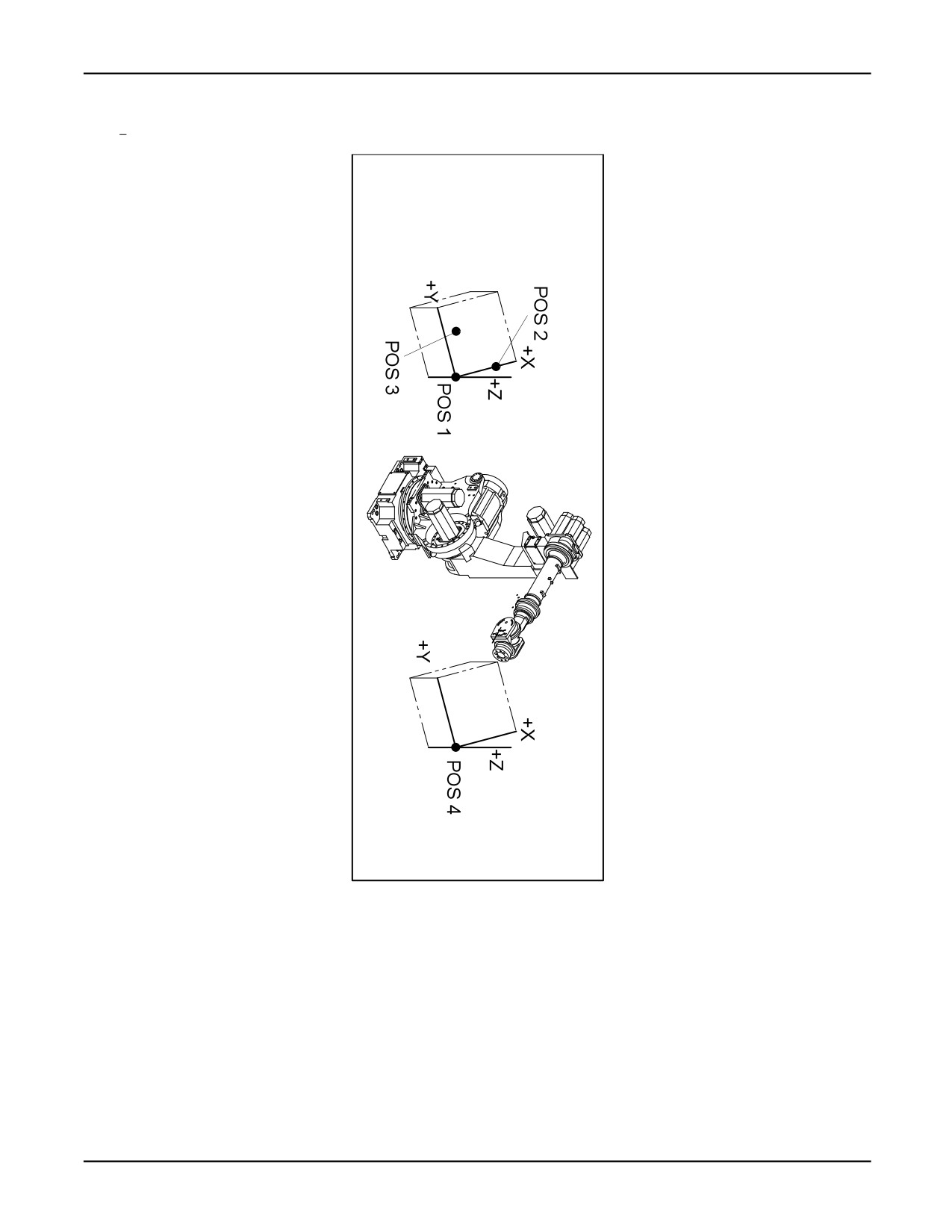
— pos1 is assumed to be the origin unless a pos4 argument is supplied. See Figure A-2 .
— If pos4 is supplied, the origin is shifted to pos4 , and the new coordinate frame retains the
same orientation in space as the first coordinate frame. See Figure A-2 .
— The x-axis is parallel to a line from pos1 to pos2 .
— The xy-plane is defined to be that plane containing pos1 , pos2 , and pos3 , with pos3 in the
positive half of the plane.
— The y-axis is perpendicular to the x-axis and in the xy-plane.
— The z-axis is through pos1 and perpendicular to the xy-plane. The positive direction is
determined by the right hand rule.
— The configuration of the result is set to that of pos1 , or pos4 if it is supplied.
• pos1 and pos2 arguments must be at least 10 millimeters apart and pos3 must be at least 10
millimeters away from the line connecting pos1 and pos2 .
If either condition is not met, the program is paused with an error.
A-142
MARRC75KR07091E Rev D
A. KAREL LANGUAGE ALPHABETICAL DESCRIPTION
Figure A-2. FRAME Built-In Function
Example: The following example allows the operator to set a frame to a pallet so that a palletizing
routine will be able to move the TCP along the x, y, z direction in the pallet’s coordinate frame.
FRAME Built-In Function
WRITE(’Teach corner_1, corner_2, corner_3’,CR)
RELEASE --Allows operator to turn on teach pendant
--and teach positions
A-143
A. KAREL LANGUAGE ALPHABETICAL DESCRIPTION
MARRC75KR07091E Rev D
ATTACH
--Returns motion control to program
$UFRAME = FRAME (corner_1, corner_2, corner_3)
A.7.7
FROM Clause
Purpose: Indicates a variable or routine that is external to the program, allowing data and/or routines
to be shared among programs
Syntax : FROM prog_name
where:
prog_name : any KAREL program identifier
Details:
• The FROM clause can be part of a type, variable, or routine declaration.
• The type, variable, or routine belongs to the program specified by prog_name .
• In a FROM clause, prog_name can be the name of any program, including the program in which
the type, variable, or routine is declared.
• If the FROM clause is used in a routine declaration and is called during program execution, the
body of the declaration must appear in the specified program and that program must be loaded.
• The FROM clause cannot be used when declaring variables in the declaration section of a routine.
Example: Refer to the following sections for detailed program examples:
Section B.6 , "Path Variables and Condition Handlers Program" (PTH_MOVE.KL)
Section B.7 , "Listing Files and Programs and Manipulating Strings" (LIST_EX.KL)
Section B.10 , "Using Dynamic Display Built-ins" (DYN_DISP.KL)
Section B.11 , "Manipulating Values of Dynamically Displayed Variables" (CHG_DATA.KL)
Section B.12 , "Displaying a List From a Dictionary File" (DCLST_EX.KL)
Section B.1 , "Setting Up Digital Output Ports for Monitoring" (DOUT_EX.KL)
A-144
MARRC75KR07091E Rev D
A. KAREL LANGUAGE ALPHABETICAL DESCRIPTION
A.8
- G - KAREL LANGUAGE DESCRIPTION
A.8.1
GET_ATTR_PRG Built-In Procedure
Purpose: Gets attribute data from the specified teach pendant or KAREL program
Syntax : GET_ATTR_PRG(program_name, attr_number, int_value, string_value, status)
Input/Output Parameters :
[in] program_name :STRING
[in] attr_number :INTEGER
[out] int_value :INTEGER
[out] string_value :STRING
[out] status :INTEGER
%ENVIRONMENT Group :PBCORE
Details:
• program_name specifies the program from which to get attribute.
• attr_number is the attribute whose value is to be returned. The following attributes are valid:
AT_PROG_TYPE : Program type
AT_PROG_NAME : Program name (String[12])
AT_OWNER : Owner (String[8])
AT_COMMENT : Comment (String[16])
AT_PROG_SIZE : Size of program
AT_ALLC_SIZE : Size of allocated memory
AT_NUM_LINE : Number of lines
AT_CRE_TIME : Created (loaded) time
AT_MDFY_TIME : Modified time
AT_SRC_NAME : Source file ( or original file ) name (String[128])
A-145
A. KAREL LANGUAGE ALPHABETICAL DESCRIPTION
MARRC75KR07091E Rev D
AT_SRC_VRSN : Source file versionA
AT_DEF_GROUP : Default motion group mask (for task attribute). See Table A-16 .
AT_PROTECT : Protection code; 1 :Protection OFF ; 2 :Protection ON
AT_STORAGE : Storage type; TPSTOR_CMOS; TPSTOR_SHADOW; TPSTOR_FILE;
TPSTOR_SHOD
AT_STK_SIZE : Stack size (for task attribute)
AT_TASK_PRI : Task priority (for task attribute)
AT_DURATION : Time slice duration (for task attribute)
AT_BUSY_OFF : Busy lamp off (for task attribute)
AT_IGNR_ABRT : Ignore abort request (for task attribute)
AT_IGNR_PAUS : Ignore pause request (for task attribute)
AT_CONTROL : Control code (for task attribute)
•
The program type returned for AT_PROG_TYPE will be one of the following constants:
PT_KRLPRG : Karel program
PT_MNE_UNDEF : Teach pendant program of undefined sub type
PT_MNE_JOB : Teach pendant job
PT_MNE_PROC : Teach pendant process
PT_MNE_MACRO : Teach pendant macro
•
If the attribute data is a number, it is returned in int_value and string_value is not modified.
•
If the attribute data is a string, it is returned in string_value and int_value is not modified.
•
status explains the status of the attempted operation. If it is not equal to 0, then an error has
occurred. Some of the errors which could occur are:
7073 The program specified in program_name does not exist
17027 string_value is not large enough to contain the attribute string. The value has been
truncated to fit.
17033 attr_number has an illegal value
See Also: SET_ATTR_PRG, GET_TSK_INFO, SET_TSK_ATTR Built-In Procedures
A-146
MARRC75KR07091E Rev D
A. KAREL LANGUAGE ALPHABETICAL DESCRIPTION
A.8.2
GET_FILE_POS Built-In Function
Purpose: Returns the current file position (where the next READ or WRITE operation will take
place) in the specified file
Syntax : GET_FILE_POS(file_id)
Function Return Type :INTEGER
Input/Output Parameters :
[in] file_id :FILE
%ENVIRONMENT Group :FLBT
Details:
• GET_FILE_POS returns the number of bytes before the next byte to be read or written in the file.
• Line terminators are counted in the value returned.
• The file associated with file_id must be open. Otherwise, the program is aborted with an error.
• If the file associated with file_id is open for read-only, it cannot be on the FROM or RAM
disks as a compressed file.
Warning
GET_FILE_POS is only supported for files opened on the RAM Disk
device. Do not use GET_FILE_POS on another device; otherwise, you
could injure personnel and damage equipment.
Example: The following example opens the filepos.dt data file, stores the positions in my_path in
the file, and builds a directory to access them.
GET_FILE_POS Built-In Function
OPEN FILE file_id (’RW’,’filepos.dt’)
FOR i = 1 TO PATH_LEN(my_path) DO
temp_pos = my_path[i].node_pos
pos_dir[i] = GET_FILE_POS(file_id)
WRITE file_id (temp_pos)
ENDFOR
A-147
A. KAREL LANGUAGE ALPHABETICAL DESCRIPTION
MARRC75KR07091E Rev D
A.8.3
GET_JPOS_REG Built-In Function
Purpose: Gets a JOINTPOS value from the specified register
Syntax : GET_JPOS_REG(register_no, status <,group_no>)
Function Return Type :REGOPE
Input/Output Parameters :
[in] register_no :INTEGER
[out] status :INTEGER
[in] group_no :INTEGER
%ENVIRONMENT Group :REGOPE
Details:
• register_no specifies the position register to get.
• If group_no is omitted, the default group for the program is assumed.
• If group_no is specified, it must be in the range of 1 to the total number of groups defined on
the controller.
• GET_JPOS_REG returns the position in JOINTPOS format. Use POS_REG_TYPE to determine
the position representation.
• status explains the status of the attempted operation. If not equal to 0, then an error occurred.
See Also: GET_POS_REG, SET_JPOS_REG, SET_POS_REG Built-in Procedures
Example: Refer to Section B.5 , "Using Register Built-ins" (REG_EX.KL) for a detailed program
example.
A.8.4
GET_JPOS_TPE Built-In Function
Purpose: Gets a JOINTPOS value from the specified position in the specified teach pendant program
Syntax : GET_JPOS_TPE(open_id, position_no, status <, group_no>)
Function Return Type :JOINTPOS
Input/Output Parameters :
[in] open_id :INTEGER
A-148
MARRC75KR07091E Rev D
A. KAREL LANGUAGE ALPHABETICAL DESCRIPTION
[in] position_no :INTEGER
[out] status :INTEGER
[in] group_no :INTEGER
%ENVIRONMENT Group :PBCORE
Details:
• open_id specifies the teach pendant program. A program must be opened before calling this
built-in.
• position_no specifies the position in the program to get.
• If group_no is omitted, the default group for the program is assumed.
• If group_no is specified, it must be in the range of 1 to the total number of groups defined on
the controller.
• No conversion is done for the position representation. The position data must be in JOINTPOS
format. If the stored position is not in JOINTPOS, an error status is returned. Use GET_POS_TYP
to get the position representation.
• If the specified position in the program is uninitialized, the returned JOINTPOS value is
uninitialized and the status is set to 17038, "Uninitialized TPE position".
• status explains the status of the attempted operation. If not equal to 0, then an error has occurred.
See Also: SET_JPOS_TPE, GET_POS_TPE, SET_POS_TPE Built-ins
Example: Refer to Section B.14 , "Applying Offsets to a Copied Teach Pendant Program"
(CPY_TPE.KL), for a detailed program example.
A.8.5
GET_PORT_ASG Built-in Procedure
Purpose: Allows a KAREL program to determine the physical port(s) to which a specified logical
port is assigned.
Syntax : GET_PORT_ASG(log_port_type, log_port_no, rack_no, slot_no, phy_port_type,
phy_port_no, n_ports, status)
Input/Output Parameters :
[in] log_port_type :INTEGER
[in] log_port_no :INTEGER
[out] rack_no :INTEGER
A-149