FANUC Series 30i/300i/300is-MODEL A. Machining Center System. User's manual - page 182
11.PROGRAM MANAGEMENT
OPERATION
B-63944EN/03
- 1412 -
11.12
PROGRAM COPY FUNCTION
A program is copied or moved from folder to folder.
Procedure for copying a program compact
1
Press function key
.
2
Press chapter selection soft key [FOLDER].
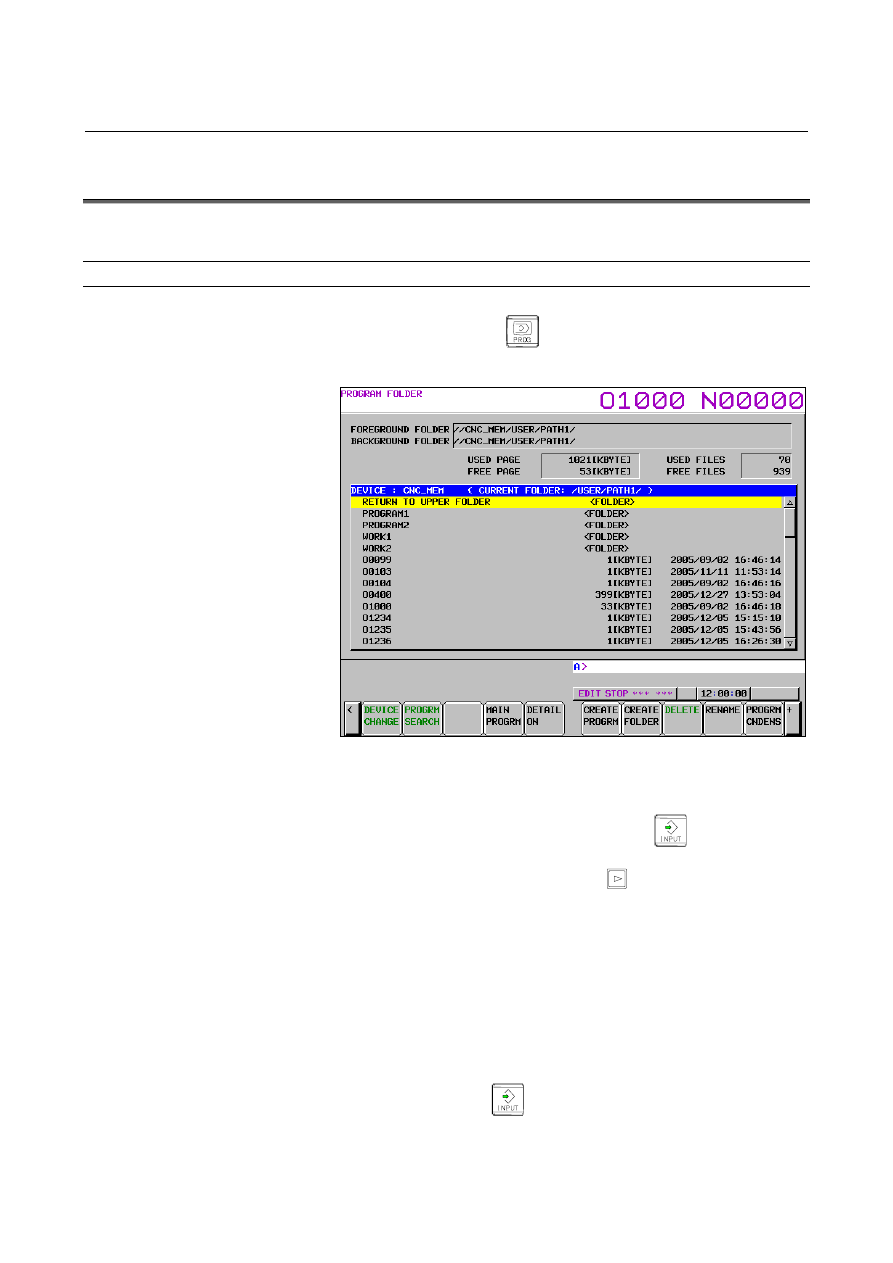
The following program folder screen appears:
3
Press the soft key [(OPRT)].
4 Display the folder from which the program to be copied or
moved. Move the cursor to the folder (indicated by
<FOLDER>) on the screen and press
to move to the
folder.
5 Press the continuous menu key
until soft key [SELECT
START] appears.
Press the soft key [SELECT START].
6
Move the cursor to the program that you want to select, and press
soft key [SELECT]. The background color of the selected
program changes to blue to indicate that the program is selected.
To select multiple programs, repeat this procedure.
7
Press the soft key [SELECT END]. The selected program is
determined.
8 Display the folder to which the program is to be copied or moved.
Move the cursor to the folder (indicated by <FOLDER>) on the
screen and press
to move to the folder.