FANUC Series 30i/300i/300is-MODEL A. Machining Center System. User's manual - page 179
 

  Index      Manuals     FANUC Series 30i/300i/300is-MODEL A. Machining Center System. User's manual (B-63944EN/03)


Search            copyright infringement  


Content      ..     177      178      179      180     ..


FANUC Series 30i/300i/300is-MODEL A. Machining Center System. User's manual - page 179


10.EDITING PROGRAMS

 OPERATION 

B-63944EN/03


- 1388 - 

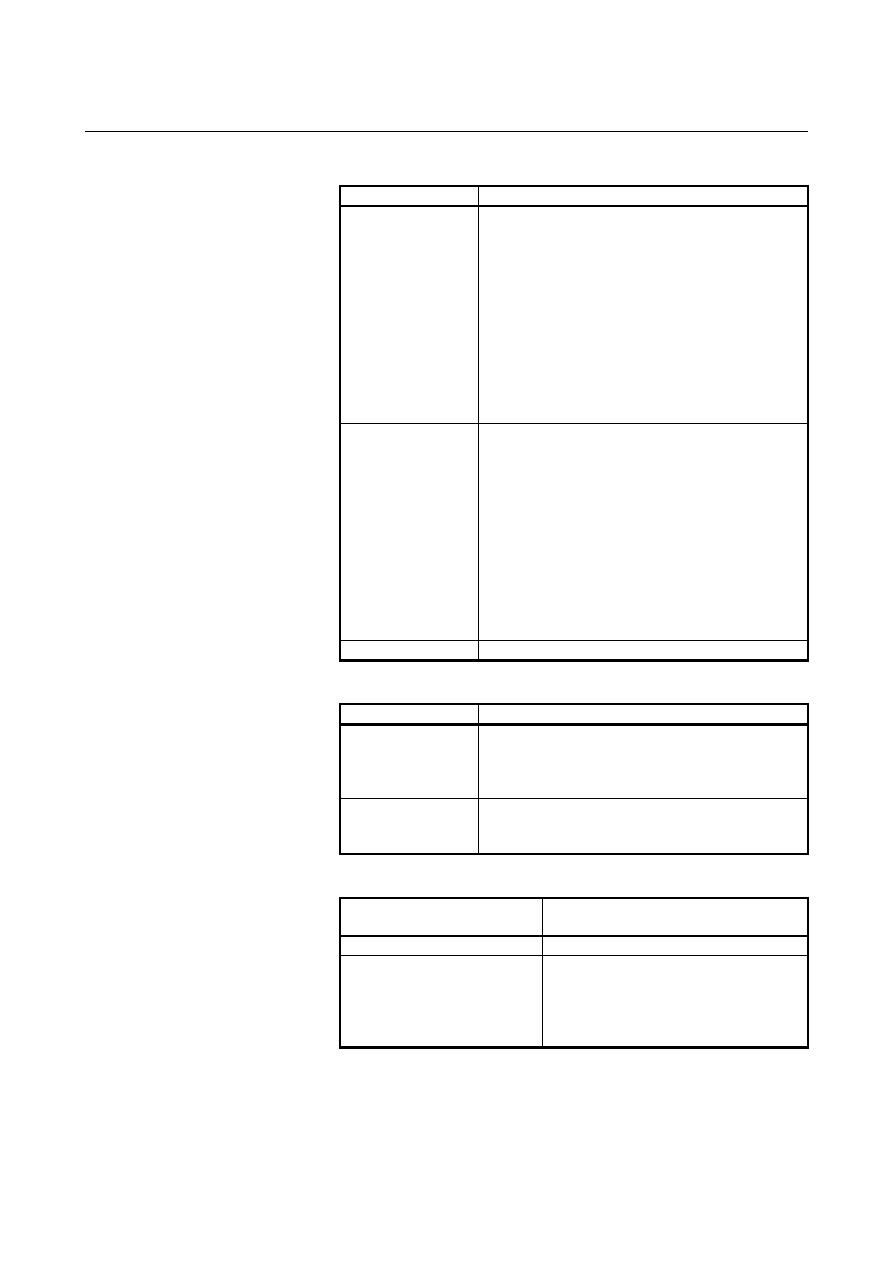
   Outputting specified multiple programs 

Locked/unlocked

Results 

Locked 

When all of the specified programs fall outside the 
protected range, they are output as usual. 
When all of the specified programs are within the 
security range, warning message "PROTECTED" is 
issued. 
When some of the specified program numbers are 
outside the security range, and the others are within 
the security range, only the programs outside the 
security range are output normally. 
When the programs to be output are not within the 
specified range, warning message "THE WRONG 
DATA IS USED" is issued. 

Unlocked 

When all of the specified programs fall outside the 
protected range, they are output as usual. 
When all the specified programs fall within the 
protected range, they are output as encoded 
programs. 
When some of the specified program numbers are 
outside the security range, and the others are within 
the security range, only the programs within the 
security range are encoded and output. 
When the programs to be output are not within the 
specified range, warning message "THE WRONG 
DATA IS USED" is issued. 

Password not set 

The program is output in a normal way. 


   Inputting an un-encrypted program 

Locked/unlocked

Results 

Locked 

When the program to be read is outside the security 
range, it is input normally. 
When the program to be read is within the security 
range, warning message "PROTECTED" is issued. 

Unlocked, or 
password 
not set 

The program is input. 


   Inputting an encrypted program 

Password set in the system 

and password of the program

Results 

Password set in the system 

Warning “WRITE PROTECT” is issued. 

Password for the program 

When the program is within the security 
range, it is input normally. 
When the program is outside the security 
range, warning message "WRITE 
PROTECTED" is issued. 

B-63944EN/03

 OPERATION 

10.EDITING PROGRAMS


- 1389 - 

Password set in the system 

and password of the program

Results 

Password not set in the system

The program is input. 
The PSW in the file is set for parameter 
No. 3220. 
This applies if the program is in the 
security range. 
If the program is outside the security 
range, warning message "PROTECTED" 
is issued. 


      Collating a program with an encrypted program 

In the unlocked state, the following takes place: 

Password set in the system 

and password of the program

Results 

Password set in the system 

Alarm SR0075 “PROTECT” is issued. 

Password set in the system = 
Password of the program, or 
password not set in the system

The program is collated. 

In the locked state, program collation cannot be performed. 
 

NOTE 


To encrypt programs, set parameter ISO (bit 1 of 
No.0000) to 1 (to specify that the punch code is 
ISO). 


 - Program display 

On the program folder screen, all program numbers are displayed 
together with comments. 

In the locked state, the programs within the security range are not 
displayed on the program screen.  In the unlocked state, the 
programs within the security range are displayed in the same way 
as normal programs. 


NOTE 


Immediately after switched from the unlocked state 
to the locked state or from the locked state to the 
unlocked state, programs are displayed in the 
previous state. They are displayed in the new state 
when a program search or other operation is 
performed. 


  - Editing and deleting programs 

When the program memory is locked, the programs within the security 
range cannot be edited or deleted. When the program memory is 
locked, an attempt to delete all programs results in only those 
programs outside the security range being deleted. 
In the locked state, the programs in the security range cannot be 
selected as a main program. If an attempt is made to select such a 
program on the program folder screen as a main program, warning 
message "SETTING A MAIN PROGRAM FAILED" is issued. 

10.EDITING PROGRAMS

 OPERATION 

B-63944EN/03


- 1390 - 


  - Searching for programs 

In the locked state, a program search is performed within the protected 
range as described below. 
 
1  When no program number is specified, programs within the 

protected range are skipped. 

2  When an attempt is made to search for a program within the 

security range by specifying a program number, the search 
operation is ignored, resulting in warning message "Program is 
protected". 


B-63944EN/03

 OPERATION 

10.EDITING PROGRAMS


- 1391 - 

10.13 

SIMULTANEOUS EDITING OF MULTIPATH PROGRAMS 

 
Simultaneous editing of multipath programs enables simultaneous 
editing of programs for multiple paths on a single screen. 
This function is enabled when bit 0 (DHD) of parameter No. 3106 is 
1. 
 

Explanation 
 - Procedure 

1  Set the paths subject to simultaneous editing, with multipath 

simultaneous display parameters Nos. 13131 and 13132. 


(For details of the parameters, refer to the Parameter Manual 
(B-63950EN).) 

Place the paths subject to simultaneous editing in EDIT mode. 

Press function key 

4  Press soft key [PROGRAM] to display the program editing 

screen. 


 - Screen display 

Figure 10.13 (a) to (c) show examples of performing simultaneous 
editing of multipath programs. 
Above each program is a status line on which three items of 
information are displayed: the program name, "FG-EDIT", which 
indicates that the program is being edited in the foreground, and the 
path name. 
For the program currently being edited, its status line is displayed in 
reverse video. 


Figure 10.13 (a)    Simultaneous editing of multipath programs screen 

(10.4-inch LCD) 


Target of 

editing

10.EDITING PROGRAMS

 OPERATION 

B-63944EN/03


- 1392 - 


Figure 10.13 (b)    Simultaneous editing of multipath programs screen 

(15-inch LCD) 


Figure 10.13 (c)    Simultaneous editing of multipath programs screen 

(7.2-inch LCD) 


 - Modes 

When the paths to be displayed simultaneously are in either EDIT or 
MEM mode, the multipath programs are displayed simultaneously on 
the program screen. Selecting the path for which EDIT mode is 
selected enables program editing to be performed. 
Figure 10.13 (d) shows an example in which both EDIT and MEM 
modes are selected. 
For path 1, MEM mode (execution status screen) is selected, and for 
path 2, EDIT mode (editing screen) is selected. 

B-63944EN/03

 OPERATION 

10.EDITING PROGRAMS


- 1393 - 

Soft keys are switched according to the mode for the currently 
selected path. 


Figure 10.13 (d)    Screen on which both MEM and EDIT modes are 

selected 


  - Switching the path subject to editing 

The path selected with the path selection signal is subject to editing.


  - Maximum number of paths that can be subject to editing simultaneously 

The maximum number of paths that can be subject to editing 
simultaneously on each LCD is as given in the table below. 
 

LCD size 

Maximum number of paths that can 

be subject to editing 

simultaneously 

7.2, 8.4, or 10.4-inch 

15-inch 4 


  - Conditions under which simultaneous editing is not usable 

Simultaneous editing of multipath programs is disabled in the 
following cases: 


The program screen is selected as a small screen. 

  The paths to be displayed simultaneously include a path for 

which a mode other than EDIT and MEM modes is selected. 


The virtual MDI key function is enabled. 

 
If, in the state of simultaneous editing of multipath programs, 
background editing is started, background editing is performed on all 
screens. Simultaneous editing of multipath programs and background 
editing cannot be used at the same time. 
 

10.EDITING PROGRAMS

 OPERATION 

B-63944EN/03


- 1394 - 

  - Simultaneous editing on 7.2/8.4-inch LCDs 

When simultaneous editing is performed on 7.2/8.4-inch LCDs, the 
characters get smaller. 
The number of characters per path in the editing area is as follows: 


Display of 38 columns and 10 rows for non-simultaneous display 

  Display of 74 columns and 15 rows for 1-path simultaneous 

display 

  Display of 35 columns and 14 rows for 2-path simultaneous 

display 

  Display of 22 columns and 14 rows for 3-path simultaneous 

display 


B-63944EN/03

 OPERATION 

11.PROGRAM MANAGEMENT


- 1395 - 

11 

PROGRAM MANAGEMENT 

 
Program management functions are classified into the following two 
types: 


Functions for folders 


Functions for programs 

 
Functions for folders include creation, deletion, change of names and 
attributes, and so on. 
Functions for programs include main program selection, deletion, 
change of names and attributes, program compaction, and so on. 
 

Management of
devices and
folders

Program
management

Creation and registration

Editing

Management

Execution

Output

Creating a folder.................................See III-11.2.

Renaming a folder..............................See III-11.3.

Changing folder attributes ..................See III-11.4.

Deleting a folder .................................See III-11.5.

Renaming a file.................................. See III-11.7.

Deleting a file ..................................... See III-11.8.

Changing file attributes ...................... See III-11.9.

Selecting a main program .................. See III-11.10.

Making a program compact................ See III-11.11.

Selecting a default folder ....................See III-11.6.

Selecting a device ..............................See III-11.1.


Content      ..     177      178      179      180     ..