FANUC Series 30i/300i/300is-MODEL A. Machining Center System. User's manual - page 85
 

  Index      Manuals     FANUC Series 30i/300i/300is-MODEL A. Machining Center System. User's manual (B-63944EN/03)


Search            copyright infringement  


Content      ..     83      84      85      86     ..


FANUC Series 30i/300i/300is-MODEL A. Machining Center System. User's manual - page 85


19.PATTERN DATA INPUT

 PROGRAMMING 

B-63944EN/03


- 636 - 

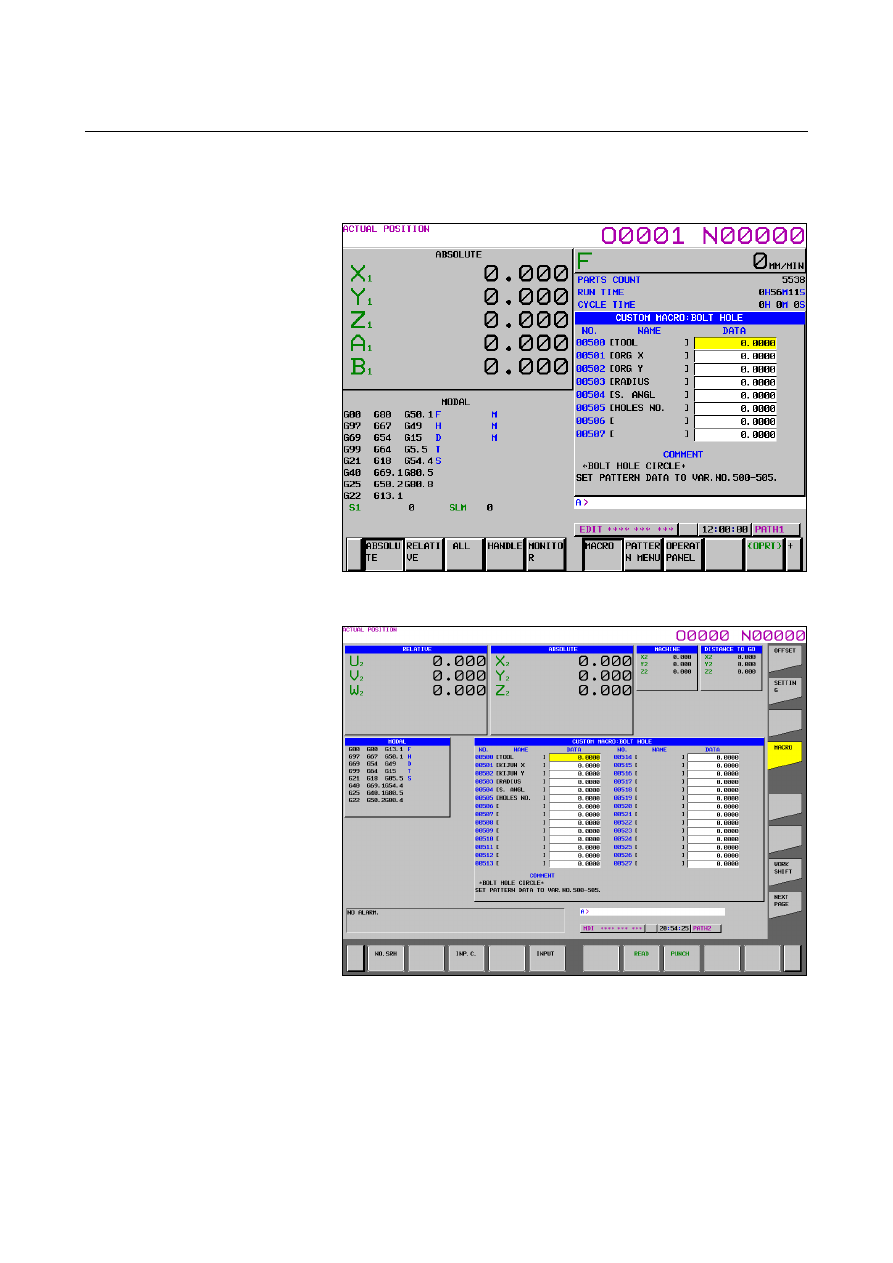
Custom macro variable screen 

The following custom macro screen is displayed. 


Fig. 19.3 (h) Custom macro screen when the pattern data is input 

(10.4-inch) 


Fig. 19.3 (i) Custom macro screen when the pattern data is input 

(15-inch) 

 
When the screen is changed to the custom macro screen, the macro 
variable number that is selected first is specifiied with the parameters 
Nos.6101 to 6110. The macro variables that variable name is not 
defined can be input, too. 
 

B-63944EN/03

 PROGRAMMING 

19.PATTERN DATA INPUT


- 637 - 

NOTE 

1  The variable name that is displayed cannot be used 

as the common variable name of the NC program. 

2  When the common varialbe name is defined by 

SETVN command, the varialbe name defined by 
pattern data input function is given priority. 

3  When bit 0 (POC) of parameter No.11318 is set to 

“1”, The variable number    is three digit display. 


And the value of 12 digits or more is input, 11 digits 
from head of value are displayed. 

 Example) 
  Input: 

-123456789.123 

 Display: -123456789.1 


19.PATTERN DATA INPUT

 PROGRAMMING 

B-63944EN/03


- 638 - 

19.4 

DEFINITION OF THE SCREEN 

 
The definition of the screen is performed by NC program. 
 

Program configuration


This function is consist of one program for the definition of pattern 
menu screen and maximum ten programs for the definition of custom 
macro screen.   
Register the macro program for the pattern data input function to the 
following folder. 
//CNC_MEM/USER/LIBRARY/PATH1 to PATH[n] 

[n] is the maximum path number of the system 

The PATH1 to PATH[n] should be made by the machine tool 
builder. 

The program number is as follows 
 

Table 19.4 (a) Numbers of subprograms employed in the pattern data 

input function


Sub program No. 

Screen 

O9500 

Specifies character strings displayed on the pattern 
data menu. 

O9501 

Specifies a character string of the pattern data 
corresponding to pattern No.1 

O9502 

Specifies a character string of the pattern data 
corresponding to pattern No.2 

O9503 

Specifies a character string of the pattern data 
corresponding to pattern No.3 

O9504 

Specifies a character string of the pattern data 
corresponding to pattern No.4 

O9505 

Specifies a character string of the pattern data 
corresponding to pattern No.5 

O9506 

Specifies a character string of the pattern data 
corresponding to pattern No.6 

O9507 

Specifies a character string of the pattern data 
corresponding to pattern No.7 

O9508 

Specifies a character string of the pattern data 
corresponding to pattern No.8 

O9509 

Specifies a character string of the pattern data 
corresponding to pattern No.9 

O9510 

Specifies a character string of the pattern data 
corresponding to pattern No.10 


Table 19.4 (b) Macro commands used in the pattern data input function


G code 

H code 

Function 

G65 

H90 

Specifies the menu title. 

G65 

H91 

Specifies the pattern name. 

G65 

H92 

Specifies the pattern data title. 

G65 

H93 

Specifies the variable name. 

G65 

H94 

Specifies the comment. 


Table 19.4 (c) System variables employed in the pattern data input 

function 

System variable 

Function 

#5900 

Pattern No. selected by user. 


B-63944EN/03

 PROGRAMMING 

19.PATTERN DATA INPUT


- 639 - 

19.4.1 

Definition of the Pattern Menu Screen


Menu title and pattern name are defined as follows. 


Fig. 19.4.1 (a) Pattern menu screen 


Definition of menu title 

The character string displayed in the menu title of the pattern menu 
screen is defined. 
The menu title is specified up to 12 characters in a half size letter and 
up to 6 characters in a full size letter such as kanji character. 
 

 - Format 

G65 H90 P_ Q_ R_ I_ J_ K_ ; 

H90  : Specifies the menu title 
P_  : The code of 1st and 2nd characters of title 
Q_  : The code of 3rd and 4th characters of title 
R_  : The code of 5th and 6th characters of title 
I_ 

: The code of 7th and 8th characters of title 

J_ 

: The code of 9th and 10th characters of title 

K_  : The code of 11th and 12th characters of title 
As for the way of setting the character-code, refer to the 
Subsection 19.4.3, "Setting the Character-codes". 


Menu title 

Pattern name

19.PATTERN DATA INPUT

 PROGRAMMING 

B-63944EN/03


- 640 - 

Definition of pattern name 

The character string displayed in the pattern name which becomes a 
menu item is defined. 
The pattern name is specified up to 10 characters in a half size letter 
and up to 5 characters in a full size letter. 
 

 - Format 

G65 H91 P_ Q_ R_ I_ J_ K_ ; 

H91  : Specifies the pattern name 
P_  : Specifies the menu number of the pattern name 
 

  The menu number 

1 to 10 

Q_  : The code of 1st and 2nd characters of pattern name
R_  : The code of 3rd and 4th characters of pattern name 
I_ 

: The code of 5th and 6th characters of pattern name 

J_ 

: The code of 7th and 8th characters of pattern name 

K_  : The code of 9thd and 10th characters of pattern name
As for the way of setting the character-code, refer to the 
Subsection 19.4.3, "Setting the Character-codes". 


Example 

The following is example for pattern menu screen. 


Fig. 19.4.1 (b) Pattern menu screen 


O9500 

N1 G65 H90 P072079 Q076069 R032080 I065084 J084069 K082078; .. "HOLE PATTERN"
N2 G65 H91 P1 Q066079 R076084 I032072 J079076 K069032; ............ "BOLT HOLE" 
N3 G65 H91 P2 Q071082 R073068; ........................................................ "GRID" 
N4 G65 H91 P3 Q076073 R078069 I032065 J078071 K076069; ............ "LINE ANGLE" 
N5 G65 H91 P4 Q084065 R080080 I073078 J071032;  .......................... "TAPPING" 
N6 G65 H91 P5 Q068082 R073076 I076073 J078071;............................ "DORILLING" 
N7 G65 H91 P6 Q066079 R082073 I078071; .......................................... "BORING" 
N8 G65 H91 P7 Q080079 R067075 I069084; .......................................... "POCKET" 
N9 G65 H91 P8 Q080069 R067075; ........................................................ "PECK" 
N10 G65 H91 P9 Q084069 R083084; ...................................................... "TEST" 
N11 G65 H91 P10 Q066065 R067075; .................................................... "BACK" 
N12 M99; 

B-63944EN/03

 PROGRAMMING 

19.PATTERN DATA INPUT


- 641 - 

19.4.2 

Definition of the Custom Macro Screen 

 
The title, variable name and comment are defined as follows. 


Fig. 19.4.2 (a) Custom macro screen 


Definition of title 

The character string displayed in the title of the custom macro screen 
is defined. 
The title is specified up to 12 characters in a half size letter and up to 6 
characters in a full size letter. 
 

 - Format 

G65 H92 P_ Q_ R_ I_ J_ K_ ; 

H92 : Specifies the menu title 


P_  : The code of 1st and 2nd characters of the menu title 
Q_  : The code of 3rd and 4th characters of the menu title 
R_  : The code of 5th and 6th characters of the menu title 
I_  : The code of 7th and 8th characters of the menu title 
J_  : The code of 9th and 10th characters of the menu title 
K_  : The code of 11th and 12th characters of the menu title
As for the way of setting the character-code, refer to the 
Subsection 19.4.3, "Setting the Character-codes". 


Macro variable name

Title 

Comment 

19.PATTERN DATA INPUT

 PROGRAMMING 

B-63944EN/03


- 642 - 

Definition of macro variable 

The character string displayed in the macro variable name is defined. 
The macro variable is specified up to 10 characters in a half size letter 
and up to 5 characters in a full size letter. 
 
The variable which can be used is as follows 
#100 to 199 (100 variables) 
#500 to 999 (500 variables), 600 variables in total 
 

 - Format 

G65 H93 P_ Q_ R_ I_ J_ K_ ; 

H93 : Specifies the variable name 
P_  : Specifies the variable number 
 

  Specifies 100 to 199 or 500 to 999 

Q_  : The code of 1st and 2nd characters of the variable name
R_  : The code of 3rd and 4th characters of the variable name 
I_  : The code of 5th and 6th characters of the variable name 
J_  : The code of 7th and 8th characters of the variable name 
K_  : The code of 9th and 10th characters of the variable name
As for the way of setting the character-code, refer to the 
Subsection 19.4.3, "Setting the Character-codes". 


B-63944EN/03

 PROGRAMMING 

19.PATTERN DATA INPUT


- 643 - 

Definition of a comment 

The character string of the comment displayed on the custom macro 
screen is defined. 
The comment is specified by up to 12 characters in a half size letter 
and up to 6 characters in a full size letter per one block. 


When the comment is displayed at the bottom

(

bit 0 (POC) of 

parameter No.11318=0

)


The number of blocks is defined up to maximum 9 blocks. 


One line is composition of 3 blocks and maximum 3 lines can be 
displayed. 


The comment is displayed in the order specified by program as 
the following figure. 


The block is arranged in defined order. 


Block 1 

Block 2 

Block 3 

Block 4 

Block 5 

Block 6 

Block 7 

Block 8 

Block 9 

Fig.19.4.2 (b)    Block reyout of comment 


  When the comment is displayed at the right

(

bit 0 (POC) of 

parameter No.11318=1

)


1 line is composed by 1 blocks, the maximum number of lines is 
8 on the 7.2-inch and 8.4-inch display unit or 12 on the 10.4-inch 
display unit. 


 - Format 

G65 H94 P_ Q_ R_ I_ J_ K_ ; 

H94 : Specifies the comment


P_  : The code of 1st and 2nd characters of comment 
Q_  : The code of 3rd and 4th characters of comment 
R_  : The code of 5th and 6th characters of comment 
I_  : The code of 7th and 8th characters of comment 
J_  : The code of 9th and 10th characters of comment 
K_  : The code of 11th and 12th characters of comment 
As for the way of setting the character-code, refer to the 
Subsection 19.4.3, "Setting the Character-codes". 


Content      ..     83      84      85      86     ..