FANUC Series 0i-MODEL F Plus. CONNECTION MANUAL (FUNCTION) - page 120
 

  Index      Manuals     FANUC Series 0i-MODEL F Plus. CONNECTION MANUAL (FUNCTION) B-64693EN-1/01


Search            copyright infringement  


Content      ..     118      119      120      121     ..


FANUC Series 0i-MODEL F Plus. CONNECTION MANUAL (FUNCTION) - page 120


5. AUTOMATIC OPERATION


B-64693EN-1/01


- 914 - 


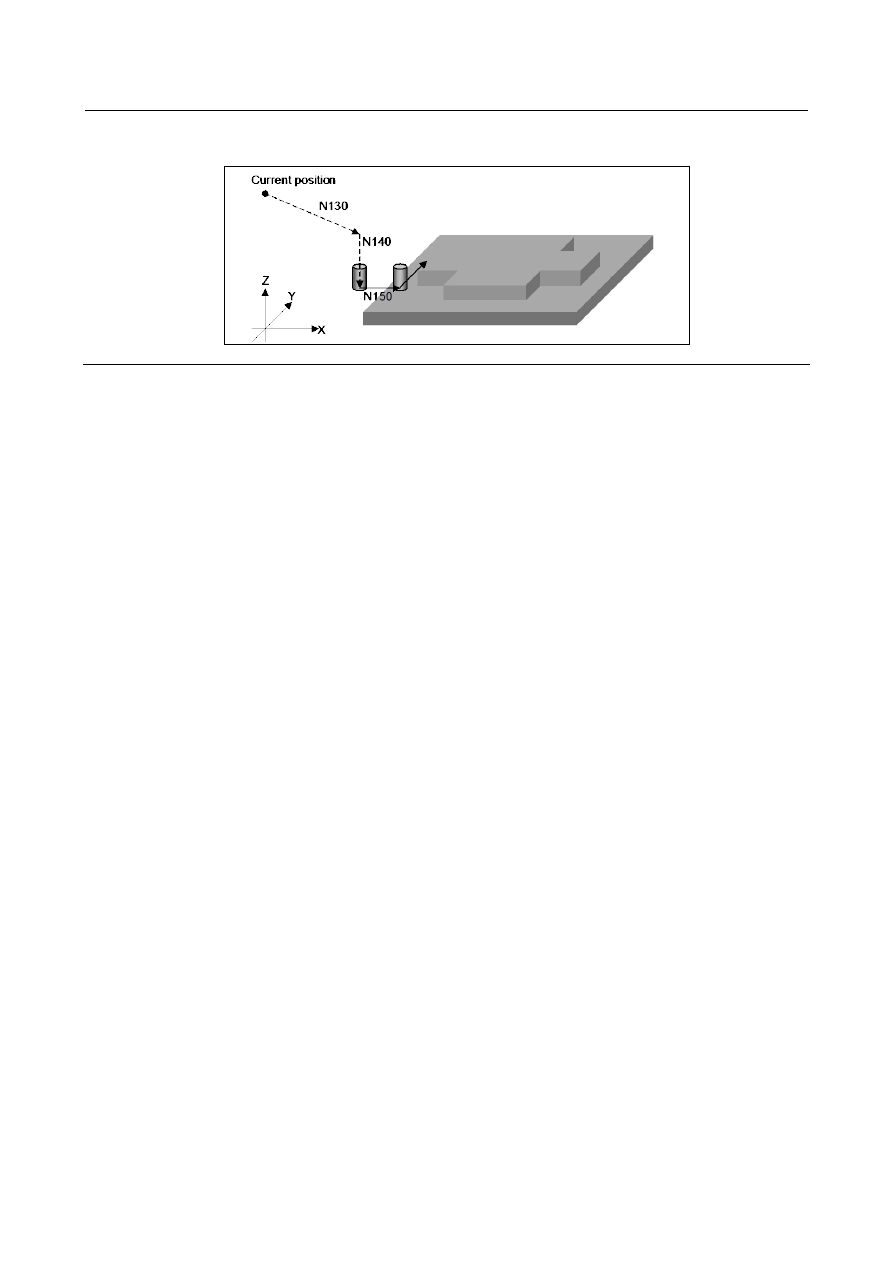
When N130 is specified as the restart block, the tool moves from the current position to the 
end point of N130. 


Explanation 

Bit 5 (SPR) of parameter No. 11250 can be used to select whether to use suppress motion. To use 
suppress motion, press soft key [SET SUPRES] on the program restart information screen. 
 

  - 

Block for which suppress motion is available 

To perform suppress motion, select a block which satisfies conditions (1) to (3) below: 
(1)  An absolute command is specified in the block. 
 

If an incremental command is specified in the restart block, alarm PS1930, “ILLEGAL COMMAND 
AFTER RESTART”, occurs. 

(2)  The G00 or G01 command is specified in the block. 
 

If a command other than G00 or G01 is specified in the block, alarm PS1930 occurs. 

(3)  The block is not a modal block listed below. 
 

If the restart block is a modal block listed below, suppress motion is not available even when the 
G00 or G01 command is specified in that block. If suppress motion is performed for a modal block 
listed below, alarm PS1931, “ILLEGAL MODE AFTER RESTART”, occurs. 

Programmable mirror image 

3-dimensional coordinate system conversion 

Coordinate system rotation 

Tilted working plane indexing 

Tilted working plane indexing by tool axis direction 

Tilted working plane indexing (incremental multiple command) 

Scaling 

Polar coordinate interpolation 

Normal direction control 

Canned cycle for drilling 

Canned cycle 


  - 

Saving the suppress motion status 

By setting bit 6 (SAV) of parameter No. 11250 to 1, the suppress motion status can be saved. With this 
function,  when suppress motion is always executed, once suppress motion setting is performed, the 
setting can be omitted after that. 
The suppress motion status can be checked using parameter No. 7310. When suppress motion is used, a 
negative value is set in parameter No. 7310. 
For an axis for which an invalid value is set in parameter No. 7310, the suppress motion status is not 
saved. 
 

B-64693EN-1/01


5. AUTOMATIC OPERATION


- 915 - 

Caution 

  CAUTION 


When suppress motion is used, the tool moves to the end point of the restart 
block only along the axis specified in the restart block. For this reason, the tool 
does not move to the end point of the restart block along any axis that is not 
specified in the restart block. 


When N160 in the example is specified for the restart block, the tool moves not 
along path B, but along path A as shown below: 


N160 

Current position 

Path B 

Path A 


Along any axis that is not specified in the restart block, move the tool to a position 
where it will not hit anything when it moves during restart operation, in the manual 
mode in advance. 


Note


NOTE 

1  While the tool is moving along another axis, suppress motion cannot be set or 

canceled. If suppress motion is set or canceled while the tool is moving along 
another axis, the warning message, “COMMAND ILLEGAL USE”, is displayed. 

2  Performing approach for each arbitrary axis in the suppress motion status 

cancels the suppress motion. 


Parameter 

7310 


Ordinal number of an axis along which a movement is made in dry run after program restart 


[Input type]  Setting input 


[Data type]  Byte axis 

[Valid data range]  1 to (Number of controlled axes) 

This parameter sets the ordinal number of an axis along which a movement is made in dry 
run after the program is restarted. 
 

  WARNING 

1  When there is two or more axes which has the same setting value in 

this parameter, the movement to the restart point is not executed in 
the second or more axis. 

2  When the quick program restart is effective and bit 6 (SAV) of 

parameter No.11250 is set to 1, the movement to the restart point is 
not done in the axis which this parameter is set negative value(-1 to 
-(Number of controlled axes)). 


NOTE 


When this parameter is 0, alarm SR5020, "PARAMETER OF 
RESTART ERROR" or the warning "ORDINAL NUMBER ERROR 
(RESTART)" is displayed. 

5. AUTOMATIC OPERATION


B-64693EN-1/01


- 916 - 


#7 

#6 

#5 

#4 

#3 

#2 

#1 

#0 

11250 


SAV 

SPR 


[Input type]  Parameter input 


[Data type]  Bit path 


#5  SPR

  Suppress motion is: 

0: 

Disabled.   

1: 

Enabled.   


#6  SAV

  The suppress motion state is:   

0: 

Not saved to a parameter. 

1: 

Saved to a parameter. 


Alarm and message 

Number 

Message 

Description 

PS1930 

ILLEGAL COMMAND AFTER 
RESTART 

The restart block does not satisfy either of the following 
conditions: 
(1)  An absolute command is specified in the block. 
(2)  The G00 or G01 command is specified in the block. 
Select a block satisfying conditions (1) and (2) as the restart 
block. 

PS1931 

ILLEGAL MODE AFTER RESTART 

Suppress motion is specified in a mode in which suppress 
motion is not available. 
Select a block in a mode in which suppress motion is 
available as the restart block. 


Reference item 

Manual name 

Item name 

OPERATOR’S MANUAL (B-64694EN) 

Suppress motion of quick program restart 


5.7.2 

Quick program restart for multi path system 

Overview 

When the machining was restarted by quick program restart in multi path system, it has been necessary to 
operate the program restart every one path.   
In this function, when the program restart is operated in one path, the program restart is automatically 
operated as for other paths. As a result, the program restart can be executed by an easy operation in the 
machine with a multi path system. 
 

Explanation 

When the program restart is operated in certain one path,  it  is automatically operated in the multi path 
system as for other paths. 
This operation is called "multi path quick program restart" ("multi path restart" at the following). 
As for this function, only the program restart of the search method is possible. It cannot be used with the 
direct jump method. 
 

Setting 

In the path that sets the same group number as parameter No.7337, Multi path restart is available. 
When the program restart is  operated  in a certain path,  it  is  operated  at the same time in the path  that 
belongs to the same group.   
In the path that sets 0 to parameter No.7337, Multi path restart is not available. 

B-64693EN-1/01


5. AUTOMATIC OPERATION


- 917 - 

Blocks in which restart is possible 

It is the following blocks that can restart the machining by the multi path restart. 
(1)  Block that is memorized in program restart memory, and was interrupted machining 
(2)  Block  of  waiting  M  code that was memorized in program restart memory, or arbitrary waiting  M 

code specified on program restart setting screen 


Fig. 5.7.2 (a)    Screen for specify waiting M code 

 
(3)  Block of arbitrary sequence number specified on program restart setting screen without using 

program restart memory 

 
When the program restart is executed  to the block like the above-mentioned  in certain one path,  an 
operation of the program restart  is automatically  started  as for other paths.  When an  operation of the 
program restart is started, each path starts the search of a target block severally. 
 
Operation when the block of above-mentioned (1) - (3) is specified is as follows. 
(a)  Block where machining was interrupted 
 

The block where machining is interrupted is searched for in each path and the search stops at the 
block. 

(b)  Block of the waiting M code 
 

A block of the specified waiting M code is searched in each path, and the search stops in a block in 
which it was found. However, if the subprogram call is commanded in the same block as the waiting 
M code, the search stops at a first block of the subprogram. (Machining is restarted from a head of 
subprogram.) 

(c)  Block of arbitrary sequence number 
 

A block of the specified sequence number is searched in each path, and the search stops in a block in 
which it was found. This method can be used in case that the same sequence number is put on the 
program in each path as a sign of the delimitation of the machining. 

 
When the block that corresponds to above-mentioned (a)-(c) is specified as a restart block, the following 
method to specify are possible. 
 

5. AUTOMATIC OPERATION


B-64693EN-1/01


- 918 - 

Fig. 5.7.2 (a)    Search that restart for multi path system is possible 

Method to specify 


Kind of restart block 

Select in list or detail 

screen   

Select in list or detail 

screen and edit 

Direct specification by 

newly edit   

(a)  Block where machining was 

interrupted 

Available 

Not available   

Not available   

(b)  Block of the waiting   

M code 

Available 

Not available   

Available 

(c)  Block of arbitrary sequence 

number 

Not available   

Not available   

Available 


NOTE 

1  Warning "CAN NOT RESTART IN MULTI PATH MODE" is displayed when multi 

path restart is executed with specifying blocks other than the above-mentioned 
(a) to (c). 

2  No-wait signal NOWT <G0063.1> and NMWT <Gn063.7> can be used as well as 

normal automatic operation when searching a waiting M code. It is not searched 
in a path which the waiting M code is disable. 


However, warning “CAN NOT RESTART IN MULTI PATH MODE” is displayed in 
the following cases. 

-  It is ignoring waiting in operation path 
-  The path that can be searched by ignoring waiting is below one path. 

3  When the alarm is issued in a path executing the multi path restart, alarm 

(PS0060) "SEQUENCE NUMBER NOT FOUND" or alarm (PS0071) "DATA NOT 
FOUND" is issued in other paths of the same group.   


Operation after search is completed 

The target path of dry run movement after search is specified by bit 0 (MPD) of parameter No.7331. 
- When parameter MPD is set 0 : 

The order in the path which dry run movement is executed after search can be specified by parameter 
No.7338.   
It enters the state of STRT after the axes move to the machining restart position with dry run and the 
machining program becomes waiting for execution.   
When all paths of the same group enter the state of STRT, the waiting state is released and the 
machining program is executed.   
In the path that 0 is set to parameter No.7338, the dry run movement and the machining program are 
executed without waiting for other path.   

- When parameter MPD is set 1 : 

Dry run is executed in the path that has been selected by the path selection signal HEAD<G0063.0>, 

HEAD2<G0062.7>.   

It is necessary to do cycle start in each path whenever the selected path is changed by the path selection 

signal. 

It enters the state of STRT after the axes move to the machining restart position with dry run and the 
machining program becomes waiting for execution.   

When all paths of the same group enter the state of STRT, the waiting state is released and the 

machining program is executed.   
 

B-64693EN-1/01


5. AUTOMATIC OPERATION


- 919 - 

NOTE 

1  In case of bit 0 (MPD) of parameter No.7331 is set 0, when one path enters in the 

state of STRT, the movement of a dry run of next path is automatically started. 

2  In case of bit 0 (MPD) of parameter No.7331 is set 1, the path has not been 

selected by the path selection signal does not accept the cycle start to a dry run 
movement after search.   

3  Program restart under way signal SRNMV<Fn002.4> becomes "1" until the 

movement of a dry run in all paths that belong to the same group is completed. 
However, when the movement of a dry run in the path is completed, signal 
SRNMV<Fn002.4> becomes "0" as for the path set to parameter MPD=0 and 
parameter No.7338=0. 


  WARNING 


The path of the same group to restart a multi path begins the execution of the 
machining program after waiting for other paths, but it does not synchronize with 
the path that is not the same group. 


Single path restart 


Fig. 5.7.2 (b)    Program restart screen 

 
When a soft key [SINGLE PATH] is pushed, it is change in the single path restart mode. 
In the single path restart mode, it can be done the program restart operation only in the path under the 
display.   
"SINGLE PATH" is displayed on the right of a left screen like showing in Fig. 5.7.2 (b) the single system 
restart mode inside. 
The single path restart mode is canceled by either of the following operations.   

Program restart operation is executed. 

Another screen was selected. 

Soft key [MULTI PATH] is pushed. 


Limitation 

- Miscellaneous function 

The miscellaneous function under the search is not output to PMC. 
Please restore the state of the miscellaneous function by MDI operation before restarting the machining 
after the search ends. 

- Synchronous / Composite / Superimposed control 

On/off command of the synchronous control, the composite control, and the superimposed control by the 
miscellaneous function or G code under the search is invalid. 

5. AUTOMATIC OPERATION


B-64693EN-1/01


- 920 - 

Please restore the state of the synchronous control, the composite control, and the superimposed control 
by MDI operation before restarting the machining after the search ends. 
 

- Flexible path axis assignment 

In the command of the flexible path axis assignment under the search, the flexible path axis assignment is 
not operated.   
Please restore the state of the flexible path axis assignment by MDI operation before restarting the 
machining after the search ends. 
 

Parameter 

The parameter used by this function is shown as follows. 


#7 

#6 

#5 

#4 

#3 

#2 

#1 

#0 

7331 


MPD 


[Input type]  Setting input 


[Data type]  Bit 


#0  MPD

  In the multi path quick program restart function, the target path for a dry run movement 

after restart search is : 
0: 

Specified by parameter No.7338. 

1: 

Specified by path select signal HEAD<G0063.0> and HEAD2<G0062.7>. 


NOTE 


When MPD is set 1, do the cycle start further after the axes moves 
to the machining restart position to make each path stand-by in the 
STRT state. In the multi path quick program restart, all paths in the 
same group should be these stand-by states for an automatic 
operation to be executed. 


7337 


Group number of multi path quick program restart 


[Input type]  Setting input 


[Data type]  Byte path 

[Valid data range]  0 to (Number of controlled paths) 

Please set the group number to this parameter in the path which the multi path  quick 
program restart is effective. 
 

Example)  In the four paths system, when path1  to  3 and path4 are made each group, 

please set this parameter as follows. 

Path 

Setting value of parameter No.7337 

2   

( or 0 ) 


In this setting, the program restart is automatically executed in path2 and path3 set 
to the same group when the program restart is executed in path1.   


Similarly, when the program restart is executed in  path2 or path3, the program 
restart is automatically executed in two remaining paths. 


When the program restart is executed in path4, the program restart is executed only 
in path4. 


B-64693EN-1/01


5. AUTOMATIC OPERATION


- 921 - 

NOTE 


If a value that is bigger than the number of controlled paths is set, 
warning "CAN NOT RESTART IN MULTI PATH MODE" is 
displayed at the search. 


7338 


Ordinal number of a path when moving by dry run in multi path quick program restart 


[Input type]  Setting input 


[Data type]  Byte path 

[Valid data range]  0 to (Number of controlled paths) 

Set the order of the path when moving to the restart point by a dry run after it begins to 
restart. When the same number is set, it moves at the same time. The path to which 0 is 
set does not wait for other paths, and the movement of a dry run and the machining 
program are executed. 
 

Example)  In the four paths system, to move a dry run in order in the first path2, in the 

second path1 and path3, at the end path4, set this parameter as follows. 

Path 

Setting value of parameter No.7338 


NOTE 


This parameter is effective at bit 0 (MPD) of parameter No.7331 is 
set 0.   


5.7.3 

Improvement of Quick program restart for non-machining 
program 

Overview 

In  Quick  Program  Restart  function, when a  program is executed in MEM or RMT mode, restart block 
information is automatically memorized in the program restart memory. 
After  a  machining program is interrupted, another program,  which  is not related to machining,  is 
sometimes executed for the purpose of tool retract and the preparation of the machining in MEM or RMT 
mode. In this case, restart the block information is newly memorized, and the restart block information on 
the machining program memorized till then is overwritten. (It is not overwritten when a non-machining 
program is executed in MDI mode.) 
By  this improvement, restart block information is not memorized in the case of  a certain specific 
program.   
As a result, even when programs  of tool retract and machining preparation are executed during the 
machining, restart block information related to machining can be kept. 
 

Explanation 

When the parameter to activate this function is set and the following programs are executed, restart block 
information is not memorized.   
(1)


Program with specific program number 
Specify the range of the program number by the  parameter No.7335 and No.7336.  When the 
program with the program number specified here is selected as a  main program, restart block 
information is not memorized.   
Moreover, restart block information of  a  subprogram called from this main program is not 


Content      ..     118      119      120      121     ..