Seat Leon. Service Manual - part 3
-------------------------------------------------------------------------------------------------------------------------------------------------------------
The essentials
Cruise control
Operating the cruise control system
(CCS)*
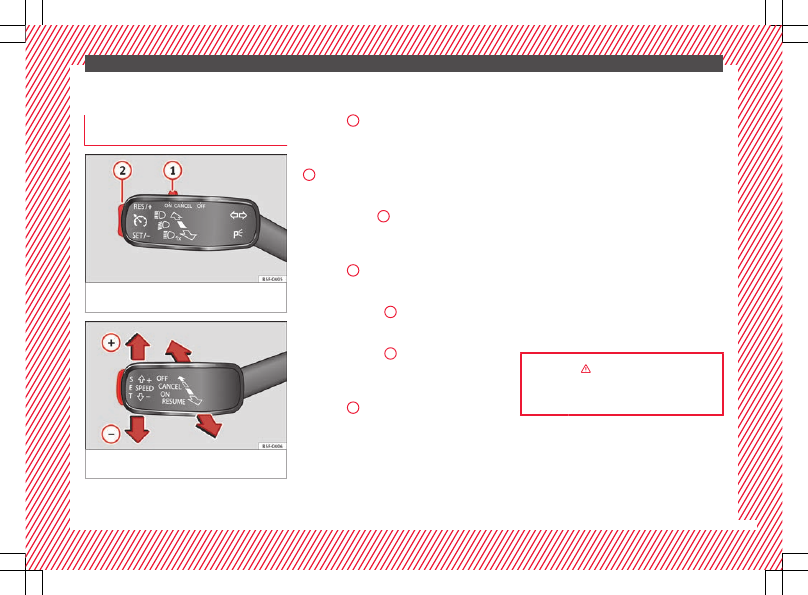
Fig. 47
On the left of the steering column:
switches and controls for operating the CCS
Fig. 48
On the left of the steering column:
third lever to operate the CCS.
Operation of the turn signal lever
●
Switching on the CCS: Move switch
1
to . The system is on. If no
speed has been programmed, the system will
not control it.
●
Activating the CCS: Press button
2
in the area. The current speed is
memorised and controlled.
●
Temporarily switching off the CCS: Move
switch
1
to or push the
brake. The cruise control system is switched
off temporarily.
●
Reactivating the CCS: Press button
2
in . The memorised speed
is saved and controlled again.
●
Increasing stored speed during CCS regula-
tion: press button
2
in . The vehicle ac-
celerates until the new stored speed.
●
Reducing stored speed during CCS regula-
tion: press button
2
in to lower the
speed by 1 km/h (1 mph). Speed is reduced
until reaching the new stored speed.
●
Switching off the CCS: Move switch
1
to . The system is disconnec-
ted and the memorised speed is deleted.
Operation using the third lever
●
Switching on the CCS: move the third lever
to
. The system switches on but it
does not control the speed as no speed has
been programmed.
●
Activating the CCS: press the
›››
button. It memorises and maintains the cur-
rent speed.
●
Temporarily switching off the CCS: move
the lever to
and release it or
press the brake pedal. The cruise control sys-
tem is switched off temporarily.
●
Reactivating the CCS: move the lever to
›››
and release it. The memo-
rised speed is saved and controlled again.
●
Switching off the CCS: move the third lever
to position
. The system is dis-
connected and the memorised speed is de-
leted.
39