Scion iA. Service Manual - part 13
 

  Index      Manuals     Scion iA. Service Manual


Search            copyright infringement  


Content      ..     11      12      13      14     ..


Scion iA. Service Manual - part 13


205

iA_OM_OM99M17z_(U)

3-10. Active Safety System

3

Wh

en Drivin

g

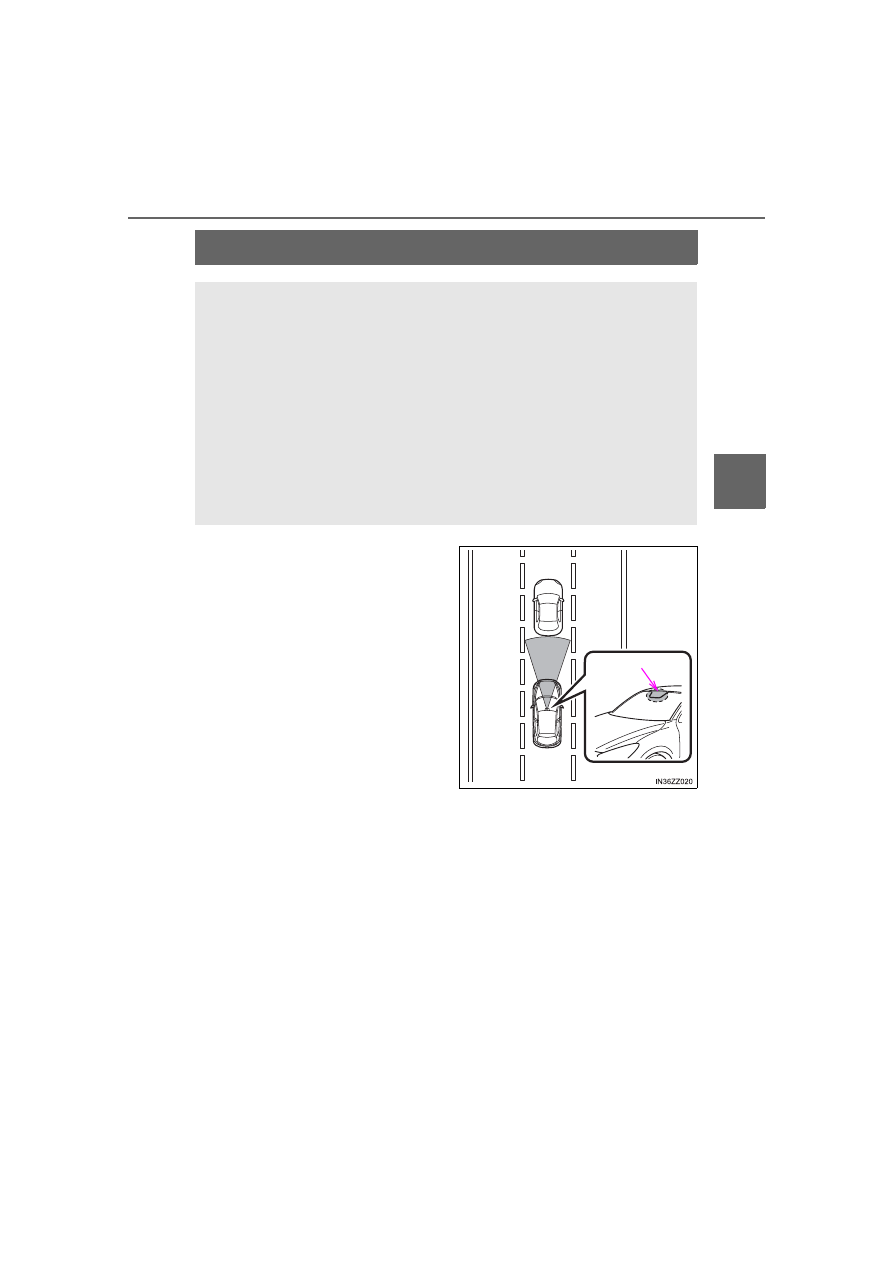
Smart City Brake Support (SCBS)

: If equipped

The Smart City Brake Support (SCBS) system is designed to
reduce damage in the event of a collision by operating the brake
control (SCBS brake) when the system’s laser sensor detects a
vehicle ahead and determines that a collision with a vehicle
ahead is unavoidable. It may also be possible to avoid a colli-
sion if the relative speed between your vehicle and a vehicle
ahead is less than about 12 mph (20 km/h).

In addition, when the driver depresses the brake pedal while the
system is in the operation range at about 2 to 18 mph (4 to
30 km/h), the brakes are applied firmly and quickly to assist.
(Brake Assist (SCBS brake assist))

Laser sensor

-------------------------------------------------------------------------------------------------------------------------------------------------------------

206

iA_OM_OM99M17z_(U)

3-10. Active Safety System

The Smart City Brake Support (SCBS) system will not operate if the driver is
deliberately performing driving operations (accelerator pedal and steering
wheel).

The Smart City Brake Support (SCBS) system will operate under the follow-
ing conditions.

• The engine is running.
• The Smart City Brake Support (SCBS) warning light (amber) does not

illuminate.

• The vehicle speed is between about 2 to 18 mph (4 to 30 km/h).
• The Smart City Brake Support (SCBS) system is not turned off.
• The DSC is not malfunctioning.

The Smart City Brake Support (SCBS) detects a vehicle ahead by emitting a
near-infrared laser beam and receiving the beam reflected off the reflector
of the vehicle ahead, and then using it for the measurement. Consequently,
the Smart City Brake Support (SCBS) may not operate under the following
conditions:

• Reflection of the laser is poor due to the shape of the vehicle ahead.
• The vehicle ahead is significantly dirty.
• Under bad weather condition, such as rain, fog and snow.
• The window washer is being used or the windshield wipers are not used

when it’s raining.

• The windshield is dirty.
• The steering wheel is turned completely left or right, or the vehicle is

accelerated rapidly and comes close to the vehicle ahead.

• Trucks with low loading platforms and vehicles with an extremely low or

high profile.

• Vehicles with certain shapes such as a vehicle carrier.

Under the following conditions, the Smart City Brake Support (SCBS) sys-
tem may not operate normally.

• Heavy luggage is loaded in the luggage compartment or on the rear seat.
• If there is the possibility of partial contact with a vehicle ahead.
• When driving on continuously curving roads, and entering and exiting

exits.

• Elongated luggage or cargo is loaded onto installed roof rails and covers

the laser sensor.

• Exhaust gas from the vehicle in front, sand, snow, and water vapor rising

from manholes and grating, and water splashed into the air.

• When towing a malfunctioning vehicle.
• When driving with tires having significantly different wear.

-------------------------------------------------------------------------------------------------------------------------------------------------------------

iA_OM_OM99M17z_(U)

207

3-10. Active Safety System

3

Wh

en Drivin

g

In the following cases, the laser sensor may inadvertently determine that
there is a vehicle ahead and the Smart City Brake Support (SCBS) system
may operate.

• Objects on the road at the entrance to a curve.
• Vehicles passing in the opposite lane while making a curve.
• Metal objects, bumps, or protruding objects on the road.
• When passing through a toll gate equipped with a bar.
• When passing under a vinyl curtain or flag.
• Plastic objects such as pylons.
• Two-wheeled vehicles, pedestrians, animals or standing trees.

Manual transaxle:
If the vehicle is stopped by the SCBS operation and the clutch pedal is not
depressed, the engine stops.

When the system operates, the user is notified by the flashing Smart City
Brake Support (SCBS) indicator light (red).

The Smart City Brake Support (SCBS) warning light (amber) turns on when
the system has a malfunction.
Refer to Warning Lights on P. 157.

-------------------------------------------------------------------------------------------------------------------------------------------------------------

208

iA_OM_OM99M17z_(U)

3-10. Active Safety System

WARNING

Do not rely on the Smart City Brake Support System (SCBS) as a sub-
stitute for safer driving
The Smart City Brake Support (SCBS) system cannot compensate for
unsafe and reckless driving, excessive speed, tailgating (following another
vehicle too closely), and driving on slippery roads such as wet, snowy, and
icy roads (reduced tire friction and road contact because of water on the
road surface). You can still have an accident.

Do not rely completely on the Smart City Brake Support (SCBS) system

The Smart City Brake Support (SCBS) system is only designed to reduce
damage in the event of a collision. Over reliance on the system leading to
the accelerator pedal or brake pedal being mistakenly operated could
result in an accident.

The Smart City Brake Support (SCBS) is a system which operates in
response to a vehicle ahead. The system may not be able to detect or
react to two-wheeled vehicles or pedestrians.

The laser sensor for the Smart City Brake Support (SCBS) system is
installed near the rearview mirror. To assure the correct operation of the
Smart City Brake Support (SCBS), heed the following cautions.

• Do not apply stickers to the surface of the windshield near the laser

sensor (including transparent stickers). Otherwise, the laser sensor
may not be able to detect vehicles ahead which could result in an acci-
dent.

• Do not apply coating agent to the windshield. Otherwise, the laser sen-

sor may not be able to detect vehicles or obstructions in front which
could result in an accident.

• Do not disassemble the laser sensor.
• If cracks or damage caused by flying gravel or debris is visible near the

laser sensor, stop using the Smart City Brake Support (SCBS) system
immediately and have your vehicle inspected by your Scion dealer. If
the vehicle continues to be driven with cracks or scratch marks left on
the windshield near the laser sensor, the system may operate unneces-
sarily and cause an unexpected accident.
Refer to Stopping The Smart City Brake Support (SCBS) System Oper-
ation on P. 210.

• When replacing the windshield wipers or windshield, consult your Scion

dealer.

The laser sensor includes a function for detecting a soiled windshield and
informing the driver, however, depending on the conditions, it may not
detect plastic shopping bags, ice or snow on the windshield. In such
cases, the system cannot accurately determine a vehicle ahead and may
not be able to operate normally. Always drive carefully and pay attention to
the road ahead.

-------------------------------------------------------------------------------------------------------------------------------------------------------------

iA_OM_OM99M17z_(U)

209

3-10. Active Safety System

3

Wh

en Drivin

g

If the Smart City Brake Support
(SCBS) is operating, the indicator
light (red) flashes.

The collision warning beep sounds intermittently while the SCBS brake or
brake assist (SCBS brake assist) is operating.

If the vehicle is stopped by the SCBS operation and the brake pedal is not
depressed, the warning beep sounds one time after about 2 seconds and
the SCBS brake is automatically released.

WARNING

Do not modify the suspension
If the vehicle height or inclination is changed, the system will not be able to
correctly detect vehicles ahead. This will result in the Smart City Brake Sup-
port (SCBS) system not operating normally or mistakenly operating, which
could cause a serious accident.

Turn off the Smart City Brake Support (SCBS) when the vehicle is run-
ning on a chassis roller or being towed
Turn off the Smart City Brake Support (SCBS) system to prevent mistaken
operation when the vehicle is running on a chassis roller or being towed. 
Refer to Stopping The Smart City Brake Support (SCBS) System Operation
on P. 210.

NOTICE

When driving off-road in areas where there is grass or forage, it is recom-
mended that the Smart City Brake Support (SCBS) system be turned off.

Always use tires for all wheels that are of the specified size, and the same
manufacturer, brand, and tread pattern. In addition, do not use tires with
significantly different wear patterns on the same vehicle as the Smart City
Brake Support (SCBS) system may not operate normally.

Smart City Brake Support (SCBS) Indicator Light (Red)

-------------------------------------------------------------------------------------------------------------------------------------------------------------

210

iA_OM_OM99M17z_(U)

3-10. Active Safety System

The Smart City Brake Support (SCBS) system can be temporarily
deactivated.

When the Smart City Brake Sup-
port (SCBS) system  is  turned  off,
the Smart City Brake Support
(SCBS) OFF indicator light turns
on.

When the engine is restarted, the
system becomes operational.

Without SCBS OFF switch

Refer to Customizable Features on P. 572.

With SCBS OFF switch

Press the SCBS OFF switch to
turn off the system. The Smart
City Brake Support (SCBS) OFF
indicator light in the combination
meter will illuminate.

Press the switch again to turn the
system back on. The Smart City
Brake Support (SCBS) OFF indica-
tor light will turn off.

Stopping the Smart City Brake Support (SCBS) System Opera-
tion

-------------------------------------------------------------------------------------------------------------------------------------------------------------

211

iA_OM_OM99M17z_(U)

3-10. Active Safety System

3

Wh

en Drivin

g

Laser Sensor

Always keep the surface of the
windshield around the laser sen-
sor clean to assure proper opera-
tion of the Smart City Brake
Support (SCBS) system.

: If equipped

The Smart City Brake Support (SCBS) laser sensor is installed at
the top of the windshield near the rearview mirror.

WARNING

As there is the possibility of eye damage occurring from the laser,
always heed the following precautions

Never remove the sensor.

A removed sensor will not meet the conditions for a class 1M laser under
the IEC 60825-1 specification and therefore eye safety cannot be assured.

Do not peer into the sensor using optical instruments with a magnification
function such as magnifying glasses, and microscopic and objective
lenses within a distance of 3.94 in. (100 mm) from the sensor.

-------------------------------------------------------------------------------------------------------------------------------------------------------------

212

iA_OM_OM99M17z_(U)

3-10. Active Safety System

WARNING

Laser sensor radiation data 
Maximum average power: 45 mW 
Pulse duration: 33 ns 
Wavelength: 905 nm 
Divergence angle (horizontal 

 vertical): 28 degrees  12 degrees

-------------------------------------------------------------------------------------------------------------------------------------------------------------

213

iA_OM_OM99M17z_(U)

3-11. Cruise Control

3

Wh

en Drivin

g

Cruise Control

CANCEL switch

RESUME switch

Cruise control SET+/SET-
switch

OFF switch

ON switch

: If equipped

With cruise control, you can set and automatically maintain any
speed of more than about 16 mph (25 km/h).

WARNING

Do not use the cruise control under the following conditions
Using the cruise control under the following conditions is dangerous and
could result in loss of vehicle control.

Hilly terrain

Steep inclines

Heavy or unsteady traffic

Slippery or winding roads

Similar restrictions that require inconsistent speed

Cruise Control Switch

1
2
3

4
5

-------------------------------------------------------------------------------------------------------------------------------------------------------------

214

iA_OM_OM99M17z_(U)

3-11. Cruise Control

The indicator light has two colors.

● Cruise Main Indicator Light (Amber)

The indicator light illuminates amber when the cruise control sys-
tem is activated.

● Cruise Set Indicator Light (Green)

The indicator light illuminates green when a cruising speed has
been set.

To activate the system, press the ON switch. The cruise main indica-
tor light (Amber) illuminates.

To deactivate the system, press the OFF switch.

The cruise main indicator light (Amber) turns off.

When the ignition is switched OFF, the system status before it was turned off
is maintained. For example, if the ignition is switched OFF with the cruise
control system operable, the system will be operable when the ignition is
switched ON the next time.

Cruise Main Indicator Light (Amber)/Cruise Set Indicator Light
(Green)

Activation/Deactivation

WARNING

Always turn off the cruise control system when it is not in use
Leaving the cruise control system in an activation-ready state while the
cruise control is not in use is dangerous as the cruise control could unex-
pectedly activate if the activation button is accidentally pressed, and result
in loss of vehicle control and an accident.

-------------------------------------------------------------------------------------------------------------------------------------------------------------

iA_OM_OM99M17z_(U)

215

3-11. Cruise Control

3

Wh

en Drivin

g

Activate the cruise control system by pressing the ON switch. The
cruise main indicator light (Amber) illuminates.

Accelerate to the desired speed, which must be more than 16 mph
(25 km/h).

Set the cruise control by pressing the SET 

 or SET   switch at

the desired speed. The cruise control is set at the moment the SET

 or SET   switch is pressed. Release the accelerator pedal

simultaneously. The cruise set indicator light (Green) illuminates.

The cruise control speed setting cannot be performed under the following
conditions:

• Manual transaxle: The shift lever is in the neutral position.
• Automatic transaxle: The selector lever is in the P or N position.
• The parking brake is applied.

Release the SET   or SET   switch at the desired speed, otherwise the
speed will continue increasing while the SET   switch is pressed and held,
and continue decreasing while the SET   switch is pressed and held
(except when the accelerator pedal is depressed).

On a steep grade, the vehicle may momentarily slow down while ascending,
or speed up while descending.

Cruise control will cancel if the vehicle speed decreases below 13 mph (21
km/h) when cruise is activated, such as when climbing a steep grade.

Cruise control may cancel at about 9 mph (15 km/h) below the preset
speed, such as when climbing a long, steep grade.

To Set Speed

1

2

3

-------------------------------------------------------------------------------------------------------------------------------------------------------------

216

iA_OM_OM99M17z_(U)

3-11. Cruise Control

Follow either of these procedures.

To increase speed using cruise control switch

Press the SET 

 switch and hold it. Your vehicle will accelerate.

Release the switch at the speed you want.

Press the SET 

 switch and release it immediately to adjust the

preset speed. Multiple operations will increase the preset speed
according to the number of times it is operated.
● Increasing speed with a single SET   switch operation

Meter display for vehicle speed indicated in mph: 1 mph (1.6 km/h)

Meter display for vehicle speed indicated in km/h: 1 km/h (0.6
mph)

To increase speed using accelerator pedal

Depress the accelerator pedal to accelerate to the desired speed.
Press the SET 

 or SET   switch and release it immediately.

Accelerate if you want to speed up temporarily when the cruise control
is on. Greater speed will not interfere with or change the set speed.
Take your foot off the accelerator to return to the set speed.

Press the SET   switch and hold it. The vehicle will gradually slow.
Release the switch at the speed you want.

Press the SET   switch and release it immediately to adjust the pre-
set speed. Multiple operations will decrease the preset speed accord-
ing to the number of times it is operated.
● Decreasing speed with a single SET   switch operation

Meter display for vehicle speed indicated in mph: 1 mph (1.6 km/h)

Meter display for vehicle speed indicated in km/h: 1 km/h (0.6 mph)

To Increase Cruising Speed

To Decrease Cruising Speed

-------------------------------------------------------------------------------------------------------------------------------------------------------------

iA_OM_OM99M17z_(U)

217

3-11. Cruise Control

3

Wh

en Drivin

g

If some other method besides the OFF switch was used to cancel
cruising speed (such as applying the brake pedal) and the system is
still activated, the most recent set speed will automatically resume
when the RESUME switch is pressed.

If vehicle speed is below 16 mph (25 km/h), increase the vehicle
speed up to 16 mph (25 km/h) or more and press the RESUME
switch.

To temporarily cancel the system, use one of these methods:
● Slightly depress the brake pedal.
● Manual transaxle: Depress the clutch pedal.
● Press the CANCEL switch.
If the RESUME switch is pressed when the vehicle speed is 16 mph
(25 km/h) or higher, the system reverts to the previously set speed.

If any of the following conditions occur, the cruise control system is tempo-
rarily canceled.

• The parking brake is applied.
• Manual transaxle: The shift lever is in the neutral position.
• Automatic transaxle: The selector lever is in the P or N position.

When the cruise control system is temporarily canceled by even one of the
applicable cancel conditions, the speed cannot be re-set.

Automatic transaxle:
The cruise control cannot be cancelled while driving in manual mode (selec-
tor lever shifted from D to M position). Therefore, engine braking will not be
applied even if the transaxle is shifted down to a lower gear. If deceleration
is required, lower the set speed or depress the brake pedal.

To deactivate the system, press the OFF switch.

To Resume Cruising Speed at More Than 16 mph (25 km/h)

To Temporarily Cancel

To Deactivate

-------------------------------------------------------------------------------------------------------------------------------------------------------------

218

iA_OM_OM99M17z_(U)

3-12. Tire Pressure Monitoring System

Tire Pressure Monitoring System

The system monitors the tire pres-
sures indirectly using the data
sent from the ABS wheel speed
sensors.

To allow the system to operate correctly, the system needs to be ini-
tialized with the specified tire pressure (value on the tire pressure
label). Follow the procedure and perform the initialization.
Refer to Tire Pressure Monitoring System Initialization on P. 221. 

The warning light flashes when the system has a malfunction.
Refer to Warning Lights on P. 157.

: If equipped

The Tire Pressure Monitoring System (TPMS) monitors the air
pressure of all four tires. If the air pressure of one or more tires
is too low, the system warns the driver by indicating the tire
pressure monitoring system warning light in the combination
meter and operating a beep sound. 

ABS wheel speed sensor

-------------------------------------------------------------------------------------------------------------------------------------------------------------

iA_OM_OM99M17z_(U)

219

3-12. Tire Pressure Monitoring System

3

Wh

en Drivin

g

Because this system detects slight changes in tire conditions, the timing
of the warning may be faster or slower in the following cases:

The size, manufacturer, or the type of tires is different from the specifica-
tion.

The size, manufacturer, or the type of a tire is different from the others,
or the level of tire wear is excessively different between them.

A run-flat tire, studless tire, snow tire, or tire chains are used.

An emergency tire is used (The tire pressure monitoring system warning
light may flash and then continue illuminating).

A tire is repaired using the emergency flat tire repair kit.

The tire pressure is excessively higher than the specified pressure, or
the tire pressure is suddenly lowered for some reason such as a tire
burst during driving.

The vehicle speed is lower than about 9.3 mph (15 km/h) (including
when the vehicle is stopped), or the drive period is shorter than 5 min-
utes.

The vehicle is driven on an extremely rough road or a slippery, icy road.

Hard steering and rapid acceleration/deceleration are repeated such as
during aggressive driving on a winding road.

Load on the vehicle is applied to a tire such as by loading heavy luggage
to one side of the vehicle.

System initialization has not been implemented with the specified tire
pressure.

-------------------------------------------------------------------------------------------------------------------------------------------------------------

220

iA_OM_OM99M17z_(U)

3-12. Tire Pressure Monitoring System

NOTICE

Each tire, including the spare (if provided), should be checked monthly
when cold and inflated to the inflation pressure recommended by the
vehicle manufacturer on the vehicle placard or tire inflation pressure
label. (If your vehicle has tires of a different size than the size indicated
on the vehicle placard or tire inflation pressure label, you should deter-
mine the proper tire inflation pressure for those tires.)
As an added safety feature, your vehicle has been equipped with a tire
pressure monitoring system (TPMS) that illuminates a low tire pres-
sure telltale when one or more of your tires is significantly under-
inflated. Accordingly, when the low tire pressure telltale illuminates,
you should stop and check your tires as soon as possible, and inflate
them to the proper pressure. Driving on a significantly under-inflated
tire causes the tire to overheat and can lead to tire failure. Under-infla-
tion also reduces fuel efficiency and tire tread life, and may affect the
vehicle’s handling and stopping ability.
Please note that the TPMS is not a substitute for proper tire mainte-
nance, and it is the driver’s responsibility to maintain correct tire pres-
sure, even if under-inflation has not reached the level to trigger
illumination of the TPMS low tire pressure telltale.
Your vehicle has also been equipped with a TPMS malfunction indica-
tor to indicate when the system is not operating properly.
The TPMS malfunction indicator is combined with the low tire pressure
telltale. When the system detects a malfunction, the telltale will flash
for approximately one minute and then remain continuously illumi-
nated. This sequence will continue upon subsequent vehicle start-ups
as long as the malfunction exists. When the malfunction indicator is
illuminated, the system may not be able to detect or signal low tire
pressure as intended. TPMS malfunctions may occur for a variety of
reasons, including the installation of replacement or alternate tires or
wheels on the vehicle that prevent the TPMS from functioning properly.
Always check the TPMS malfunction telltale after replacing one or
more tires or wheels on your vehicle to ensure that the replacement or
alternate tires and wheels allow the TPMS to continue to function prop-
erly.

To avoid false readings, the system samples for a little while before
indicating a problem. As a result it will not instantaneously register a
rapid tire deflation or blow out.

-------------------------------------------------------------------------------------------------------------------------------------------------------------


Content      ..     11      12      13      14     ..