СТАНЦИЯ УПРАВЛЕНИЯ ЗАКАЗАМИ. Спецификация API версии 2.0 (Редакция 2.79)
СТАНЦИЯ УПРАВЛЕНИЯ ЗАКАЗАМИ
(ORDER MANAGEMENT STATION)
Спецификация API версии 2.0
(API Specification V2.0)
Редакция 2.79
(Revision 2.79)
Содержание
1
Введение (Introduction)
1
1.1
Сокращения, определения (Terminology)
1
1.2
Общее описание (General description)
2
1.3
Описание процесса (General description process)
5
1.3.1
«01.01.00.00 Создать заказ на эмиссию КМ» (Create order for emission IC)
6
1.3.2
«01.02.00.00 Получить статус массива КМ из бизнес-заказа» (Get IC buffer status)
10
1.3.3
«01.03.00.00 Получить КМ из бизнес-заказа» (Get ICs from the order)
14
1.3.4
«01.04.00.00 Отправить отчёт об использовании КМ» (Send IC utilisation report to OMS)
17
1.4
Буфер хранения КМ в СУЗ (ICs storage buffer in the OMS)
20
2
Описание API (API description)
21
2.1
Требования к API
21
2.1.1
Цифровая подпись сообщений (Digitally Signing Messages)
21
2.1.2
Формирование GS1 DataMatrix (Constructing a GS1 DataMatrix)
23
2.1.3
Обработка JSON (JSON Processing)
23
2.2
Описание API (API description)
24
2.2.1
Создать бизнес-заказ на эмиссию кодов маркировки (Create order for emission IC)
25
2.2.1.1 Запрос (Request)
26
2.2.1.1.1 Расширения для табачной промышленности (Extensions for the tobacco industry)27
2.2.1.1.2 Расширения для лёгкой промышленности - категория товарной группы
«Предметы одежды, белье постельное, столовое, туалетное и кухонное» (Extensions for the
light industry - category «Articles of apparel, bed linen, dining room, toilet and kitchen»)
29
2.2.1.1.3 Расширения для лёгкой промышленности - категория товарной группы «Обувные
товары» (Extensions for the light industry - category «Shoe products»)
31
2.2.1.1.4 Расширения для производителей шин - категория товарной группы «Шины и
покрышки пневматические резиновые новые» (Extensions for tire manufacturers - category of
the product group «New pneumatic rubber tires and tires»)
34
2.2.1.1.5 Расширения для производителей парфюмерной продукции - категория товарной
группы «Духи и туалетная вода» (Extensions for manufacturers of perfumes - category of the
product group «Perfume and toilet water»)
35
2.2.1.1.6 Расширения для производителей фототоваров - категория товарной группы
«Фотокамеры (кроме кинокамер), фотовспышки и лампы-вспышки» (Extensions for photo
goods manufacturers - category of the product group «Cameras (except movie cameras), flash
and flash lamps»)
37
2.2.1.1.7 Расширения для фармацевтической промышленности (Extensions for the
pharmacy industry)
39
2.2.1.1.8 Расширения для производителей молока (Extensions for the milk producers)
40
2.2.1.1.9 Расширения для производителей велосипедов и велосипедных рам (Extensions
for the bicycle producers)
42
2.2.1.1.10 Расширения для производителей кресел-колясок (Extensions for the wheelchairs
producers)
43
2.2.1.2 Ответ на запрос (Response to request)
44
2.2.2
Отправить отчёт о выбытии/отбраковке КМ (Send report of dropout IC to OMS)
45
2.2.2.1 Запрос (Request)
46
2.2.2.1.1 Расширения для табачной промышленности (Extensions for the tobacco industry)47
2.2.2.2 Ответ на запрос (Response to request)
48
2.2.3
Отправить отчёт об агрегации КМ (Send IC aggregation report to OMS)
49
2.2.3.1 Запрос (Request)
49
2.2.3.1.1 Расширения для табачной промышленности (Extensions for the tobacco industry)51
2.2.3.1.2 Спецификации для производителей молока (Specifications for the milk producers)
52
2.2.3.2 Ответ на запрос (Response to request)
53
2.2.4
Отправить отчёт об использовании (нанесении) КМ (Send IC utilisation report to OMS) 54
2.2.4.1 Запрос (Request)
55
2.2.4.1.1 Расширения для табачной промышленности (Extensions for the tobacco industry)56
2.2.4.1.2 Расширения для фармацевтической промышленности (Extensions for the
pharmacy industry)
57
2.2.4.1.3 Расширения для производителей молока (Extensions for the milk producers)
61
2.2.4.2 Ответ на запрос (Response to request)
62
2.2.5
Закрыть подзаказ по заданному GTIN (Close IC array for the specified product GTIN)
63
2.2.5.1 Запрос (Request)
64
2.2.5.2 Ответ на запрос (Response to request)
65
2.2.6
Получить КМ из бизнес-заказа (Get ICs from the order)
65
2.2.6.1 Запрос (Request)
66
2.2.6.2 Ответ на запрос (Response to request)
68
2.2.7
Получить статус массива КМ из бизнес-заказа (Get IC buffer status)
68
2.2.7.1 Запрос (Request)
69
2.2.7.2 Ответ на запрос (Response to request)
69
2.2.8
Получить статус бизнес-заказов (Get status orders)
72
2.2.8.1 Запрос (Request)
73
2.2.8.2 Ответ на запрос (Response to request)
73
2.2.9
Получить информацию об агрегации (Get aggregation)
75
3
2.2.9.1 Запрос (Request)
75
2.2.9.2 Ответ на запрос (Response to request)
76
2.2.9.2.1 Расширение для табачной промышленности
77
2.2.10
Получить статус обработки отчёта (Get status processing report)
78
2.2.10.1
Запрос (Request)
79
2.2.10.2
Ответ на запрос (Response to request)
79
2.2.11
Отправить лог файлы АСУТП (Send Automated process control system logs files)
80
2.2.11.1
Запрос (Request)
80
2.2.11.2
Ответ на запрос (Response to request)
81
2.2.12
Проверить доступность СУЗ (Ping OMS)
82
2.2.12.1
Запрос (Request)
82
2.2.12.2
Ответ на запрос (Response to request)
83
2.2.13
Получить маркер безопасности по имени пользователя и паролю (Get a security token by
username and password)
84
2.2.13.1
Запрос (Request)
84
2.2.13.2
Ответ на запрос (Response to request)
85
2.2.14
Получить версию СУЗ и API (Get OMS and API versions)
86
2.2.14.1
Запрос (Request)
86
2.2.14.2
Ответ на запрос (Response to request)
86
2.2.15
Получить список идентификаторов пакетов кодов маркировки (Get identifiers of blocks of
ICs)
87
2.2.15.1
Ограничения (Restrictions)
87
2.2.15.2
Запрос (Request)
87
2.2.15.3
Ответ на запрос (Response to request)
88
2.2.16
Получить повторно коды маркировки из заказа кодов маркировки (Get ICs from the order
repeatedly)
90
2.2.16.1
Ограничения (Restrictions)
90
2.2.16.2
Запрос (Request)
91
2.2.16.3
Ответ на запрос (Response to request)
92
2.2.17
Отправить отчет об использовании и об автоматическом вводе в оборот (Send a report on
the use and automatic commissioning)
93
2.2.17.1
Ограничения (Restrictions)
93
2.2.17.2
Запрос (Request)
93
2.2.17.2.1 Расширения для производителей молока (Extensions for the milk producers)
96
4
2.2.17.3
Ответ на запрос (Response to request)
98
2.2.18
Запрос номера документа отчета о вводе в оборот (Request for the document number of the
report on the use and automatic commissioning)
99
2.2.18.1
Ограничения (Restrictions)
99
2.2.18.2
Запрос (Request)
99
2.2.18.3
Ответ (Response to request)
100
2.3
Справочники (Dictionary)
102
2.3.1
Справочник №1 «Способ выпуска товаров в оборот» (Voc. №1 «Method of release of goods
into circulation»)
102
2.3.2
Справочник №2 «Вид СИ» (Voc. №2 «Identification Type»)
102
2.3.3
Справочник №3 «Способ формирования индивидуального серийного номера» (Voc. №3
«Method of generation of individual serial number»)
103
2.3.4
Справочник №4 «Вид маркировки» (Voc. №4 «Type of marking»)
103
2.3.5
Справочник №5 «Способ изготовления» (Voc №5 «Manufacturing Method»)
103
2.3.6
Справочник №6 «Способ получения» (Voc №6 «Method of receiving»)
104
2.3.7
Справочник №7 «Шаблоны КМ» (Voc №7 «Template IC»)
104
2.3.8
Справочник №8 «Статус массива КМ» (Voc №8 «IC array status»)
105
2.3.9
Справочник №9 «Тип агрегации» (Voc №9 «Aggregation Type»)
106
2.3.10
Справочник №10 «Статус буфера КМ» (Voc №10 «IC buffer status»)
106
2.3.11
Справочник №11 «Статус обработки отчёта» (Voc №11 «Report Processing Status») ...107
2.3.12
Справочник №12 «Тип использования» (Voc №12 «Usage Type»)
109
2.3.13
Справочник №13 «Статус бизнес заказа» (Voc №13 «Order status»)
110
2.3.14
Справочник №14 «Причина выбытия» (Voc №14 «Dropout reason»)
111
2.3.15
Справочник №15 «Тип кода маркировки» (Voc №15 «IC type»)
112
2.4
Формат и коды ошибок (Format and error codes)
113
2.4.1
Формат ошибки (Error format)
113
2.4.2
Описание ошибок (Error description)
114
3
Матрица предоставления сервисов API СУЗ 2.0 компонентами программного комплекса СУЗ
(Matrix of providing services of API OMS 2.0 by components of the OMS software complex)
115
4
Список изменений (List of changes)
117
5

1 Введение (Introduction)
Контроллер API REST аутентифицирует клиентов с помощью так называемого
клиентского токена, отправляемого клиентом в заголовке HTTP-запроса. Маркер
безопасности (ClientToken) передаётся в заголовке HTTP клиентского токена - «clientToken».
Некоторые методы API при отправке данных используют метод HTTP POST. В таких
случаях следует использовать указание дополнительного HTTP-заголовка - «Content-Type:
application/json».
Методы API СУЗ в качестве параметров используют идентификатор СУЗ «omsId»,
идентификатор СУЗ «omsId» доступен в настройках СУЗ.
API methods of the OMS as parameters use the ID «Omsid», the ID «Omsid» is available in
the settings of the OMS.
API REST controller authenticates the clients by so-called client token sent by the client in
the HTTP request header. The client token HTTP header name is “clientToken”.
Some API calls require sending data using HTTP POST method. In such cases you should use
specify additional HTTP Header - Content-Type: application/json.
Допустимые символы КМ приведены ниже в таблице (Таблица 1). Данные символы
используются в следующих группах данных кодов маркировки: «Серийный номер»,
«Идентификатор ключа», «Код проверки».
Valid characters IC are listed in the table below. These symbols are used in the following
groups of marking code data: “Serial number”, “Key identifier”, “Verification code”.
Таблица 1 - Допустимые символы КМ (Valid characters IC)
Допустимые символы КМ. Valid characters IC
ABCDEFGHIJKLMNOPQRSTUVWXYZabcdefghijklmnopqrstuvwxyz0123456789!"%&'()*+
,-./_:;=<>?
1.1 Сокращения, определения (Terminology)
Таблица 2 - Сокращения, определения (Glossary)
Термин
Описание
Term
Description
КМ,
Код маркировки
IC
Identification Codes
ИС МП, Marking
Информационная система мониторинга и прослеживаемости товаров
Information System
Marking Information System
Станция управления заказами.
СУЗ, OMS
Order management station
АСУТП,
Automated process
Автоматизированная система управления технологическими процессами.
control system
Automated process control system.
(APCS)
1
Центр этикетирования и маркировки.
ЦЭМ, LMS
Labeling and Marking Center
Единица складского учёта
SKU
Stock Keeping Unit,
1.2 Общее описание (General description)
В данном разделе приведено описание API СУЗ, взаимодействие осуществляется по
протоколу HTTP, используя формат JSON.
This section describes the OMS API, the interaction is carried out using the HTTP protocol,
using the JSON format.
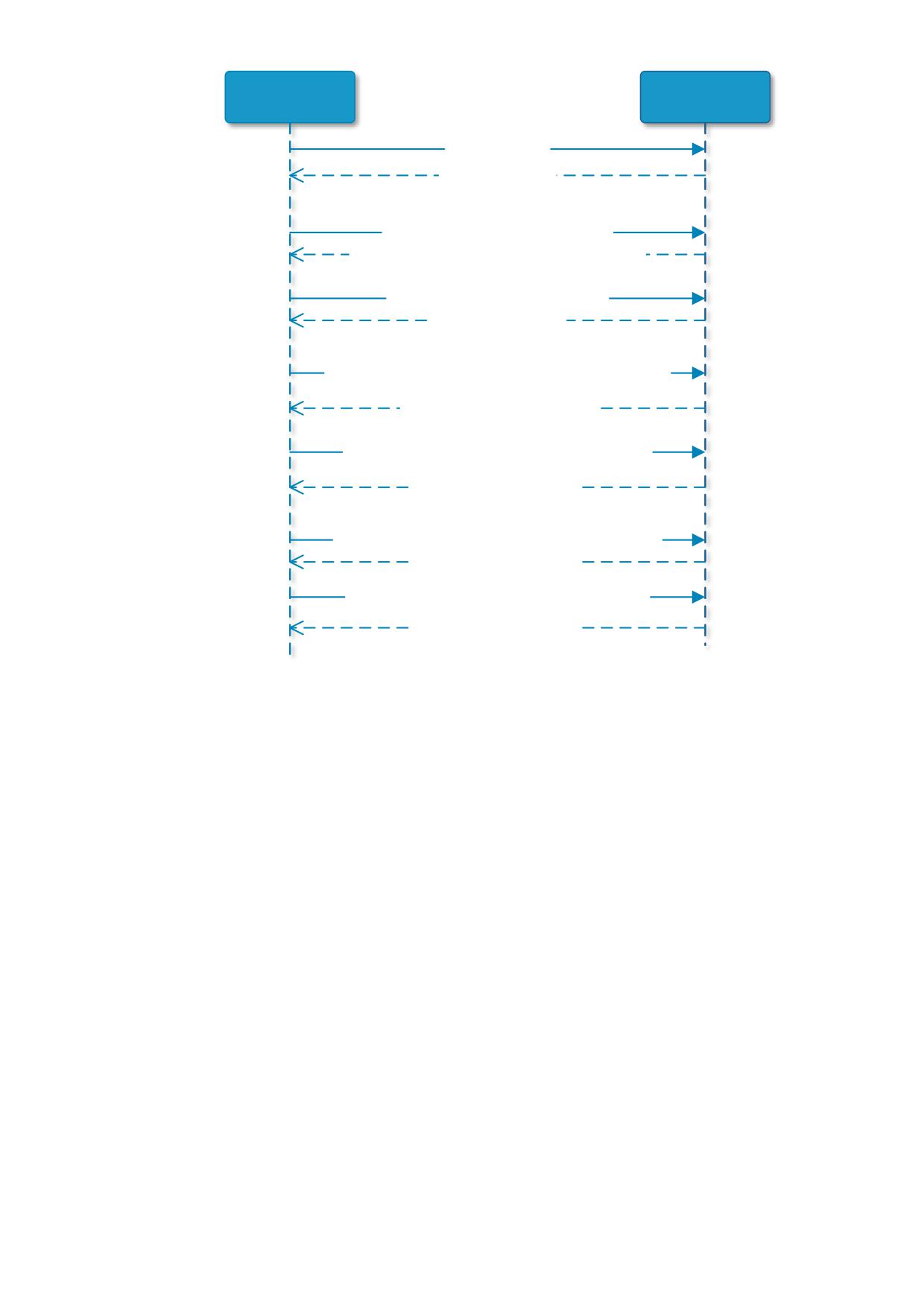
Ниже представлена последовательность вызова методов СУЗ при создании нового бизнес
заказа на эмиссию КМ (Below is the sequence of call of OMS methods when creating a new business
order for issuing a IC):
1. Проверить доступность СУЗ (см. раздел 2.2.12) (Ping OMS, see section 2.2.12);
2. Создать бизнес-заказ на эмиссию кодов маркировки (см. раздел 2.2.1) (Create order
for emission IC, see section 2.2.1);
3. Получить статус массива КМ из бизнес-заказа (см. раздел 2.2.7) (Get IC buffer status,
see section 2.2.7);
4. Получить КМ из бизнес-заказа (см. раздел 2.2.6) (Get ICs from the order, see section
2.2.6);
5. Отправить отчёт об использовании КМ (см. раздел 2.2.4) (Send IC utilisation report
to OMS, see section 2.2.4);
6. Отправить отчёт об агрегации КМ (см. раздел 2.2.3) (Send IC aggregation report to
OMS, see section 2.2.3);
7. Отправить отчёт о выбытии/отбраковке КМ (см. раздел 2.2.2) (Send report of dropout
IC to OMS, see section 2.2.2);
Диаграмма последовательности вызова методов СУЗ представлена на рисунке ниже
(Рисунок 1). Diagram of the call sequence of the OMS methods is presented in the figure below.
API СУЗ также предоставляет вспомогательные методы (The OMS API also provides helper
methods):
- Получить статус обработки отчёта (см. раздел 2.2.10) (Get status processing report,
see section 2.2.10);
- Отправить лог файлы АСУТП (см. раздел 2.2.11) (Send Automated process control
system logs files, see section 2.2.11);
- Получить статус бизнес-заказов (см. раздел 2.2.8) (Get status orders, see section
2.2.8);
- Получить маркер безопасности по имени пользователя и паролю (см. раздел 2.2.13)
(Get a security token by username and password, see section 2.2.13);
2
- Закрыть подзаказ по заданному GTIN (см. раздел 2.2.5) (Close IC array for the
specified product GTIN, see section 2.2.5);
- Получить версию СУЗ и API (см. раздел 2.2.14) (Get OMS and API versions, see
section 2.2.14);
- Получить список идентификаторов пакетов кодов маркировки (см. раздел 2.2.15)
(Get identifiers of blocks of ICs, see section 2.2.15);
- Получить повторно коды маркировки из заказа кодов маркировки (см. раздел
2.2.16) (Get ICs from the order repeatedly, see section 2.2.16);
- Отправить отчет об использовании и об автоматическом вводе в оборот (см. раздел
2.2.17) (Send a report on the use and automatic commissioning, see section 2.2.17);
- Запрос номера документа отчета о вводе в оборот (см. раздел 2.2.18) (Request for
the document number of the report on the use and automatic commissioning, see section
2.2.18);
- Получить информацию об агрегации (см. раздел 2.2.9) (Get aggregation, see section
2.2.9).
Примечание: при наличии неиспользованных кодов маркировки при закрытии заказа
будет сформирован и отправлен отчёт об аннулировании кодов маркировки.
Note: if there are unused marking codes when closing an order, a report on annulment of
marking codes will be generated and sent.
3
Automated process
OMS
control system
(СУЗ)
(АСУТП)
1. Ping OMS (omsId)
HTTP code 200 : omsId
2. Create order for emission IC (omsId, order)
HTTP code 200 : omsId, orderId, expectedCompletionTime
3. Get IC buffer status (omsId, orderId, gtin)
HTTP code 200 : bufferInfo
4. Get ICs from the order (omsId, orderId, gtin, quantity, lastBlockId)
HTTP code 200 : omsId, codes, blockId
5. Send IC utilisation report to OMS(omsId, utilisationReport)
HTTP code 200 : omsId, reportId
6. Send IC aggregation report to OMS (omsId, aggregationReport)
HTTP code 200 : omsId, reportId
7. Send report of dropout IC to OMS (omsId, dropoutReport)
HTTP code 200 : omsId, reportId
Рисунок 1. Последовательность вызова методов СУЗ (Sequence of calling OMS methods)
4
1.3 Описание процесса (General description process)
В данном разделе приведено общее описание процесса эмиссии кодов маркировки.
Общий процесс эмиссии КМ включает четыре ключевых этапа:
1.
«01.01.00.00 Создать заказ на эмиссию КМ»;
2.
«01.02.00.00 Получить статус массива КМ из бизнес-заказа»;
3.
«01.03.00.00 Получить КМ из бизнес-заказа»;
4.
«01.04.00.00 Отправить отчёт об использовании КМ».
Процесс отправки отчётов об агрегации и отчётов о выбытии/отбраковки
осуществляется аналогично процессу «01.04.00.00 Отправить отчёт об использовании КМ».
This section provides a general description of the process of issuing marking codes. The overall
emission process of the CM includes four key stages.
1.
«01.01.00.00 Create order for emission IC»;
2.
«01.02.00.00 Get IC buffer status»;
3.
«01.03.00.00 Get ICs from the order»;
4.
«01.04.00.00 Send IC utilisation report».
The process of sending reports on IC aggregation and reports of dropout IC is carried out
similarly to the process «01.04.00.00 Send IC utilisation report».
5
1.3.1
«01.01.00.00 Создать заказ на эмиссию КМ» (Create order for emission
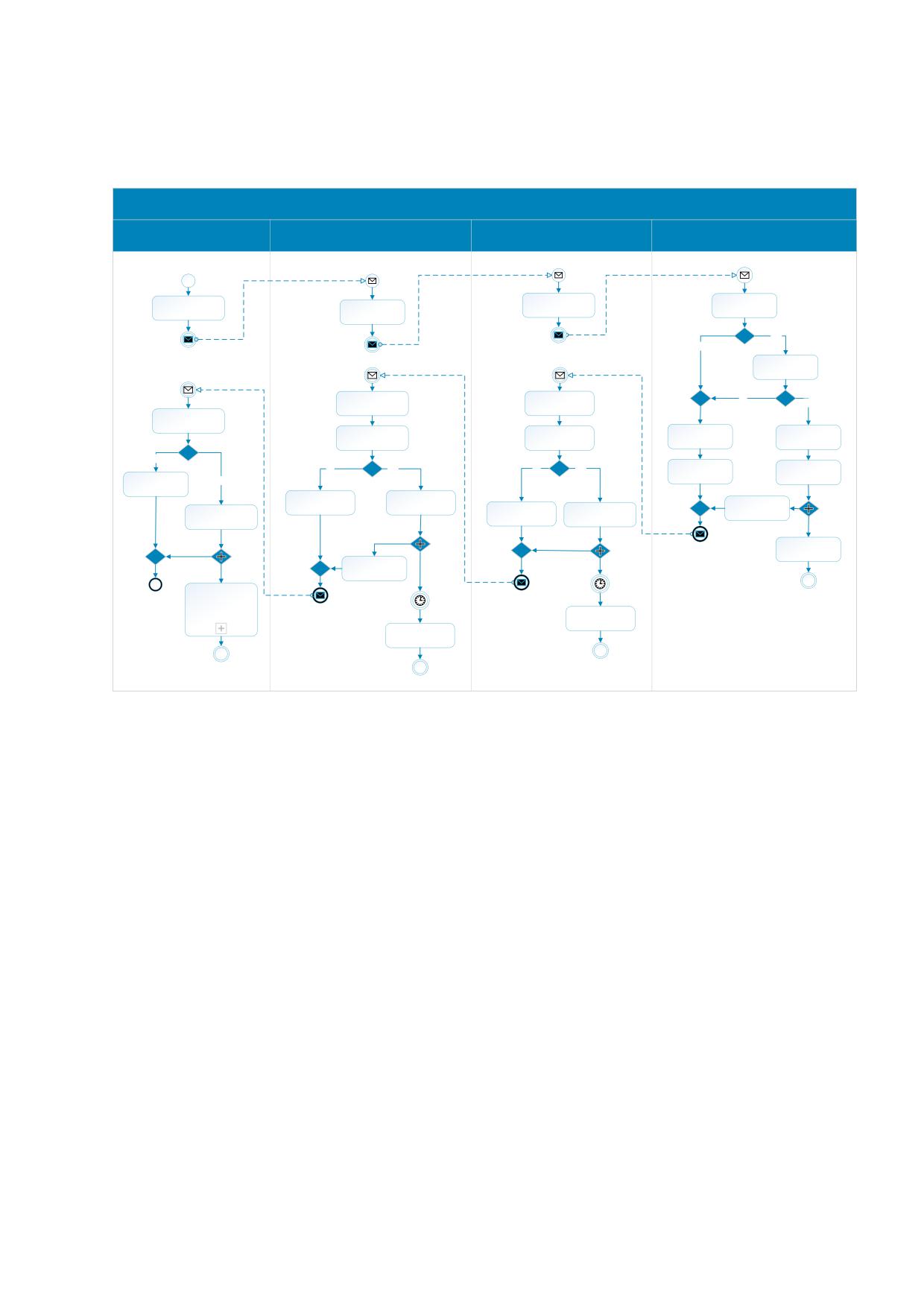
IC)
Диаграмма процесса создания заказа на эмиссию КМ приведена на рисунке ниже (см. Рисунок
2).
01.01.00.00 «Создать заказ на эмиссию КМ»
АСУТП
СУЗ
РЭ
СЭ
Заказ на эмиссию КМ
Начало
Бизнес-заказ на эмиссию КМ
Сформировать
Сформировать
Проверить ФЛК
Бизнес-заказ на
Проверить ФЛК
запрос содержащий
заказ на эмиссию КМ
запроса
эмиссию КМ
запроса
Нет
Да
Ошибки есть?
Проверить заказ
на эмиссию КМ
Получить результат
Получить результат
Да
Нет
обработки запроса
обработки запроса
Ошибки есть?
Проверить наличие
ошибок
Присвоить
Проверить наличие
Проверить наличие
Зарегистрировать
ошибок
ошибок
ошибку в журнале
идентификатор
заказу
Д
а
Сформировать
Есть ошибки?
Да
Нет
Да
Нет
Рассчитать время
сообщение об
Зарегистрировать
Нет
Ошибки есть?
Есть ошибки?
ошибке
готовности заказа
ошибку в журнале
Сформировать
сообщение об
Создать массив КМ
Сформировать
Зарегистрировать
ответное
Сохранить данные
ошибке
Создать пул КМ
сообщение
бизнес-заказа
ошибку в журнале
Обработать заказ
на эмиссию КМ
Сформировать
ответное
сообщение
Время готовности
заказа
01.02.00.00
Завершение
«Получить статус
Время готовности
заказа
массива КМ из
бизнес-заказа»
Запросить в СЭ
эмитированные КМ
Запросить в РЭ
эмитированные КМ
Рисунок 2. «Создать заказ на эмиссию КМ».
Описание:
1.
АСУТП формирует бизнес-заказ и отправляет его в СУЗ;
2.
СУЗ проводит проверку запроса и отправляет заказ в Регистратор эмиссии;
3.
Регистратор эмиссии формирует запрос содержащий заказ на эмиссию КМ и отправляет его в
Сервер эмиссии;
4.
Сервер эмиссии получив запрос содержащий заказ на эмиссию КМ, производит проверку запроса.
4.1.
В случае если запрос содержит ошибки, Сервер эмиссии регистрирует ошибку в журнале;
4.2.
Сервер эмиссии формирует сообщение об ошибке и отправляет в Регистратор эмиссии;
4.3.
Осуществляется переход на шаг 8 основного сценария.
5.
Сервер эмиссии при отсутствии ошибок, проверяет заказа на эмиссию КМ.
5.1.
В случае если запрос содержит ошибки, Сервер эмиссии регистрирует ошибку в журнале;
5.2.
Сервер эмиссии формирует сообщение об ошибке и отправляет в Регистратор эмиссии;
5.3.
Осуществляется переход на шаг 8 основного сценария.
6.
Сервер эмиссии при отсутствии ошибок в заказе на эмиссию КМ, присваивает заказу
идентификатор и рассчитывает время готовности заказа;
6
6.1.
Сервер эмиссии, отправляет заказ на обработку (действие выполняется асинхронно);
7. Сервер эмиссии формирует ответное сообщение и отправляет в Регистратор эмиссии;
8. Регистратор эмиссии получает результат обработки запроса;
9. Регистратор эмиссии проверяет наличие ошибок:
9.1.
В случае если сообщение содержит ошибки, Регистратор эмиссии регистрирует ошибку в
журнале;
9.2.
Регистратор эмиссии формирует сообщение об ошибке и отправляет в СУЗ;
9.3.
Осуществляется переход на шаг 12 основного сценария.
10. Регистратор эмиссии при отсутствии ошибок формирует пустой пул КМ;
10.1. Регистратор эмиссии ожидает время готовности заказа и запрашивает эмитированные КМ
в Сервере эмиссии (действие выполняется асинхронно).
11. Регистратор эмиссии отправляет ответное сообщение в СУЗ;
12. СУЗ получает результат обработки запроса от Регистратора эмиссии;
13. СУЗ проверяет наличие ошибок;
13.1. СУЗ при наличии ошибок, регистрирует ошибку в журнале;
13.2. СУЗ формирует сообщение об ошибке и отправляет в АСУТП;
13.3. Осуществляется переход на шаг 16 основного сценария.
14. СУЗ при отсутствии ошибок создаёт массив КМ;
14.1. СУЗ ожидает время готовности заказа и запрашивает эмитированные КМ в Регистраторе
эмиссии (действие выполняется асинхронно).
15. СУЗ формирует ответное сообщение и отправляет в АСУТП;
16. АСУТП получает результат обработки запроса от СУЗ;
17. АСУТП проверяет наличие ошибок;
17.1. АСУТП при наличии ошибок, регистрирует ошибку в журнале;
17.2. Процесс завершается.
18. АСУТП при отсутствии ошибок сохраняет данные заказа;
18.1. АСУТП инициирует выполнение процесса 01.02.00.00 «Получить статус массива КМ из
бизнес-заказа» (действие выполняется асинхронно).
19. Процесс завершается.
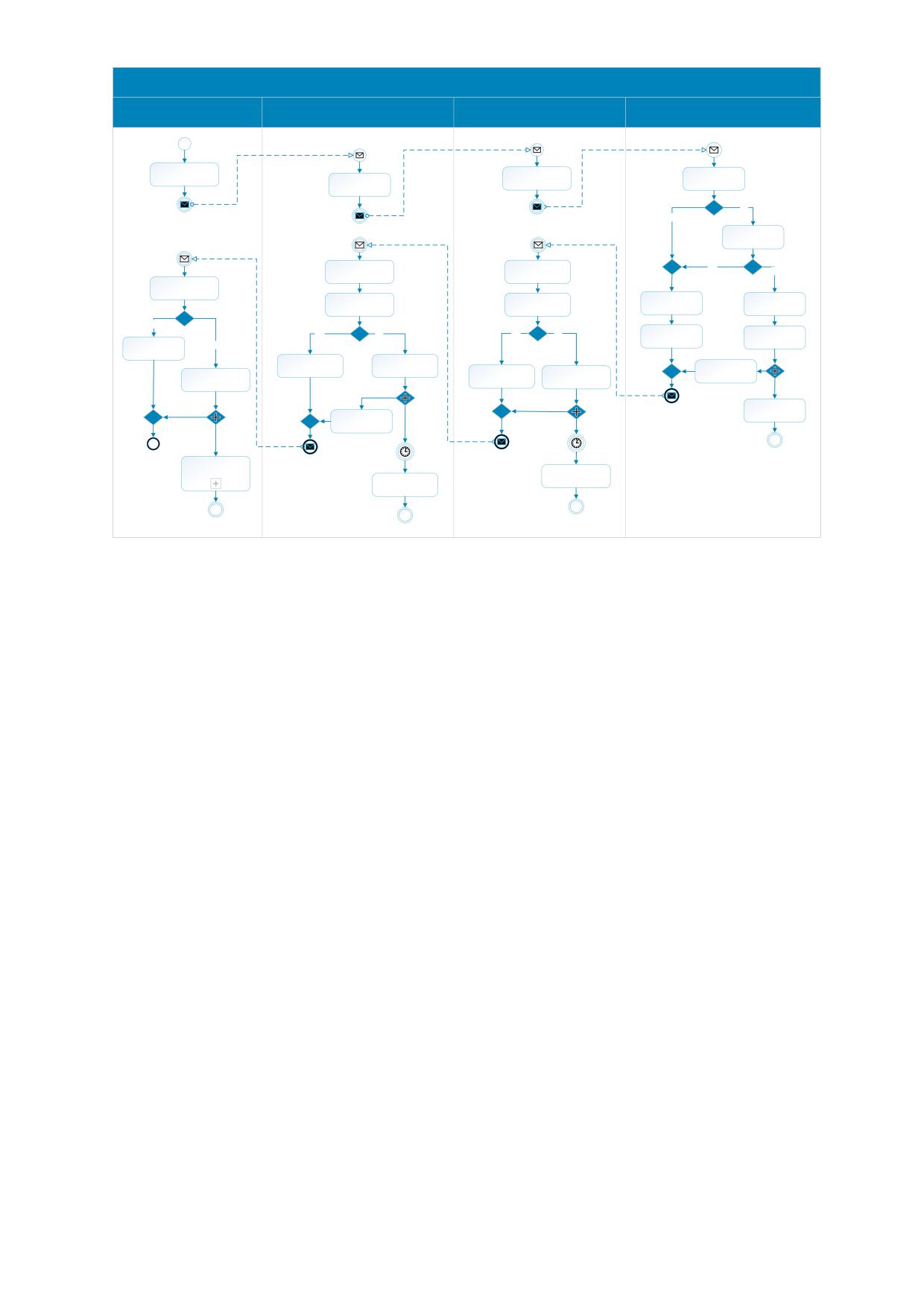
A diagram of the process of creating an order for emission IC is shown in the figure below (see Figure
3).
7
01.01.00.00 «Create order for emission IC»
Automated process control
OMS
Emission Registrar
Emission Server
system
Order for emission IC
Order for emission IC
Create a business
Create a request
order for the emission
containing an order
Check request
of IC
Check request
for issuing IC
No
Yes
Any mistakes?
Check order of
emission IC
Get the result of
Get the result of
Yes
processing the
processing the
No
request
request
Any mistakes?
Check for errors
Log an error in the
Check for errors
Check for errors
log
Assign an order ID
Yes
Any mistakes?
Yes
No
Yes
No
Create error
Calculate order
Log an error in the
N
o
Any mistakes?
Any mistakes?
message
ready time
log
Create error message
Create IC array
Create response
Save business order
Log an error in the
Create pool IC
message
log
data
Process order of
Create response
emission IC
message
Waiting for order
Waiting for order
ready
Завершение
ready
01.02.00.00 «Get IC
buffer status»
Request an IC issued
Request an IC In the
by the Emission Server
Emission Registrar
Рисунок 3. «Create order for emission IC».
Description:
1.
APCS forms a business order and sends it to the OMS;
2.
The OMS conducts the verification of the request and sends the order to the Emission Registrar;
3.
The Emission Registrar forms a request containing an order for the emission ICs and sends it to the
Emission Server;
4.
Emission Server receives a request containing an order for the emission ICs, checks the request.
4.1.
In case the request contains errors, the Emission Server logs an error in the log;
4.2.
The Emission Server generates an error message and sends it to the Emission Registrar;
4.3.
The transition to step 8 of the main scenario Is carried out.
5.
The Emission Server in the absence of errors, checks the order for the emission of ICs.
5.1.
In case the request contains errors, the Emission Server logs an error in the log;
5.2.
The Emission Server generates an error message and sends it to the Emission Registrar;
5.3.
The transition to step 8 of the main scenario Is carried out.
6.
The Emission Server if there are no errors in the order for the emission of ICs, assigns the order ID and
calculates the time of order readiness;
6.1.
The Emission Server sends the order for processing (the action is performed asynchronously);
7.
The Emission Server forms a response message and sends it to the Emission Registrar;
8.
The Emission Registrar receives the result of processing the request;
9.
The Emission Registrar checks for errors:
8
9.1.
In case the message contains errors, the Emission Registrar registers an error in the journal;
9.2.
The Emission Registrar generates an error message and sends it to the OMS;
9.3.
The transition to step 12 of the main scenario Is carried out.
10. The Emission Registrar generates an empty pool of ICs in the absence of errors;
10.1. The Emission Registrar waits for the order readiness time and requests the emitted ICs in the
Emission Server (the action is performed asynchronously).
11. The Emission Registrar sends a reply message to the OMS;
12. The OMS receives the result of the request processing from the Emission Registrar;
13. The OMS checks for errors;
13.1. In case of errors, logs an error in the log;
13.2. The OMS generates an error message and sends it to the APCS;
13.3. The transition to step 16 of the main scenario Is carried out.
14. The OMS creates an array of ICs in the absence of errors;
14.1. The OMS expects the time of readiness of the order and requests the emitted ICs in the Emission
Registrar (the action is performed asynchronously).
15. The OMS forms a reply message and sends it to the APCS;
16. The APCS receives the result of processing the request from the OMS;
17. The APCS checks for errors;
17.1. In case of errors, registers an error in the log;
17.2. The Process is completed.
18. If there are no errors, the APCS saves the order data;
18.1. The APCS initiates the 01.02.00.00 process «Get IC buffer status» (the action is performed
asynchronously).
19. The Process is completed.
9
1.3.2
«01.02.00.00 Получить статус массива КМ из бизнес-заказа» (Get IC
buffer status)
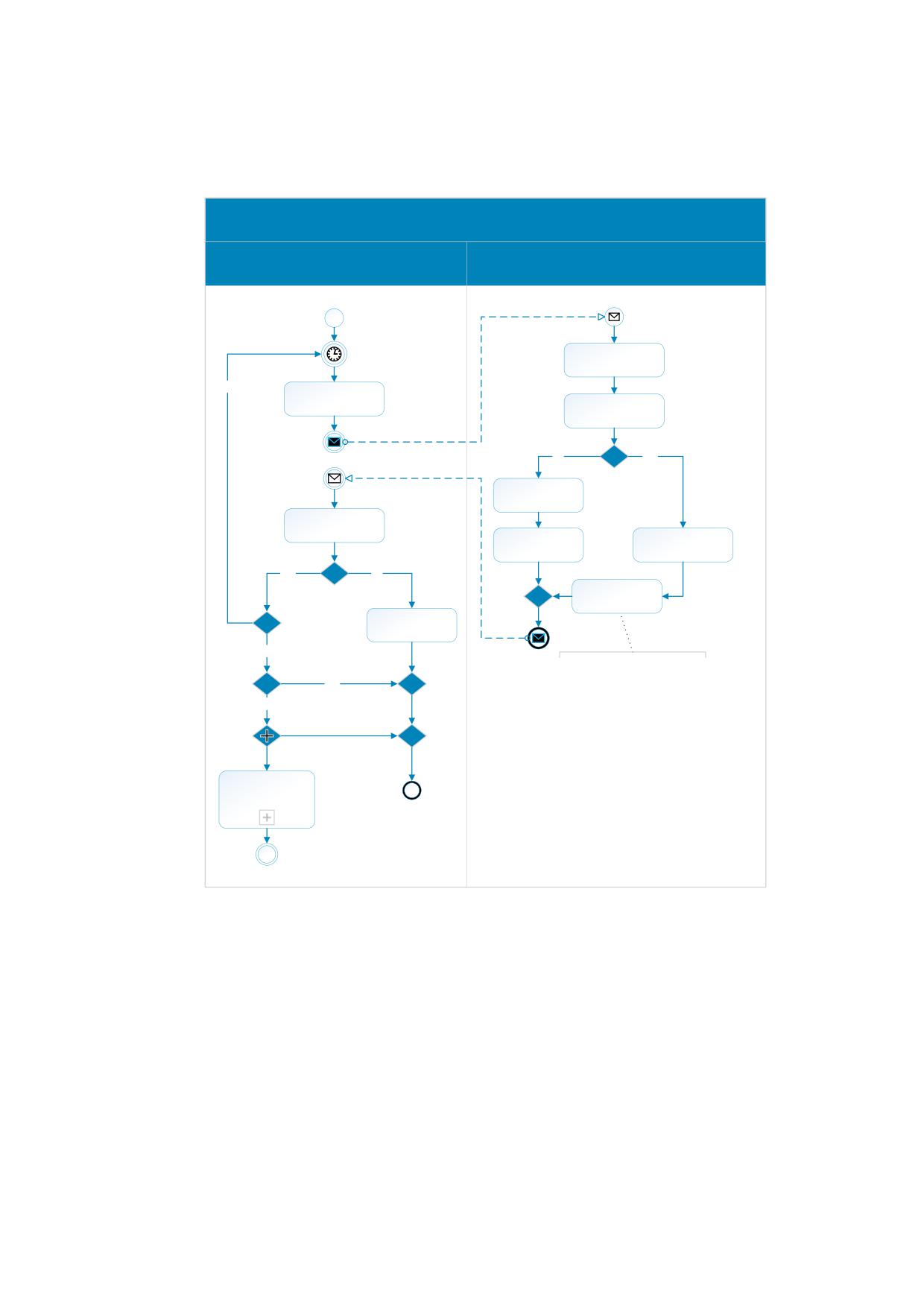
Диаграмма процесса получения статуса массива КМ приведена на рисунке ниже (см. Рисунок
4).
01.02.00.00 «Получить статус массива КМ из бизнес-заказа»
АСУТП
СУЗ
Идентификатор заказа и GTIN
Запрос статуса КМ из бизнес-заказа
Время готовности
заказа
Проверить ФЛК
запроса
Да
Сформировать
запрос статуса КМ из
Проверить наличие
бизнес-заказа
ошибок
Да
Нет
Ошибки есть?
Зарегистрировать
ошибку в журнале
Проверить наличие
ошибок
Сформировать
Получить
сообщение об
информацию о
ошибке
массиве КМ
Нет
Да
Сформировать
Есть ошибки?
ответное
Статус буфера КМ
равен «PENDING»?
сообщение
Зарегистрировать
ошибку в журнале
Нет
Статус буфера КМ
равен «ACTIVE»?
Ответное сообщение
включает информацию о
Нет
буфере и массивах КМ
Да
01.03.00.00
«Получить КМ из
бизнес-заказа»
Завершение
Рисунок 4. «Получить статус массива КМ из бизнес-заказа».
Описание:
1. АСУТП ожидает время готовности заказа;
2. АСУТП формирует запрос получения статуса массива КМ и отправляет его в СУЗ;
3. СУЗ проводит проверку запроса;
4. СУЗ проверяет наличие ошибок:
4.1.
В случае если запрос содержит ошибки, СУЗ регистрирует ошибку в журнале;
4.2.
СУЗ формирует сообщение об ошибке и отправляет в АСУТП;
4.3.
Осуществляется переход на шаг 7 основного сценария.
10
5. СУЗ получает информацию о массиве КМ;
6. СУЗ формирует ответное сообщение и отправляет в АСУТП;
7. АСУТП получает ответное сообщение;
8. АСУТП проверяет наличие ошибок:
8.1.
В случае если запрос содержит ошибки, АСУТП регистрирует ошибку в журнале;
8.2.
Процесс завершается.
9. АСУТП при отсутствии ошибок, проверяет статус буфера КМ равен «PENDING»:
9.1.
В случае если статус буфера КМ равен «PENDING», АСУТП инициирует повторный
запрос статуса массива КМ.
9.2.
Осуществляется переход на шаг 1 основного сценария.
10. АСУТП при отсутствии ошибок, проверяет статус буфера КМ равен «ACTIVE»:
10.1. В случае если статус буфера КМ не равен «ACTIVE» процесс завершается.
11. В случае если статус буфера КМ равен «ACTIVE», АСУТП инициирует выполнение процесса
01.03.00.00 «Получить КМ из бизнес-заказа» (действие выполняется асинхронно);
12. Процесс завершается.
A diagram of the process of obtaining the status of an array of CM is shown in the figure below .
11
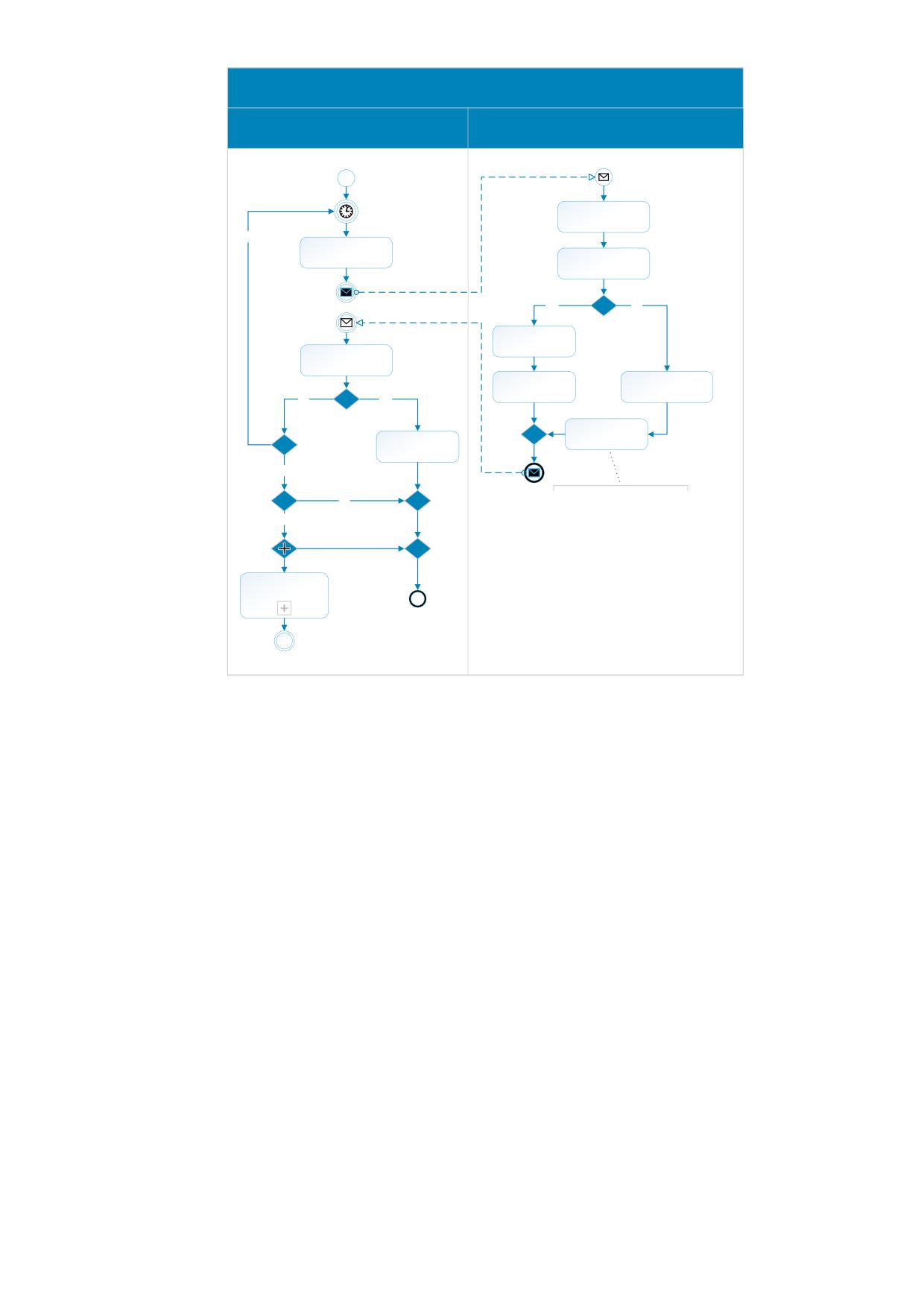
01.02.00.00 «Get IC buffer status»
Automated process control system
OMS
Order ID and GTIN
Request IC status from business order
Waiting for order
ready
Check request
Yes
Create a IC status
request from a
business order
Check for errors
Yes
No
Any mistakes?
Log an error in the
log
Check for errors
Create error
Get information about
message
the IC array
No
Yes
Any mistakes?
Is the CM buffer status
Create response
«PENDING»?
Log an error in the
message
log
No
Is the IC buffer status
«ACTIVE»?
The response message
No
includes information about the
Yes
buffer and IC arrays.
01.03.00.00 «Get ICs
from the order»
End
Рисунок 5. «Get IC buffer status».
Description:
1.
The APCS expects the time of order readiness;
2.
The APCS forms a request to obtain the status of the array of ICs and sends it to the OMS;
3.
The OMS conducts the request verification;
4.
The OMS checks for errors:
4.1.
In case the request contains errors, the OMS logs an error in the log;
4.2.
The OMS generates an error message and sends it to the APCS;
4.3.
The transition to step 7 of the main scenario Is carried out.
5.
The OMS receives information about the ICs array;
6.
The OMS forms a response message and sends it to the APCS;
7.
The APCS receives a response message;
8.
The APCS checks for errors:
8.1.
In case the request contains errors, the APCS registers an error in the log;
8.2.
The process is completed.
9.
The APCS in the absence of errors, checks the status of the buffer ICs equals «PENDING»:
12
9.1.
If the status of the IC buffer is equal to «PENDING», the APCS initiates a repeated request for
the status of the IC array.
9.2.
The transition to step 1 of the main scenario is carried out.
10. APCS in the absence of errors, checks the status of the buffer KM equals «ACTIVE»:
10.1. If the status Of the KM buffer is not equal to «ACTIVE» the process terminates.
11. If the status of the IC buffer is «ACTIVE», the APCS initiates the process of 01.03.00.00 «Get IC from the
order» (the action is performed asynchronously);
12. The process is completed.
13
1.3.3
«01.03.00.00 Получить КМ из бизнес-заказа» (Get ICs from the order)
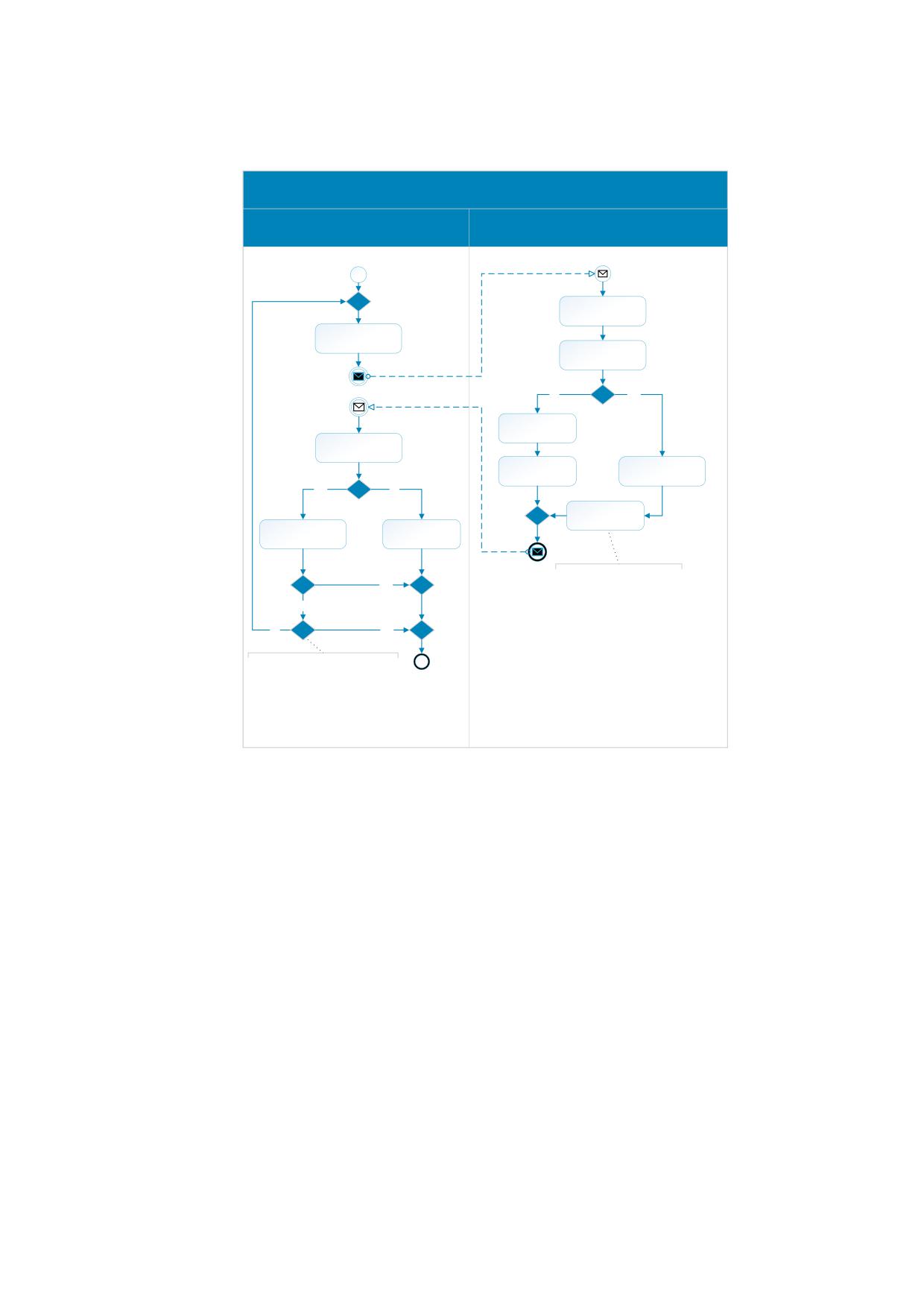
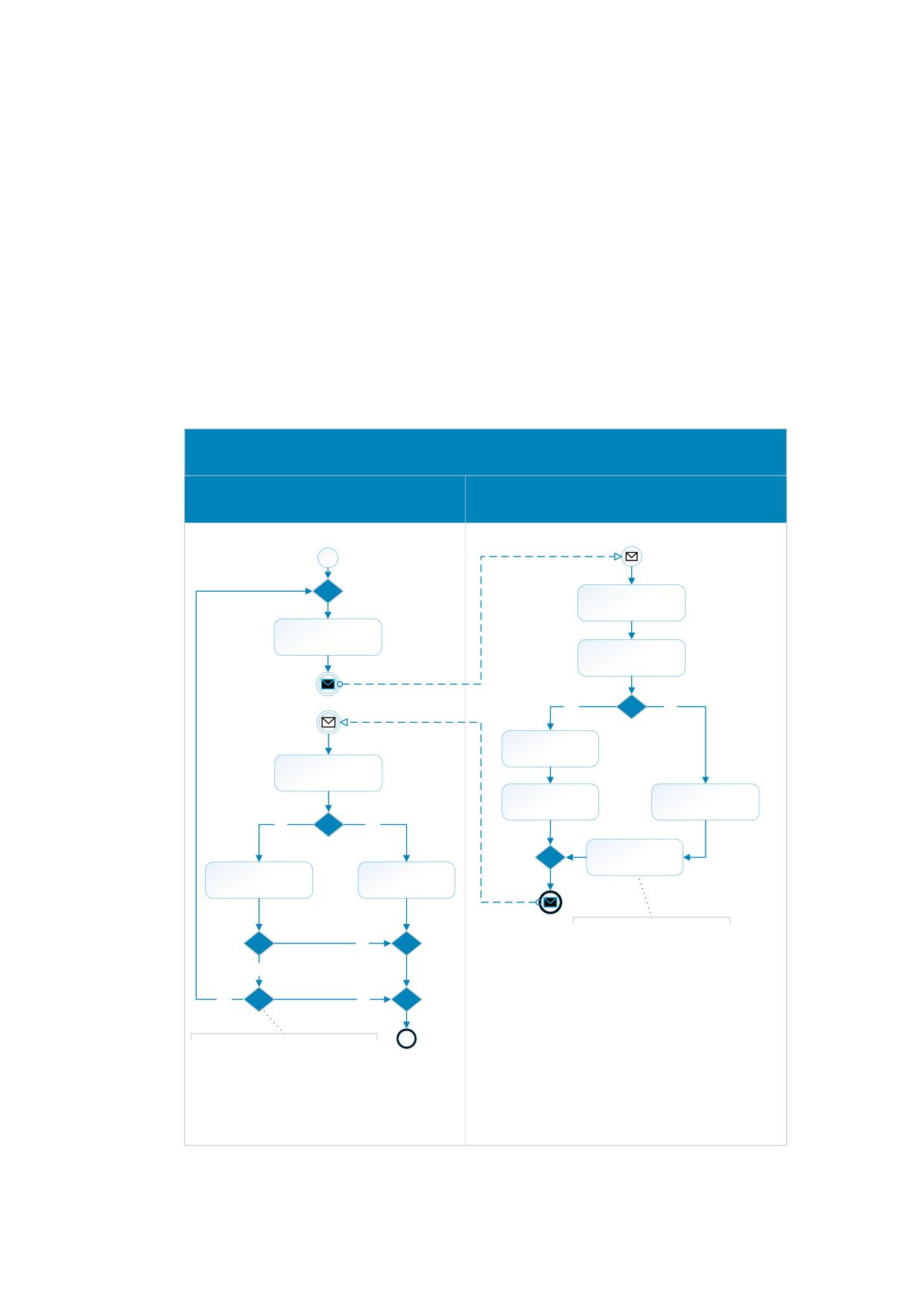
Диаграмма процесса получения КМ из бизнес заказа приведена на рисунке ниже (см. Рисунок
4).
01.03.00.00 «Получить КМ из бизнес-заказа»
АСУТП
СУЗ
Идентификатор заказа, GTIN и количество запрашиваемых кодов
Запрос КМ из бизнес-заказа
Проверить ФЛК
запроса
Сформировать
запрос получения
КМ из бизнес-заказа
Проверить наличие
ошибок
Да
Нет
Ошибки есть?
Зарегистрировать
ошибку в журнале
Проверить наличие
ошибок
Сформировать
Сформировать
сообщение об
массив
ошибке
эмитированных КМ
Нет
Да
Есть ошибки?
Сформировать
ответное
Обработать ответное
Зарегистрировать
сообщение
сообщение
ошибку в журнале
Есть ещё КМ в
заказе?
Ответное сообщение
Нет
включает информацию о
буфере и массивах КМ
Да
Требуется загрузить
КМ из заказа?
Да
Нет
Эмитированные КМ загружаются
Завершение
блоками, при загрузке следующего
блока в запросе должен
указываться параметр «lastBlockId»
- Идентификатор блока кодов,
выданных в предыдущем запросе.
Рисунок 6. «Получить КМ из бизнес-заказа».
Описание:
1.
АСУТП формирует запрос получения КМ из бизнес заказа и отправляет его в СУЗ;
2.
СУЗ проводит проверку запроса;
3.
СУЗ проверяет наличие ошибок:
3.1.
В случае если запрос содержит ошибки, СУЗ регистрирует ошибку в журнале;
3.2.
СУЗ формирует сообщение об ошибке и отправляет в АСУТП;
3.3.
Осуществляется переход на шаг 6 основного сценария.
4.
СУЗ формирует массив эмитированных КМ;
5.
СУЗ формирует ответное сообщение и отправляет в АСУТП;
6.
АСУТП получает ответное сообщение;
7.
АСУТП проверяет наличие ошибок:
7.1.
В случае если запрос содержит ошибки, АСУТП регистрирует ошибку в журнале;
14
7.2.
Процесс завершается.
8. АСУТП обрабатывает полученное сообщение.
9. АСУТП проверяет есть ли ещё КМ в заказе.
9.1.
В случае если КМ в заказе отсутствуют, процесс завершается.
10. При наличии КМ в заказе, АСУТП проверяет требуется ли загрузка оставшихся КМ.
10.1. В случае если требуется загрузить оставшиеся КМ в заказе, АСУТП инициирует повторное
выполнение процесса 01.03.00.00 «Получить КМ из бизнес-заказа»;
10.2. Осуществляется переход на шаг 1 основного сценария.
11. В случае если не требуется загрузка оставшихся КМ в заказе, то процесс завершается.
A diagram of the process of obtaining a CM from a business order is shown in the figure below.
01.03.00.00 «Get ICs from the order»
Automated process control system
OMS
Order Id, GTIN and number of codes requested
Request IC from Business order
Check request
Create a request to
receive ICs from a
business order
Check for errors
Yes
No
Any mistakes?
Log an error in the
log
Check for errors
Create error
Generate an array of
message
emitted IC
No
Yes
Any mistakes?
Create response
message
Process response
Log an error in the
message
log
Is there more IC in the
The Response message
order?
No
includes information about the
buffer and arrays of IC
Yes
Need to download IC
from your order?
Yes
No
Emitted KM are loaded by blocks,
End
when the next block is loaded, the
request must specify the parameter
"lastBlockId"- the Id of the code
block issued in the previous request.
Рисунок 7. «Get ICs from the order».
Description:
15
1. The APCS forms a request to receive ICs from the business order and sends it to the OMS;
2. The OMS conducts the request verification;
3. The OMS checks for errors:
3.1.
In case the request contains errors, the OMS logs an error in the log;
3.2.
The OMS generates an error message and sends it to the APCS;
3.3.
The transition to step 6 of the main scenario Is carried out.
4. The OMS forms an array of emitted ICs;
5. The OMS forms a response message and sends it to the APCS;
6. The APCS receives a response message;
7. The APCS checks for errors:
7.1.
In case the request contains errors, the APCS registers an error in the log;
7.2.
The process is completed.
8. The APCS processes the received message.
9. The APCS checks if there are more IC in the order.
9.1.
In case the IC is absent in the order, the process is completed.
10. If there is an IC in the order, the AOP checks whether the remaining IC is required to be downloaded.
10.1. If it is necessary to load the remaining IC in the order, the company initiates the re-execution of
the process 01.03.00.00 «Get IC from the order»;
10.2. The transition to step 1 of the main scenario is carried out.
11. If you do not need to download the remaining ICs in the order, the process is completed.
16
1.3.4
«01.04.00.00 Отправить отчёт об использовании КМ» (Send IC
utilisation report to OMS)
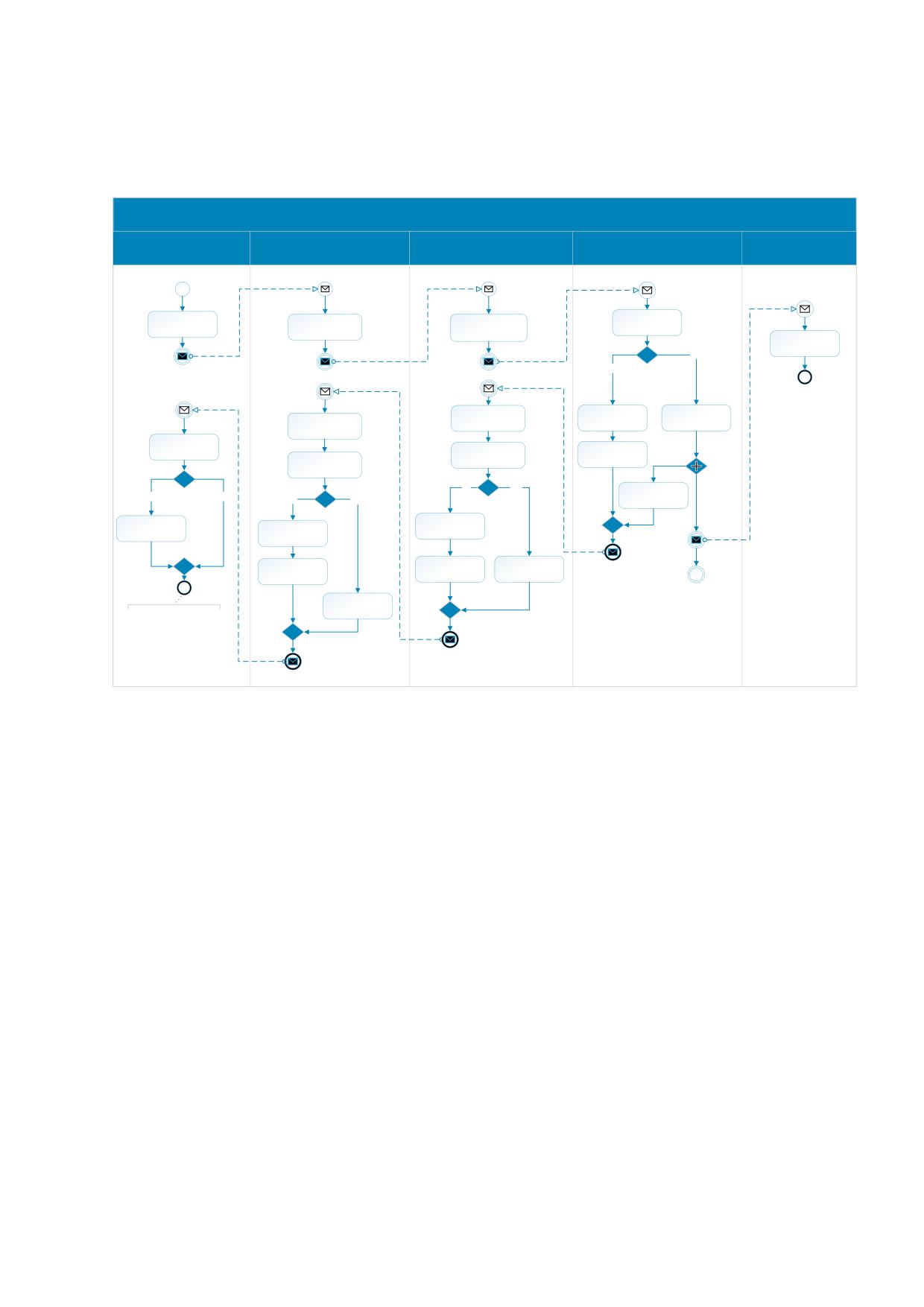
Диаграмма процесса отправки отчёта об использовании КМ приведена на рисунке ниже (см.
Рисунок 8).
01.04.00.00 «Отправить отчёт об использовании КМ»
АСУТП
СУЗ
РЭ
СЭ
ИС МП
Отчёт об использовании (нанесении) КМ
Отчёт об использовании КМ
Отчёт
Отчёт
Сформировать
Сформировать
Проверить ФЛК
Проверить ФЛК
запрос
запрос содержащий
запроса
запроса
отчёт
Обработать отчёт
Нет
Да
Ошибки есть?
Присвоить
Получить результат
Зарегистрировать
идентификатор
Получить результат
обработки запроса
ошибку в журнале
обработки запроса
отчёту
Проверить
Сформировать
наличие ошибок
Проверить наличие
сообщение об
Проверить наличие
ошибок
ошибке
ошибок
Да
Нет
Сформировать
Да
Есть ошибки?
Нет
ответное
Да
Нет
Есть ошибки?
сообщение
Ошибки есть?
Зарегистрировать
Зарегистрировать
Зарегистрировать
ошибку в журнале
ошибку в журнале
ошибку в журнале
Сформировать
Сформировать
Сформировать
сообщение об
сообщение об
ответное
ошибке
ошибке
сообщение
Сформировать
ответное
При отсутствии ошибок
сообщение
ответное сообщение
содержит
идентификатор отчёта
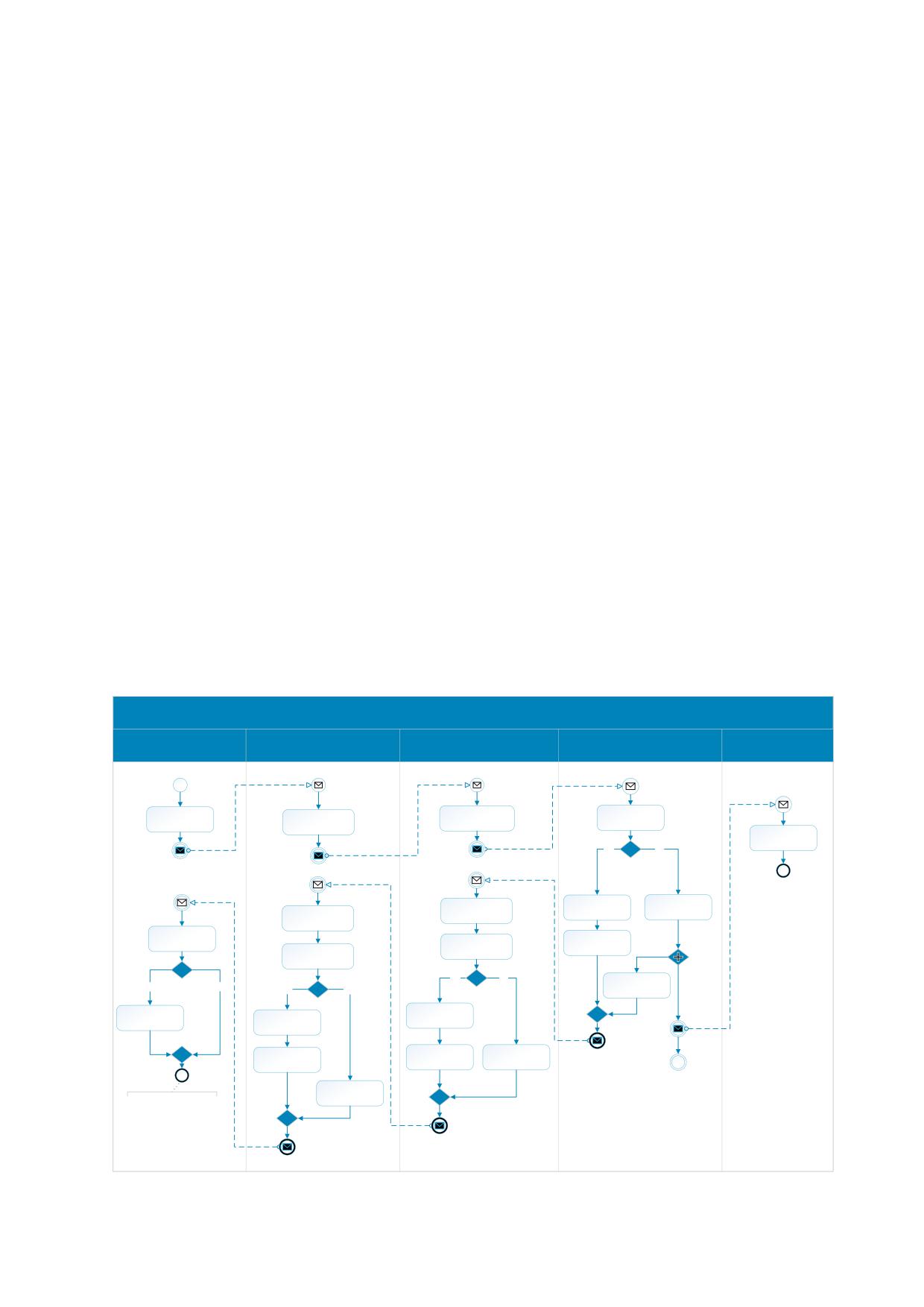
Рисунок 8. «Отправить отчёт об использовании КМ».
Описание:
1.
АСУТП формирует запрос содержащий отчёт об использовании КМ и отправляет его в СУЗ;
2.
СУЗ проводит проверку запроса и отправляет запрос содержащий отчёт об использовании КМ в
Регистратор эмиссии;
3.
Регистратор эмиссии формирует запрос содержащий отчёт об использовании КМ и отправляет его
в Сервер эмиссии;
4.
Сервер эмиссии получив запрос содержащий отчёт об использовании КМ, производит проверку
запроса.
4.1.
В случае если запрос содержит ошибки, Сервер эмиссии регистрирует ошибку в журнале;
4.2.
Сервер эмиссии формирует сообщение об ошибке и отправляет в Регистратор эмиссии;
4.3.
Осуществляется переход на шаг 7 основного сценария.
5.
Сервер эмиссии при отсутствии ошибок, присваивает отчёту идентификатор;
5.1.
Сервер эмиссии, отправляет отчёт в обработку в ИС МП (действие выполняется
асинхронно);
6.
Сервер эмиссии формирует ответное сообщение и отправляет в Регистратор эмиссии;
7.
Регистратор эмиссии получает результат обработки запроса;
17
8. Регистратор эмиссии проверяет наличие ошибок:
8.1.
В случае если сообщение содержит ошибки, Регистратор эмиссии регистрирует ошибку в
журнале;
8.2.
Регистратор эмиссии формирует сообщение об ошибке и отправляет в СУЗ;
8.3.
Осуществляется переход на шаг 10 основного сценария.
9. Регистратор эмиссии при отсутствии ошибок формирует и отправляет ответное сообщение в СУЗ;
10. СУЗ получает результат обработки запроса от Регистратора эмиссии;
11. СУЗ проверяет наличие ошибок;
11.1. СУЗ при наличии ошибок, регистрирует ошибку в журнале;
11.2. СУЗ формирует сообщение об ошибке и отправляет в АСУТП;
11.3. Осуществляется переход на шаг 13 основного сценария.
12. СУЗ при отсутствии ошибок формирует ответное сообщение и отправляет в АСУТП;
13. АСУТП получает результат обработки запроса от СУЗ;
14. АСУТП проверяет наличие ошибок;
14.1. АСУТП при наличии ошибок, регистрирует ошибку в журнале;
14.2. Процесс завершается.
15. АСУТП при отсутствии ошибок сохраняет идентификатор отчёта, процесс завершается.
A diagram of the process of sending a report on the IC utilisation is shown in the figure below
01.04.00.00 «Send IC utilisation report to OMS»
Automated process
Marking Information
OMS
Emission Registrar
Emission Server
control system
System
IC utilisation report
IC utilisation report
Report
Report
Generate a request
Create request
Check request
Check request
containing a report
Process report
Yes
No
Any mistakes?
Get the result of
Log an error in the
Get the result of
Assign a report id
processing the
log
processing the
request
request
Check for errors
Create error
Check for errors
message
Check for errors
Yes
No
Any mistakes?
Create response
Yes
No
Yes
No
Any mistakes?
message
Any mistakes?
Log an error in the
Log an error in the
log
Log an error in the
log
log
Create error
Create error
Create response
message
message
message
Create response
If there are no errors,
message
the response message
contains the report
identifier.
18
Рисунок 9. «Send IC utilisation report».
Description
1.
The APCS forms a request containing an IC utilisation report and sends it to the OMS;
2.
The OMS conducts a request verification and sends a request containing an IC utilisation report in the
Emission Registrar;
3.
The Emission Registrar forms a request containing an IC utilisation report and sends it to the Emission
Server;
4.
The Emission Server receives a request containing an IC utilisation report, checks the request.
4.1.
In case the request contains errors, the Emission Server logs an error in the log;
4.2.
The Emission Server generates an error message and sends it to the Emission Registrar;
4.3.
The transition to step 7 of the main scenario is carried out.
5.
The Emission Server, if there are no errors, assigns an ID to the report;
5.1.
The emission Server sends the report to the processing in Marking Information System (the action
is performed asynchronously);
6.
The Emission Server forms a response message and sends it to the Emission Registrar;
7.
The Emission Registrar receives the result of processing the request;
8.
The Emission Registrar checks for errors:
8.1.
In case the message contains errors, the Emission Registrar registers an error in the journal;
8.2.
The Emission Registrar generates an error message and sends it to the OMS;
8.3.
The transition to step 10 of the main scenario is carried out.
9.
The Emission Registrar generates and sends a response message to the OMS in the absence of errors;
10. The OMS receives the result of the request processing from the Emission Registrar;
11. The OMS checks for errors;
11.1. In case of errors, logs an error in the log;
11.2. The OMS generates an error message and sends it to the APCS;
11.3. The transition to step 14 of the main scenario is carried out.
12. If there are no errors, the OMS forms a response message and sends it to the APCS;
13. The APCS receives the result of processing the request from the OMS;
14. The APCS checks for errors;
14.1. In case of errors, registers an error in the log;
14.2. The process is completed.
15. If there are no errors, the process retains the ID of the report.
19
1.4 Буфер хранения КМ в СУЗ (ICs storage buffer in the OMS)
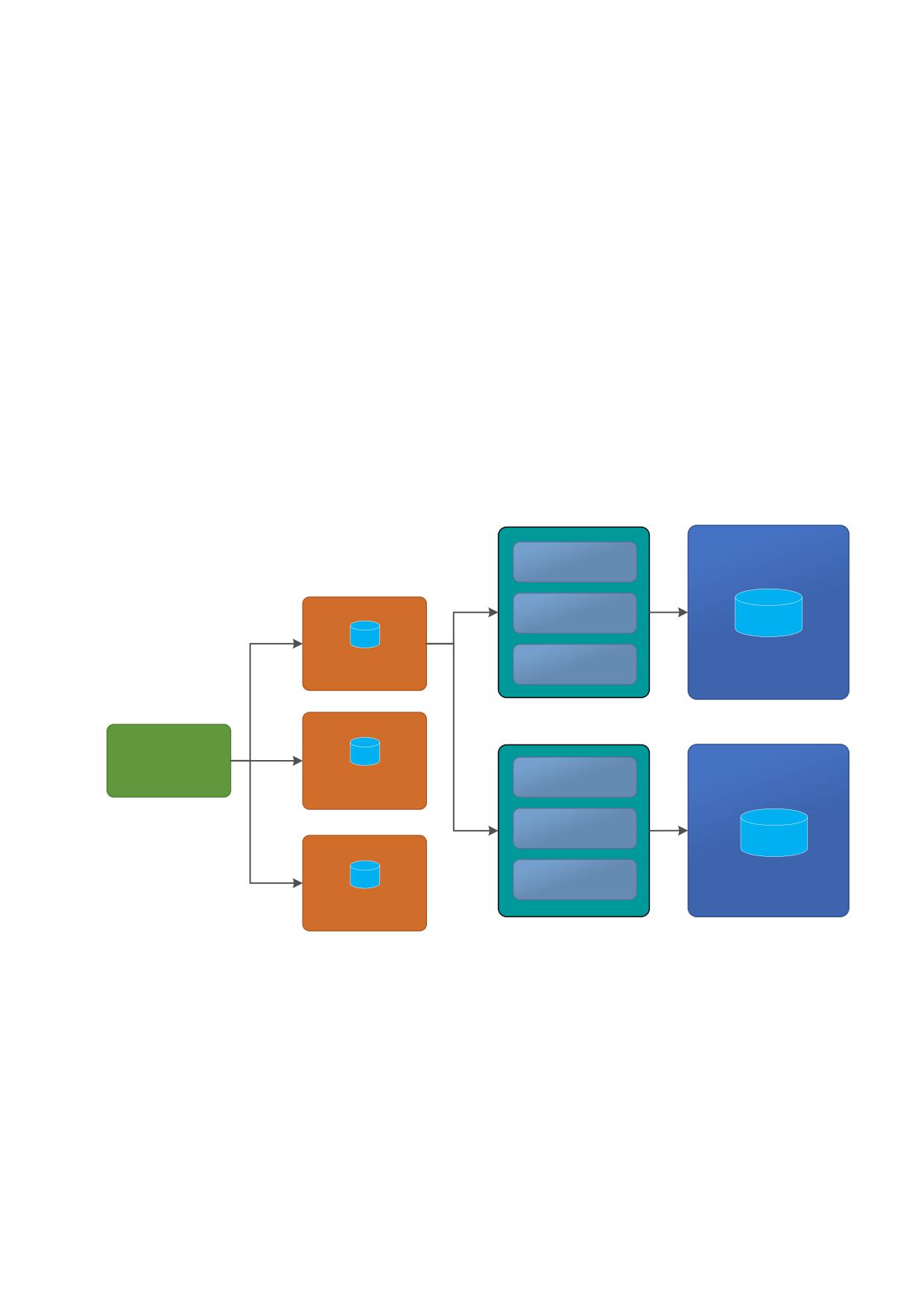
Для обеспечения необходимой производительности для высокоскоростных
производственных линий, СУЗ хранит внутри небольшой буфер с кодами маркировки, на
каждую номенклатуру бизнес-заказа. Размер блока кодов, который возможно получить из СУЗ
для данной номенклатуры за один раз, ограничен размером буфера. Он настраивается под
потребности производства. Структура хранения кодов маркировки в СУЗ представлена на
рисунке ниже (см. Рисунок 10). Такая структура хранения, дополнительно обеспечивает
отказоустойчивость блока эмиссии кодов маркировки на производстве
To ensure the necessary performance for high-speed production lines, the OMS stores inside a
small buffer with marking codes for each item of a business order. The size of the block of codes that
can be obtained from the control system for a given item at a time is limited by the size of the buffer.
It is customized to the needs of production. The storage structure of marking codes in the OMS is
shown in the figure below. This storage structure additionally ensures the fault tolerance of the
emission unit marking codes in production
Регистратор эмиссии 1
(Emission Registrar 1)
Заказ 1 (Order 1)
GTIN 1
Заказ 2 (Order 2)
Буфер КМ
Хранилище КМ
Заказ (Order..)
(IC buffer)
(ICs Storage)
GTIN 1
Бизнес-заказ
Регистратор эмиссии 2
(Business order)
Буфер КМ
Заказ 1 (Order 1)
(Emission Registrar 2)
(IC buffer)
Заказ 2 (Order 2)
GTIN 1
Заказ (Order..)
Хранилище КМ
Буфер КМ
(ICs Storage)
(IC buffer)
Рисунок 10. Распределение заказов КМ между РЭ (Distribution of orders for IC between Emission
Registrants).
20
2 Описание API (API description)
2.1 Требования к API
2.1.1 Цифровая подпись сообщений (Digitally Signing Messages)
Для обеспечения юридической значимости передаваемых сообщений посредством
интерфейса API СУЗ 2.0, в заголовок HTTP запроса и ответа со стороны СУЗ добавлен
опциональный параметр «X-Signature», для включения откреплённой цифровой подписи
данных запроса и ответа (при включении в параметр «X-Signature» откреплённой подписи
данные должны кодироваться в Base64).
Формат подписи - откреплённая подпись в формате CMS. Синтаксис криптографических
сообщений CMS [IETF RFC 5652] используется для цифровой подписи, хэширования,
проверки подлинности и шифрования произвольных сообщений. Для CMS используются
криптографические алгоритмы согласно стандартам ГОСТ 28147-89, ГОСТ Р 34.10-2012 и
ГОСТ Р
34.11-2012, а также документа Технического комитета по стандартизации
«Криптографическая защита информации» (ТК
26), «Информационная технология.
Криптографическая защита информации. Рекомендации по стандартизации. Использование
алгоритмов ГОСТ 28147-89, ГОСТ Р 34.11 и ГОСТ Р 34.10 в криптографических сообщениях
формата CMS».
Значения CMS генерируются с помощью языка АСН.1 ГОСТ Р ИСО/МЭК 8824-1 с
использованием базовых правил кодирования (BER) ГОСТ Р ИСО/МЭК 8825-1.
В целях проведения тестирования, будут поддерживаться тестовый Удостоверяющий
Центр ООО «КРИПТО-ПРО» (https://www.cryptopro.ru/certsrv/).
Заказы и отчёты также могут быть подписаны участником оборота посредством
пользовательского интерфейса СУЗ.
В настоящий момент для товарных групп «Предметы одежды, белье постельное,
столовое, туалетное и кухонное», «Обувные товары», «Духи и туалетная вода», «Шины и
покрышки пневматические резиновые новые», «Фотокамеры (кроме кинокамер),
фотовспышки и лампы-вспышки», «Молочная продукция», «Велосипеды и велосипедные
рамы», «Кресла-коляски» в том случае, если заказ не подписывается через API, его требуется
обязательно подписать через пользовательский интерфейс.
Если в составе запроса был отправлен параметр «X-Signature», содержащий
откреплённую подпись параметров запроса или тела сообщения, то СУЗ проводит валидацию
подписи и в случае, если подпись действительна, то запрос обрабатывается СУЗ, в противном
случае возвращает ошибку, ниже приведён пример включения в запрос откреплённой
цифровой подписи.
To ensure the legal significance of the messages transmitted through the OMS 2.0 API, the
optional «X-Signature» parameter has been added to the HTTP request and response header of the
OMS to enable an unencrypted digital signature of the request and response data (when an
21
unencrypted parameter is included in the «X-Signature» parameter signatures, data must be encoded
in Base64).
Signature format - a detached signature in CMS format. The CMS cryptographic message
syntax [IETF RFC 5652] is used to digitally sign, hash, authenticate, and encrypt arbitrary messages.
For CMS, cryptographic algorithms are used according to the standards GOST 28147-89, GOST R
34.10-2012 and GOST R 34.11-2012, as well as the document of the Technical Committee for
Standardization «Cryptographic Information Protection» (TC 26), «Information Technology.
Cryptographic information security. Standardization Recommendations. Using the algorithms GOST
28147-89, GOST R 34.11 and GOST R 34.10 in cryptographic messages of the CMS format».
CMS values are generated using the language ASN.1 GOST R ISO / IEC 8824-1 using the basic
coding rules (BER) ISO / IEC 8825-1.
For testing purposes, a test Certification Authority will be supported «CRYPTO-PRO»
Orders and reports can also be signed by a participant in the turnover through the OMS user
interface.
In cases when the order is not signed through API, it should be signed throw the OMS user
interface for product groups «Articles of apparel, bed linen, dining room, toilet and kitchen», «Shoe
products», «New pneumatic rubber tires and tires», «Perfume and toilet water», «Cameras (except
movie cameras), flash and flash lamps», «Milk products», «Bicycles», «Wheelchairs».
If the request sent an «X-Signature» parameter containing an unattached signature of the
request parameters or message body, the OMS will validate the signature, and if the signature is
valid, the request will be processed by the OMS, otherwise it returns an error, an example is given
below inclusion of a detached digital signature in the request.
Пример (Example):
POST /api/v2/{extension}/orders?omsId=CDF12109-10D3-11E6-8B6F-
0050569977A1 HTTP/1.1
Accept: application/json
clientToken: 1cecc8fb-fb47-4c8a-af3d-d34c1ead8c4f
Content-Type: application/json;charset=UTF-8
X-Signature:
MIIE5QYJKoZIhvcNAQcCoIIE1jCCBNICAQExDjAMBggqhQMHAQECAgUAMAsGCSqGSIb3
DQEHAaCCA64wggOqMIIDWaADAgECAhMSADtoj1yy/t4ybprnAAEAO2iPMAgGBiqFAwIC
AzB/MSMwIQYJKoZIhvcNAQkBFhRzdXBwb3J0QGNyeXB0b3Byby5ydTELMAkGA1UEBhMC
UlUxDzANBgNVBAcTBk1vc2NvdzEXMBUGA1UEChMOQ1JZUFRPLVBSTyBMTEMxITAfBgNV
BAMTGENSWVBUTy1QUk8gVGVzdCBDZW50ZXIgMjAeFw0xOTA5MjkxMzIzMjdaFw0xOTEy
MjkxMzMzMjdaMIGuMScwJQYJKoZIhvcNAQkBFhhteWxvbmdsb25nbmFtZUBnbWFpbC5j
b20xFTATBgNVBAMMDFZsYWRpbWlyV2ViMjENMAsGA1UECwwEaG9tZTENMAsGA1UECgwE
aG9tZTETMBEGA1UEBwwK0J/QtdC90LfQsDEsMCoGA1UECAwj0J/QtdC90LfQtdC90YHQ
utCw0Y8g0L7QsdC70LDRgdGC0YwxCzAJBgNVBAYTAlJVMGYwHwYIKoUDBwEBAQEwEwYH
KoUDAgIkAAYIKoUDBwEBAgIDQwAEQBsvZTPYdD+mZxp1TU8iWNXsC6o5M9YcLJw4AIlu
dme1J4K9iEjYf/I/rmbjf43Ds2/CKYs/tyvSBSBn2KzBnaOjggF3MIIBczAPBgNVHQ8B
Af8EBQMDB/AAMBMGA1UdJQQMMAoGCCsGAQUFBwMDMB0GA1UdDgQWBBSpoGfZxUJ4YK4R
cSViA3G5FkFTrDAfBgNVHSMEGDAWgBROgz4Uae/sXXqVK18R/jcyFklVKzBcBgNVHR8E
VTBTMFGgT6BNhktodHRwOi8vdGVzdGNhLmNyeXB0b3Byby5ydS9DZXJ0RW5yb2xsL0NS
WVBUTy1QUk8lMjBUZXN0JTIwQ2VudGVyJTIwMigxKS5jcmwwgawGCCsGAQUFBwEBBIGf
MIGcMGQGCCsGAQUFBzAChlhodHRwOi8vdGVzdGNhLmNyeXB0b3Byby5ydS9DZXJ0RW5y
b2xsL3Rlc3QtY2EtMjAxNF9DUllQVE8tUFJPJTIwVGVzdCUyMENlbnRlciUyMDIoMSku
Y3J0MDQGCCsGAQUFBzABhihodHRwOi8vdGVzdGNhLmNyeXB0b3Byby5ydS9vY3NwL29j
22
c3Auc3JmMAgGBiqFAwICAwNBAHIfklsYgixUVKVy75nXFgOK1vnJjJYj3RjK3fwsQFbf
mRwkzBVXHF0R/FIvbMmUgTNLC7+Gw3kEsRCZ2tu5yeMxgf0wgfoCAQEwgZYwfzEjMCEG
CSqGSIb3DQEJARYUc3VwcG9ydEBjcnlwdG9wcm8ucnUxCzAJBgNVBAYTAlJVMQ8wDQYD
VQQHEwZNb3Njb3cxFzAVBgNVBAoTDkNSWVBUTy1QUk8gTExDMSEwHwYDVQQDExhDUllQ
VE8tUFJPIFRlc3QgQ2VudGVyIDICExIAO2iPXLL+3jJumucAAQA7aI8wDAYIKoUDBwEB
AgIFADAMBggqhQMHAQEDAgUABEBqxixPd0wnkxB22kdt4fMhdgoH2TaGqwY3u3ZD62LK
4WHDX1NbN18mIODeAXOuuZLPzTlWWSKyrHXRBsruvPc0=
Content-Length: 783
{body content is omitted - содержание тела опущено}
2.1.2 Формирование GS1 DataMatrix (Constructing a GS1 DataMatrix)
Для корректного формирования GS1 DataMatrix необходимо в начало получаемой
строки кода маркировки добавлять признак символики - ASCII232, перед конвертацией в
DataMatrix, в соответствии с требованиями GS1 General Specification, в противном случае
технические средства не распознают код правильно и не смогут его корректно обработать.
Ниже приведены ссылки на спецификации:
-
-
For the correct formation of the GS1 DataMatrix, it is necessary to add the symbolic attribute
- ASCII232 at the beginning of the received marking code line, before converting to DataMatrix, in
accordance with the requirements of GS1 General Specification, otherwise the technical means will
not recognize the code correctly and will not be able to process it correctly. Below are links to
specifications:
-
-
2.1.3 Обработка JSON (JSON Processing)
Так как код маркировки содержит специальные символы (см. раздел 1), то Участники
оборота интегрируя свои решения должны корректно обрабатывать формат JSON средствами
которые соответствуют RFC 8259, а не обрабатывать его как «Plain Text». Применение в своих
решениях средств, которые соответствуют RFC 8259 обеспечивает корректную передачу и
получение кодов маркировки содержащие специальные символы (специальные символы
экранируются).
Аналогично если в своих решениях участники оборота используют формат XML, то
специальные символы, содержащиеся в строке, должны конвертироваться в соответствии со
спецификациями XML.
Since the marking code contains special characters (see section 1), the turnover Participants
integrating their decisions should correctly process the JSON format using tools that comply with
RFC 8259, and not treat it like “Plain Text”. The use in their solutions of tools that comply with RFC
8259 ensures the correct transmission and receipt of marking codes containing special characters
(special characters are escaped).
23
Similarly, if in their decisions the participants in the turnover use the XML format, then the
special characters contained in the string must be converted in accordance with the XML
specifications.
2.2 Описание API (API description)
API СУЗ поддерживает расширения для фармацевтической промышленности, табачной
промышленности и лёгкой промышленности. Доступ к расширениям API СУЗ обеспечивается
при помощи URL.
The OMS API supports extensions for the pharmaceutical industry, the tobacco industry and
the light industry. Access to the OMS API extensions is provided via a URL.
Структура URL API СУЗ имеет следующие параметры (The OMS API URL structure has
the following parameters):
http://<server-name>[:server-port]/api/v2/{extension}/
параметры (options):
- server-name - имя сервера или IP адрес (server name or IP address);
- server-port - порт для соединения (connection port);
- extension - параметр URL определяющий доступ к расширениям API СУЗ (URL
parameter defining access to OMS API extensions).
Параметр URL «extension» определяющий доступ к расширениям товарных групп,
имеет следующие значения по умолчанию (The URL parameter “extension”, which determines
access to product group extensions, has the following default values.):
- light - параметр URL «extension» для лёгкой промышленности (URL parameter
«extension» for light industry);
- pharma
- параметр URL «extension» для фармацевтической промышленности
(URL parameter «extension» for the pharmaceutical industry);
- tobacco
- параметр URL «extension» для табачной промышленности (URL
parameter «extension» for the tobacco industry);
- tires - параметр URL «extension» для производителей шин (URL parameter
«extension» for tire manufacturers).
- photo - параметр URL «extension» для производителей фототоваров (URL for
photo goods manufacturers).
- perfum
- параметр URL «extension» для производителей парфюмерной
продукции (URL parameter «extension» for manufacturers of perfumes).
- milk - параметр URL «extension» для производителей молока, используют базовые
модели (классы) без расширений (URL parameter «extension» for milk producers,
using basic models (classes) without extensions);
Примечание*: производители молока используют базовые модели (классы) без
расширений.
Note*: Manufacturers of milk use basic models (classes) without extensions.
24
2.2.1 Создать бизнес-заказ на эмиссию кодов маркировки (Create order for
emission IC)
Этот метод используется для создания и отправки заказа на эмиссию КМ. Маркер
безопасности (token) генерируется СУЗ при регистрации клиента СУЗ. Маркер безопасности
(token) передаётся на сервер в HTTP-заголовке с именем «clientToken».
This method is used to create and send an order for emission IC. The security token is generated
by OMS during registration of OMS client. The security token is sent to the server in the HTTP-
Header named «clientToken».
Примечания*:
1) одна товарная позиция (GTIN) в одном бизнес-заказе не должна превышать 150000
кодов маркировки, количество товарных позиций в одном бизнес-заказе не должно превышать
10 (1 бизнес-заказ - 10 GTIN).
Для фармацевтической промышленности количество товарных позиций в одном бизнес-
заказе не должно превышать 1 (1 бизнес заказ - 1 GTIN).
2) одновременно может быть не более 100 активных заказов. К активным заказам
относятся такие заказы в статусе READY, где хотя бы один подзаказ (буфер КМ) имеет статус
ACTIVE, PENDING или EXHAUSTED.
В очереди также не может быть более 100 заказов. К таким заказам относятся заказы в
статусах CREATED, PENDING, APPROVED.
При достижении одного из лимитов создание заказа будет невозможно;
3) в связи с п.2 обращение к данному методу с одного источника возможно не чаще, чем
100 раз в секунду.
Notes:
1) one commodity item (GTIN) in one business order should not exceed 150000 marking codes,
the number of commodity items in one business order should not exceed 10 (1 business order - 10
GTIN).
For the pharmaceutical industry, the number of product items in one business order must not
exceed more than 1 (1 business order - 1 GTIN).
2) it is impossible to have more than 100 active orders simultaneously. Active orders are those
orders in status READY which have at least one suborder (IC buffer) in status ACTIVE, PENDING
or EXHAUSTED.
It is impossible to have more than 100 orders in queue too. Such orders include orders in
statuses CREATED, PENDING, APPROVED.
When one of these limits is reached, the order creation will be impossible;
3) with regard to paragraph 2 the use of this method from one source is possible not more than
100 per second.
25
2.2.1.1 Запрос (Request)
Параметры REST запроса (Parameters of REST request)
URL: http://<server-name>[:server-
port]/api/v2/{extension}/orders?omsId={omsId}
Method:POST
Content-Type:application/json
clientToken:{clientToken}
Параметры строки запроса приведены в таблице ниже (Таблица 3).
The query string parameters are listed in the table below.
Таблица 3 - Параметры строки запроса (Query string parameters)
Обязательность.
Параметр
Описание
Тип
Is it mandatory to
Parameter
Description
Type
complete the field?
omsId
Уникальный идентификатор СУЗ.
String
Да (Yes)
Unique OMS identifier.
(UUID)
Описание формата JSON запроса создания и отправки заказа на эмиссию КМ (объект
«Order»), приведено в таблице ниже (Таблица 4).
The description of the JSON format for creating and sending an order for emission CM are
listed in the table below.
Таблица 4 - Описание формата JSON запроса создания и отправки заказа на эмиссию КМ, объект
«Order» (Request of the JSON format for creating a business order for issuing a CM, object «Order»)
Поле
Описание
Тип
Обязательность
Field
Description
Type
Is it mandatory to
complete the
field?
JSON Array of
Список товаров.
products
OrderProduct
Да (Yes)
List of products.
(Таблица 5)
Описание формата объекта «OrderProduct» приведено в таблице ниже (Таблица 5).
The format of the object «OrderProduct» are listed in the table below.
Таблица 5 - Формат объекта «OrderProduct» (Format of object «OrderProduct»)
Обязательность.
Поле
Описание
Тип
Is it mandatory to
Field
Description
Type
complete the
field?
GTIN продукта
String (14)
Да (Yes)
gtin
Product GTIN
[0-9]{14}
Количество КМ.
Integer
Да (Yes)
quantity
Quantity of ICs / Identifiers
($int32)
Способ генерации серийных номеров.
String
Да (Yes)
serialNumberType
Method of generation of individual serial
(Voc. №3)
number.
(See section.2.3.3)
JSON Array of
Нет (No)
Массив серийных номеров. Это поле
serialNumbers
String*
Условно
указывается в случае, если значение
обязательное
26
«serialNumberType = SELF_MADE» (см.
(conditionally
раздел.2.3.3).
mandatory)
Unique serial numbers. This field is to be
filled if only «serialNumberType» =
SELF_MADE (See section.2.3.3)
Integer
Идентификатор шаблона КМ
($int32)
Да (Yes)
templateId
IC template ID
(Voc. №7)
(See section. 2.3.7)
Примечание: первично установленная схема генерации и структура шаблона КМ для
конкретного типа товара (GTIN), определяемая атрибутом «serialNumberType» не может быть
изменена в дальнейшем.
Note: the initially established generation scheme and structure of the IC template for a
specific type of product (GTIN), defined by the attribute «serialNumberType» cannot be changed in
the future.
2.2.1.1.1 Расширения для табачной промышленности (Extensions for the tobacco industry)
Описание расширения объекта «OrderProduct» для табачной промышленности
приведено в таблице ниже (Таблица 15).
The extension of the object «OrderProduct» for the tobacco industry is listed in the table
below.
Таблица 6 - Описание расширения объекта «OrderProduct» для табачной промышленности (The
extension of the object «OrderProduct» for the tobacco industry)
Обязательность.
Поле
Описание
Тип
Is it mandatory to
Field
Description
Type
complete the
field?
Максимальная
розничная
цена,
mrp
String (4-6)
Да (Yes)
Maximum retail price
Примечание*: Поле «mrp» (Максимальная розничная цена) является обязательным
для заполнения, максимально розничная цена должна указываться в копейках, с точностью до
единицы, например, если цена 105 рублей и 1 копейка, то это число 10501, для блока это сумма
всех пачек, так же в копейках.
Note*: The «mrp» field (Maximum Retail Price) is required, the maximum retail price should
be indicated in kopecks, with an accuracy of one, for example, if the price is 105 rubles and 1 kopeck,
then this number is 10501, for a block it is the sum of all packs, also in kopecks.
Описание расширения объекта «Order» для табачной промышленности приведено в
таблице ниже (Таблица 7).
The extension of the object «Order» for the tobacco industry are listed in the table below.
Таблица 7 - Структура расширения объекта «Order» для табачной промышленности (The extension of the
object «Order» for the tobacco industry)
Поле
Описание
Тип
Обязательность.
27
Field
Description
Type
Is it mandatory to
complete the
field?
Идентификатор производства.
(Глобальный номер места
factoryId
String
Да (Yes)
нахождения)
Factory Identifier (GLN).
Наименование производства.
factoryName
String
Нет (No)
Factory Name.
Адрес производства.
factoryAddress
String
Нет (No)
Factory Address
Страна производителя.
Да (Yes)
factoryCountry
String
Factory Country.
Идентификатор
производственной
Да (Yes)
линии.
productionLineId
String
Line Identifier. Could be either a GAI or a
string for line identification
Код продукта (SKU)
Да (Yes)
productCode
String
Product Code (SKU).
Описание продукта
Да (Yes)
productDescription
String
Product Description
Номер производственного заказа
poNumber
String
Нет (No)
PO Number
Дата начала производства продукции
String
expectedStartDate
по данному заказу.
Нет (No)
(yyyy-mm-dd)
Expected Start Date
Пример REST запроса (для табачной промышленности).
Sample REST query (for the tobacco industry).
POST /api/v2/tobacco/orders?omsId=CDF12109-10D3-11E6-8B6F-
0050569977A1 HTTP/1.1
Content-Length: 718
Accept: application/json
clientToken: 1cecc8fb-fb47-4c8a-af3d-d34c1ead8c4f
Content-Type: application/json;charset=UTF-8
Host: localhost:8080
{
"products":[ {
"gtin":"01334567894339",
"quantity" : 20,
"serialNumberType" : "SELF_MADE",
"serialNumbers" : [ "Z9bmNYR", "8i8PjF3", "JTyZqzO",
"cXypJQe", "GTRnsaw", "5SIMTDk", "s6oi9Dp", "3TgycS6",
"B4ZHoMZ", "5rnFx84", "JeOzqDR", "WyDWOLm", "HbkGP2s",
"iO7yrJf", "cr6ZTiq", "1WrGk77", "52pCNKw", "Wkyrj8D",
"ZnAMQTE", "kJMXFAB" ],
"templateId" : 3,
" mrp" : 31055}],
"factoryId":"Identifier",
"factoryName":"Tobacco Fac",
"factoryAddress":"Address",
"factoryCountry":"Country",
"productionLineId":"1",
"productCode":"6789",
28
"productDescription":"Simple description",
"poNumber":"12345",
"expectedStartDate":"2019-03-01"
}
2.2.1.1.2 Расширения для лёгкой промышленности - категория товарной группы
«Предметы одежды, белье постельное, столовое, туалетное и кухонное»
(Extensions for the light industry - category «Articles of apparel, bed linen, dining
room, toilet and kitchen»)
Описание расширения объекта «Order» для лёгкой промышленности категории
товарной группы «Предметы одежды, белье постельное, столовое, туалетное и кухонное»
приведено в таблице ниже (Таблица 8).
A description of the expansion of the «Order» facility for light industry of the product group
category «Garments, bedding, table, toilet and kitchen items» is listed in the table below.
Таблица 8 - Описание расширения объекта «Order» для лёгкой промышленности категории товарной
группы «Предметы одежды, белье постельное, столовое, туалетное и кухонное» (The extension of the object
«Order» facility for light industry of the product group category «Garments, bedding, table, toilet and kitchen»)
Обязательность.
Поле
Описание
Тип
Is it mandatory to
Field
Description
Type
complete the
field?
Контактное лицо
Да (Yes)
contactPerson
String
Contact person
Способ выпуска товаров в оборот
(Voc. №1)*
Да (Yes)
releaseMethodType
Method of release of goods
(See section.2.3.1)
Способ изготовления СИ
(Voc. №5)
Да (Yes)
createMethodType
Create method type
(See section.2.3.5)
Идентификатор производственного
Нет (No)
productionOrderId
заказа.
String
The Id of the production order.
Номер договора с оператором
(данное поле не используется) *
contractNumber
String
Нет (No)*
Contract number with operator (this
field is not used) *
Дата договора с оператором
(данное поле не используется) *
String
Нет (No)*
contractDate
Date of contract with operator (this
(yyyy-mm-dd)
field is not used) *
Примечание*: значения «CROSSBORDER» справочника «Способ выпуска товаров в
оборот» не применимо для категории товаров «Предметы одежды, белье постельное, столовое,
туалетное и кухонное». Поля «contractNumber» и «contractDate» с 01.01.2020 будут
исключены (данные поля отмечены как не используемые).
Note *: the value "CROSSBORDER" of the directory "Method for the release of goods into
circulation" is not applicable for the category of goods "Garments, bedding, table, toilet and kitchen".
The fields «contractNumber» and «contractNumber» will be excluded from 01/01/2020 (these
fields are marked as not used).
29
Описание расширения объекта «OrderProduct» для лёгкой промышленности категории
товарной группы «Предметы одежды, белье постельное, столовое, туалетное и кухонное»
приведено в таблице ниже (Таблица 104).
The extension of the object «OrderProduct» facility for light industry of the product group
category «Garments, bedding, table, toilet and kitchen items» is listed in the table below.
Таблица 104 - Описание расширения объекта «OrderProduct» для лёгкой промышленности
категории товарной группы «Предметы одежды, белье постельное, столовое, туалетное и кухонное» (The
extension of the object «OrderProduct» facility for light industry of the product group category «Garments,
bedding, table, toilet and kitchen»)
Обязательность.
Поле
Описание
Тип
Is it mandatory
Field
Description
Type
to complete the
field?
Справочник №15
Тип кода маркировки
(см. раздел 2.3.15)
cisType
Да
IC type
Voc. №15
(See section 2.3.15)
Пример REST запроса для лёгкой промышленности, категория товарной группы
«Предметы одежды, белье постельное, столовое, туалетное и кухонное».
An example of a REST request for light industry, the category of the product group «Articles
of apparel, bedding, table, toilet and kitchen».
POST /api/v2/light/orders?omsId=CDF12109-10D3-11E6-8B6F-0050569977A1
HTTP/1.1
Accept: application/json
clientToken: 1cecc8fb-fb47-4c8a-af3d-d34c1ead8c4f
Content-Type: application/json;charset=UTF-8
Content-Length: 783
Host: localhost:8080
{
"products" : [ {
"gtin" : "01334567894339",
"quantity" : 20,
"serialNumberType": "SELF_MADE",
"serialNumbers": [ "QIQ8BQCXmSJJe", "GLTP9kqZn5QRt",
"2Xg3Cz3KFIjDI","ETpOsXYzKgFJf","TrjipM76LBfkO","ZyLajXcsKCKEt",
"zXo2z7aAib4f3","kDEGDIQemE9IE","sFHNXi4Ss6D4D","iOpbrH3AAObaw",
"LL8GyS1szEs8b","DZSzdNOoBZgsW","mpF7K5pY5jBIo","9xiZObR1Lf8tb",
"zFH93Lrww6dn5","9siRZSs7Jrobq","tp6CYNzDSnk9a","961RmCQ3GFFNQ",
"xmWOa5g7zbgFm","M3fAgZdGrStA8"],
"templateId": 1,
"cisType": "UNIT"
} ],
"contactPerson":"Иванов П.А.",
"releaseMethodType": "PRODUCTION",
"createMethodType": "SELF_MADE",
"productionOrderId": "08528091-808a-41ba-a55d-d6230c64b332",
"contractNumber":"4689725647",
"contractDate":"2019-09-12"
30
2.2.1.1.3 Расширения для лёгкой промышленности - категория товарной группы
«Обувные товары» (Extensions for the light industry - category «Shoe products»)
Описание расширения объекта «Order» для лёгкой промышленности категории
товарной группы «Обувные товары» приведено в таблице ниже (Таблица 9).
A description of the expansion of the «Order» facility for light industry of the product group
category «Shoe products» is listed in the table below.
Таблица 9 - Описание расширения объекта «Order» для лёгкой промышленности категории товарной
группы «Обувные товары» (The extension of the object «Order» facility for light industry of the product
group category «Shoe products»)
Обязательность.
Поле
Описание
Тип
Is it mandatory to
Field
Description
Type
complete the
field?
Контактное лицо
Да (Yes)
contactPerson
String
Contact person
Способ выпуска товаров в оборот
(Voc. №1)
Да (Yes)
releaseMethodType
Method of release of goods
(See section.2.3.1)
Способ изготовления СИ
(Voc. №5)
Да (Yes)
createMethodType
Create method type
(See section.2.3.5)
Идентификатор производственного
Нет (No)
productionOrderId
заказа.
String
The Id of the production order.
Номер договора с оператором
(данное поле не используется) *
contractNumber
String
Нет (No)*
Contract number with operator (this
field is not used) *
Дата договора с оператором
(данное поле не используется) *
String
Нет (No)*
contractDate
Date of contract with operator (this
(yyyy-mm-dd)
field is not used) *
Признак
того,
что
товар
произведен/приобретен
до
01.07.2020 (даты запрета оборота
немаркированных товаров по данной
ТГ). Является обязательным при
указании способа ввода в оборот
"REMAINS" (маркировка остатков).
Допустимые значения:
true - товар произведен/приобретен
Нет (No)
до 01.07.2020;
Условно
false - иначе.
обязательное
remainsAvailable
boolean
(conditionally
Примечание: создание заказа со
mandatory)
способом ввода в оборот "REMAINS"
для товарной группы "Обувные
товары" возможно только для
товаров,
приобретенных/произведенных до
01.07.2020.
The flag indicating that the goods have
been
produced/purchased
before
31
01.07.2020 (the prohibition date of the
goods tradability for this product group).
It is mandatory in case when the release
method "REMAINS" (residue marking) is
chosen.
Available values:
true
- the goods have been
produced/purchased before 01.07.2020;
false - otherwise.
Note: order creation with release
method "REMAINS" for product group
"Shoe products" will be available only
for the goods produced/purchased
before 01.07.2020.
Признак импортного товара
-
ввезенного в РФ после
01.07.2020
(даты
запрета
оборота
немаркированных товаров по данной
ТГ). Является обязательным при
указании способа ввода в оборот
"REMAINS" ("Маркировка остатков").
Допустимые значения:
true - импортный товар (ввезенный в
РФ после 01.07.2020);
false - иначе.
Примечание: для импортных товаров
(ввезенных в РФ после 01.07.2020)
создание заказа со способом ввода в
оборот "REMAINS" будет возможно до
Нет (No)
01.08.2020, для прочих
- до
Условно
01.09.2020.
обязательное
remainsImport
boolean
(conditionally
The flag indicating that the goods have
mandatory)
been imported to Russia after
01.07.2020 (the prohibition date of the
goods tradability for this product group).
It is mandatory in case when the release
method "REMAINS" " (residue marking)
is chosen.
Available values:
true - the goods have been imported to
Russia (after 01.07.2020);
false - otherwise.
Note: for imported goods (imported to
Russia after 01.07.2020) order creation
with release method "REMAINS" will be
available until 01.08.2020, for other
goods - until 01.09.2020.
Примечание*: Поля «contractNumber» и «contractDate» с 01.01.2020 будут исключены
(данные поля отмечены как не используемые).
Note*: The fields «contractNumber» and «contractNumber» will be excluded from
01/01/2020 (these fields are marked as not used).
32
Пример REST запроса для лёгкой промышленности, категория товарной группы
«Обувные товары».
An example of a REST request for light industry, the category of the product group «Shoe
products».
Описание расширения объекта «OrderProduct» для ТГ «Обувные товары» приведено в
таблице ниже (
Таблица 10).
The extension of the object «OrderProduct» facility for light industry of the product group
category «Shoe products» is listed in the table below.
Таблица 10 - Описание расширения объекта «OrderProduct» ТГ «Обувные товары» (The
extension of the object «OrderProduct» of the product group category «Shoe products»)
Обязательность.
Поле
Описание
Тип
Is it mandatory
Field
Description
Type
to complete the
field?
exporterTaxpayerId
ИНН/УНБ (или аналог) экспортера
String
Нет (No)*
Примечание*: Поле «exporterTaxpayerId» становится обязательным, если в поле
releaseMethodType (способ выпуска товара в оборот) было выбрано значение
«CROSSBORDER» (Ввезен в РФ из стран ЕАЭС).
POST /api/v2/light/orders?omsId=CDF12109-10D3-11E6-8B6F-0050569977A1
HTTP/1.1
Accept: application/json
clientToken: 1cecc8fb-fb47-4c8a-af3d-d34c1ead8c4f
Content-Type: application/json;charset=UTF-8
Content-Length: 783
Host: localhost:8080
{
"products" : [ {
"gtin" : "01334567894339",
"quantity" : 20,
"serialNumberType": "SELF_MADE",
"serialNumbers": [ "QIQ8BQCXmSJJe", "GLTP9kqZn5QRt",
"2Xg3Cz3KFIjDI","ETpOsXYzKgFJf","TrjipM76LBfkO","ZyLajXcsKCKEt",
"zXo2z7aAib4f3","kDEGDIQemE9IE","sFHNXi4Ss6D4D","iOpbrH3AAObaw",
"LL8GyS1szEs8b","DZSzdNOoBZgsW","mpF7K5pY5jBIo","9xiZObR1Lf8tb",
"zFH93Lrww6dn5","9siRZSs7Jrobq","tp6CYNzDSnk9a","961RmCQ3GFFNQ",
"xmWOa5g7zbgFm","M3fAgZdGrStA8"],
"templateId": 1,
"exporterTaxpayerId ": "123456789"
} ],
"contactPerson":"Иванов П.А.",
"releaseMethodType": "CROSSBORDER",
"createMethodType": "SELF_MADE",
"productionOrderId": "08528091-808a-41ba-a55d-d6230c64b332",
"contractNumber":"4689725647",
"contractDate":"2019-09-12"
33
}
2.2.1.1.4 Расширения для производителей шин - категория товарной группы «Шины и
покрышки пневматические резиновые новые» (Extensions for tire manufacturers
- category of the product group «New pneumatic rubber tires and tires»)
Описание расширения объекта «Order» для производителей шин категории товарной
группы «Шины и покрышки пневматические резиновые новые» приведено в таблице ниже
(Таблица 11).
A description of the expansion of the “Order” facility tire manufacturers of the product group
category «New pneumatic rubber tires and tires» is listed in the table below.
Таблица 11 - Описание расширения объекта «Order» для производителей шин категории товарной группы
«Шины и покрышки пневматические резиновые новые» (The extension of the object «Order» facility tire
manufacturers of the product group category «New pneumatic rubber tires and tires»)
Обязательность.
Поле
Описание
Тип
Is it mandatory to
Field
Description
Type
complete the
field?
Контактное лицо
Да (Yes)
contactPerson
String
Contact person
Способ выпуска товаров в оборот.
(Voc. №1)*
Да (Yes)
releaseMethodType
Method of release of goods
(See section.2.3.1)
Способ изготовления СИ.
(Voc. №5)
Да (Yes)
createMethodType
Create method type
(See section.2.3.5)
Идентификатор производственного
Нет (No)
productionOrderId
заказа.
String
The Id of the production order.
Номер договора с оператором
(данное поле не используется) *
contractNumber
String
Нет (No)*
Contract number with operator (this
field is not used) *
Дата договора с оператором
(данное поле не используется) *
String
Нет (No)*
contractDate
Date of contract with operator (this
(yyyy-mm-dd)
field is not used) *
Примечание*: значения «CROSSBORDER» справочника «Способ выпуска товаров в
оборот» не применимо для категории товаров «Шины и покрышки пневматические резиновые
новые». Поля «contractNumber» и «contractDate» с 01.01.2020 будут исключены (данные
поля отмечены как не используемые).
Note *: the value «CROSSBORDER» of the directory «Method for the release of goods into
circulation» is not applicable for the category of goods «New pneumatic rubber tires and tires». The
fields «contractNumber» and «contractNumber» will be excluded from 01/01/2020 (these fields
are marked as not used).
Пример REST запроса для производителей шин, категория товарной группы «Шины и
покрышки пневматические резиновые новые».
An example of a REST request for tire manufacturers, the category of the product group «New
pneumatic rubber tires and tires».
34
POST /api/v2/tires/orders?omsId=CDF12109-10D3-11E6-8B6F-0050569977A1
HTTP/1.1
Accept: application/json
clientToken: 1cecc8fb-fb47-4c8a-af3d-d34c1ead8c4f
Content-Type: application/json;charset=UTF-8
Content-Length: 783
Host: localhost:8080
{
"products" : [ {
"gtin" : "01334567894339",
"quantity" : 20,
"serialNumberType": "SELF_MADE",
"serialNumbers": [ "QIQ8BQCXmSJJe", "GLTP9kqZn5QRt",
"2Xg3Cz3KFIjDI","ETpOsXYzKgFJf","TrjipM76LBfkO","ZyLajXcsKCKEt",
"zXo2z7aAib4f3","kDEGDIQemE9IE","sFHNXi4Ss6D4D","iOpbrH3AAObaw",
"LL8GyS1szEs8b","DZSzdNOoBZgsW","mpF7K5pY5jBIo","9xiZObR1Lf8tb",
"zFH93Lrww6dn5","9siRZSs7Jrobq","tp6CYNzDSnk9a","961RmCQ3GFFNQ",
"xmWOa5g7zbgFm","M3fAgZdGrStA8"],
"templateId": 7
} ],
"contactPerson":"Иванов П.А.",
"releaseMethodType": "PRODUCTION",
"createMethodType": "SELF_MADE",
"productionOrderId": "08528091-808a-41ba-a55d-d6230c64b332",
"contractNumber":"4689725647",
"contractDate":"2019-09-12"
}
2.2.1.1.5 Расширения для производителей парфюмерной продукции
- категория
товарной группы «Духи и туалетная вода» (Extensions for manufacturers of
perfumes - category of the product group «Perfume and toilet water»)
Описание расширения объекта «Order» для производителей парфюмерной продукции
категории товарной группы «Духи и туалетная вода» приведено в таблице ниже (Таблица 12).
A description of the expansion of the “Order” facility for manufacturers of perfumes of the
product group category «Perfume and toilet water» is listed in the table below.
Таблица 12 - Описание расширения объекта «Order» для производителей парфюмерной продукции
категории товарной группы «Духи и туалетная вода» (The extension of the object «Order» facility for
manufacturers of perfumes of the product group category «Perfume and toilet water»)
Обязательность.
Поле
Описание
Тип
Is it mandatory to
Field
Description
Type
complete the
field?
Контактное лицо
Да (Yes)
contactPerson
String
Contact person
Способ выпуска товаров в оборот.
(Voc. №1)*
Да (Yes)
releaseMethodType
Method of release of goods
(See section.2.3.1)
Способ изготовления СИ.
(Voc. №5)
Да (Yes)
createMethodType
Create method type
(See section.2.3.5)
Идентификатор производственного
Нет (No)
productionOrderId
String
заказа.
35
The Id of the production order.
Номер договора с оператором
(данное поле не используется) *
contractNumber
String
Нет (No)*
Contract number with operator (this
field is not used) *
Дата договора с оператором
(данное поле не используется) *
String
Нет (No)*
contractDate
Date of contract with operator (this
(yyyy-mm-dd)
field is not used) *
Примечание*: значения «REMAINS», «CROSSBORDER» справочника «Способ
выпуска товаров в оборот» не применимо для категории товаров «Духи и туалетная вода».
Поля «contractNumber» и «contractDate» с 01.01.2020 будут исключены (данные поля
отмечены как не используемые).
Note *: the values «REMAINS», «CROSSBORDER» of the directory «Method for the release
of goods into circulation» is not applicable for the category of goods «Perfume and toilet water».
The fields «contractNumber» and «contractNumber» will be excluded from 01/01/2020 (these
fields are marked as not used).
Описание расширения объекта «OrderProduct» для производителей парфюмерной
продукции категории товарной группы «Духи и туалетная вода» приведено в таблице ниже
(Таблица 105).
A description of the expansion of the “OrderProduct” facility for manufacturers of perfumes
of the product group category «Perfume and toilet water» is listed in the table below.
Таблица 105 - Описание расширения объекта «OrderProduct» для производителей парфюмерной
продукции категории товарной группы «Духи и туалетная вода» (The extension of the object «OrderProduct»
facility for manufacturers of perfumes of the product group category «Perfume and toilet water»)
Обязательность.
Поле
Описание
Тип
Is it mandatory
Field
Description
Type
to complete the
field?
Справочник №15
Тип кода маркировки
(см. раздел 2.3.15)
cisType
Да
IC type
Voc. №15
(See section 2.3.15)
Пример REST запроса для производителей парфюмерной продукции, категория
товарной группы «Духи и туалетная вода».
An example of a REST request for manufacturers of perfumes, the category of the product
group «Perfume and toilet water».
POST /api/v2/perfum/orders?omsId=CDF12109-10D3-11E6-8B6F-
0050569977A1 HTTP/1.1
Accept: application/json
clientToken: 1cecc8fb-fb47-4c8a-af3d-d34c1ead8c4f
Content-Type: application/json;charset=UTF-8
Content-Length: 783
Host: localhost:8080
36
{
"products" : [ {
"gtin" : "01334567894339",
"quantity" : 20,
"serialNumberType": "SELF_MADE",
"serialNumbers": [ "QIQ8BQCXmSJJe", "GLTP9kqZn5QRt",
"2Xg3Cz3KFIjDI","ETpOsXYzKgFJf","TrjipM76LBfkO","ZyLajXcsKCKEt",
"zXo2z7aAib4f3","kDEGDIQemE9IE","sFHNXi4Ss6D4D","iOpbrH3AAObaw",
"LL8GyS1szEs8b","DZSzdNOoBZgsW","mpF7K5pY5jBIo","9xiZObR1Lf8tb",
"zFH93Lrww6dn5","9siRZSs7Jrobq","tp6CYNzDSnk9a","961RmCQ3GFFNQ",
"xmWOa5g7zbgFm","M3fAgZdGrStA8"],
"templateId": 9,
"cisType": "UNIT"
} ],
"contactPerson":"Иванов П.А.",
"releaseMethodType": "PRODUCTION",
"createMethodType": "SELF_MADE",
"productionOrderId": "08528091-808a-41ba-a55d-d6230c64b332",
"contractNumber":"4689725647",
"contractDate":"2019-09-12"
}
2.2.1.1.6 Расширения для производителей фототоваров - категория товарной группы
«Фотокамеры (кроме кинокамер), фотовспышки и лампы-вспышки»
(Extensions for photo goods manufacturers - category of the product group «Cameras
(except movie cameras), flash and flash lamps»)
Описание расширения объекта «Order» для производителей фототоваров категории
товарной группы «Фотокамеры (кроме кинокамер), фотовспышки и лампы-вспышки»
приведено в таблице ниже (Таблица 8).
A description of the expansion of the «Order» for photo goods manufacturers of the product
group category «Cameras (except movie cameras), flash and flash lamps» is listed in the table below.
Таблица 13 - Описание расширения объекта «Order» для производителей фототоваров категории
товарной группы «Фотокамеры (кроме кинокамер), фотовспышки и лампы-вспышки» (The extension of
the object «Order» for photo goods manufacturers of the product group category «Cameras (except movie
cameras), flash and flash lamps»)
Обязательность.
Поле
Описание
Тип
Is it mandatory to
Field
Description
Type
complete the
field?
Контактное лицо
Да (Yes)
contactPerson
String
Contact person
Способ выпуска товаров в оборот.
(Voc. №1)*
Да (Yes)
releaseMethodType
Method of release of goods
(See section.2.3.1)
Способ изготовления СИ.
(Voc. №5)
Да (Yes)
createMethodType
Create method type
(See section.2.3.5)
Идентификатор производственного
Нет (No)
productionOrderId
заказа.
String
The Id of the production order.
Номер договора с оператором
(данное поле не используется) *
contractNumber
String
Нет (No)*
Contract number with operator (this
field is not used) *
37
Дата договора с оператором
(данное поле не используется) *
String
Нет (No)*
contractDate
Date of contract with operator (this
(yyyy-mm-dd)
field is not used) *
Примечание*: значение «CROSSBORDER» справочника «Способ выпуска товаров в
оборот» не применимо для категории товаров «Фотокамеры (кроме кинокамер), фотовспышки
и лампы-вспышки». Поля «contractNumber» и «contractDate» с
01.01.2020 будут
исключены (данные поля отмечены как не используемые).
Note *: the value «CROSSBORDER» of the directory «Method for the release of goods into
circulation» is not applicable for the category of goods «Cameras (except movie cameras), flash and
flash lamps». The fields «contractNumber» and «contractNumber» will be excluded from
01/01/2020 (these fields are marked as not used).
Описание расширения объекта «OrderProduct» для производителей фототоваров
категории товарной группы «Фотокамеры (кроме кинокамер), фотовспышки и лампы-
вспышки» приведено в таблице ниже (Таблица 106).
A description of the expansion of the «OrderProduct» for photo goods manufacturers of the
product group category «Cameras (except movie cameras), flash and flash lamps» is listed in the
table below.
Таблица 106 - Описание расширения объекта «OrderProduct» для производителей фототоваров категории
товарной группы «Фотокамеры (кроме кинокамер), фотовспышки и лампы-вспышки» (The extension of
the object «OrderProduct» for photo goods manufacturers of the product group category «Cameras (except movie
cameras), flash and flash lamps»)
Обязательность.
Поле
Описание
Тип
Is it mandatory
Field
Description
Type
to complete the
field?
Справочник №15
Тип кода маркировки
(см. раздел 2.3.15)
cisType
Да
IC type
Voc. №15
(See section 2.3.15)
Пример REST запроса для производителей фототоваров, категория товарной группы
«Фотокамеры (кроме кинокамер), фотовспышки и лампы-вспышки».
An example of a REST request for photo goods manufacturers, the category of the product
group «Cameras (except movie cameras), flash and flash lamps».
POST /api/v2/photo/orders?omsId=CDF12109-10D3-11E6-8B6F-0050569977A1
HTTP/1.1
Accept: application/json
clientToken: 1cecc8fb-fb47-4c8a-af3d-d34c1ead8c4f
Content-Type: application/json;charset=UTF-8
Content-Length: 783
Host: localhost:8080
{
"products" : [ {
"gtin" : "01334567894339",
"quantity" : 20,
"serialNumberType": "SELF_MADE",
38
"serialNumbers": [ "QIQ8BQCXmSJJe", "GLTP9kqZn5QRt",
"2Xg3Cz3KFIjDI","ETpOsXYzKgFJf","TrjipM76LBfkO","ZyLajXcsKCKEt",
"zXo2z7aAib4f3","kDEGDIQemE9IE","sFHNXi4Ss6D4D","iOpbrH3AAObaw",
"LL8GyS1szEs8b","DZSzdNOoBZgsW","mpF7K5pY5jBIo","9xiZObR1Lf8tb",
"zFH93Lrww6dn5","9siRZSs7Jrobq","tp6CYNzDSnk9a","961RmCQ3GFFNQ",
"xmWOa5g7zbgFm","M3fAgZdGrStA8"],
"templateId": 8,
"cisType": "UNIT"
} ],
"contactPerson":"Иванов П.А.",
"releaseMethodType": "PRODUCTION",
"createMethodType": "SELF_MADE",
"productionOrderId": "08528091-808a-41ba-a55d-d6230c64b333",
"contractNumber":"4689725648",
"contractDate":"2019-09-12"
}
2.2.1.1.7 Расширения для фармацевтической промышленности (Extensions for the
pharmacy industry)
Описание расширения объекта «Order» для фармацевтической промышленности
приведено в таблице ниже (Таблица 14).
The extension of the object «Order» for the pharmacy industry is listed in the table below.
Таблица 14 - Описание расширения объекта «Order» для фармацевтической промышленности (The
extension of the object «Order» for the pharmacy industry)
Обязательность.
Поле
Описание
Тип
Is it mandatory to
Field
Description
Type
complete the field?
subjectId
Субъект обращения. Номер,
String
Да (Yes)
присвоенный при регистрации в ФГИС
(36)
МДЛП
GUID
Subject ID. Number assigned during
registration with IS MDLP
freeCode
Признак оплаты эмиссии КМ.
boolean
Нет (No)
true - КМ не подлежит оплате;
false - КМ подлежит оплате (значение по
умолчанию).
Sign of payment for IC issue.
true - IC is not payable;
false - IC payable (default value).
paymentType
Тип оплаты. Допустимые значения:
Int32
Нет (No)
1- Оплата по эмиссии;
2- Оплата по нанесению (значение по
умолчанию).
Payment type.
Valid Values:
1- Payment by issue;
2- Application Payment (default value).
Пример REST запроса (для фармацевтического производства).
Sample REST query (for the pharmacy industry).
39
POST /api/v2/pharma/orders?omsId=CDF12109-10D3-11E6-8B6F-
0050569977A1 HTTP/1.1
Accept: application/json
clientToken: 1cecc8fb-fb47-4c8a-af3d-d34c1ead8c4f
Content-Length: 559
Content-Type: application/json;charset=UTF-8
Host: localhost:8080
{
"freeCode": true,
"paymentType": 1,
"products" : [ {
"gtin" : "01334567894339",
"quantity" : 20,
"serialNumberType" : "SELF_MADE",
"serialNumbers" : [ "77X4DdOGGDc9d", "6KfL3i7igypkd",
"oBtEYaq1HCxHN", "kRGmTQoeOckPx", "KHnFN1fj7NmL6", "LSsbD7BrWRyFX",
"rEw3MOgC86H4w", "7WQ4FZapQpacq", "Qaty1C5Imop1O", "mSWjzXd5axLRj",
"2sneq3ZzQPxRD", "m6edPWjxsTc6R", "pIfdgy1XyYIkx", "CTQzSe9ZTormg",
"dock4TYN5HSkW", "ZA6AITKGQNfO1", "AJfr6XoYxRIHE", "GpxniqfHc6iBA",
"57gx4I7fj8J58", "iQ4PtkYIYfxKL" ],
"templateId":2
} ],
"subjectId ":"65468245-fb47-4c8a-af3d-d3486ead8c4a"
}
2.2.1.1.8 Расширения для производителей молока (Extensions for the milk producers)
Описание расширения объекта «OrderProduct» для производителей молока приведено
в таблице ниже (Таблица 15).
The extension of the object «OrderProduct» for the milk producers is listed in the table below.
Таблица 15 - Описание расширения объекта «OrderProduct» для производителей молока
промышленности (The extension of the object « OrderProduct » for the milk producers)
Обязательность.
Поле
Описание
Тип
Is it mandatory to
Field
Description
Type
complete the
field?
Дата окончания срока годности
Нет (No)
продукции (срок хранения более 72
Условно
String (6)
expDate
часов).
обязательное
(YYMMDD)
Expiry date of the product (expiration
(conditionally
date more than 72 hours).
mandatory)
Дата окончания срока годности
Нет (No)
продукции (срок хранения менее 72
Условно
String (10)
expDate72
часов)
обязательное
(YYMMDDHHMM)
Expiration date of the product (shelf life
(conditionally
less than 72 hours)
mandatory)
Примечания:
1) в зависимости от срока хранения молочной продукции заполняется поле «expDate»
или «expDate72» (данные по сроку годности продукции могут и не указываться, но в этом
случае срок годности продукции не будет включён в код маркировки):
40
- для продуктов со сроком хранения более 72 часов, заполняется поле «expDate» и
состоит из 6 цифр в формате ГГММДД (YYMMDD), содержащих дату окончания срока
годности продукции;
- для продуктов со сроком хранения менее 72 часов, заполняется поле «expDate72» и
состоит из 10 цифр в формате ГГММДДЧЧММ (YYMMDDHHMM), содержащих дату и время
окончания срока годности продукции;
- при одновременном заполнении обоих полей формируется ошибка «Должно быть
заполнено только одно поле «expDate» или «expDate72»;
2) значения «expDate» и «expDate72» должны быть не ранее начала текущей даты
(00:00:00) и не позднее 36 месяцев с текущей даты.
Notes:
1) depending on the shelf life of dairy products, the «expDate» or «expDate72» field is filled:
- for products with a shelf life of more than 72 hours, the «expDate» field is filled in and consists
of 6 digits in the format YYMMDD containing the expiration date of the product;
- for products with a shelf life of less than 72 hours, the «expDate72» field is filled in and
consists of 10 digits in the format YYMMDDHНMM containing the date and time of the end of the
shelf life of the product;
- if both of the fields are used, the error will be received «Both dates ExpDate and ExpDate72
are specified simultaneously»;
2) the values of the fields «expDate» and «expDate72» should be not earlier than the current
date beginning (00:00:00) and not later than 36 months after the current date.
Описание расширения объекта «Order» для производителей молока категории товарной
группы «Молочные продукты» приведено в таблице ниже (см. Таблица 16).
The description of the expansion of the «Order» object for milk producers in the category of
the «Milk products» group is listed in the table below.
Таблица 16 - Описание расширения объекта «Order» для производителей молока (The extension of the
object «Order» for the milk producers)
Обязательность.
Поле
Описание
Тип
Is it mandatory to
Field
Description
Type
complete the
field?
Контактное лицо
Да (Yes)
contactPerson
String
Contact person
Способ выпуска товаров в оборот.
(Voc. №1)*
Да (Yes)
releaseMethodType
Method of release of goods
(See section.2.3.1)
Способ изготовления СИ.
(Voc. №5)
Да (Yes)
createMethodType
Create method type
(See section.2.3.5)
Идентификатор производственного
Нет (No)
productionOrderId
заказа.
String
The Id of the production order.
Примечание*: значения «REMAINS», «CROSSBORDER», «IMPORT» справочника
«Способ выпуска товаров в оборот» не применимы для категории товаров «Молочная
продукция».
41
Note *: the values «REMAINS», «CROSSBORDER», «IMPORT» of the directory «Method
for the release of goods into circulation» are not applicable for the category of goods «Milk
products».
Пример REST запроса (для производителей молока).
Sample REST query (for the milk producers).
POST /api/v2/milk/orders?omsId=CDF12109-10D3-11E6-8B6F-0050569977A1
HTTP/1.1
Content-Length: 718
Accept: application/json
clientToken: 1cecc8fb-fb47-4c8a-af3d-d34c1ead8c4f
Content-Type: application/json;charset=UTF-8
Host: localhost:8080
{
"products":[ {
"gtin":"04603721568000",
"quantity" : 5,
"serialNumberType" : "SELF_MADE",
"serialNumbers" : [ "MZX78RZ9bmNYR", "MZX78R8i8PjF3",
"MZX78RJTyZqzO", "MZX78RZnAMQTE", "MZX78RkJMXFAB" ],
"templateId" : 6,
" expDate":"200706"
} ],
"contactPerson":"Иванов П.А.",
"releaseMethodType": "PRODUCTION",
"createMethodType": "SELF_MADE",
"productionOrderId": "08528091-808a-41ba-a55d-d6230c64b333"
}
2.2.1.1.9 Расширения для производителей велосипедов и велосипедных рам (Extensions
for the bicycle producers)
Описание расширения объекта «Order» для производителей велосипедов и
велосипедных рам категории товарной группы «Велосипеды и велосипедные рамы»
приведено в таблице ниже (см. Таблица 17).
The description of the expansion of the «Order» object for bicycle producers in the category
of the «Bicycle » group is listed in the table below.
Таблица 17 - Описание расширения объекта «Order» для производителей велосипедов и велосипедных
рам (The extension of the object «Order» for the bicycle producers)
Обязательность.
Поле
Описание
Тип
Is it mandatory to
Field
Description
Type
complete the
field?
Контактное лицо
Да (Yes)
contactPerson
String
Contact person
Способ выпуска товаров в оборот.
(Voc. №1)*
Да (Yes)
releaseMethodType
Method of release of goods
(See section.2.3.1)
Способ изготовления СИ.
(Voc. №5)
Да (Yes)
createMethodType
Create method type
(See section.2.3.5)
42
Идентификатор производственного
Нет (No)
productionOrderId
заказа.
String
The Id of the production order.
Примечание*: значение «REMAINS», «CROSSBORDER» справочника «Способ
выпуска товаров в оборот» не применимо для категории товаров «Велосипеды и велосипедные
рамы».
Note *: the values «REMAINS», «CROSSBORDER» of the directory «Method for the release
of goods into circulation» is not applicable for the category of goods «Bicycle».
Пример REST запроса (для производителей велосипедов и велосипедных рам).
Sample REST query (for the bicycle producers).
POST /api/v2/bicycle/orders?omsId=CDF12109-10D3-11E6-8B6F-
0050569977A1 HTTP/1.1
Content-Length: 718
Accept: application/json
clientToken: 1cecc8fb-fb47-4c8a-af3d-d34c1ead8c4f
Content-Type: application/json;charset=UTF-8
Host: localhost:8080
{
"products":[ {
"gtin":"04603721568000",
"quantity" : 5,
"serialNumberType" : "SELF_MADE",
"serialNumbers" : [ "MZX78RZ9bmNYR", "MZX78R8i8PjF3",
"MZX78RJTyZqzO", "MZX78RZnAMQTE", "MZX78RkJMXFAB" ],
"templateId" : 11
} ],
"contactPerson":"Иванов П.А.",
"releaseMethodType": "PRODUCTION",
"createMethodType": "SELF_MADE",
"productionOrderId": "08528091-808a-41ba-a55d-d6230c64b333"
}
2.2.1.1.10 Расширения для производителей кресел-колясок (Extensions for the wheelchairs
producers)
Описание расширения объекта «Order» для производителей кресел-колясок категории
товарной группы «Кресла-коляски» приведено в таблице ниже (см. Таблица 17).
The description of the expansion of the «Order» object for wheelchairs producers in the
category of the «Weelchairs» group is listed in the table below.
Таблица 18 - Описание расширения объекта «Order» для производителей кресел-колясок (The extension of
the object «Order» for the weelchairs producers)
Обязательность.
Поле
Описание
Тип
Is it mandatory to
Field
Description
Type
complete the
field?
Контактное лицо
Да (Yes)
contactPerson
String
Contact person
43
Способ выпуска товаров в оборот.
(Voc. №1)*
Да (Yes)
releaseMethodType
Method of release of goods
(See section.2.3.1)
Способ изготовления СИ.
(Voc. №5)
Да (Yes)
createMethodType
Create method type
(See section.2.3.5)
Идентификатор производственного
Нет (No)
productionOrderId
заказа.
String
The Id of the production order.
Примечание*: значение «REMAINS», «CROSSBORDER» справочника «Способ
выпуска товаров в оборот» не применимо для категории товаров «Кресла-коляски».
Note *: the value «REMAINS», «CROSSBORDER» of the directory «Method for the release
of goods into circulation» is not applicable for the category of goods «Wheelchairs».
Пример REST запроса (для производителей кресел-колясок).
Sample REST query (for the Wheelchairs producers).
POST /api/v2/wheelchairs/orders?omsId=CDF12109-10D3-11E6-8B6F-
0050569977A1 HTTP/1.1
Content-Length: 718
Accept: application/json
clientToken: 1cecc8fb-fb47-4c8a-af3d-d34c1ead8c4f
Content-Type: application/json;charset=UTF-8
Host: localhost:8080
{
"products":[ {
"gtin":"04603721568000",
"quantity" : 5,
"serialNumberType" : "SELF_MADE",
"serialNumbers" : [ "MZX78RZ9bmNYR", "MZX78R8i8PjF3",
"MZX78RJTyZqzO", "MZX78RZnAMQTE", "MZX78RkJMXFAB" ],
"templateId" : 12
} ],
"contactPerson":"Иванов П.А.",
"releaseMethodType": "PRODUCTION",
"createMethodType": "SELF_MADE",
"productionOrderId": "08528091-808a-41ba-a55d-d6230c64b333"
}
2.2.1.2 Ответ на запрос (Response to request)
Метод возвращает уникальный идентификатор заказа и время планируемого выполнения
заказа в миллисекундах (полученное время необходимо поделить на 1000, чтобы получить
секунды и на 60, чтобы получить минуты). Значение «orderId» используется для получения
КМ из заказа, когда заказ выполнен (см. 2.2.6). Коды ошибок приведены в разделе 2.3.15.
The method returns a unique OMS order ID and the expected order completion time in
milliseconds (The received time must be divided by 1000 to get seconds and 60 to get minutes). The
“orderId” value is used to get the CM from the order when the order is completed (see section 2.2.6).
Error codes are described in section 2.3.15.
Таблица 19 - Формат ответа на запрос (Format of the response to the request)
44
Обязательность.
Поле
Описание
Тип
Is it mandatory
Field
Description
Type
to complete the
field?
Уникальный идентификатор СУЗ.
String
Да (Yes)
omsId
Unique OMS identifier.
(UUID)
Уникальный идентификатор
String
Да (Yes)
orderId
бизнес-заказа на эмиссию КМ.
(UUID)
Unique OMS order ID
Время планируемого выполнения
заказа в миллисекундах.
Integer
Да (Yes)
expectedCompleteTimestamp
Expected order completion time in
($int64)
msec.
Пример JSON ответа
Sample of JSON response
HTTP/1.1 200 OK
Pragma: no-cache
X-XSS-Protection: 1; mode=block
Expires: 0
X-Frame-Options: DENY
X-Content-Type-Options: nosniff
Content-Type: application/json;charset=UTF-8
Content-Length: 111
Cache-Control: no-cache, no-store, max-age=0, must-revalidate
{
"omsId" : "CDF12109-10D3-11E6-8B6F-0050569977A1",
"orderId" : "b024ae09-ef7c-449e-b461-05d8eb116c79",
"expectedCompleteTimestamp" : 5100
}
2.2.2 Отправить отчёт о выбытии/отбраковке КМ (Send report of dropout IC
to OMS)
Этот метод используется для отправки отчёта о выбытии/отбраковке КМ в СУЗ. Маркер
безопасности (token) генерируется СУЗ при регистрации клиента СУЗ. Маркер безопасности
(token) передаётся на сервер в HTTP-заголовке с именем «clientToken». В случае если маркер
безопасности (token) был получен при вызове метода «Получить маркер безопасности по
имени пользователя и паролю» (см. раздел 2.2.13), то в HTTP-заголовке с именем «userName»
должно передаваться имя пользователя.
Примечание: в настоящий момент данный метод доступен только для товарной группы
«Табачная продукция».
This method is used for sending the report of dropout IC to OMS. In the report, the ICs are sent
without verification codes. The security token is generated by OMS during registration of OMS client.
The security token is sent to the server in HTTP-Header named "clientToken". If the security token
was received by calling the method “Get security token by user name and password” (see section
3.1.13), then the user name should be transmitted in the HTTP header named “userName”.
Note: at present this method is available only for the product group «Tobacco».
45
2.2.2.1 Запрос (Request)
Структура запроса JSON для отправки отчёта о выбытии/отбраковке КМ в СУЗ.
Structure of JSON query for sending the report of dropout IC to OMS
Параметры REST запроса (Parameters of REST request)
URL: http://<server-name>[:server-
port]/api/v2/{extension}/dropout?omsId={omsId}
Method:POST
Content-Type:application/json
clientToken:{clientToken}
userName:{userName}
Параметры строки запроса приведён в таблице ниже (Таблица 20).
The query string parameters are listed in the table below.
Таблица 20 - Параметры строки запроса (Query string parameters)
Обязательность.
Параметр
Описание
Тип
Is it mandatory to
Parameter
Description
Type
complete the field?
omsId
Уникальный идентификатор СУЗ.
String
Да (Yes)
Unique OMS identifier.
(UUID)
Описание структуры объекта «DropoutReport» для отправки отчёта о
выбытии/отбраковке КМ в СУЗ, приведено в таблице ниже (Таблица 21).
The description of the structure of the object «DropoutReport» for sending a report of dropout
IC to OMS are listed in the table below.
Таблица 21 - Структура объекта «DropoutReport» (Structure of the object «DropoutReport»)
Обязательность.
Поле
Описание
Тип
Is it mandatory to
Field
Description
Type
complete the
field?
Причина выбытия.
String
dropoutReason
The Identification Code dropout
(Voc. №14)
Да (Yes)
reason
(See section. 2.3.14)
Информация о выбывших КМ
(GTIN+serial#).
sntins
Identification Codes that were
JSON Array of String
Да (Yes)
dropped out.
Array of (GTIN+serial#)
Примечание. Количество КМ в отчёте о выбытии не должно превышать 30 000 кодов.
Note: The number of IC in the dropout report should not exceed 30 000 codes
46
2.2.2.1.1 Расширения для табачной промышленности (Extensions for the tobacco industry)
Описание расширения объекта «DropoutReport» для табачной промышленности
приведено в таблице ниже (Таблица 22).
The extension of the object «DropoutReport» for the tobacco industry is listed in the table
below.
Таблица 22 - Описание расширения объекта «DropoutReport» для табачной промышленности (The
extension of the object «DropoutReport» for the tobacco industry)
Обязательность.
Поле
Описание
Тип
Is it mandatory to
Field
Description
Type
complete the field?
Дата документа
String
Нет (No)
sourceDocDate
Date of the IC dropout document.
(yyyy-mm-dd)
Идентификатор документа, на основании
которого осуществляется списание.
Нет (No)
sourceDocNum
String
Identifier of the document on the basis of
which the write-off.
Адрес, где было произведено списание.
Да (Yes)
address
String
Address where the write-off was made.
Признак списания всех вложенных
Boolean
Да (Yes)
withChild
элементов.
(Default
Specifies whether to write off all nested items.
value=false)
Идентификационный номер
participantId
налогоплательщика.
String
Да (Yes)
Taxpayer Identification Number.
productionOrderId
Идентификатор производственного заказа.
String
Нет (No)
The Id of the production order.
productionLineId
Идентификатор производственной линии.
String
Нет (No)
Production Line Number
Примечание*: В случае отсутствия полей sourceDocDate и sourceDocNum СУЗ
заполняет их автоматически следующими значениями:
• sourceDocDate - текущая дата в unixTime UTC:0 в миллисекундах;
• sourceDocNum - текущая дата в unixTime UTC:0 в миллисекундах.
Note *: if there are no fields «sourceDocDate» и «sourceDocNum», OMS fills them
automatically with the following values:
• sourceDocDate - current date in unixTime UTC: 0 in milliseconds;
• sourceDocNum - current date in unixTime UTC: 0 in milliseconds.
Пример REST запроса (для табачной промышленности).
Sample REST query (for the tobacco industry).
POST /api/v2/tobacco/dropout?omsId=CDF12109-10D3-11E6-8B6F-
0050569977A1 HTTP/1.1
Accept: application/json
clientToken: 1cecc8fb-fb47-4c8a-af3d-d34c1ead8c4f
47
Content-Type: application/json;charset=UTF-8
Host: localhost:8080
Content-Length: 168
{
"dropoutReason":"DEFECT",
"sntins":[ "SNTIN1", "SNTIN2" ],
"sourceDocNum":"12345",
"sourceDocDate":"2018-05-01",
"address":"198206 г Санкт-Петербург ш Петергофское, 71 ",
"withChild": false,
"participantId": "3543033591",
"productionOrderId":"123",
"productionLineId":"7098"
}
2.2.2.2 Ответ на запрос (Response to request)
При успешном выполнении запроса, сервер возвращает HTTP код -200 и уникальный
идентификатор отчёта о выбытии/отбраковке КМ, присвоенный СУЗ. Полученный
идентификатор отчёта о выбытии/отбраковке КМ используется для получения статуса
обработки отчёта (см. 2.2.10). Структура ответа на запрос отправки сведений об агрегации
приведён в таблице ниже (Таблица 23). Коды ошибок приведены в разделе 2.3.15.
If the request is successful, the server returns the HTTP code -200 and unique identifier of the
dropout report, assigned to the OMS. The received identifier of the dropout report of IC is used to
obtain the status of report processing (see section 2.2.10). The structure of the response to the request
to send dropout report are listed in the table below. Error codes are described in section 2.3.15.
Таблица 23 - Формат ответа на запрос отправки отчёта выбытии/отбраковке КМ (The format of the
response to the request to send dropout report)
Обязательность.
Поле
Описание
Тип
Is it mandatory
Field
Description
Type
to complete the
field?
omsId
Уникальный идентификатор СУЗ.
String
ДА (Yes)
Unique OMS identifier.
(UUID)
reportId
Уникальный
идентификатор
отчёта
о
String
выбытии/отбраковке КМ (СУЗ)
(UUID)
ДА (Yes)
Unique OMS report ID
Пример JSON ответа
Sample of JSON response
HTTP/1.1 200 OK
Content-Length: 74
Pragma: no-cache
X-XSS-Protection: 1; mode=block
Expires: 0
X-Frame-Options: DENY
X-Content-Type-Options: nosniff
Content-Type: application/json;charset=UTF-8
Cache-Control: no-cache, no-store, max-age=0, must-revalidate
48
{
"omsId" : "CDF12109-10D3-11E6-8B6F-0050569977A1",
"reportId" : "46795d19-5024-404e-9275-959ac89ccb57"
}
2.2.3 Отправить отчёт об агрегации КМ (Send IC aggregation report to OMS)
Этот метод используется для отправки отчёта об агрегации КМ в СУЗ. В отчёте, КМ
отправляются без кода проверки. Маркер безопасности (token) генерируется СУЗ при
регистрации клиента СУЗ. Маркер безопасности (token) передаётся на сервер в HTTP-
заголовке с именем «clientToken». В случае если маркер безопасности (token) был получен при
вызове метода «Получить маркер безопасности по имени пользователя и паролю» (см. раздел
2.2.13), то в HTTP-заголовке с именем «userName» должно передаваться имя пользователя.
Примечание: в настоящий момент данный метод доступен для товарных групп
«Табачная продукция», «Молоко».
This method is used for sending the IC aggregation report to OMS. In the report, the ICs are
sent without verification codes. The security token is generated by OMS during registration of OMS
client. The security token is sent to the server in HTTP-Header named «clientToken». If the security
token was received by calling the method “Get security token by user name and password” (see
section 3.1.13), then the user name should be transmitted in the HTTP header named “userName”.
Note: at present this method is available for the product groups «Tobacco», «Milk».
2.2.3.1 Запрос (Request)
Структура запроса JSON для отправки отчёта об агрегации КМ в СУЗ.
Structure of JSON query for sending the IC aggregation report to OMS.
Параметры REST запроса (Parameters of REST request)
URL: http://<server-name>[:server-
port]/api/v2/{extension}/aggregation?omsId={omsId}
Method:POST
Content-Type:application/json
clientToken:{clientToken}
userName:{userName}
Параметры строки запроса приведены в таблице ниже (Таблица 24).
The query string parameters are listed in the table below.
Таблица 24 - Параметры строки запроса (Query string parameters)
Обязательность.
Параметр
Описание
Тип
Is it mandatory to
Parameter
Description
Type
complete the field?
omsId
Уникальный идентификатор СУЗ.
String
Да (Yes)
Unique OMS identifier.
(UUID)
Описание структуры объекта «AggregationReport» запроса отправки сведений об
агрегации приведено в таблице ниже (Таблица 26).
49
A description of the structure of the object «AggregationReport» for the aggregation
information send request are listed in the table below.
Таблица 25 - Структура объекта «AggregationReport» (Structure of object «AggregationReport»)
Обязательность.
Поле
Описание
Тип
Is it mandatory to
Field
Description
Type
complete the
field?
Массив единиц агрегации.
Array of
aggregationUnits
Array of aggregation unit
AggregationUnit
ДА (Yes)
(Таблица 26)
Идентификационный номер
participantId
налогоплательщика.
String
ДА (Yes)
Taxpayer Identification Number.
Описание структуры объекта «AggregationUnit» приведено в таблице ниже (Таблица
26).
A description of the structure of the object «AggregationUnit» are listed in the table below.
Таблица 26 - Структура объекта «AggregationUnit» (Structure of object «AggregationUnit»)
Обязательность.
Поле
Описание
Тип
Is it mandatory to
Field
Description
Type
complete the
field?
Фактическое количество штук в
единице агрегации.
Integer
aggregatedItemsCount
ДА (Yes)
Actual number of pieces in the
($int32)
aggregation unit
Тип агрегации.
String
aggregationType
Type of aggregation
(Voc. №9)
ДА (Yes)
(See section. 2.3.9)
Ёмкость упаковки
Integer
aggregationUnitCapacity
ДА (Yes)
Aggregation unit capacity
($int32)
Массив агрегированных КМ
Array of aggregated IC
Формат в случаях, когда в КМ
- используется стандарт GS1:
01+товарная номенклатура
(GTIN)+21+серийный номер
- не используется стандарт GS1
(примеры: шаблон КМ №4, см.
раздел 2.3.7):
JSON Array of
sntins
товарная номенклатура
ДА (Yes)
String
(GTIN)+ серийный номер
The format in case when IC
-
use GS1 standart:
01+GTIN+21+serial number
-
do not use GS1 standart
(examples: template №4,
see section 2.3.7):
GTIN+serial number
50
Идентификационный код
единицы агрегации.
unitSerialNumber*
String
ДА (Yes)
The Identification Code of
aggregation unit
Примечание*: для товарной группы «Молочная продукция» поле «unitSerialNumber»
(код агрегата) должно содержать код транспортной упаковки (SSCC - длина 18 цифровых
символов).
Note*: for the product group «Milk products» the field «unitSerialNumber» (the Identification
Code of aggregation unit) should contain a transport packing code (SSCC - 18 numeric characters).
2.2.3.1.1 Расширения для табачной промышленности (Extensions for the tobacco industry)
Описание расширения объекта «AggregationReport» для табачной промышленности
приведено в таблице ниже (Таблица 27).
The extension of the object «AggregationReport» for the tobacco industry is listed in the table
below.
Таблица 27 - Описание расширения объекта «AggregationReport» для табачной промышленности (The
extension of the object «AggregationReport» for the tobacco industry)
Обязательность.
Поле
Описание
Тип
Is it mandatory to
Field
Description
Type
complete the field?
Идентификатор производственной
String
productionLineId
линии.
Да (Yes)
Production Line Identifier
Идентификатор производственного
productionOrderId
String
Нет (No)
заказа.
The Id of the production order.
Пример REST запроса для табачной промышленности.
Sample of REST query for the tobacco industry
POST /api/v2/tobacco/aggregation?omsId=CDF12109-10D3-11E6-8B6F-
0050569977A1 HTTP/1.1
Accept: application/json
clientToken: 1cecc8fb-fb47-4c8a-af3d-d34c1ead8c4f
Content-Type: application/json;charset=UTF-8
Content-Length: 785
Host: localhost:8080
{
"participantId": "3543033591",
"productionLineId": 235431,
"productionOrderId": 123,
"aggregationUnits": [
{
"aggregatedItemsCount" : 2,
"aggregationType" : "AGGREGATION",
"aggregationUnitCapacity" : 10,
"sntins" : [
"00000000666999QbUMR5M",
"00000000666999r2Aw4Ge"],
"unitSerialNumber" : "0100000000777999213l1SMYX"
},
{
51
"aggregatedItemsCount": 2,
"aggregationType": "AGGREGATION",
"aggregationUnitCapacity": 10,
"sntins": [
"00000000666988QbUMR5M",
"00000000666988r2Aw4Ge"],
"unitSerialNumber": "0100000000777999213l1SMYT"
}
]
}
2.2.3.1.2 Спецификации для производителей молока (Specifications for the milk
producers)
Структура отчета об агрегации КМ для производителей молока содержит базовый
объект «AggregationReport» без расширений для товарной группы, однако имеет свою
специфику. В случае частичного заполнения агрегата в полях «aggregationUnitCapacity» и
«aggregatedItemsCount» необходимо передавать значение 1. Ниже приведены примеры REST
запросов для производителей молока (в случае полного и частичного заполнения агрегата).
The structure of IC aggregation report for the milk producers contains the basic object
«AggregationReport» without extensions, but has its own features. In the case of partial aggregator
filling the fields «aggregationUnitCapacity» and «aggregatedItemsCount» should contain 1. The
REST query samples for the milk producers are listed below (for full and partial aggregator filling).
Пример REST запроса для производителей молока (полное заполнение агрегата).
Sample of REST query for the milk producers (full aggregator filling).
POST /api/v2/milk/aggregation?omsId=CDF12109-10D3-11E6-8B6F-
0050569977A1 HTTP/1.1
Accept: application/json
clientToken: 1cecc8fb-fb47-4c8a-af3d-d34c1ead8c4f
Content-Type: application/json;charset=UTF-8
Content-Length: 785
Host: localhost:8080
{
"participantId": "3543033591",
"aggregationUnits": [
{
"aggregatedItemsCount" : 4,
"aggregationType" : "AGGREGATION",
"aggregationUnitCapacity" : 4,
"sntins" : [
"010469022800405621MZX78RZ9bmNYR",
"010469022800405621MZX78R8i8PjF3",
"010469022800405621MZX78RJTyZqzO",
"010469022800405621MZX78RZnAMQTE"],
"unitSerialNumber" : "010000000077799921"
}
]
}
Пример REST запроса для производителей молока (частичное заполнение агрегата).
Sample of REST query for the milk producers (partial aggregator filling).
52
POST /api/v2/milk/aggregation?omsId=CDF12109-10D3-11E6-8B6F-
0050569977A1 HTTP/1.1
Accept: application/json
clientToken: 1cecc8fb-fb47-4c8a-af3d-d34c1ead8c4f
Content-Type: application/json;charset=UTF-8
Content-Length: 785
Host: localhost:8080
{
"participantId": "3543033591",
"aggregationUnits": [
{
"aggregatedItemsCount" : 1,
"aggregationType" : "AGGREGATION",
"aggregationUnitCapacity" : 1,
"sntins" : [
"010460166200003021MZE78RZ9bmNYR",
"010460166200003021MZE78R8i8PjF3",
"010460166200003021MZE78RJTyZqzO",
"010460166200003021MZE78RZnAMQTE"],
"unitSerialNumber" : "010000000077799922"
}
]
}
2.2.3.2 Ответ на запрос (Response to request)
При успешном выполнении запроса, сервер возвращает HTTP код -200 и уникальный
идентификатор отчёта, присвоенный СУЗ. Полученный идентификатор отчёта об агрегации
КМ используется для получения статуса обработки отчёта (см. 2.2.10). Структура ответа на
запрос отправки сведений об агрегации приведён в таблице ниже (Таблица 28). Коды ошибок
приведены в разделе 2.3.15.
If the request is successful, the server returns the HTTP code -200 and a unique report
identifier assigned to the OMS. The received identifier of the aggregation report of IC is used to
obtain the status of report processing (see section 2.2.10). The structure of the response to the request
to send information about the aggregation is given in the table below. Error codes are described in
section 2.3.15.
Таблица 28 - Формат ответа на запрос отправки сведений об агрегации (Format of the response to the
request to send information about the aggregation)
Обязательность.
Поле
Описание
Тип
Is it mandatory
Field
Description
Type
to complete the
field?
Уникальный идентификатор СУЗ.
omsId
String
Да (Yes)
Unique OMS identifier.
(UUID)
Уникальный идентификатор отчёта СУЗ
String
reportId
Да (Yes)
Unique OMS report ID
(UUID)
Пример JSON ответа
53
Sample of JSON response
HTTP/1.1 200 OK
Content-Length: 74
Pragma: no-cache
X-XSS-Protection: 1; mode=block
Expires: 0
X-Frame-Options: DENY
X-Content-Type-Options: nosniff
Content-Type: application/json;charset=UTF-8
Cache-Control: no-cache, no-store, max-age=0, must-revalidate
{
"omsId" : "CDF12109-10D3-11E6-8B6F-0050569977A1",
"reportId" : "fab1c0e4-9590-4ed7-8d58-18862d6a9aab"
}
2.2.4 Отправить отчёт об использовании (нанесении) КМ (Send IC utilisation
report to OMS)
Этот метод используется для отправки отчёта об использовании КМ в СУЗ. Маркер
безопасности (token) генерируется СУЗ при регистрации клиента СУЗ. Маркер безопасности
(token) передаётся на сервер в HTTP-заголовке с именем «clientToken». В случае если маркер
безопасности (token) был получен при вызове метода «Получить маркер безопасности по
имени пользователя и паролю» (см. раздел 2.2.13), то в HTTP-заголовке с именем «userName»
должно передаваться имя пользователя.
Примечание: в настоящий момент данный метод доступен для товарных групп
«Табачная продукция», «Молочная продукция», «Лекарственные препараты для
медицинского применения». Для следующих товарных групп отчет формируется
автоматически:
1) Велосипеды и велосипедные рамы
2) Кресла-коляски
3) Предметы одежды, белье постельное, столовое, туалетное и кухонное
4) Обувные товары
5) Духи и туалетная вода
6) Шины и покрышки пневматические резиновые новые
7) Фотокамеры (кроме кинокамер), фотовспышки и лампы-вспышки
Впоследствии, по мере готовности информационной системы (предварительно в 3-ем
квартале 2020 года), автоматическая отправка отчетов о нанесении будет отключена. Отчеты
об использовании (нанесении) КМ необходимо будет формировать и отправлять
самостоятельно с помощью описываемого метода.
This method is used for sending the IC utilisation report to OMS. The security token is
generated by OMS during registration of OMS client. The security token is sent to the server in HTTP-
Header named "clientToken". If the security token was received by calling the method “Get security
54
token by user name and password” (see section 3.1.13), then the user name should be transmitted in
the HTTP header named “userName”.
Note: at present this method is available for the product groups «Tobacco», «Milk products»,
«Medical drugs». The report is generated automatically for these product groups:
1) Bicycles
2) Wheelchairs
3) Articles of apparel, bed linen, dining room, toilet and kitchen
4) Shoe products
5) Perfume and toilet water
6) New pneumatic rubber tires and tires
7) Cameras (except movie cameras), flash and flash lamps
Later, as the information system will be ready (tentatively in the third quarter of 2020 year),
the automatic sending of reports will be stopped. It will be necessary to make and send reports
manually using the current method.
2.2.4.1 Запрос (Request)
Структура запроса JSON для отправки отчёта об использовании КМ в СУЗ.
Structure of JSON query for sending the IC utilization report to OMS.
Параметры REST запроса (Parameters of REST request)
URL: http://<server-name>[:server-
port]/api/v2/{extension}/utilisation?omsId={omsId}
Method:POST
Content-Type:application/json
clientToken:{clientToken}
userName:{userName}
Параметры строки запроса приведён в таблице ниже (Таблица 29).
The query string parameters are listed in the table below.
Таблица 29 - Параметры строки запроса (Query string parameters)
Обязательность.
Параметр
Описание
Тип
Is it mandatory to
Parameter
Description
Type
complete the field?
omsId
Уникальный идентификатор СУЗ.
String
Да (Yes)
Unique OMS identifier.
(UUID)
Описание структуры объекта «UtilisationReport» для отправки отчёта об использовании
КМ в СУЗ приведено в таблице ниже (Таблица 30).
The description of the structure of the object «UtilisationReport» for sending a report on the
IC utilization report to OMS are listed in the table below.
Примечание. Передаваемые коды маркировки в качестве параметров «sntins» должны
включать полный код маркировки, включающий код проверки, так как данный отчёт
55
передаётся в регистратор эмиссии, где осуществляется проверка подлинности кода
маркировки. Количество КМ в отчёте об использовании не должно превышать 30 000 кодов.
Note: Transmitted IСs as «sntins» parameters should include the full marking code, including
the verification code (crypto code), since this report is transmitted to the issue registrar, where the
authentication of the IС is performed. The number of IC in the utilisation report should not exceed
30 000 codes.
Таблица 30 - Структура объекта «UtilisationReport» (Structure of the object «UtilisationReport»)
Обязательность.
Поле
Описание
Тип
Is it mandatory to
Field
Description
Type
complete the
field?
Массив строк (полный
код маркировки, включая
код проверки).
Да (Yes)
sntins
JSON Array of String
Array of strings (full
marking code, including
verification code).
String
Тип использования.
Да (Yes)
usageType
(Voc. №12)
Usage Type.
(See section. 2.3.12)
2.2.4.1.1 Расширения для табачной промышленности (Extensions for the tobacco industry)
Описание расширения объекта «UtilisationReport» для табачной промышленности
приведено в таблице ниже (Таблица 31).
The extension of the object «UtilisationReport» the tobacco industry is listed in the table below.
Таблица 31 - Описание расширения объекта «UtilisationReport» для табачной промышленности (The
extension of the object «UtilisationReport» for tobacco Industry)
Обязательность.
Поле
Описание
Тип
Is it mandatory to
Field
Description
Type
complete the
field?
productionLineId
Идентификатор
производственной
String
Да (Yes)
линии.
Production Line Number
Идентификатор производственного
productionOrderId
Нет (No)
заказа.
String
The Id of the production order.
brandcode
Наименование бренда продукции
String
Нет (No)
Product Brand Name
(256)
Идентификатор отчёта о нанесении
sourceReportId
String
Нет (No)
АСУТП.
(36)
Utilisation report identifier of - APCS
Пример REST запроса для табачной промышленности.
Sample of REST query (for tobacco industry)
POST /api/v2/tobacco/utilisation?omsId=CDF12109-10D3-11E6-8B6F-
0050569977A1 HTTP/1.1
56
Accept: application/json
clientToken: 1cecc8fb-fb47-4c8a-af3d-d34c1ead8c4f
Content-Type: application/json;charset=UTF-8
Content-Length: 145
Host: localhost:8080
{
"sntins" : [ "SNTIN1", "SNTIN2" ],
"usageType" : "USED_FOR_PRODUCTION",
"productionLineId" : "1",
"productionOrderId":"123",
"brandcode" : "2212Brandcode",
"sourceReportId":"8ed74f90-0119-48f2-b289-379707934e2f"
}
2.2.4.1.2 Расширения для фармацевтической промышленности (Extensions for the
pharmacy industry)
Описание расширения объекта «UtilisationReport» для фармацевтической
промышленности приведено в таблице ниже (Таблица 32).
The extension of the object «UtilisationReport» for the pharmacy industry are listed in the table
below.
Таблица 32 - Описание расширения объекта «UtilisationReport» для фармацевтической промышленности
(The extension of the object «UtilisationReport» for Pharmacy Industry)
Обязательность.
Поле
Описание
Тип
Is it mandatory to
Field
Description
Type
complete the field?
expirationDate
Дата истечения срока годности.
String
Да (Yes)
Expiration Date
(dd.mm.yyyy)
orderType
Тип заказа.
Integer
Нет (No)
Order Type
(1 or 2)
ownerId
Идентификатор владельца.
String (36)
Нет (No)
Owner Identifier
(GUID)
seriesNumber
Номер производственной серии.
String (1-20)
Да (Yes)
Series Number
subjectId
Субъект обращения (Идентификатор
String
Да (Yes)
места деятельности)
(14 or 36)
Subject ID
[0-9]{14} or
GUID
packingId
Идентификатор производителя,
String (36)
Нет (No)
осуществившего упаковку/фасовку во
(GUID)
вторичную (а при ее отсутствии -
первичную упаковку)
The ID of the packaging manufacturer
controlId
Идентификатор производителя,
String (36)
Нет (No)
осуществляющего выпускающий
(GUID)
контроль качества
The ID of the manufacturer who produced
the quality control
57
productionDate
Дата производства. Не должна
String
Нет (No)
опережать дату создания заказа на
(dd.mm.yyyy
эмиссию КМ.
hh:mm:ss±hh)
Рroduction dates
customsReceiverId
Идентификатор местонахождения
String (36)
Нет (No)
товара в зоне таможенного контроля
(GUID)
Identifier of the location of goods in the
customs control zone
Примечание (Note)*: Значение subjectId (value of subjectId):
- при производстве лекарственного препарата на территории Российской Федерации:
14-значный идентификатор места осуществления деятельности субъекта обращения согласно
лицензии, присвоенный по итогам регистрации субъектом обращения места осуществления
деятельности в ФГИС МДЛП (local drug production in Russia: 14-digit identifier of the location
according the license in the information system MDLP);
- при производстве лекарственного препарата вне территории Российской Федерации:
36-значный номер, присвоенный держателю регистрационного удостоверения (или его
представительству) при его регистрации в ФГИС МДЛП (drug production outside the Russia:
36-characters MAH identifier (or representative office in Russia) in the information system MDLP).
Внимание!
А) При производстве лекарственных препаратов на территории Российской
Федерации:
- Поле orderType является обязательным. Указанное поле должно содержать
числовое значение типа производственного заказа - (1) собственное или (2)
контрактное производство.
- В случае указания orderType=2 в обязательном порядке должно быть указано
значение поля ownerId
-
36-значный номер, присвоенный субъекту
обращения, являющемуся заказчиком контрактного производства, при его
регистрации в ФГИС МДЛП.
- Поля packingId, controlId, customsReceiverId не заполняются.
Б) При производстве лекарственных препаратов вне территории Российской
Федерации:
- Поле packingId
является
обязательным. Должно содержать
36-значный идентификатор, присваиваемый иностранным контрагентам при их
регистрации в ФГИС МДЛП держателем регистрационного удостоверения
лекарственного препарата (или его представительством).
- Поле customsReceiverId является необязательным.
Поле должно быть
заполнено в случае маркировки лекарственных препаратов в зоне таможенного
58
контроля. Должно содержать 36-значный идентификатор местонахождения
товара из реестра мест в зоне таможенного контроля в ФГИС МДЛП.
- Поле controlId является необязательным.
Обязательность
атрибута controlId наступает
при
заполненном
customReceiverId, т.е. поле должно быть заполнено в случае маркировки
лекарственных препаратов в зоне таможенного контроля.
Поле controlId может быть заполнено для производства вне территории РФ
даже в случае, если маркировка осуществляется вне зоны таможенного контроля
(поле при этом является опциональным).
Должно содержать 36-значный идентификатор, присваиваемый иностранным
контрагентам при их регистрации в ФГИС МДЛП держателем
регистрационного удостоверения лекарственного препарата (или его
представительством).
- Поля orderType и ownerId не заполняются.
Attention!
А) Local drug production in Russia:
- Field orderType must be completed. The specified field must contain the numeric
value of the production order type - (1) own, (2) contract.
- If orderType=2 field ownerId must be completed - 36-characters identifier of the
production customer in the information system MDLP.
- Fields packingId, controlId, customsReceiverId are not required.
B) Drug production outside the Russia:
- Field packingId must be completed. The specified field must contain the 36-
characters identifier of secondary packaging manufacturer from the register of
foreign counter companies in the information system MDLP.
- Field customsReceiverId is not required. The field must be filled in case of
labeling of drugs in the customs control zone. Must contain a 36-digit identifier of
goods from the customs control zone in the information system MDLP.
- Field controlId is not required. The field must be filled in case of labeling of drugs
in
the
customs
control
zone.
It must contain a 36-digit identifier assigned to foreign counterparties when they are
registered with the information system MDLP by the holder of the registration
certificate of the drug (or its representative office). If the field
customsReceiverId is not filled, the field controlId should not contain any
value.
59
- Fields orderType and ownerId are not required.
Пример REST запроса (для фармацевтической промышленности, для производства
на территории Российской Федерации).
Sample of REST query (for Pharma industry, Local drug production in Russia)
POST /api/v2/pharma/utilisation?omsId=CDF12109-10D3-11E6-8B6F-
0050569977A1 HTTP/1.1
Accept: application/json
clientToken: 1cecc8fb-fb47-4c8a-af3d-d34c1ead8c4f
Content-Length: 271
Content-Type: application/json;charset=UTF-8
Host: localhost:8080
{
"sntins":[ "SNTIN1", "SNTIN2" ],
"usageType":"VERIFIED",
"expirationDate":"12.06.2020",
"orderType":"2",
"ownerId":"0c290e4a-aabb-40ae-8ef2-ce462561ce7f",
"seriesNumber":"123",
"subjectId":"00000000000397",
"productionDate":"31.10.2019 23:59:59+03"
}
Пример REST запроса (для фармацевтической промышленности, для производства вне
территории Российской Федерации - в случае маркировки лекарственных препаратов в зоне
таможенного контроля).
Sample of REST query (for Pharma industry, Drug production outside the Russia - in case of
labeling of drugs in the customs control zone)
POST /api/v2/pharma/utilisation?omsId=CDF12109-10D3-11E6-8B6F-
0050569977A1 HTTP/1.1
Accept: application/json
clientToken: 1cecc8fb-fb47-4c8a-af3d-d34c1ead8c4f
Content-Length: 271
Content-Type: application/json;charset=UTF-8
Host: localhost:8080
{
"sntins":[ "SNTIN1", "SNTIN2" ],
"usageType":"VERIFIED",
"expirationDate":"12.06.2020",
"seriesNumber":"123",
"subjectId":"1c858e4m-uucb-77re-1te2-ce345231ce9m",
"packingId":"0c456e4a-aacb-42ae-8ef2-ce462662ce8a",
"customsReceiverId": "b2jy241f-a959-1a65-9d64-5dd1378bec83",
"controlId": "a6fb141f-d958-4a95-8f57-7ff2319ceb95",
"productionDate":"31.10.2019 23:59:59+03"
}
60
Пример REST запроса (для фармацевтической промышленности, для производства вне
территории Российской Федерации - за исключением случаев маркировки лекарственных
препаратов в зоне таможенного контроля).
Sample of REST query (for Pharma industry, Drug production outside the Russia - not in
case of labeling of drugs in the customs control zone)
POST /api/v2/pharma/utilisation?omsId=CDF12109-10D3-11E6-8B6F-
0050569977A1 HTTP/1.1
Accept: application/json
clientToken: 1cecc8fb-fb47-4c8a-af3d-d34c1ead8c4f
Content-Length: 271
Content-Type: application/json;charset=UTF-8
Host: localhost:8080
{
"sntins":[ "SNTIN1", "SNTIN2" ],
"usageType":"VERIFIED",
"expirationDate":"12.06.2020",
"seriesNumber":"123",
"subjectId":"1c858e4m-uucb-77re-1te2-ce345231ce9m",
"packingId":"0c456e4a-aacb-42ae-8ef2-ce462662ce8a",
"productionDate":"31.10.2019 23:59:59+03"
}
2.2.4.1.3 Расширения для производителей молока (Extensions for the milk producers)
Описание расширения объекта «UtilisationReport» для производителей молока
приведено в таблице ниже (см. Таблица 33).
The extension of the object «UtilisationReport» for the milk producers are listed in the table
below.
Таблица 33 - Описание расширения объекта «UtilisationReport» для производителей молока (The
extension of the object «UtilisationReport» for milk producers)
Обязательность.
Поле
Описание
Тип
Is it mandatory to
Field
Description
Type
complete the
field?
accompanyingDocument
Производственный
ветеринарный
String
Да (Yes)
сопроводительный документ
expDate
Дата окончания срока годности
Нет (No)*
продукции (срок хранения более 72
Условно
String (6)
часов).
обязательное
(YYMMDD)
Expiry date of the product (expiration
(conditionally
date more than 72 hours).
mandatory)
expDate72
Дата окончания срока годности
Нет (No)*
продукции (срок хранения менее 72
String (10)
Условно
часов)
обязательное
Expiration date of the product (shelf life
(YYMMDDHHMM)
(conditionally
less than 72 hours)
mandatory)
capacity
Объем
Double
Нет (No)
Capacity
(3 знака после
запятой)
61
usedInProduction
Признак использования КМ на
Integer
Нет (No)
производстве:
($int32)
0 - значение по умолчанию;
1 - КМ были использованы на
производстве.
The indication of use of ICs in production:
0 - default value;
1 - the ICs have been used in production.
Примечание*: В отчёте обязательно должна быть представлена дата срока годности
продукции в атрибуте «expDate» или «expDate72». В случае, если коды маркировки содержат
дату срока годности продукции, отличную от значения, указанного в атрибутах «expDate» или
«expDate72», отчёт не будет принят.
Note*: the report should include the product expiration date, filled either in the filed «expDate»
or in the field «expDate72». In case when ICs contain another expiration date (which is different
from values, filled in «expDate» and «expDate72») - the report will not be accepted.
Пример REST запроса (для производителей молока).
Sample REST query (the milk producers).
POST /api/v2/milk/utilisation?omsId=CDF12109-10D3-11E6-8B6F-
0050569977A1 HTTP/1.1
Accept: application/json
clientToken: 1cecc8fb-fb47-4c8a-af3d-d34c1ead8c4f
Content-Type: application/json;charset=UTF-8
Content-Length: 78
Host: localhost:8080
{
"sntins" : [ "SNTIN1", "SNTIN2" ],
"usageType" : "USED_FOR_PRODUCTION",
"accompanyingDocument": " AE68-730A-F64C-45E0-B24C-964A-DB04-33CE",
"expDate":"190516",
"capacity":"1.001",
"usedInProduction":0
}
2.2.4.2 Ответ на запрос (Response to request)
При успешном выполнении запроса, сервер возвращает HTTP код -200 и уникальный
идентификатор отчёта об использовании КМ, присвоенный СУЗ. Полученный идентификатор
отчёта об использовании КМ используется для получения статуса обработки отчёта (см.
2.2.10). Структура ответа на запрос отправки отчёта об использовании приведён в таблице
ниже (Таблица 34). Коды ошибок приведены в разделе 2.3.15.
If the request is successful, the server returns the HTTP code -200 and unique identifier of the
report IC utilisation, assigned to the OMS. The received identifier of the report IC utilisation is used
to obtain the status of report processing (see section 2.2.10). The structure of the response to the
62
request to send information about the report IC utilisation are listed in the table below. Error codes
are described in section 2.3.15.
Таблица 34 - Формат ответа на запрос отправки отчёта о нанесении КМ (The format of the response to the
request to send report IC utilisation)
Обязательность.
Поле
Описание
Тип
Is it mandatory
Field
Description
Type
to complete the
field?
omsId
Уникальный идентификатор СУЗ.
String
Да (Yes)
Unique OMS identifier.
(UUID)
reportId
Уникальный идентификатор отчёта об нанесении КМ
String
(СУЗ)
(UUID)
Да (Yes)
Unique OMS report ID
Пример JSON ответа
Sample of JSON response
HTTP/1.1 200 OK
Content-Length: 74
Pragma: no-cache
X-XSS-Protection: 1; mode=block
Expires: 0
X-Frame-Options: DENY
X-Content-Type-Options: nosniff
Content-Type: application/json;charset=UTF-8
Cache-Control: no-cache, no-store, max-age=0, must-revalidate
{
"omsId" : "CDF12109-10D3-11E6-8B6F-0050569977A1",
"reportId" : "3179f5d2-2bf5-47d1-8df0-9452b257d851"
}
2.2.5 Закрыть подзаказ по заданному GTIN (Close IC array for the specified
product GTIN)
Этот метод используется для закрытия массива КМ (подзаказ) используя следующие
параметры: маркер безопасности (token), идентификатор СУЗ, идентификатор заказа и GTIN.
Маркер безопасности (token) генерируется СУЗ при регистрации клиента СУЗ. Маркер
безопасности (token) передаётся на сервер в HTTP-заголовке с именем «clientToken».
Примечание: Подзаказ - массив КМ в рамках одного GTIN в бизнеc-заказе. После
закрытия последнего подзаказа заказ закрывается автоматически.
The method closes IC array for the specified order and product GTIN and requires the
following parameters: security token, order ID, and product GTIN. The security token is generated
by OMS during registration of OMS client. The security token is sent to the server in the HTTP-
header named "clientToken".
63
2.2.5.1 Запрос (Request)
Параметры REST запроса (Parameters of REST request)
URL:http://<server-name>[:server-
port]/api/v2/{extension}/buffer/close
?orderId={orderId}>in={gtin}&omsId={omsId}&
lastBlockId={lastBlockId}
Method:POST
clientToken:{clientToken}
Параметры строки запроса приведены в таблице ниже (Таблица 35).
The query string parameters are listed in the table below.
Таблица 35 - Параметры строки запроса (Query string parameters)
Обязательность.
Параметр
Описание
Тип
Is it mandatory to
Parameter
Description
Type
complete the field?
omsId
Уникальный идентификатор СУЗ.
String
Да (Yes)
Unique OMS identifier.
(UUID)
Идентификатор бизнес-заказа на эмиссию
String
orderId
Да (Yes)
КМ СУЗ.
(UUID)
Unique OMS Order ID.
GTIN товара, по которому требуется
gtin
String (14)
Да (Yes)
прекратить выдачу КМ.
[0-9]{14}
Product GTIN
lastBlockId
Идентификатор последнего полученного
блока кодов (значение по умолчанию :0).
Нет (No)
String
Last received Code block identifier (Default
value : 0)
Примечание: правила закрытия подзаказа описаны ниже:
- В запросе для подтверждения закрытия подзаказа требуется отправлять
параметр «lastBlockId», в котором должно указываться значение последнего
идентификатора блока кодов полученного в ответном сообщении при вызове
метода «Получить КМ из бизнес-заказа» (см. раздел 2.2.6). В случае если
участником оборота не запрашивались коды маркировки, то поле «lastBlockId»
заполнять не требуется (будет установлено значение по умолчанию - «0»);
Note: the rules for closing an order are described below:
- In the request, to confirm the closing of the order, it is required to send the parameter
“lastBlockId”, which should indicate the value of the last identifier of the code block
received in the response message when calling the method “Get KM from the business
order” (see section 2.2.6). If the participant in the turnover did not request marking
codes, then the “lastBlockId” field is not required to be filled (the default value will
be set to “0”);
Пример REST запроса
Sample of REST query
64
POST /api/v2/tobacco/buffer/close HTTP/1.1
Accept: application/json
Content-Type: application/x-www-form-urlencoded;charset=UTF-8
clientToken: 1cecc8fb-fb47-4c8a-af3d-d34c1ead8c4f
Host: localhost:8080
orderId=b024ae09-ef7c-449e-b461-
05d8eb116c79>in=01334567894339&lastBlockId=0&omsId=CDF12109-10D3-
11E6-8B6F-0050569977A1
2.2.5.2 Ответ на запрос (Response to request)
При успешном выполнении запроса, сервер возвращает HTTP код -200 и уникальный
идентификатор СУЗ. Структура ответа на запрос закрытие подзаказа по заданному GTIN
приведён в таблице ниже (Таблица 36). Коды ошибок приведены в разделе 2.3.15.
If the request is successful, the server returns the HTTP code -200 and a unique OMS identifier.
The structure of the response to a request to close a sub-order according to a given GTIN are listed
in the table below. Error codes are described in section 2.3.15.
Таблица 36 - Формат ответа на запрос закрытие подзаказа по заданному GTIN (Format of the response to
the request to close a sub-order according to a given GTIN)
Поле
Описание
Тип
Field
Description
Type
Уникальный идентификатор СУЗ. (UUID)
omsId
String
Unique OMS identifier (UUID).
Пример JSON ответа
Sample of JSON response
HTTP/1.1 200 OK
Pragma: no-cache
X-XSS-Protection: 1; mode=block
Expires: 0
X-Frame-Options: DENY
X-Content-Type-Options: nosniff
Content-Type: application/json;charset=UTF-8
Content-Length: 19
Cache-Control: no-cache, no-store, max-age=0, must-revalidate
{
"omsId" : "CDF12109-10D3-11E6-8B6F-0050569977A1"
}
2.2.6 Получить КМ из бизнес-заказа (Get ICs from the order)
Этот метод используется для получает массив КМ определённого заказа используя
следующие параметры: маркер безопасности (token), идентификатор СУЗ, идентификатор
заказа, GTIN, количество запрашиваемых кодов. Маркер безопасности (token) генерируется
65
СУЗ при регистрации клиента СУЗ. Маркер безопасности (token) передаётся на сервер в HTTP-
заголовке с именем «clientToken».
The method of getting ICs from the specified order requires the following parameters: security
token, OMS identifier, order ID, product GTIN and quantity of ICs to be provided. The security token
is generated by OMS during registration of OMS client. The security token is sent to the server in the
HTTP-Header named «clientToken». If the order is still in progress and the IC array has not been
generated yet, the method return an error.
2.2.6.1 Запрос (Request)
Параметры REST запроса (Parameters of REST request)
URL:http://<server-name>[:server-port]/api/v2/{extension}/codes?
omsId={omsId}&orderId={orderId}>in={gtin}&quantity={quantity}&
lastBlockId={lastBlockId}
Method:GET
clientToken:{clientToken}
Параметры строки запроса приведены в таблице ниже (Таблица 37).
The query string parameters are listed in the table below.
Таблица 37 - Параметры строки запроса (Query string parameters)
Обязательность.
Параметр
Описание
Тип
Is it mandatory to
Parameter
Description
Type
complete the
field?
omsId
Уникальный идентификатор СУЗ.
String
Да (Yes)
Unique OMS identifier.
(UUID)
orderId
Идентификатор бизнес-заказа на эмиссию КМ.
String
Да (Yes)
Unique OMS Order identifier
(UUID)
String
gtin
GTIN товара, по которому запрашиваются коды.
(14)
Да (Yes)
Product GTIN
[0-9]{14}
quantity
Количество запрашиваемых кодов.
Integer
Да (Yes)
Quantity of requested codes
($int32)
Идентификатор блока кодов, выданных в
предыдущем запросе. Может быть равен 0 при
первом запросе КМ из пула. Далее должен
передаваться идентификатор предыдущего
lastBlockId
пакета. Значение по умолчанию: 0.
String
Нет (No)
ID of the block of codes issued in the previous
request. May be 0 on the first IC request from the
pool. Further, the identifier of the previous packet
should be transmitted. Default value: 0.
Примечание: Получение эмитированных кодов маркировки осуществляется
участником оборота (гарантированное получение эмитированных кодов маркировки) с
передачей в запросах подтверждения получения кодов маркировки и при закрытии заказа.
Правила получения кодов маркировки представлено ниже:
66
- при первом запросе кодов маркировки, значение атрибута «lastBlockId»
указывается равным
«0» (ноль), ответное сообщении будет содержаться
идентификатор блока кодов (значение атрибута «blockId»), который должен быть
указан в следующем запросе кодов маркировки и далее каждый запрос должен
содержать значение атрибута «lastBlockId» равный идентификатору блока кодов,
полученный в предыдущем запросе (передача идентификатор блока кодов
является подтверждением получения эмитированных кодов маркировки);
- финальным шагом является закрытие заказа, которое выполняется автоматически
при печати последнего КМ. Ручное закрытие заказа осуществляется участником
оборота по его желанию, когда не были напечатаны все КМ (см. раздел 2.2.5). В
запросе на закрытие (атрибут «lastBlockId») должен передаваться последний
полученный идентификатор блока кода, если часть КМ уже была напечатана.
Если ни один КМ в заказе не был напечатан, то атрибут «lastBlockId» заполнять
не требуется (будет установлено значение «0»).
Note: Receipt of emitted marking codes is performed by a turnover participant (guaranteed
receipt of emitted marking codes) with a transfer in confirmation requests for receipt of marking
codes and upon closing of the order. The rules for obtaining marking codes are presented below:
- the first request for marking codes, the value of the «lastBlockId» attribute is set to «0»
(zero), the response message will contain the identifier of the code block (the value of
the attribute «blockId»), which should be specified in the next request for marking codes
and then each request should contain the value of the «lastBlockId» attribute equal to
the identifier of the code block received in the previous request (the transfer of the code
block identifier is a confirmation of receipt of the emitted marking codes);
- the final step is to close the order, closing the order should be carried out by the
turnover participants by calling the method «Close IC array for the specified product
GTIN» (see section 2.2.5) in the request of which the last received code block identifier
should be transmitted.
Пример REST запроса.
Sample of REST query
GET /api/v2/tobacco/codes?orderId=b024ae09-ef7c-449e-b461-
05d8eb116c79>in=01334567894339&quantity=15&lastBlockId=0&omsId=CDF
12109-10D3-11E6-8B6F-0050569977A1 HTTP/1.1
Accept: application/json
Content-Type: application/x-www-form-urlencoded;charset=UTF-8
clientToken: 1cecc8fb-fb47-4c8a-af3d-d34c1ead8c4f
Host: localhost:8080
67
2.2.6.2 Ответ на запрос (Response to request)
При успешном выполнении запроса, сервер возвращает HTTP код -200 и массив КМ КМ.
Формат ответа на запрос получения КМ для заданного товара приведён в таблице ниже
(Таблица 38). Коды ошибок приведены в разделе 2.3.15.
If the request is successful, the server returns the HTTP code -200 and IC array. The format of
the response to the request for receipt of the IC for a given product are listed in the table below. Error
codes are described in section 2.3.15.
Таблица 38 - Формат ответа на запрос получения КМ для заданного товара (The format of the response to
the request for receipt of the CM for a product)
Обязательность.
Поле
Описание
Тип
Is it mandatory
Field
Description
Type
to complete the
field?
omsId
Уникальный идентификатор СУЗ.
String
Да (Yes)
Unique OMS identifier.
(UUID)
codes
Массив КМ.
JSON Array of
Да (Yes)
IC array
Strings
blockId
Идентификатор пакета КМ.
String
Да (Yes)
ID of the block of codes.
(UUID)
Пример JSON ответа
Sample of JSON response
HTTP/1.1 200 OK
Pragma: no-cache
X-XSS-Protection: 1; mode=block
Expires: 0
X-Frame-Options: DENY
X-Content-Type-Options: nosniff
Content-Length: 820
Content-Type: application/json;charset=UTF-8
Cache-Control: no-cache, no-store, max-age=0, must-revalidate
{
"omsId" : "CDF12109-10D3-11E6-8B6F-0050569977A1",
"codes" : [ "010460165303004621\u003drxDV3M\u001d93VXQI",...],
"blockId" : "012cc7b0-c9e4-4511-8058-2de1f97a87b0"
}
2.2.7 Получить статус массива КМ из бизнес-заказа (Get IC buffer status)
Этот метод используется для получения текущего статуса массива КМ из заказа в
качестве параметров требует: маркер безопасности (token), идентификатор СУЗ,
идентификатор заказа «orderId» и GTIN. Маркер безопасности (token) генерируется СУЗ при
регистрации клиента СУЗ. Маркер безопасности (token) передаётся на сервер в HTTP-
заголовке с именем «clientToken».
The method of getting current IC buffer status for a specific order requires the following
parameters: security token, OMS identifier, order ID, and product GTIN. The security token is
68
generated by OMS during registration of OMS client. The security token is sent to the server in the
HTTP-header named "clientToken".
2.2.7.1 Запрос (Request)
Структура запроса получения статуса массива КМ из заказа.
Structure of query for getting IC array status for the order.
Параметры REST запроса (Parameters of REST request)
URL:http://<server-name>[:server-
port]/api/v2/{extension}/buffer/status?
omsId={omsId}&orderId={orderId}>in={gtin}
Method:GET
clientToken:{clientToken}
Параметры строки запроса приведены в таблице ниже (Таблица 39).
The query string parameters are listed in the table below.
Таблица 39 - Параметры строки запроса (Query string parameters)
Обязательность.
Поле
Описание
Тип
Is it mandatory to
Field
Description
Type
complete the field?
omsId
Уникальный идентификатор СУЗ.
String
Да (Yes)
Unique OMS identifier.
(UUID)
orderId
Идентификатор бизнес-заказа на эмиссию КМ.
String
Да (Yes)
Unique OMS Order ID
(UUID)
GTIN товара, по которому нужно получить статус заказа.
String
gtin
Product GTIN
(14)
Да (Yes)
[0-9]{14}
Пример REST запроса.
Sample of REST query
GET /api/v2/tobacco/buffer/status?orderId=b024ae09-ef7c-449e-b461-
05d8eb116c79>in=01334567894339&omsId=CDF12109-10D3-11E6-8B6F-
0050569977A1 HTTP/1.1
Accept: application/json
Content-Type: application/x-www-form-urlencoded;charset=UTF-8
clientToken: 1cecc8fb-fb47-4c8a-af3d-d34c1ead8c4f
Host: localhost:8080
2.2.7.2 Ответ на запрос (Response to request)
Формат JSON ответа на запрос получения статуса массива КМ приведена в таблице ниже
(Таблица 40). Коды ошибок приведены в разделе 2.3.15.
The JSON format of the response to the request for obtaining the status of the KM array are
listed in the table below. Error codes are described in section 2.3.15.
Таблица 40 - Формат ответа на запрос, объект «BufferInfo» (Format of the response to the request, object
«BufferInfo»)
Поле
Описание
Тип
Обязательность.
Field
Description
Type
69
Is it mandatory
to complete the
field?
Общее количество доступных КМ для
товара в буфере и пулах регистратора.
Integer
availableCodes
Да (Yes)
Number of available codes in buffer and
($int32)
pools.
String
Статус буфера
(Voc. №10)
bufferStatus
Да (Yes)
Buffer status
(See
section.2.3.10)
String
GTIN - по которому был сделал запрос.
gtin
(14)
Да (Yes)
Product GTIN.
[0-9]{14}
Количество
неиспользованных
КМ.
Integer
leftInBuffer
(локальный буфер)
Да (Yes)
($int32)
Number of unused ICs in the array
Уникальный идентификатор СУЗ.
omsId
String
Да (Yes)
Unique OMS identifier.
Уникальный идентификатор заказа на
эмиссию КМ. Заказ, по которому был
String
orderId
Да (Yes)
сделан запрос.
(UUID)
A unique order ID in OMS
JSON Array of
Массив пулов, созданных для буфера Array
poolInfos
PoolInfo Object
Да (Yes)
of pools created for the IC buffer
(Таблица 41)
Пулы КМ в регистраторах исчерпаны.
poolsExhausted
Boolean
Да (Yes)
IC buffer of ERs was exhausted
Причина отклонения буфера СУЗ-ом
Buffer rejection reason
Примечание: в случае отклонения заказа в
данном поле содержится значение «Order
rejectionReason
declined: » и далее причина отклонения
String
Нет (No)
заказа.
Note: in case when the order is declined this
field contains the text «Order declined: » and
then the reason of declining.
Заказанное количество КМ в заказе
Integer
Да (Yes)
totalCodes
Order quantity of IC in the order.
($int32)
Суммарное кол-во КМ полученных из
Да (Yes)
Integer
totalPassed
буфера
($int32)
Buffer total passed codes
Количество недоступных кодов.
Integer
Да (Yes)
unavailableCodes
Number of unavailable codes.
($int32)
Таблица 41 - Формат объекта «PoolInfo» (Format of object «PoolInfo»)
Обязательность.
Поле
Описание
Тип
Is it mandatory
Field
Description
Type
to complete the
field?
Готовность РЭ.
Logical flag that shows if the
Да (Yes)
isRegistrarReady
Boolean
Emission Registrar is currently
ready for orders
70
Метка времени, последней
наблюдавшейся ошибки РЭ.
Long
Да (Yes)
lastRegistrarErrorTimestamp
Timestamp when the last
($int64)
Emission Registrar error
occurred.
Оставшееся количество КМ в
пуле.
Integer
Да (Yes)
leftInRgistrar
Number of unused ICs in the
($int32)
pool
Заказанное количество КМ в
пуле.
Integer
Да (Yes)
quantity
Number of ICs ordered in the
($int32)
array
Количество ошибок РЭ.
Integer
Да (Yes)
registrarErrorCount
Number of Emission Registrar
($int32)
errors occurred
Идентификатор РЭ (номер).
Да (Yes)
registrarId
String
Emission Registrar Identifier
Причина отказа.
The IC array rejection reason
rejectionReason
String
Нет (No)
returned by the Emission
Registrar
String
Статус пула КМ.
Да (Yes)
status
(Voc. №8)
IC array status
(See section.2.3.8)
Пример JSON ответа (буфер существует)
Sample of JSON response (the buffer exists)
HTTP/1.1 200 OK
Pragma: no-cache
X-XSS-Protection: 1; mode=block
Expires: 0
X-Frame-Options: DENY
X-Content-Type-Options: nosniff
Content-Length: 659
Content-Type: application/json;charset=UTF-8
Cache-Control: no-cache, no-store, max-age=0, must-revalidate
{
"poolInfos" : [ {
"status" : "READY",
"quantity" : 9,
"leftInRegistrar" : 0,
"registrarId" : "Virtual Registrar",
"isRegistrarReady" : true,
"registrarErrorCount" : 0,
"lastRegistrarErrorTimestamp" : 0
}, {
"status" : "READY",
"quantity" : 11,
"leftInRegistrar" : 0,
"registrarId" : "Virtual Registrar",
"isRegistrarReady" : true,
"registrarErrorCount" : 0,
"lastRegistrarErrorTimestamp" : 0
} ],
"leftInBuffer" : 0,
71
"totalCodes" : 20,
"poolsExhausted": false,
"unavailableCodes" : 0,
"availableCodes" : 20,
"orderId" : "b024ae09-ef7c-449e-b461-05d8eb116c79",
"gtin" : "01334567894339",
"bufferStatus" : "ACTIVE",
"totalPassed": 0,
"omsId" : "CDF12109-10D3-11E6-8B6F-0050569977A1"
}
Пример JSON ответа (для отклонённого заказа)
Sample of JSON response (for declined order)
HTTP/1.1 200 OK
Pragma: no-cache
X-XSS-Protection: 1; mode=block
Expires: 0
X-Frame-Options: DENY
X-Content-Type-Options: nosniff
Content-Length: 659
Content-Type: application/json;charset=UTF-8
Cache-Control: no-cache, no-store, max-age=0, must-revalidate
{
"leftInBuffer" : -1,
"poolsExhausted": false,
"totalCodes" : -1,
"unavailableCodes" : -1,
"availableCodes" : -1,
"orderId" : "6be66e5e-ab2b-4b8b-b2b7-19a71ddefb9d",
"gtin" : "04606038003172",
"bufferStatus" : "REJECTED",
"rejectionReason": "Order declined: Контрольно-логическая проверка
заказа не пройдена. 0106: Значение 04606038003172 в поле 'GTIN' в
документе 'Заказ КМ'{1} не найдено в реестре GTIN.",
"totalPassed": -1,
"omsId": "0206854c-f182-4356-8207-0c2517c3853b"
}
2.2.8 Получить статус бизнес-заказов (Get status orders)
Этот метод используется для получения статуса бизнес заказов используя следующие
параметры: маркер безопасности (token), идентификатор СУЗ. Маркер безопасности (token)
генерируется СУЗ при регистрации клиента СУЗ. Маркер безопасности (token) передаётся на
сервер в HTTP-заголовке с именем «clientToken».
The method receives the status of business orders using the following parameters: security
token, OMS identifier. The security token is generated by OMS during registration of OMS client.
The security token is sent to the server in the HTTP-Header named «clientToken».
Примечания:
1) метод предназначен для восстановления АСУТП после полной потери данных,
использование предоставляемых им возможностей в штатных процессах работы с СУЗ
запрещено.
72
2) Обращение к данному методу с одного источника, как и к методу создания заказов,
возможно не чаще, чем 100 раз в секунду.
Notes:
1) this method can be used only for the automated process control system restore after total
data loss, the use of its opportunities in regular work processes of OMS is prohibited.
2) The use of this method from one source is possible not more than 100 per second, as well as
the order creation method.
2.2.8.1 Запрос (Request)
Параметры REST запроса (Parameters of REST request)
URL: http://<server-name>[:server-
port]/api/v2/{extension}/orders?omsId={omsId}
Method:GET
clientToken:{clientToken}
Параметр строки запроса приведён в таблице ниже (Таблица 42).
The query string parameter are listed in the table below.
Таблица 42 - Параметры строки запрос (Query string parameters)
Обязательность.
Параметр
Описание
Тип
Is it mandatory to
Parameter
Description
Type
complete the field?
Уникальный идентификатор СУЗ.
String
omsId
Да (Yes)
Unique OMS identifier.
(UUID)
Пример REST запроса.
Sample of REST query
GET /api/v2/tobacco/orders?omsId=CDF12109-10D3-11E6-8B6F-
0050569977A1 HTTP/1.1
Accept: application/json
Content-Type: application/x-www-form-urlencoded;charset=UTF-8
clientToken: 1cecc8fb-fb47-4c8a-af3d-d34c1ead8c4f
Host: localhost:8080
2.2.8.2 Ответ на запрос (Response to request)
При успешном выполнении запроса, сервер возвращает HTTP код -200 и данные статус
бизнес заказов и уникальный идентификатор СУЗ. Формат ответа на запрос получения
состава агрегата приведён в таблице ниже (Таблица 43). Коды ошибок приведены в разделе
2.3.15.
If the request is successful, the server returns the HTTP code -200 and business order status
data and unique OMS identifier. The structure of the response to the request for obtaining the
composition of the aggregation unit are listed in the table below. Error codes are described in section
2.3.15.
73
Таблица 43 - Формат ответа на запрос получения статуса бизнес-заказа (The format of the response to a
request for receiving the status orders)
Обязательность.
Параметр
Описание
Тип
Is it mandatory to
Parameter
Description
Type
complete the
field?
Уникальный идентификатор СУЗ.
omsId
String
Да (Yes)
Unique OMS identifier.
(UUID)
Массив бизнес-заказов с их статусами.
JSON Array of
orderInfos
An array of business orders with their
Да (Yes)
OrderSummaryInfo
statuses.
(Таблица 44)
Таблица 44 - Формат объекта «OrderSummaryInfo» (Format of object «OrderSummaryInfo»)
Обязательность.
Поле
Описание
Тип
Is it mandatory to
Field
Description
Type
complete the field?
Идентификатор бизнес-заказа на эмиссию
String
orderId
КМ.
Да (Yes)
(UUID)
Unique OMS Order ID.
String
Статус бизнес-заказа.
(Voc. №13)
orderStatus
Да (Yes)
Business order status.
(See section.
2.3.13)
JSON Array of
Массив информации о статусе буферов
BufferInfo
buffers
Да (Yes)
Array of buffer status information.
(Таблица 40)
Время создания заказа
Integer
createdTimestamp
Да (Yes)
Order creation time.
($int64)
Причина отклонения заказа
declineReason
String
Нет (No)
Order decline reason
Пример JSON ответа
Sample JSON response
HTTP/1.1 200 OK
Pragma: no-cache
X-XSS-Protection: 1; mode=block
Expires: 0
X-Frame-Options: DENY
X-Content-Type-Options: nosniff
Content-Length: 953
Content-Type: application/json;charset=UTF-8
Cache-Control: no-cache, no-store, max-age=0, must-revalidate
{
"omsId" : "CDF12109-10D3-11E6-8B6F-0050569977A1",
"orderInfos" : [ {
"orderId" : "b024ae09-ef7c-449e-b461-05d8eb116c79",
"orderStatus" : "READY",
"createdTimestamp" : 1550650989568,
"buffers" : [ {
"poolInfos" : [ {
74
"status" : "READY",
"quantity" : 9,
"leftInRegistrar" : 0,
"registrarId" : "Virtual Registrar",
"isRegistrarReady" : true,
"registrarErrorCount" : 0,
"lastRegistrarErrorTimestamp" : 0
}, {
"status" : "READY",
"quantity" : 11,
"leftInRegistrar" : 0,
"registrarId" : "Virtual Registrar",
"isRegistrarReady" : true,
"registrarErrorCount" : 0,
"lastRegistrarErrorTimestamp" : 0
} ],
"leftInBuffer" : 20,
"totalCodes" : 20,
"unavailableCodes" : 0,
"orderId" : "b024ae09-ef7c-449e-b461-05d8eb116c79",
"gtin" : "01334567894339",
"bufferStatus" : "ACTIVE",
"omsId" : "CDF12109-10D3-11E6-8B6F-0050569977A1"
} ]
} ]
}
2.2.9 Получить информацию об агрегации (Get aggregation)
Этот метод используется для получения состава агрегации используя следующие
параметры: токен, идентификатор СУЗ, идентификатор агрегата. Токен генерируется СУЗ при
регистрации клиента СУЗ. Токен передаётся на сервер в HTTP-заголовке с именем
«clientToken».
The method gets the composition of the aggregation using the following parameters: token,
OMS identifier, aggregation unit identifier. The token is generated by OMS during registration of
OMS client. The token is sent to the server in the HTTP-Header named «clientToken».
2.2.9.1 Запрос (Request)
Параметры REST запроса (Parameters of REST request)
URL: http://<server-name>[:server-
port]/api/v2/{extension}/aggregation/info?omsId={omsId}&
unitSerialNumber={unitSerialNumber}
Method:GET
Accept: application/json
clientToken:{clientToken}
Параметр строки запроса приведён в таблице ниже (Таблица 45).
The query string parameter are listed in the table below.
Таблица 45 - Параметры строки запроса (Query string parameters)
Параметр
Описание
Тип
Обязательность.
Parameter
Description
Type
75
Is it mandatory to
complete the field?
Уникальный идентификатор СУЗ.
omsId
String
Да (Yes)
Unique OMS identifier.
(UUID)
Идентификатор агрегата. Так как код
может содержать спец символы, значение
должно
быть
перекодировано
в
действительный формат ASCII (URL
unitSerialNumber
Да (Yes)
Encoding).
String
Aggregation Unit Serial Number. Value of the
parameter must to be converted into a valid
ASCII format (URL Encoding).
String да
(Yes)
Пример REST запроса.
Sample of REST query
GET /api/v2/tobacco/aggregation/info?unitSerialNumber=
0100000000777999213l1SMYX8005100000&omsId=CDF12109-10D3-11E6-8B6F-
0050569977A1 HTTP/1.1
Accept: application/json
clientToken: 1cecc8fb-fb47-4c8a-af3d-d34c1ead8c4f
Content-Type: application/json;charset=UTF-8
Host: localhost:8080
2.2.9.2 Ответ на запрос (Response to request)
При успешном выполнении запроса, сервер возвращает HTTP код -200 и данные
справочника товарной номенклатуры. Формат ответа на запрос получения состава агрегата
приведён в таблице ниже (Таблица 46). Коды ошибок приведены в разделе 2.3.15.
If the request is successful, the server returns the HTTP code -200 and data of the commodity
nomenclature directory. The structure of the response to the request for obtaining the composition of
the aggregation unit are listed in the table below. Error codes are described in section 2.3.15.
Таблица 46 - Формат ответа на запрос информации об агрегации, объект «AggregationInfo» (The format of
the response to the request for information about the aggregation, the object «AggregationInfo»)
Обязательность.
Поле
Описание
Тип
Is it mandatory to
Field
Description
Type
complete the field?
Массив единиц агрегации.
Array of
aggregationUnits
Array of aggregation unit
AggregationUnit
ДА (Yes)
(Таблица 26)
omsId
Уникальный идентификатор СУЗ.
String
Да (Yes)
Unique OMS identifier.
(UUID)
Идентификационный номер
participantId
налогоплательщика.
String
ДА (Yes)
Taxpayer Identification Number.
Информация о продукте.
Array of
productsInfo
Product information
ProductInfo
Нет (No)
(Таблица 47)
76
Описание структуры объекта «ProductInfo» приведено в таблице ниже (Таблица 47).
A description of the structure of the object «ProductInfo» are listed in the table below.
Таблица 47 - Формат объекта «ProductInfo» (Format of object «ProductInfo»)
Обязательность.
Поле
Описание
Тип
Is it mandatory to
Field
Description
Type
complete the field?
GTIN продукта.
String
Да (Yes)
gtin
Product GTIN
(14)
[0-9]{14}
Наименование товара.
String
Да (Yes)
name
Name of product
Пример JSON ответа.
Sample of JSON response
HTTP/1.1 200 OK
Pragma: no-cache
X-XSS-Protection: 1; mode=block
Expires: 0
X-Frame-Options: DENY
Content-Length: 119
X-Content-Type-Options: nosniff
Content-Type: application/json;charset=UTF-8
{
"aggregationUnit": {
"aggregatedItemsCount": 48,
"aggregationType": "AGGREGATION",
"aggregationUnitCapacity": 50,
"sntins": [
"0100000848839984215LJ",
"0100000848839984215Py"
],
"unitSerialNumber": "0100000000777999213l1SMYX8005100000"
},
"omsId": "CDF12109-10D3-11E6-8B6F-0050569977A1",
"participantId": "string",
"productsInfo": [
{
"gtin": "string",
"name": "string"
}
]
}
2.2.9.2.1 Расширение для табачной промышленности
Описание расширения объекта «AggregationInfo» для производителей табачной
промышленности приведено в таблице ниже (см. Таблица 48).
Таблица 48 - Описание расширения объекта «AggregationInfo» для производителей табачной
промышленности (The extension of the object «AggregationInfo» for tabaco products)
Поле
Описание
Тип
Обязательность.
77
Field
Description
Type
Is it mandatory to
complete the
field?
Идентификатор производственной
String
productionLineId
линии.
Да (Yes)
Production Line Identifier
Идентификатор производственного
productionOrderId
String
Нет (No)
заказа.
The Id of the production order.
Пример JSON ответа.
Sample of JSON response
HTTP/1.1 200 OK
Pragma: no-cache
X-XSS-Protection: 1; mode=block
Expires: 0
X-Frame-Options: DENY
Content-Length: 119
X-Content-Type-Options: nosniff
Content-Type: application/json;charset=UTF-8
{
"aggregationUnit": {
"aggregatedItemsCount": 48,
"aggregationType": "AGGREGATION",
"aggregationUnitCapacity": 50,
"sntins": [
"0100000848839984215LJ",
"0100000848839984215Py"
],
"unitSerialNumber": "0100000000777999213l1SMYX8005100000"
},
"omsId": "CDF12109-10D3-11E6-8B6F-0050569977A1",
"participantId": "string",
"productionLineId": 235431,
"productionOrderId": 123,
"productsInfo": [
{
"gtin": "string",
"name": "string"
}
]
}
2.2.10 Получить статус обработки отчёта (Get status processing report)
Этот метод используется для получения статуса обработки отчёта использует
следующие параметры: маркер безопасности (token) и идентификатор СУЗ, идентификатор
отчёта. Маркер безопасности (token) генерируется СУЗ при регистрации клиента СУЗ. Маркер
безопасности (token) передаётся на сервер в HTTP-заголовке с именем «clientToken».
The method receives the report processing status using the following parameters: security
token, report identifier and unique OMS identifier. The security token is generated by OMS during
78
registration of OMS client. The security token is sent to the server in the HTTP-Header named
"clientToken".
2.2.10.1 Запрос (Request)
Параметры REST запроса (Parameters of REST request)
URL: http://<server-name>[:server-
port]/api/v2/{extension}/report/info?omsId={omsId}&
reportId={reportId}
Method:GET
clientToken:{clientToken}
Параметр строки запроса приведён в таблице ниже (Таблица 49).
The query string parameter are listed in the table below.
Таблица 49 - Параметры строки запрос (Query string parameters)
Обязательность.
Параметр
Описание
Тип
Is it mandatory to
Parameter
Description
Type
complete the field?
Уникальный идентификатор СУЗ.
omsId
String
Да (Yes)
Unique OMS identifier.
(UUID)
Уникальный идентификатор отчёта СУЗ
String
Да (Yes)
reportId
Unique OMS report ID
(UUID)
Пример REST запроса
Sample of REST query
GET /api/v2/tobacco/report/info?reportId=fab1c0e4-9590-4ed7-8d58-
18862d6a9aab&omsId=CDF12109-10D3-11E6-8B6F-0050569977A1 HTTP/1.1
Accept: application/json
clientToken: 1cecc8fb-fb47-4c8a-af3d-d34c1ead8c4f
Content-Type: application/json;charset=UTF-8
Host: localhost:8080
2.2.10.2 Ответ на запрос (Response to request)
При успешном выполнении запроса, сервер возвращает HTTP код -200 и уникальный
идентификатор СУЗ и статус обработки отчёта. Формат ответа на запрос на получение статуса
обработки отчёта приведён в таблице ниже (Таблица 50). Коды ошибок приведены в разделе
2.3.15.
If the request is successful, the server returns the HTTP code -200 and unique OMS identifier
and report processing status. The format of the response to a request for receiving the report
processing status are listed in the table below. Error codes are described in section 2.3.15.
Таблица 50 - Формат ответа на запрос получения статуса обработки отчёта (The format of the response to
a request for receiving the report processing status)
Параметр
Описание
Тип
Обязательность.
79
Parameter
Description
Type
Is it mandatory to
complete the
field?
omsId
Уникальный идентификатор СУЗ.
String
Да (Yes)
Unique OMS identifier.
(UUID)
Уникальный идентификатор отчёта
String
Да (Yes)
reportId
СУЗ
(UUID)
Unique OMS report ID
String
reportStatus
Статус обработки отчёта.
Да (Yes)
(Voc. №11)
Report processing status
(See section. 2.3.11 )
Пример JSON ответа.
Sample of JSON response.
HTTP/1.1 200 OK
Pragma: no-cache
X-XSS-Protection: 1; mode=block
Expires: 0
X-Frame-Options: DENY
Content-Length: 108
X-Content-Type-Options: nosniff
Content-Type: application/json;charset=UTF-8
Cache-Control: no-cache, no-store, max-age=0, must-revalidate
{
"omsId":"CDF12109-10D3-11E6-8B6F-0050569977A1",
"reportId":"fab1c0e4-9590-4ed7-8d58-18862d6a9aab",
"reportStatus":"SENT"
}
2.2.11 Отправить лог файлы АСУТП (Send Automated process control
system logs files)
Этот метод используется для отправки лог файлов АСУТП в формате zip и использует
следующие параметры: маркер безопасности (token), идентификатор СУЗ и файл в формате
zip. Маркер безопасности (token) генерируется СУЗ при регистрации клиента СУЗ. Маркер
безопасности (token) передаётся на сервер в HTTP-заголовке с именем «clientToken».
This method is used to send automated process control system log files in ZIP format and
requires the following parameters: security token, unique OMS identifier and zip file. The security
token is generated by OMS during registration of OMS client. The security token is sent to the server
in the HTTP-header named "clientToken".
2.2.11.1 Запрос (Request)
Параметры REST запроса (Parameters of REST request)
URL: http://<server-name>[:server-port]/api/v2/{extension}/
logs?omsId={omsId}
Method:POST
80
Content-Type: multipart/form-data
clientToken:{clientToken}
Параметр строки запроса приведён в таблице ниже (Таблица 51).
The query string parameter are listed in the table below.
Таблица 51 - Параметры строки запроса (Query string parameters)
Обязательность.
Параметр
Описание
Тип
Is it mandatory to
Parameter
Description
Type
complete the field?
omsId
Уникальный идентификатор СУЗ.
String
Да (Yes)
Unique OMS identifier.
(UUID)
Параметр запроса приведён в таблице ниже (Таблица 52).
The body parameters are listed in the table below.
Таблица 52 - Параметры тела запроса (Body parameters)
Обязательность.
Параметр
Описание
Тип
Is it mandatory to
Parameter
Description
Type
complete the field?
Файл в формате zip
log
Да (Yes)
Zip file
-
Пример запроса
Sample of query
POST /api/v2/tobacco/logs/upload?omsId=CDF12109-10D3-11E6-8B6F-
0050569977A1 HTTP/1.1
Accept: application/json
clientToken: 1cecc8fb-fb47-4c8a-af3d-d34c1ead8c4f
Content-Type: multipart/form-data;charset=UTF-8;
boundary=6o2knFse3p53ty9dmcQvWAIx1zInP11uCfbm
Host: localhost:8080
--6o2knFse3p53ty9dmcQvWAIx1zInP11uCfbm
Content-Disposition: form-data; name=omsId
123456
--6o2knFse3p53ty9dmcQvWAIx1zInP11uCfbm
Content-Disposition: form-data; name=log; filename=logs.zip
Content-Type: text/plain
Test data
--6o2knFse3p53ty9dmcQvWAIx1zInP11uCfbm--
2.2.11.2 Ответ на запрос (Response to request)
При успешном выполнении запроса, сервер возвращает HTTP код -200 и уникальный
идентификатор СУЗ. Формат ответа на запрос доступности СУЗ приведён в таблице ниже
(Таблица 53). Коды ошибок приведены в разделе 2.3.15.
If the request is successful, the server returns the HTTP code -200 and unique OMS identifier.
The format of the response to the request for availability of OMS are listed in the table below. Error
codes are described in section 2.3.15.
81
Таблица 53 - Формат ответа на запрос доступности СУЗ (The format of the response to the request for
availability of OMS)
Обязательность.
Поле
Описание
Тип
Is it mandatory
Field
Description
Type
to complete the
field?
Уникальный идентификатор СУЗ.
String
omsId
Да (Yes)
Unique OMS identifier.
(UUID)
Пример JSON ответа.
Sample of JSON response.
HTTP/1.1 200 OK
Pragma: no-cache
X-XSS-Protection: 1; mode=block
Expires: 0
X-Frame-Options: DENY
X-Content-Type-Options: nosniff
Content-Type: application/json;charset=UTF-8
Content-Length: 19
Cache-Control: no-cache, no-store, max-age=0, must-revalidate
{
"omsId" : "CDF12109-10D3-11E6-8B6F-0050569977A1"
}
2.2.12 Проверить доступность СУЗ (Ping OMS)
Этот метод проверяет доступность СУЗ и использует следующие параметры: маркер
безопасности (token) и идентификатор СУЗ. Маркер безопасности (token) генерируется СУЗ
при регистрации клиента СУЗ. Маркер безопасности (token) передаётся на сервер в HTTP-
заголовке с именем «clientToken».
This method checks the availability of the OMS and requires the following parameters: security
token and unique OMS identifier. The security token is generated by OMS during registration of OMS
client. The security token is sent to the server in the HTTP-Header named "clientToken".
2.2.12.1 Запрос (Request)
Параметры REST запроса (Parameters of REST request)
URL: http://<server-name>[:server-
port]/api/v2/{extension}/ping?omsId={omsId}
Method:GET
clientToken:{clientToken}
Параметр строки запроса приведён в таблице ниже (Таблица 54).
The query string parameter are listed in the table below.
Таблица 54 - Параметры строки запроса (Query string parameters)
Обязательность.
Параметр
Описание
Тип
Is it mandatory to
Parameter
Description
Type
complete the field?
82
omsId
Уникальный идентификатор СУЗ.
String
Да (Yes)
Unique OMS identifier.
(UUID)
Пример REST запроса
Sample of REST query
GET /api/v2/tobacco/ping?omsId=CDF12109-10D3-11E6-8B6F-0050569977A1
HTTP/1.1
Accept: application/json
Content-Type: application/x-www-form-urlencoded;charset=UTF-8
clientToken: 1cecc8fb-fb47-4c8a-af3d-d34c1ead8c4f
Host: localhost:8080
2.2.12.2 Ответ на запрос (Response to request)
При успешном выполнении запроса, сервер возвращает HTTP код -200 и уникальный
идентификатор СУЗ. Формат ответа на запрос доступности СУЗ приведён в таблице ниже
(Таблица 55). Коды ошибок приведены в разделе 2.3.15.
If the request is successful, the server returns the HTTP code -200 and unique OMS identifier.
The format of the response to the request for availability of OMS are listed in the table below. Error
codes are described in section 2.3.15.
Таблица 55 - Формат ответа на запрос доступности СУЗ (The format of the response to the request for
availability of OMS)
Обязательность.
Поле
Описание
Тип
Is it mandatory
Field
Description
Type
to complete the
field?
Уникальный идентификатор СУЗ.
String
omsId
Да (Yes)
Unique OMS identifier.
(UUID)
Пример JSON ответа.
Sample of JSON response.
HTTP/1.1 200 OK
Pragma: no-cache
X-XSS-Protection: 1; mode=block
Expires: 0
X-Frame-Options: DENY
X-Content-Type-Options: nosniff
Content-Type: application/json;charset=UTF-8
Content-Length: 19
Cache-Control: no-cache, no-store, max-age=0, must-revalidate
{
"omsId":"CDF12109-10D3-11E6-8B6F-0050569977A1"
}
83
2.2.13 Получить маркер безопасности по имени пользователя и паролю
(Get a security token by username and password)
Этот метод позволяет получить маркер безопасности (token) по имени пользователя и
паролю. Метод использует следующие параметры: идентификатор СУЗ, имя пользователя и
пароль. Полученный маркер безопасности (token) используется в HTTP-заголовке с именем
«clientToken» при вызове других методов (обращение к другим ресурсам) API СУЗ.
This method allows you to get a security token by username and password. The method uses
the following parameters: OMS ID, user name and password. The resulting security token (token) is
used in the HTTP header with the name “clientToken” when calling other methods (accessing other
resources) of the OMS API
Примечание*: данный метод не поддерживается в облачной СУЗ.
Note*: this method is not supported in the cloud OMS.
2.2.13.1 Запрос (Request)
Параметры REST запроса (Parameters of REST request)
URL: http://<server-name>[:server-
port]/api/v2/{extension}/token?omsId={omsId}&
username={username}&password={password}
Method:GET
tokenName: tokenName
Accept: application/json
Параметры HTTP заголовка приведены в таблице ниже (Таблица 56).
The НТТP header parameters are listed in the table below.
Таблица 56 - Параметры HTTP заголовка (НТТP header parameters)
Обязательность.
Параметр
Описание
Тип
Is it mandatory to
Parameter
Description
Type
complete the field?
Имя
пользователя
(наименование
tokenName
клиентского устройства).
String
Да (Yes)
Username (name of the client device).
Параметр строки запроса приведён в таблице ниже (Таблица 57).
The query string parameter are listed in the table below.
Таблица 57 - Параметры строки запроса (Query string parameters)
Обязательность.
Параметр
Описание
Тип
Is it mandatory to
Parameter
Description
Type
complete the field?
omsId
Уникальный идентификатор СУЗ.
String
Да (Yes)
Unique OMS identifier.
(UUID)
username
Имя пользователя.
Да (Yes)
String
User name.
password
Пароль пользователя.
Да (Yes)
String
User password.
84
Пример REST запроса
Sample of REST query
GET /api/v2/tobacco/token?omsId=CDF12109-10D3-11E6-8B6F-0050569977A1
&username=admin&password=password HTTP/1.1
Accept: application/json
Host: localhost:8080
2.2.13.2 Ответ на запрос (Response to request)
При успешном выполнении запроса, сервер возвращает HTTP код -200, уникальный
идентификатор СУЗ и маркер безопасности (token). Формат ответа на запрос доступности СУЗ
приведён в таблице ниже (Таблица 58). Коды ошибок приведены в разделе 2.3.15.
If the request is successful, the server returns the HTTP code -200, unique OMS identifier and
security token. The format of the response to the request for availability of OMS are listed in the table
below. Error codes are described in section 2.3.15.
Таблица 58 - Формат ответа на запрос маркера безопасности (The format of the response to the request for
security token)
Обязательность.
Поле
Описание
Тип
Is it mandatory
Field
Description
Type
to complete the
field?
Уникальный идентификатор СУЗ.
String
omsId
Да (Yes)
Unique OMS identifier.
(UUID)
Маркер безопасности.
token
String
Да (Yes)
Security token.
Пример JSON ответа.
Sample of JSON response.
HTTP/1.1 200 OK
Pragma: no-cache
X-XSS-Protection: 1; mode=block
Expires: 0
X-Frame-Options: DENY
X-Content-Type-Options: nosniff
Content-Type: application/json;charset=UTF-8
Content-Length: 19
Cache-Control: no-cache, no-store, max-age=0, must-revalidate
{
"omsId":"CDF12109-10D3-11E6-8B6F-0050569977A1",
" token":"1cecc8fb-fb47-4c8a-af3d-d34c1ead8c4f",
}
85
2.2.14 Получить версию СУЗ и API (Get OMS and API versions)
Этот метод позволяет получить версию СУЗ и версию API СУЗ. Метод не требует
параметров. Маркер безопасности (token), который генерируется СУЗ при регистрации
клиента СУЗ, передаётся на сервер в HTTP-заголовке с именем «clientToken».
This method allows you to get OMS and API versions. The method does not use any parameters.
The security token, which is generated by OMS during registration of OMS client, is sent to the server
in the HTTP-Header named "clientToken".
2.2.14.1 Запрос (Request)
Параметры REST запроса (Parameters of REST request)
Method:GET
clientToken:{clientToken}
Accept: application/json
2.2.14.2 Ответ на запрос (Response to request)
При успешном выполнении запроса, сервер возвращает HTTP код -200, номер версии
СУЗ и номер API СУЗ. Формат ответа на запрос доступности СУЗ приведён в таблице ниже
(Таблица 58). Коды ошибок приведены в разделе 2.3.15.
If the request is successful, the server returns the HTTP code -200, version OMS and API
version. The format of the response to the request for availability of OMS are listed in the table below.
Error codes are described in section 2.3.15.
Таблица 59 - Формат ответа на запрос версии СУЗ и API (The format of the response to the request for OMS
and API versions)
Обязательность.
Поле
Описание
Тип
Is it mandatory
Field
Description
Type
to complete the
field?
Версия API СУЗ.
apiVersion
String
Да (Yes)
API version OMS.
Версия СУЗ
omsVersion
String
Да (Yes)
OMS Version
Пример JSON ответа.
Sample of JSON response.
HTTP/1.1 200 OK
Content-Type: application/json;charset=UTF-8
Content-Length: 19
{
"apiVersion": "2.0.0.54",
"omsVersion": "3.1.8.0"
}
86
2.2.15 Получить список идентификаторов пакетов кодов маркировки (Get
identifiers of blocks of ICs)
Этот метод используется для получения списка идентификаторов пакетов кодов
маркировки, выданных ранее из заказа кодов маркировки - для осуществления повторного
запроса кодов маркировки посредством вызова метода «Получить повторно коды маркировки
из заказа кодов маркировки» (см. раздел 2.2.16).
Метод использует следующие параметры: идентификатор СУЗ, идентификатор заказа,
GTIN. Маркер безопасности (token), который генерируется СУЗ при регистрации клиента
СУЗ, передаётся на сервер в HTTP-заголовке с именем «clientToken».
This method allows you to get identification numbers of blocks of ICs, which have been issued
earlier from the order - to get these codes repeatedly using the method “To get ICs from the order
repeatedly” (see section 2.2.16).
The method uses the following parameters: OMS identifier, order identifier, GTIN. The security
token, which is generated by OMS during registration of OMS client, is sent to the server in the
HTTP-Header named "clientToken".
2.2.15.1 Ограничения (Restrictions)
Получение списка идентификаторов пакетов кодов маркировки, выданных ранее,
возможно только в случае, если подзаказ кодов маркировок не был закрыт и первый запрос на
печать выполнялся через API.
You can get identification numbers of blocks of ICs, which have been issued earlier, only when
IC array was not closed and the first getting codes request was made using API.
2.2.15.2 Запрос (Request)
Параметры REST запроса:
Parameters of the REST request:
URL: http://<server-name>[:server-
port]/api/v2/{extension}/codes/blocks?omsId={omsId}&
orderId={orderId}>in={gtin}
Method:GET
clientToken:{clientToken}
Accept: application/json
Таблица 60 - Параметры строки запроса (Query string parameters)
Обязательность
Параметр
Описание
Тип
Is it mandatory to
Parameter
Description
Type
complete the field?
Уникальный идентификатор СУЗ.
String
Да (Yes)
omsId
Unique OMS identifier.
(UUID)
Идентификатор заказа кодов маркировки.
Строковое значение.
String
Значение идентификатора в соответствии с
orderId
(36)
Да (Yes)
ISO/IEC 9834-8.
(UUID)
Шаблон:
[0-9a-fA-F]{8}-[0-9a-fA-F]{4}-[0-9a-
fA-F]{4}-[0-9a-fA-F]{4}-[0-9a-fA-F]{12}
87
Order identifier
String value, filled in accordance to ISO/IEC 9834-8
Template:
[0-9a-fA-F]{8}-[0-9a-fA-F]{4}-[0-9a-
fA-F]{4}-[0-9a-fA-F]{4}-[0-9a-fA-F]{12}
Код
товара
(GTIN),
по
которому
запрашиваются идентификаторы пакетов кодов
маркировки.
String
gtin
Шаблон: [0-9]{14}
(14)
Да (Yes)
Product identifier (GTIN), which is used in the
[0-9]{14}
request of identification blocks.
Template: [0-9]{14}
Пример запроса приведён в таблице ниже (см. Ошибка! Источник ссылки не
найден.).
The sample of REST query is listed in the table below.
Таблица 61 - Пример запроса (REST query sample)
Пример запроса
GET /api/v2/{extension}/codes/blocks?omsId=CDF12109-10D3-11E6-8B6F-
0050569977A1&orderId=b024ae09-ef7c-449e-b461-05d8eb116c79>in=01334567894339 HTTP/1.1
Accept: application/json
clientToken: 1cecc8fb-fb47-4c8a-af3d-d34c1ead8c4f
Host: localhost:8080
2.2.15.3 Ответ на запрос (Response to request)
При успешном выполнении запроса сервер возвращает HTTP код
200, список
идентификаторов пакетов кодов маркировки. Формат ответа на запрос получения списка
идентификаторов пакетов кодов маркировки для заданного заказа кодов маркировки и товара
приведён в таблице ниже (см. Ошибка! Источник ссылки не найден.). Коды ошибок
приведены в разделе 2.3.15.
If the request is successful, the server returns the HTTP code 200 and the list of identification
numbers of blocks of ICs. The format of the response to the request for the blocks identifiers for the
certain order and GTIN is listed in the table below. Error codes are described in section 2.3.15.
Таблица 62 - Формат ответа на запрос получения списка идентификаторов пакетов КМ для заданного
заказа кодов маркировки и товара (The format of the response to the request for the blocks identifiers of ICs
for the certain order and GTIN)
Обязательность
Поле
Описание
Тип
Is it mandatory
Field
Description
Type
to complete the
field?
Идентификатор заказа кодов маркировки.
Строковое значение.
Значение идентификатора в соответствии с
ISO/IEC 9834-8.
String
orderId
Шаблон:
[0-9a-fA-F]{8}-[0-9a-fA-F]{4}-[0-
(36)
Да (Yes)
9a-fA-F]{4}-[0-9a-fA-F]{4}-[0-9a-fA-F]{12}.
(UUID)
Order identifier.
String value, filled in accordance to ISO/IEC
9834-8.
88
Template:
[0-9a-fA-F]{8}-[0-9a-fA-F]{4}-[0-
9a-fA-F]{4}-[0-9a-fA-F]{4}-[0-9a-fA-F]{12}
Код
товара
(GTIN),
по
которому
запрашиваются
идентификаторы пакетов
кодов маркировки.
String
gtin
Шаблон: [0-9]{14}
(14)
Да (Yes)
Product identifier (GTIN), which was used in the
[0-9]{14}
request of identification blocks.
Template: [0-9]{14}
Уникальный идентификатор СУЗ.
String
Да (Yes)
omsId
Unique OMS identifier.
(UUID)
Массив объектов
Block.
(JSON Array of
Список пакетов кодов маркировки.
blocks
Block)
Да (Yes)
The list of ICs blocks.
(см. Ошибка!
Источник ссылки
не найден.)
Таблица 63 - Формат списка пакетов КМ, объект «Block» (The format of the list of ICs blocks, object
«Block»)
Обязательность
Поле
Описание
Тип
Is it mandatory
Field
Description
Type
to complete the
field?
Идентификатор пакета кодов маркировки,
переданный в запросе.
Строковое значение.
Значение идентификатора в соответствии с
ISO/IEC 9834-8.
String
Шаблон:
[0-9a-fA-F]{8}-[0-9a-fA-F]{4}-[0-
blockId
(36)
Да (Yes)
9a-fA-F]{4}-[0-9a-fA-F]{4}-[0-9a-fA-F]{12}.
(UUID)
The block identifier, used in the request.
String value, filled in accordance to ISO/IEC
9834-8.
Template:
[0-9a-fA-F]{8}-[0-9a-fA-F]{4}-[0-
9a-fA-F]{4}-[0-9a-fA-F]{4}-[0-9a-fA-F]{12}
Дата, время создания пакета кодов
маркировки.
Integer
blockDateTime
Формат: UnixTime
Да (Yes)
($int64)
Creation date/time of the ICs block.
Format: UnixTime
Количество кодов маркировки в пакете кодов
Integer
quantity
маркировки.
Да (Yes)
($int32)
The ICs count in the block.
Пример ответа на запрос приведён в таблице ниже (см. Ошибка! Источник ссылки не
найден.).
The sample response is listed in the table below.
Таблица 64 - Пример ответа (The sample response)
Пример ответа
89
HTTP/1.1 200 OK
Content-Type: application/json;charset=UTF-8
X-RequestId: 1a59cc06-4371-4981-9e9e-019b435bfa72
Content-Length: 310
{
"orderId": "b024ae09-ef7c-449e-b461-05d8eb116c79",
"omsId": "CDF12109-10D3-11E6-8B6F-0050569977A1",
"gtin": "01334567894339",
"blocks": [
{
"blockId": "a024ae09-ef7c-449e-b461-05d8eb116c90",
"blockDateTime": 1573986891,
"quantity": 100
},
{
"blockId": "a024ae09-ef7c-449e-b461-05d8eb116c93",
"blockDateTime": 1573986910,
"quantity": 100
}
]
}
2.2.16 Получить повторно коды маркировки из заказа кодов маркировки
(Get ICs from the order repeatedly)
Этот метод используется для повторного получения массива эмитированных КМ из
подзаказа кодов маркировки в случае, если коды маркировки не были получены в результате
коммуникационных ошибок или ошибок на стороне Системы, взаимодействующей с СУЗ.
Метод использует следующие параметры: идентификатор заказа, GTIN, идентификатор
пакета кодов маркировки. Маркер безопасности (token), который генерируется СУЗ при
регистрации клиента СУЗ, передаётся на сервер в HTTP-заголовке с именем «clientToken».
Получение списка идентификаторов пакетов кодов маркировки, выданных ранее,
осуществляется вызовом метода «Получить список идентификаторов пакетов кодов
маркировки» (см. раздел 2.2.15).
This method allows you to get codes from the ICs array repeatedly in case these codes have not
been received because of communication errors and errors on the part of the System, which the OMS
is integrated with.
The method uses the following parameters: order identifier, GTIN, block identifier. The security
token, which is generated by OMS during registration of OMS client, is sent to the server in the
HTTP-Header named "clientToken".
You can get the list of blocks’ identifiers (issued earlier) using the method «Get identifiers of
blocks of ICs» (see section 2.2.15).
2.2.16.1 Ограничения (Restrictions)
Повторно могут быть запрошены коды маркировки только в случае, если:
- они были ранее запрошены через API;
90
- подзаказ кодов маркировки не был закрыт.
ICs can be requested again only when:
- they were requested earlier using API;
- IC array was not closed.
2.2.16.2 Запрос (Request)
Параметры запроса приведены ниже:
Parameters of the REST request are listed below:
orderId={orderId}>in={gtin}&blockId={blockId}
Method:GET
clientToken:{clientToken}
Accept: application/json
Таблица 65 - Параметры строки запроса (Query string parameters)
Обязательность
Параметр
Описание
Тип
Is it mandatory to
Parameter
Description
Type
complete the field?
Идентификатор заказа кодов маркировки.
Строковое значение.
Значение идентификатора в соответствии с
ISO/IEC 9834-8.
String
Шаблон:
[0-9a-fA-F]{8}-[0-9a-fA-F]{4}-[0-9a-
orderId
(36)
Да (Yes)
fA-F]{4}-[0-9a-fA-F]{4}-[0-9a-fA-F]{12}
(UUID)
Order identifier.
String value, filled in accordance to ISO/IEC 9834-8
Template:
[0-9a-fA-F]{8}-[0-9a-fA-F]{4}-[0-9a-
fA-F]{4}-[0-9a-fA-F]{4}-[0-9a-fA-F]{12}
Код товара (GTIN), по которому повторно
запрашиваются коды маркировки.
String
Шаблон: [0-9]{14}
gtin
(14)
Да (Yes)
Product identifier (GTIN), which is used in the
request of identification blocks.
[0-9]{14}
Template: [0-9]{14}
Идентификатор блока кодов.
Строковое значение.
Значение идентификатора в соответствии с
ISO/IEC 9834-8.
Шаблон:
[0-9a-fA-F]{8}-[0-9a-fA-F]{4}-[0-9a-
String
blockId
fA-F]{4}-[0-9a-fA-F]{4}-[0-9a-fA-F]{12}
(36)
Да (Yes)
Block identifier.
(UUID)
String value, filled in accordance to ISO/IEC 9834-
8.
Template:
[0-9a-fA-F]{8}-[0-9a-fA-F]{4}-[0-9a-
fA-F]{4}-[0-9a-fA-F]{4}-[0-9a-fA-F]{12}
Пример запроса приведён в таблице ниже (см. Таблица 66).
The sample of REST query is listed below.
Таблица 66 - Пример запроса (Sample of REST query)
Пример запроса
91
GET /api/v2/{extension}/codes/retry?orderId=b024ae09-ef7c-449e-b461-
05d8eb116c79>in=01334567894339&blockId=a024ae09-ef7c-449e-b461-05d8eb116c90 HTTP/1.1
Accept: application/json
clientToken: 1cecc8fb-fb47-4c8a-af3d-d34c1ead8c4f
Host: localhost:8080
2.2.16.3 Ответ на запрос (Response to request)
При успешном выполнении запроса сервер возвращает HTTP код 200, пакет кодов
маркировки. Формат ответа на запрос повторного получения КМ для заданного товара
приведён в таблице ниже (см. Таблица 67). Коды ошибок приведены в разделе 2.3.15.
If the request is successful, the server returns the HTTP code 200 and the list of ICs. The format
of the response to the repeat request for the ICs of the certain GTIN is listed in the table below. Error
codes are described in section 2.3.15.
Таблица 67 - Формат ответа на запрос повторного получения КМ для заданного товара (The format of the
response to the repeat request for the ICs of the certain GTIN)
Обязательность
Поле
Описание
Тип
Is it mandatory
Field
Description
Type
to complete the
field?
Уникальный идентификатор СУЗ.
String
Да (Yes)
omsId
Unique OMS identifier.
(UUID)
Массив строк
Пакет кодов маркировки.
codes
(JSON Array
Да (Yes)
The list of ICs.
of Strings)
Идентификатор пакета кодов маркировки,
переданный в запросе.
Строковое значение.
Значение идентификатора в соответствии с
ISO/IEC 9834-8.
String
blockId
Шаблон:
[0-9a-fA-F]{8}-[0-9a-fA-F]{4}-[0-9a-
(36)
Да (Yes)
fA-F]{4}-[0-9a-fA-F]{4}-[0-9a-fA-F]{12}
(UUID)
The block identifier, used in the request.
String value, filled in accordance to ISO/IEC 9834-8.
Template:
[0-9a-fA-F]{8}-[0-9a-fA-F]{4}-[0-9a-
fA-F]{4}-[0-9a-fA-F]{4}-[0-9a-fA-F]{12}
Пример ответа на запрос приведён в таблице ниже (см. Таблица 68).
The sample response is listed below.
Таблица 68 - Пример ответа (The sample response)
Пример ответа
92
HTTP/1.1 200 OK
Content-Type: application/json;charset=UTF-8
Content-Length: 310
{
"blockId": "bb179f1f-d6d5-4e09-8012-2a28648474e9",
"codes": ["010460165303004621\u003drxDV3M\u001d93VXQI","..."],
"blockId": "a024ae09-ef7c-449e-b461-05d8eb116c90"
}
2.2.17 Отправить отчет об использовании и об автоматическом вводе в
оборот (Send a report on the use and automatic commissioning)
Этот метод используется для отправки отчета об использовании КМ и запроса на ввод в
оборот в СУЗ. Метод использует следующий параметр - идентификатор СУЗ. Маркер
безопасности (token), который генерируется СУЗ при регистрации клиента СУЗ, передаётся на
сервер в HTTP-заголовке с именем «clientToken». В случае если маркер безопасности (token)
был получен при вызове метода «Получить маркер безопасности по имени пользователя и
паролю» (см. раздел 2.2.13), то в HTTP-заголовке с именем «userName» должно передаваться
имя пользователя.
This method is used for sending the report with information about ICs usage and request for
commissioning to OMS. The method uses the following parameter - unique OMS identifier. The
security token, which is generated by OMS during registration of OMS client, is sent to the server in
the HTTP-Header named "clientToken". If the security token was received by calling the method “Get
security token by user name and password” (see section 3.1.13), then the user name should be
transmitted in the HTTP header named “userName”.
2.2.17.1 Ограничения (Restrictions)
На текущий момент данный метод доступен для производителей молока.
At present this method is available only for milk producers.
2.2.17.2 Запрос (Request)
Параметры REST запроса приведены ниже:
Parameters of the REST request are listed below:
URL: http://<server-name>[:server-port]/api/v2/{extension}/
rollout?omsId={omsId}
Method:POST
Content-Type:application/json
clientToken:{clientToken}
userName:{userName}
Таблица 69 - Параметры строки запроса (Query string parameters)
Параметр
Описание
Тип
Обязательность.
93
Parameter
Description
Type
Is it mandatory to
complete the field?
omsId
Уникальный идентификатор СУЗ.
String
Да (Yes)
Unique OMS identifier.
(UUID)
Параметры тела запроса приведены в таблице ниже (см. Таблица 70).
The request body parameters are listed below.
Таблица 70 - Структура объекта «RollOutReport» (Structure of the object «RollOutReport»)
Обязательность
Поле
Описание
Тип
Is it mandatory to
Field
Description
Type
complete the
field?
String
(enum)
Тип использования.
Да (Yes)
usageType
(Voc. №12)
Type of usage.
(See section.
2.3.12)
Формат документа.
Допустимое значение: «MANUAL»
Да (Yes)
documentFormat
String
Document format.
Available value: «MANUAL»
Допустимые значения:
LP_INTRODUCE_GOODS_AUTO
-
производство РФ
LP_GOODS_IMPORT_AUTO - импорт
Примечание: в настоящее время значение
LP_GOODS_IMPORT_AUTO не применимо для
категории товаров «Молочная продукция».
Да (Yes)
type
String
Available values:
LP_INTRODUCE_GOODS_AUTO
- Russian
Federation production
LP_GOODS_IMPORT_AUTO - import
Note: the value LP_GOODS_IMPORT_AUTO is
not applicable for the product group «Milk
products» now.
ИНН участника (10 или 12 цифр).
Да (Yes)
participantInn
The participant Taxpayer Identification Number
String
(10 or 12 digits).
Дата производства.
Значение атрибута должно быть в
следующем диапазоне: текущая дата минус
5 календарных лет <= productionDate <=
текущая дата.
Да (Yes)
productionDate
Date (yyyy-mm-dd)
Production date.
The attribute value should be included into the
range: (current date - 5 calendar years) <=
productionDate <= current date
products
Информация о продуктах
Array of Product
Да (Yes)
(см. Таблица 73).
Information about products (see Table 74).
94
produced
Информация о производителе РФ.
Object
Нет (No)
Заполняется, если
Produced
(Условно
type=LP_INTRODUCE_GOODS_AUTO
обязательное)
(см. Таблица 71).
(conditionally
mandatory)
Information about Russian Federation
producer. It is used only when
type=LP_INTRODUCE_GOODS_AUTO (see
Table 72).
import
Информация об импортном производителе.
Object
Нет (No)
Заполняется, если
Import
(Условно
type=LP_GOODS_IMPORT_AUTO
обязательное)
(см. Таблица 72).
(conditionally
Information about import producer. It is used
mandatory)
only when type=LP_GOODS_IMPORT_AUTO
(see Table 73).
Таблица 71 - Описание объекта «Produced» для товара, который произведен в РФ (The description of the
object «Produced» for the goods, produced in Russian Federation)
Обязательность.
Поле
Описание
Тип
Is it mandatory to
Field
Description
Type
complete the
field?
producerInn
ИНН производителя (10 или 12 цифр).
The producer Taxpayer Identification
String
Да (Yes)
Number (10 or 12 digits).
ownerInn
ИНН собственника (10 или 12 цифр).
The owner Taxpayer Identification Numbe
String
Да (Yes)
r(10 or 12 digits).
productionType
Тип производственного заказа.
Допустимое значение:
OWN_PRODUCTION
String
Да (Yes)
The production order type.
Available value:
OWN_PRODUCTION
Таблица 72 - Описание объекта «Import» для импортируемого товара (The description of the object
«Import» for imported goods)
Обязательность
Поле
Описание
Тип
Is it mandatory
Field
Description
Type
to complete the
field?
Дата регистрации декларации товара.
Значение атрибута должно быть в
следующем диапазоне:
текущая дата минус 5 календарных лет <=
declarationDate
declarationDate <= текущая дата
Date (YYYY-
Да (Yes)
MM-DD)
The date of goods declaration.
The attribute value should be included into
the range: (current date - 5 calendar years)
<= declarationDate <= current date
declarationNumber
Номер декларации товара.
String
Да (Yes)
The number of goods declaration.
95
customsCode
Код таможенного органа.
String
Да (Yes)
The code of customs authority.
Код принятия решения таможенным
Integer
decisionCode
органом.
Да (Yes)
($int64)
The code of customs authority decision.
Таблица 73 - Описание объекта «Product» (The description of the object «Product»)
Обязательность
Поле
Описание
Тип
Is it mandatory
Field
Description
Type
to complete the
field?
code
Полный КМ (включая код проверки).
String
Да (Yes)
The full IC (including validation code).
Вид документа, подтверждающего
соответствие.
Допустимые значения:
«1» - сертификат соответствия;
certificateDocument
«2» - декларация соответствия.
String
Нет (No)
The certificate kind.
Available values:
«1» - conformity certificate;
«2» - conformity declaration.
Дата документа, подтверждающего
соответствие.
Значение атрибута должно быть в
следующем диапазоне:
Date
текущая дата минус 5 календарных лет <=
certificateDocumentDate
(YYYY-
certificateDocumentDate <= текущая дата
Нет (No)
MM-
DD)
The certificate date.
The attribute value should be included into
the range: (current date - 5 calendar years)
<= certificateDocumentDate <= current date
Номер документа, подтверждающего
certificateDocumentNumber
соответствие.
String
Нет (No)
The certificate number.
tnvedCode
Код ТН ВЭД ЕАЭС товара.
String
Да (Yes)
CN FEA EES code.
(10)
2.2.17.2.1 Расширения для производителей молока (Extensions for the milk producers)
Описание расширения объекта «RollOutReport» для производителей молока приведено
в таблице ниже (Таблица 74).
The description of the expansion of the object «RollOutReport» for milk producers is listed
below (Table 75).
Таблица 74 - Описание расширения объекта «RollOutReport» для производителей молока (The description
of the expansion of the object «RollOutReport» for milk producers)
Обязательность
Поле
Описание
Тип
Is it mandatory to
Field
Description
Type
complete the
field?
96
accompanyingDocument
Производственный
ветеринарный
String
Да (Yes)
сопроводительный документ.
The production veterinary accompanying
document.
expDate
Дата окончания срока годности
Нет (No)*
продукции (срок хранения более 72
Условно
String (6)
часов).
обязательное
(YYMMDD)
Expiry date of the product (expiration
(conditionally
date more than 72 hours).
mandatory)
expDate72
Дата окончания срока годности
Нет (No)*
продукции (срок хранения менее 72
Условно
String (10)
часов).
обязательное
(YYMMDDHHMM)
Expiration date of the product (shelf life
(conditionally
less than 72 hours).
mandatory)
capacity
Объем.
Double
Нет (No)
Capacity.
(3 знака после
запятой)
(3-decimal place)
Примечание*: В отчёте обязательно должна быть представлена дата срока годности
продукции в атрибуте «expDate» или «expDate72». В случае, если коды маркировки содержат
дату срока годности продукции, отличную от значения, указанного в атрибутах «expDate» или
«expDate72», отчёт не будет принят.
Note*: the report should include the product expiration date, filled either in the filed «expDate»
or in the field «expDate72». In case when ICs contain another expiration date (which is different
from values, filled in «expDate» and «expDate72») - the report will not be accepted.
Таблица 75 - Пример запроса для товара, который был произведен в РФ (The sample request for the goods,
produced in Russian Federation)
Пример запроса
POST /api/v2/{extension}/rollout?omsId=123456789 HTTP/1.1
Accept: application/json
clientToken: 1cecc8fb-fb47-4c8a-af3d-d34c1ead8c4f
Host: localhost:8080
{
"usageType": "SENT_TO_PRINTER",
"documentFormat": "MANUAL",
"type": "LP_INTRODUCE_GOODS_AUTO",
"participantInn": "1334567890",
"productionDate": "2019-10-10",
"accompanyingDocument": "AE68-730A-F64C-45E0-B24C-964A-DB04-33CE",
"expDate": "190516",
"capacity": "120.014",
"products": [
{
"code": "01046071128147902154BkTTHqlQl9E\u001d17190516\u001d93ZmFrZQ==",
"certificateDocument": "1",
"certificateDocumentDate": "2018-10-13",
"certificateDocumentNumber": "1234",
"tnvedCode": "1111111111"
}
],
"produced":
{
"producerInn": "1134567890",
"ownerInn": "1234567890",
"productionType": "OWN_PRODUCTION"
}
97
}
Таблица 76 - Пример запроса для импортируемого товара (The sample request for imported goods)
Пример запроса
POST /api/v2/{extension}/rollout?omsId=123456789 HTTP/1.1
Accept: application/json
clientToken: 1cecc8fb-fb47-4c8a-af3d-d34c1ead8c4f
Host: localhost:8080
{
"usageType": "SENT_TO_PRINTER",
"documentFormat": "MANUAL",
"type": "LP_GOODS_IMPORT_AUTO",
"participantInn": "1334567890",
"productionDate": "2019-10-10",
"accompanyingDocument": "AE68-730A-F64C-45E0-B24C-964A-DB04-33CE",
"expDate72": "1905162112",
"capacity": "120.014",
"products": [
{
"code": "01046071128147902154BkTTHqlQl9E\u001d70031905162112\u001d93ZmFrZQ==",
"certificateDocument": "1",
"certificateDocumentDate": "2018-10-13",
"certificateDocumentNumber" : "1234",
"tnvedCode": "1111111111"
}
],
"Import":
{
"declarationDate": "2015-12-12",
"declarationNumber": "1234",
"customsCode": "1234",
"decisionCode": 321
}
}
2.2.17.3 Ответ на запрос (Response to request)
При успешном выполнении запроса сервер возвращает HTTP код 200 и уникальный
идентификатор отчета об использовании/вводе в оборот. Формат ответа на запрос приведён в
таблице ниже (см. Таблица 77). Коды ошибок приведены в разделе 2.4.
If the request is successful, the server returns the HTTP code 200, the unique identifier of the
usage/commissioning report. The format of the response is listed in the table below. Error codes are
described in section 2.3.15.
Таблица 77 - Формат ответа на запрос (The format of the response to the answer)
Обязательность
Поле
Описание
Тип
Is it mandatory
Field
Description
Type
to complete the
field?
Уникальный идентификатор СУЗ.
String
Да (Yes)
omsId
Unique OMS identifier.
(UUID)
98
Уникальный идентификатор отчета об
использовании/вводе в оборот.
String
Да (Yes)
reportId
Unique identifier of the
(UUID)
usage/commissioning report.
Таблица 78 - Пример ответа (The sample response)
Пример ответа
HTTP/1.1 200 OK
Content-Length: 74
Pragma: no-cache
X-XSS-Protection: 1; mode=block
Expires: 0
X-Frame-Options: DENY
X-Content-Type-Options: nosniff
Content-Type: application/json;charset=UTF-8
Cache-Control: no-cache, no-store, max-age=0, must-revalidate
{
"omsId" : "CDF12109-10D3-11E6-8B6F-0050569977A1",
"reportId" : "46795d19-5024-404e-9275-959ac89ccb57"
}
2.2.18 Запрос номера документа отчета о вводе в оборот (Request for the
document number of the report on the use and automatic commissioning)
Этот метод используется для получения идентификатора документа ГИС МТ отчета
ввода в оборот.
Маркер безопасности (token), который генерируется СУЗ при регистрации клиента СУЗ,
передаётся на сервер в HTTP-заголовке с именем «clientToken». В случае если маркер
безопасности (token) был получен при вызове метода «Получить маркер безопасности по
имени пользователя и паролю», то в HTTP-заголовке с именем «userName» должно
передаваться имя пользователя.
This method is used for getting of the unique identifier of the GIS MT entry document for the
report on the use and automatic commissioning.
The security token, which is generated by OMS during registration of OMS client, is sent to the
server in the HTTP-Header named "clientToken". If the security token was received by calling the
method “Get security token by user name and password” (see section 3.1.13), then the user name
should be transmitted in the HTTP header named “userName”.
2.2.18.1 Ограничения (Restrictions)
На текущий момент данный метод доступен для производителей молока.
At present this method is available only for milk producers.
2.2.18.2 Запрос (Request)
Параметры REST запроса приведены ниже:
99
Parameters of the REST request are listed below:
URL: http://<server-name>[:server-port]/api/v2/{extension}/
rollout?omsId={omsId}?reportId={reportId}
Method:GET
Content-Type:application/json
clientToken:{clientToken}
userName:{userName}
Таблица 79 - Параметры строки запроса (Query string parameters)
Обязательность
Параметр
Описание
Тип
Is it mandatory to
Parameter
Description
Type
complete the field?
omsId
Уникальный идентификатор СУЗ.
String
Да (Yes)
Unique OMS identifier.
Уникальный идентификатор отчета об
reportId
использовании/вводе в оборот.
String
Да (Yes)
Unique identifier of the usage/commissioning
report.
Таблица 80 - Пример запроса (The sample of REST request)
Пример запроса
GET /api/v2/{extension}/rollout?omsId=123456789?reportId=46795d19-5024-404e-9275-959ac89ccb57
HTTP/1.1
Accept: application/json
clientToken: 1cecc8fb-fb47-4c8a-af3d-d34c1ead8c4f
Host: localhost:8080
2.2.18.3 Ответ (Response to request)
При успешном выполнении запроса сервер возвращает HTTP код 200, уникальный
идентификатор документа, сформированного в ГИС МТ, его статус и причину отклонения (в
случае наличия). Формат ответа на запрос приведён в таблице ниже (см. Таблица 82). Коды
ошибок приведены в разделе 2.3.15.
If the request is successful, the server returns the HTTP code 200, the unique identifier of the
document in GIS MT, the document status and the rejection reason (where available). The format of
the response is listed in the table below. Error codes are described in section 2.3.15.
Таблица 81 - Формат ответа на запрос (The format of the response to the answer)
Обязательность
Поле
Описание
Тип
Is it mandatory
Field
Description
Type
to complete the
field?
Уникальный идентификатор СУЗ.
String
Да (Yes)
omsId
Unique OMS identifier.
(UUID)
Уникальный идентификатор документа ввода в оборот
ГИС МТ. Идентификатор документа ГИС МТ приходит,
String
Нет (No)
documentId
когда документ отправлен в ГИС МТ успешно (статус
(UUID)
SENT).
100
Unique identifier of the GIS MT entry document. It is
available only after successful sending to GIS MT (status
SENT).
Уникальный идентификатор отчёта об
String
Да (Yes)
reportId
использовании/вводе в оборот.
(UUID)
Unique identifier of the usage/commissioning report.
Статус:
PENDING - Документ в обработке;
SENT - документ отправлен в ГИС МТ успешно;
REJECTED - документ отклонён.
String
Да (Yes)
status
Status:
PENDING - the document is processing;
SENT - the document has been sent successfully;
REJECTED - the document has been rejected.
Причина отклонения документа.
String
Нет (No)
reason
The reason of document rejection.
Таблица 82 - Пример ответа (The sample response)
Пример ответа
HTTP/1.1 200 OK
Content-Length: 74
Pragma: no-cache
X-XSS-Protection: 1; mode=block
Expires: 0
X-Frame-Options: DENY
X-Content-Type-Options: nosniff
Content-Type: application/json;charset=UTF-8
Cache-Control: no-cache, no-store, max-age=0, must-revalidate
{
"omsId": "CDF12109-10D3-11E6-8B6F-0050569977A1",
"documentId": "46795d19-5024-404e-9275-959ac89ccb57",
"reportId": "46795d19-5024-404e-9275-959ac89ccb52",
"status": "SENT"
}
101
2.3 Справочники (Dictionary)
2.3.1 Справочник №1 «Способ выпуска товаров в оборот» (Voc. №1 «Method of release
of goods into circulation»)
Значения справочника «Способ выпуска товаров в оборот» приведены в таблице ниже
(Таблица 83).
Values of the vocabulary «Method of release of goods into circulation» are listed in the table
below.
Таблица 83 - Способ выпуска товаров в оборот (Method of release of goods into circulation)
Константа
Описание
Тип
Constant parameter
Description
Type
Производство в РФ
PRODUCTION
String
Production in the Russian Federation.
Ввезен в РФ (импорт)
IMPORT
String
Import
Маркировка остатков (доступно только для ТГ «Обувные
товары», «Шины и покрышки пневматические резиновые
новые», «Фотокамеры (кроме кинокамер), фотовспышки и
лампы-вспышки», «Предметы одежды, белье постельное,
столовое, туалетное и кухонное»).
Residue marking (available only for product groups «Shoe
products», «New pneumatic rubber tires and tires», «Cameras
(except movie cameras), flash and flash lamps», «Articles of
apparel, bed linen, dining room, toilet and kitchen»).
REMAINS
Примечание: выбор данного способа выпуска в оборот для ТГ
String
«Обувные товары» доступен только для товаров,
произведённых/приобретённых до 01.07.2020. И ограничен по
времени: для импортных товаров (ввезённых в РФ с 01.07.2020)
- до 01.08.2020; в остальных случаях - до 01.09.2020.
Note: for product group «Shoe products» this method of release of
goods into circulation is available only for goods,
manufactured/purchased until 01.07.2020. And it is limited in time:
for imported goods (imported to Russia since 01.07.2020) - until
01.08.2020; in other cases - until 01.09.2020.
Ввезен в РФ из стран ЕАЭС (доступно только для ТГ «Обувь»)
CROSSBORDER
Imported into the Russian Federation from EAEU countries (only for
String
shoes)
Примечание: для операторов EAЭC возможно только значение «CROSSBORDER».
Остальные приведут к ошибке.
2.3.2 Справочник №2 «Вид СИ» (Voc. №2 «Identification Type»)
Значения справочника «Вид СИ» приведены в таблице ниже (Таблица 84).
Values of the vocabulary «Identification Type » are listed in the table below.
Таблица 84 - Вид СИ (Identification Type)
Константа
Описание
Тип
Constant parameter
Description
Type
102
Печатаемый
PRINTED
String
Printable
Клеевой
GLUED
String
Glue
Навесной
HINGED
String
Mounted
2.3.3 Справочник №3 «Способ формирования индивидуального серийного номера»
(Voc. №3 «Method of generation of individual serial number»)
Значения справочника «Способ формирования индивидуального серийного номера»
приведены в таблице ниже (Таблица 85).
Values of the vocabulary «Methods for generating an individual serial number» are listed in
the table below.
Таблица 85 - Способ формирования индивидуального серийного номера (Method of generation of
individual serial number)
Константа
Описание
Тип
Constant parameter
Description
Type
Самостоятельно.
SELF_MADE
String
Self-generated
Оператором ИС МП.
OPERATOR
String
Generated by MTIS operator
2.3.4 Справочник №4 «Вид маркировки» (Voc. №4 «Type of marking»)
Значения справочника «Вид маркировки» приведены в таблице ниже (Таблица 86).
Values of the vocabulary «Type of marking » are listed in the table below.
Таблица 86 - Вид маркировки (Type of marking)
Константа
Описание
Тип
Constant parameter
Description
Type
На потребительскую упаковку
PRODUCT_PACKAGE
String
For consumer packaging
На товар
PRODUCT
String
For goods
PRODUCT_LABEL
На товарный ярлык
String
2.3.5 Справочник №5 «Способ изготовления» (Voc №5 «Manufacturing Method»)
Значения справочника «Способ изготовления» приведены в таблице ниже (Таблица 87).
Values of the vocabulary «Manufacturing Method» are listed in the table below.
Таблица 87 - Способ изготовления (Manufacturing Method)
Константа
Описание
Тип
Constant parameter
Description
Type
Самостоятельно.
SELF_MADE
String
Self-generated
ЦЭМ
CEM
String
СЕМ
103
2.3.6 Справочник №6 «Способ получения» (Voc №6 «Method of receiving»)
Значения справочника «Способ изготовления» приведены в таблице ниже (Таблица 87).
Values of the vocabulary «Method of receiving » are listed in the table below.
Таблица 88 - Способ получения (Method of receiving)
Константа
Описание
Тип
Constant parameter
Description
Type
На физическом носителе.
PHYSICAL
String
On physical media
В электронном виде.
ELECTRONIC
String
Electronically
2.3.7 Справочник №7 «Шаблоны КМ» (Voc №7 «Template IC»)
Значения справочника «Шаблоны КМ» приведены в таблице ниже (Таблица 89).
Values of the vocabulary «Template IC» are listed in the table below.
Таблица 89 - Шаблон КМ (Template IC)
Константа
Описание
Тип
Constant parameter
Description
Type
1
01 + gtin + 21 + serial (13 chars)
String
2
01 + gtin + 21 + serial (13 chars)
String
3
01 + gtin + 21 + serial (7 chars)
String
4
gtin + serial (7 chars)
String
5
01 + gtin + 21 + serial (13 chars)
String
01 + GTIN + 21 + SERIAL (13 chars) + 17 + expDate (6 char)
или
6
01 + GTIN + 21 + SERIAL (13 chars) + 7003 + expDate72 (10 char)
String
или
01 + GTIN + 21 + SERIAL (13 chars)
7
01 + gtin + 21 + serial (13 chars)
String
8
01 + gtin + 21 + serial (20 chars)
String
9
01 + gtin + 21 + serial (13 chars)
String
10
01 + gtin + 21 + serial (13 chars)
String
11
01 + GTIN + 21 + SERIAL (13 chars)
String
12
01 + GTIN + 21 + SERIAL (13 chars)
String
Таблица 90 - Описание шаблонов КМ (Templates description)
Наименование
Описание
Name
Description
104
Шаблон 1
Лёгкая промышленность, обувь (применительно только к обуви).
Template 1
Consumer goods industry, footwear (applies only to shoes).
Шаблон 2
Лекарственные препараты.
Template 2
Medical drugs.
Шаблон 3
Сигареты, блоки.
Template 3
Cigarettes, cartons
Шаблон 4
Сигареты, пачки.
Template 4
Cigarettes, packs.
Шаблон 5
Лекарственные препараты (короткий код проверки).
Template 5
Medical drugs (short verification code).
Шаблон 6
Производители молока (короткий код проверки).
Template 6
Milk producers (short verification code).
Шаблон 7
Производители шин (короткий код проверки).
Template 7
Tire manufacturers (short verification code).
Шаблон 8
Производители фототоваров (короткий код проверки).
Template 8
Manufacturers of photo products (short verification code).
Шаблон 9
Производители парфюмерной продукции (короткий код проверки).
Template 9
Manufacturers of perfumes (short verification code).
Шаблон 10
Лёгкая промышленность (короткий код проверки), за исключением обуви.
Template 10
Consumer goods industry (short verification code). Light industry, excluding shoes.
Шаблон 11
Велосипеды и велосипедные рамы
Template 11
Bicycles
Шаблон 12
Кресла-коляски
Template 12
Wheelchairs
Шаблон пачки отличается отсутствием AI в шаблоне и в КМ.
Pack template contains no AI in the template string and IC
2.3.8 Справочник №8 «Статус массива КМ» (Voc №8 «IC array status»)
Значения справочника «Статус массива КМ» приведены в таблице ниже (Таблица 91).
Values of the vocabulary «IC array status» are listed in the table below.
Таблица 91 - Статус массива КМ (IC array status)
Константа
Описание
Тип
Constant parameter
Description
Type
REQUEST_ERROR
Неверный формат запроса.
String
Invalid query format
REQUESTED
Массив (пул) КМ был запрошен в РЭ.
String
IC array has been requested in the Emission Registrar.
IN_PROCESS
В процессе обработки.
String
Request in processing.
READY
Массив (пул) КМ готов к использованию.
String
IC array is ready for usage.
CLOSED
Все КМ в массиве были использованы полностью.
String
All ICs in array have been used completely.
DELETED
Массив КМ был исчерпан и закрыт.
String
IC array was exhausted and closed
Заказ не был выполнен (неверные параметры заказа, например,
String
REJECTED
заказ содержит неуникальные серийные номера).
Order has not been completed (incorrect order parameters, e.g. the
order contains non-unique serial numbers).
105
Диаграмма состояний представлена на рисунке ниже (Рисунок 11).
The state diagram is shown below.
REQUESTED
REQUEST_ERROR
Запрошен
Ошибка
IN_PROCESS
REJECTED
В обработке
Отклонен
READY
Готов
CLOSED
Закрыт
DELETED
Удален
Рисунок 11. «Статус массива КМ».
2.3.9 Справочник №9 «Тип агрегации» (Voc №9 «Aggregation Type»)
Значения справочника «Тип агрегации» приведено в таблице ниже (Таблица 92).
Values of the vocabulary «Aggregation Type» are listed in the table below.
Таблица 92 -Тип агрегации (Aggregation Type)
Константа
Описание
Тип
Constant parameter
Description
Type
Новая агрегация.
AGGREGATION
String
New aggregation.
Обновление существующей агрегации.
Примечание: выбор данного значения означает переупаковку (к
указанному коду агрегата будут относиться только переданные в
рамках текущего запроса коды маркировки).
UPDATE
String
Update of the existing aggregation.
Note: choosing of this value means reaggregation (the current aggregation
unit code will include only the codes from the current request).
2.3.10 Справочник №10 «Статус буфера КМ» (Voc №10 «IC buffer status»)
Значения справочника «Статус буфера КМ» приведено в таблице ниже (Таблица 93).
106
Values of the vocabulary «IC buffer status» are listed in the table below.
Таблица 93 - Статус буфера КМ (IC buffer status)
Константа
Описание
Тип
Constant parameter
Description
Type
PENDING
Буфер КМ находиться в ожидании.
String
IC buffer is pending
ACTIVE
Буфер создан.
String
IC buffer has been created
EXHAUSTED
Буфер и пулы РЭ не содержат больше кодов.
String
The buffer and pools of Emission Registrar do not contain more codes
REJECTED
Буфер более не доступен для работы.
String
The buffer IC is no longer available for operation.
CLOSED
Буфер закрыт
String
IC buffer has been closed.
Диаграмма состояний представлена на рисунке ниже (Рисунок 12).
The state diagram is shown below.
PENDING
В ожидании
EXHAUSTED
ACTIVE
REJECTED
Исчерпан
Активный
Недоступен
CLOSED
Закрыт
Рисунок 12. «Статус буфера КМ».
2.3.11 Справочник №11 «Статус обработки отчёта» (Voc №11 «Report Processing Status»)
Значения справочника «Статус обработки отчёта» приведено в таблице ниже (Таблица
94).
Values of the vocabulary «Report Processing Status» are listed in the table below.
Таблица 94 - Статус обработки отчёта (Report Processing Status)
Константа
Описание
Тип
Constant parameter
Description
Type
DRAFT
Отчёт получен СУЗ (Устаревший, не используется) *.
String
Report received by OMS (Status is deprecated) *.
PENDING
Отчёт находиться в ожидании.
String
IC buffer is pending
107
READY_TO_SEND
Отчёт готов к отправке в РЭ
String
The report is ready to be sent to the Emission Registrar
REJECTED
Отчёт отклонён.
String
Report rejected.
SENT
Отчёт отправлен.
String
Report sent.
Диаграмма состояний представлена на рисунке ниже (Рисунок 13).
The state diagram is shown below.
PENDING
В ожидании
READY_TO_SEND
REJECTED
Готов к отправке
Отклонен
SENT
Отправлен
Рисунок 13. «Статус обработки отчёта».
108
2.3.12 Справочник №12 «Тип использования» (Voc №12 «Usage Type»)
Значения справочника «Тип использования» приведено в таблице ниже (Таблица 95).
Values of the vocabulary «Usage Type» are listed in the table below.
Таблица 95 - Тип использования (Usage Type)
Константа
Описание
Тип
Constant parameter
Description
Type
USED_FOR_PRODUCTION
КМ был передан на производственную линию.
String
IC was transferred to the production line.
SENT_TO_PRINTER
Производственная линия отправила КМ на принтер.
String
Production line sent IC to printer.
PRINTED
КМ был напечатан.
String
IC was printed.
PRINTER_LOST
Подтверждённая потеря КМ принтером.
String
Confirmed loss of IC printer.
VERIFIED
Нанесение КМ подтверждено.
String
The application of IC is confirmed.
109
2.3.13 Справочник №13 «Статус бизнес заказа» (Voc №13 «Order status»)
Значения справочника «Статус бизнес заказа» приведено в таблице ниже (Таблица 96).
Values of the vocabulary «Order status» are listed in the table below.
Таблица 96 - Статус бизнес заказа (Order status)
Константа
Описание
Тип
Constant parameter
Description
Type
CREATED
Бизнес-заказ создан.
String
Business order created.
Бизнес заказ ожидает подтверждения ИС МП.
PENDING
String
Business order is awaiting confirmation of the Marking
Information System.
Бизнес-заказ не подтверждён в ИС МП.
String
DECLINED
Business order not confirmed in the Marking Information
System.
APPROVED
Бизнес-заказ подтверждён в ИС МП.
String
Business order confirmed in the Marking Information System.
READY
Бизнес-заказ готов.
String
Business order is ready.
CLOSED
Бизнес-заказ закрыт
String
Business order is closed.
Диаграмма состояний представлена на рисунке ниже (Рисунок 14).
The state diagram is shown below.
CREATED
Создан
PENDING
В ожидании
APPROVED
DECLINED
Подтверждён
Отклонен
READY
Готов
CLOSED
Закрыт
Рисунок 14. «Статус бизнес-заказа».
110
2.3.14 Справочник №14 «Причина выбытия» (Voc №14 «Dropout reason»)
Значения справочника «Причина выбытия» приведено в таблице ниже (Таблица 97).
Values of the vocabulary « Dropout reason » are listed in the table below.
Таблица 97 - Причина выбытия (Dropout reason)
Код
Константа
Описание
Тип
Constant parameter
Description
Type
0.
Брак.
DEFECT
String
Defect
1.
Истек срок годности
EXPIRY
String
Report of dropout IC
2.
Лабораторные образцы
QA_SAMPLES
String
Laboratory sample
3.
Отзыв с рынка
PRODUCT_RECALL
String
Product recall
4.
Рекламации
COMPLAINTS
String
Complaints
5.
Тестирование продукта
PRODUCT_TESTING
String
Product testing
6.
Демонстрационные образцы
DEMO_SAMPLES
String
Demo samples
7.
Другие причины
OTHER
String
Other reasons
111
2.3.15 Справочник №15 «Тип кода маркировки» (Voc №15 «IC type»)
Таблица 103 - Тип кода маркировки (IC type)
Константа
Описание
Тип
Constant parameter
Description
Type
Единица товара
UNIT
String
The unit of the good
Комплект
BUNDLE
String
The bundle of goods
112
2.4 Формат и коды ошибок (Format and error codes)
2.4.1 Формат ошибки (Error format)
Формат ответа с ошибкой на запрос представлены в таблице ниже (Таблица 98).
The format of the response with an error on the request to send information.
Таблица 98 - Формат ответа с ошибкой (The format of the response with an error on the request to send
information)
Поле
Описание
Тип
Field
Description
Type
JSON Array Of
Ошибка
fieldErrors
ProtobeansFieldError
Errors
Object
Описание глобальных ошибок.
JSON Array Of
globalErrors
Global error description.
string
Результат выполнения запроса.
success
Boolean
The result of the query.
Описание формата объекта «ProtobeansFieldError» приведено в таблице ниже (Таблица
99).
The format of the «ProtobeansFieldError » object is described in the table below.
Таблица 99 - Формат объекта «ProtobeansFieldError» (Format of object «ProtobeansFieldError»)
Поле
Описание
Тип
Field
Description
Type
Описание ошибки.
fieldError
String
Error description.
Наименование поля.
fieldName
String
Field name.
Пример JSON ответа с ошибкой
Sample of JSON response with error
{
"fieldErrors": [
{
"fieldError": "string",
"fieldName": "string"
}
],
"globalErrors": [
"string"
],
"success": false
}
113
2.4.2 Описание ошибок (Error description)
Коды ошибок в ответе на запрос приведены в таблице ниже (Таблица 100).
Error codes in response to the request are presented in the table below.
Таблица 100 - Коды ошибок отправки сведений об агрегации (Error codes for sending aggregation
information)
Код ошибки
Описание
Error code
Description
Операция не выполнена. Неверные входные параметры.
400
Request failed. Incorrect parameters.
Операция не выполнена. Внутренняя ошибка сервера.
500
Request failed. Internal Server Error.
114
3 Матрица предоставления сервисов API СУЗ 2.0 компонентами
программного комплекса СУЗ (Matrix of providing services of API OMS
2.0 by components of the OMS software complex)
В данном разделе представлена матрица предоставления сервисов API СУЗ
2.0
компонентами программного комплекса СУЗ (см. Таблица 101).
This section presents the matrix of providing services of API OMS 2.0 by components of the
OMS software complex (see table below).
Таблица 101 -Матрица предоставления сервисов API СУЗ 2.0 (Matrix of providing services of API OMS 2.0)
СУЗ-
Метод API СУЗ 2.0
СУЗ-Клиент
СУЗ-Облако
Производство
№
OMS-
API OMS 2.0 methods
OMS-Client
OMS - Cloud
Manufacture
Создать бизнес-заказ на
эмиссию кодов маркировки.
1.
•
•
•
Create order for emission IC
Отправить отчёт о
выбытии/отбраковке КМ.
2.
•
•
•
Send report of dropout IC to OMS
Отправить отчёт об агрегации
КМ
3.
•
•
•
Send IC aggregation report to
OMS
Отправить отчёт об
использовании КМ.
4.
•
•
•
Send IC utilisation report to OMS
Закрыть подзаказ по заданному
GTIN.
5.
•
•
•
Close IC array for the specified
product GTIN
Получить КМ из бизнес-заказа.
6.
•
•
•
Get ICs from the order
Получить статус массива КМ из
бизнес-заказа
7.
•
•
•
Get IC buffer status
Получить статус бизнес-заказов
8.
•
•
•
Get status orders
Получить информацию об
агрегации
9.
•
•
•
Get aggregation
Получить статус обработки
отчёта
10.
•
•
•
Get status processing report
Отправить лог файлы АСУТП
11.
•
•
•
Send Automated process control
system logs files
12.
Проверить доступность СУЗ
115
Ping OMS
•
•
•
Получить маркер безопасности
по имени пользователя и паролю
13.
•
•
-
Get a security token by username
and password
Получить версию СУЗ и API
14.
•
•
•
Get OMS and API versionss
Получить список
идентификаторов пакетов кодов
15.
маркировки
•
•
•
Get a list of identifiers for package
codes marking codes
Получить повторно коды
маркировки из заказа кодов
16.
маркировки
•
•
•
Retrieve marking codes from
ordering marking codes
Отправить отчет об
использовании и об
17.
автоматическом вводе в оборот
•
•
•
Send a report on use and
automatic commissioning
Запрос номера документа отчета
о вводе в оборот
18.
Request for a document on the
•
•
•
report on the introduction into
circulation
116
4 Список изменений (List of changes)
Версия
Дата
Версия СУЗ
Список внесённых изменений
Version
Date
OMS Version
List of changes
Внесены следующие изменения:
-
Добавлен справочник типов кодов маркировки (см.
раздел 2.3.15);
-
Добавлено поле «cisType» (тип кода маркировки) в
расширение объекта «OrderProduct», используемого в
запросе создания заказа, для трех товарных групп:
«Предметы одежды, белье постельное, столовое,
туалетное и кухонное», «Духи и туалетная вода»,
«Фотокамеры (кроме кинокамер), фотовспышки и лампы-
вспышки» (см. разделы 2.2.1.1.2, 2.2.1.1.5, 2.2.1.1.6).
2.79
24.04.2020
3.1.12
The following changes have been made:
-
The dictionary, containing IC types, has been added (see
section 2.3.15);
-
The field «cisType» (IC type) has been added to the
extension of the object «OrderProduct», used in the
request of order creation, for product groups: «Articles of
apparel, bed linen, dining room, toilet and kitchen»,
«Perfume and toilet water», «Cameras (except movie
cameras), flash and flash lamps» (see sections 2.2.1.1.2,
2.2.1.1.5, 2.2.1.1.6).
Внесены следующие изменения:
-
Добавлено примечание об автоматической отправке
отчетов об использовании (см. раздел 2.2.4);
-
Добавлено примечание о значении типа агрегации
UPDATE (см. раздел 2.3.9).
2.78
22.04.2020
3.1.12
The following changes have been made:
-
The note about automatic sending of utilization reports
has been added (see section 2.2.4);
-
The note describing the value of aggregation type
UPDATE has been added (see section 2.3.9).
Внесены следующие изменения:
-
Добавлено примечание о том, что значение способа
выпуска товаров в оборот «IMPORT» в настоящее время не
применимо для товарной группы «Молочная продукция»
(см. раздел 2.2.1.1.8);
-
Добавлено примечание о том, что значение поля «type»
«LP_GOODS_IMPORT_AUTO» в рамках отправки отчета об
2.77
17.04.2020
3.1.12
автоматическом вводе в оборот в настоящее время не
применимо для товарной группы «Молочная продукция»
(см. раздел 2.2.17.2);
-
Изменено примечание про допустимые значения кода
агрегата для товарной группы «Молочная продукция»: в
нем должен содержаться код транспортной упаковки SSCC
(см. раздел 2.2.3.1);
117
Версия
Дата
Версия СУЗ
Список внесённых изменений
Version
Date
OMS Version
List of changes
-
Убрано дублирование слов в примечании к полю
«exporterTaxpayerId» (см. раздел 2.2.1.1.3).
The following changes have been made:
-
The note saying, that the release method with the value
«IMPORT» is not available for the product group «Milk
products», has been added (see section 2.2.1.1.8);
-
The
note
saying,
that
the
value
«LP_GOODS_IMPORT_AUTO» of the field «type» is not
available for the product group «Milk products» in the
method of sending the report on the use and automatic
commissioning, has been added (see section 2.2.17.2);
-
The note about available values of the aggregation unit
code for the product group «Milk products» has been
changed: it should contain the transport packing code
SSCC (see section 2.2.3.1);
-
The duplication of words has been removed in the note to
the field «exporterTaxpayerId» (see section 2.2.1.1.3).
Внесены следующие изменения:
-
Добавлено описание поля customsReceiverId и условий его
применения в структуре запроса на отправку отчета об
использовании
- для лекарственных препаратов (см.
раздел 2.2.4.1.2);
-
Добавлено описание изменившихся условий применения
поля controlId в структуре запроса на отправку отчета об
использовании
- для лекарственных препаратов (см.
раздел 2.2.4.1.2);
2.76
13.04.2020
3.1.12
The following changes have been made:
-
The description of the field customsReceiverId and its
usage has been added to the structure of the request of
sending IC utilisation report - for drugs (see section
2.2.4.1.2);
-
The description of the changed rules of the field controlId
usage has been added to the structure of the request of
sending IC utilisation report - for drugs (see section
2.2.4.1.2);
Внесены следующие изменения:
-
Добавлено описание разрешенного диапазона для дат
expDate, expDate72 (см. раздел 2.2.1.1.8);
-
Исправлена опечатка в названии поля freeCode: русская
буква «С» заменена на английскую (см. раздел 2.2.1.1.7);
2.75
20.03.2020
3.1.10.7.3
-
Исправлена поврежденная ссылка на раздел 2.2.15 в
разделе 2.2.16;
The following changes have been made:
-
The description of available range for dates expDate and
expDate72 has been added (see section 2.2.1.1.8);
118
Версия
Дата
Версия СУЗ
Список внесённых изменений
Version
Date
OMS Version
List of changes
-
The misprint with the name of the field freeCode has been
corrected: the Russian letter «С» has been changed to
English one (see section 2.2.1.1.7);
-
The broken link to the section 2.2.15 has been changed in
the section 2.2.16;
Внесены следующие изменения:
-
Изменена формулировка относительно подписи для ряда
товарных групп: если не используется подписание заказа
через API, то требуется подписывать через UI (см. раздел
2.1.1);
-
Исправлена
опечатка
с
названием
поля
expectedCompleteTimestamp в описании ответа на запрос
создания заказа (см. раздел 2.2.1.2).
2.74
18.03.2020
3.1.10.7.3
The following changes have been made:
-
The text about signatures has been changed for certain
product groups: if signing of the order through API is not
used, it is necessary to sign it through the OMS user
interface (see section 2.1.1);
-
The misprint with the name of the field
expectedCompleteTimestamp in the answer to the order
creating method has been corrected (see section 2.2.1.2).
Внесены следующие изменения:
-
Согласно ППР
(№216 от
29.02.2020) изменены
ограничения по маркировке остатков для обуви: даты
01.03.2020,
01.04.2020 и
01.05.2020 заменены,
соответственно, на 01.07.2020, 01.08.2020 и 01.09.2020
(см. разделы 2.3.1, 2.2.1.1.3).
2.73
10.03.2020
3.1.10.7.3
The following changes have been made:
-
According to Resolution of the Government of the Russian
Federation (№216, 29.02.2020) the deadlines of residue
marking for shoes products have been changed: the dates
01.03.2020, 01.04.2020, 01.05.2020 have been changed
to 01.07.2020, 01.08.2020, 01.09.2020 respectively (see
sections 2.3.1, 2.2.1.1.3).
Внесены следующие изменения:
-
Добавлено примечание к способу выпуска в оборот
«REMAINS» (см. раздел 2.3.1);
-
Исправлены опечатки с указанием ТГ, для которых
доступен способ выпуска в оборот «REMAINS» (см.
2.72
01.03.2020
3.1.10.7.1
разделы 2.2.1.1.2, 2.2.1.1.4, 2.2.1.1.6, 2.3.1);
-
Добавлено расширение объекта Order в запросе создания
заказа для ТГ «Обувные товары» (раздел 2.2.1.1.3).
The following changes have been made:
119
Версия
Дата
Версия СУЗ
Список внесённых изменений
Version
Date
OMS Version
List of changes
-
The note to the release method «REMAINS» has been
added (see section 2.3.1);
-
The misprints, related with description of product groups,
which the release method «REMAINS» is available for,
have been corrected (see sections 2.2.1.1.2, 2.2.1.1.4,
2.2.1.1.6, 2.3.1);
-
The extension of the object «Order» has been added to the
request of creating orders for the product group category
«Shoe products» (see section 2.2.1.1.3).
Внесены следующие изменения:
-
Дополнены примечания к разделам 2.2.1 и 2.2.8;
2.71
25.02.2020
3.1.10
The following changes have been made:
-
The notes to the sections 2.2.1 and 2.2.8 have been
updated;
Внесены следующие изменения:
-
Изменен текст примечания в разделе 1.2;
-
Добавлены ссылки на методы API в их общем описании
(см. раздел 1.2);
-
В первом примере ответа на запрос получения статуса
массива КМ (подзаказа) из заказа исправлена опечатка с
пропуском обязательных полей (см. раздел 2.2.7.2).
2.70
19.02.2020
3.1.10
The following changes have been made:
-
The notes to the section 1.2 have been updated;
-
The links to the API specifications have been added into
its general description (see section 1.2);
-
In the first example of the answer to the request of getting
IC buffer status some missed necessary fields have been
added (see section 2.2.7.2).
Внесены следующие изменения:
-
Добавлено примечание к формату ответа на запрос
получения статуса массива КМ (подзаказа) из заказа, а
также дополнительный пример - в случае отклонения
2.69
17.02.2020
3.1.10
заказа (см. раздел 2.2.7.2).
The following changes have been made:
-
Some notes to the format of the answer to the request of
getting IC buffer status and additional example (in case
of order declining) have been added (see section 2.2.7.2).
Внесены следующие изменения:
-
Приведены
допустимые
значения
для
поля
certificateDocument в запросе на отправку отчета об
использовании и автоматическом вводе в оборот (см.
2.68
14.02.2020
3.1.10
разделы 2.2.17.2, 2.2.17.2.1);
-
Добавлено примечание, что вызов метода создания
заказа с одного источника возможен не чаще, чем раз в
секунду (см. раздел 2.2.1);
120
Версия
Дата
Версия СУЗ
Список внесённых изменений
Version
Date
OMS Version
List of changes
-
Исправлена опечатка в названии поля exporterTaxpayerId в
примечании под таблицей 10;
-
В ответе на запрос получения номера документа о вводе в
оборот название поля rejectedReason изменено на
корректное reason (см. раздел 2.2.18.3);
-
Исправлено название метода в примере ответа на запрос
получения номера документа о вводе в оборот с
exploitation на rollout (см. раздел 2.2.18.3);
-
Поправлен формат поля subjectId в примере запроса на
отправку отчета о нанесении для фармацевтической
промышленности в случае производства за пределами РФ
(см. раздел 2.2.4.1.2);
-
В примерах метода отправки отчета об использовании и
автоматическом вводе в оборот поправлен формат полей
accompanyingDocument и code (см. раздел 2.2.17.2.1);
The following changes have been made:
-
Available values of the field “certificateDocument” have
been described in the request of sending the report on the
use and automatic commissioning (see sections 2.2.17.2,
2.2.17.2.1);
-
The note, describing that the use of the method of creating
orders from one source is possible not more than once
per second, has been added (see section 2.2.1);
-
The misprint in the name of the field
“exporterTaxpayerId” has been corrected in the note to
the table 10;
-
The name of the field «rejectedReason» has been changed
to the correct «reason» in the answer to the request of the
document number of the report on the use and automatic
commissioning (see section 2.2.18.3);
-
The name of the method has been changed from
“exploitation” to “rollout” in the example of in the
answer to the request of the document number of the
report on the use and automatic commissioning (see
section 2.2.18.3);
-
The format of the field “subjectId” has been corrected in
the example of sending IC utilization report for the
pharmacy industry in case of production out of Russia
(see section 2.2.4.1.2);
-
The format of the fields «accompanyingDocument»,
«code» has been corrected in the examples of the method
of sending rollout report (see section 2.2.17.2.1).
Внесены следующие изменения:
-
В примеры для нескольких API добавлены
необязательные поля (см. разделы 2.2.1.1.7,
2.2.2.1.1,
2.67
22.01.2020
3.1.10
2.2.4.1.1, 2.2.4.1.2, 2.2.4.1.3);
-
Для методов отправки отчетов о выбытии, агрегации и
использовании в примечаниях указаны товарные группы,
121
Версия
Дата
Версия СУЗ
Список внесённых изменений
Version
Date
OMS Version
List of changes
которым данные методы доступны (см. разделы 2.2.2,
2.2.3, 2.2.4);
-
В примере создания заказа для товарной группы «Духи и
туалетная вода» исправлен номер шаблона с 7 на 9 (см.
раздел 2.2.1.1.5);
-
Во втором примере отправки отчета об использовании для
товарной группы «Лекарственные препараты» (в случае их
производства вне РФ) добавлено обязательное поле
controlId (см. раздел 2.2.4.1.2);
-
В описание метода отправки отчета об использовании для
товарной группы «Молоко» добавлен параметр
usedInProduction (см. раздел 2.2.4.1.3);
-
В примере получения идентификаторов пакетов
использованное ошибочно во второй раз поле gtin
заменено на корректное omsId (см. раздел 2.2.15);
-
В описании метода отправки отчета об использовании и
автоматическом вводе в оборот тип поля tnvedCode
заменен на строковый (см. таблицу 74 в разделе 2.2.17);
-
Добавлен раздел
2.2.3.1.2, описывающий примеры
отправки отчета об агрегации для производителей
молока;
-
В разделе 2.2.3.1 в таблице 27 расширено описание поля
sntins и добавлено примечание к полю unitSerialNumber.
The following changes have been made:
-
The optional fields have been added to some API
examples (see sections
2.2.1.1.7,
2.2.2.1.1,
2.2.4.1.1,
2.2.4.1.2, 2.2.4.1.3);
-
Some notes have been added to the methods of sending
dropout reports, aggregation reports and utilization
reports. These notes describe product groups, which all
these reports are available for (see sections 2.2.2, 2.2.3,
2.2.4);
-
In the example of order creating for the product group
«Perfume and toilet water» the template number has been
changed from 7 to 9 (see section 2.2.1.1.5);
-
The mandatory field «controlId» has been added to the
second example of utilization report sending for the
product group «Medical drugs» (in case of the
production out of Russian Federation) (see section
2.2.4.1.2);
-
The optional parameter «usedInProduction» has been
added to the method of utilization report sending for the
product group «Milk» (see section 2.2.4.1.3);
-
The field «gtin» (used erroneously at second time) has
been changed to «omsId» in the example of receiving
blocks identifiers (see section 2.2.15);
122
Версия
Дата
Версия СУЗ
Список внесённых изменений
Version
Date
OMS Version
List of changes
-
The type of the field «tnvedCode» has been changed to
«String» in the method of sending rollout report (see
table 74, section 2.2.17);
-
The section 2.2.3.1.2 has been added. It describes the
examples of sending aggregation report for the milk
producers;
-
The description of the field «sntins» has been modified
and the note to the field «unitSerialNumber» has been
added in the table 27 of the section 2.2.3.1.
Внесены следующие изменения:
- В справочнике №1 (см. раздел 2.3.1) изменено русское
описание константы IMPORT c «Импорт» на «Ввезен в
РФ (импорт)».
- В справочнике №14 (см. раздел 2.3.14) изменено
русское описание константы EXPIRY с «Истечение
2.66
30.12.2019
3.1.10
срока» на «Истек срок годности».
The following changes have been made:
- The Russian description of the constant IMPORT has
been changed in the dictionary №1;
- The Russian description of the constant EXPIRY has
been changed in the dictionary №14.
Внесены следующие изменения:
- Добавлен метод по отправке отчета об утилизации и
автоматическом вводе в оборот (см. раздел 2.2.17) и
запрос номера документа о вводе в оборот (см. раздел
2.2.18)
2.65
19.12.2019
3.1.10
The following changes have been made:
- A method has been added for sending a report on
disposal and automatic putting into circulation (see
section 2.2.17) and requesting the number of a
document for putting into circulation (see section
2.2.18)
123
Версия
Дата
Версия СУЗ
Список внесённых изменений
Version
Date
OMS Version
List of changes
Внесены следующие изменения:
- Добавлена возможность повторного получения КМ (см.
разделы Ошибка! Источник ссылки не найден. и
2.2.16);
- Из ответа метода по получению информации об
агрегации (см. раздел
2.2.9.2) были перенесены
параметры productionLineId, productionOrderId в
отдельное расширение для табачной промышленности
(см. раздел 2.2.9.2.1);
- Добавлено расширение объекта «OrderProduct» для ТГ
«Обувные товары» (см. раздел 2.2.1.1.3);
- Изменен
тип
поля
accompanyingDocument
(Производственный ветеринарный сопроводительный
документ) с String (UUID) на String (см. раздел 2.2.4.1.3).
2.64
03.12.2019
3.1.10
The following changes have been made:
- Added the ability to re-receive marking codes (see sections
Ошибка! Источник ссылки не найден. и 2.2.16);
- From the response of the method for obtaining
information about aggregation (see section 2.2.9.2),
the parameters productionLineId, productionOrderId
were transferred to a separate extension for the
tobacco industry (see section 2.2.9.2.1);
- Added extension of the object «OrderProduct» facility
for light industry of the product group category «Shoe
products» (see section 2.2.1.1.3);
- Changed the type of the accompanyingDocument field
(Production Veterinary Accompanying Document)
from String (UUID) to String (see section 2.2.4.1.3).
Внесены следующие изменения:
- Удален метод по получению справочника товарной
номенклатуры (product/info);
- Восстановлена поддержка ТГ «Молочные продукты»;
2.63
28.11.2019
3.1.9.4
The following changes have been made:
- The method for obtaining a directory of product
nomenclature (product / info) has been removed;
- Renewed support for producer category of goods «Milk
products»
Внесены следующие изменения:
- Изменено описание закрытия заказа.
2.62
20.11.2019
3.1.9
The following changes have been made:
- Changed order closing description.
Внесены следующие изменения:
2.61
15.11.2019
3.1.9
- Удалена поддержка ТГ «Молочные продукты».
The following changes have been made:
124
Версия
Дата
Версия СУЗ
Список внесённых изменений
Version
Date
OMS Version
List of changes
- Removed Dairy for producer category of goods «Milk
products»
Внесены следующие изменения:
- В справочник «Способ выпуска товаров в оборот» (см.
раздел
2.3.1)
добавлено
новое
значение
«CROSSBORDER» (Ввезен в РФ из стран ЕАЭС). Доступно
только для ТГ «Обувь».
2.60
07.11.2019
3.1.9
The following changes have been made:
- A new value “CROSSBORDER” (imported into the Russian
Federation from the EAEU countries) has been added to the
directory “Method for the release of goods into
circulation” (see section 2.3.1). Available only for shoes.
Внесены следующие изменения:
- Для ТГ «Молочные продукты» изменены шаблоны КМ
(см. раздел 2.3.7);
- Для ТГ «Молочные продукты» добавлено расширение
объекта «Order» в структуре заказа (см. раздел
2.2.1.1.8);
- Для ТГ «Молочные продукты» добавлено расширение
объекта «UtilisationReport» в отчете об использовании
(см. раздел 2.2.4.1.3);
- Для фармацевтической промышленности изменены
параметры обязательности в объекте «Order» (см.
раздел 2.2.1.1.7);
- Для фармацевтической промышленности в запрос на
формирование отчета об использовании (нанесение)
добавлено поле «Дата производства» (см. раздел
2.2.4.1.2);
- Добавлены расширения базового объекта заказ (Order)
для ТГ «Велосипеды и велосипедные рамы» (см.
2.59
29.10.2019
3.1.9
раздел
2.2.1.1.9) и «Кресла-коляски» (см. раздел
2.2.1.1.10);
- Добавлено примечание, если в запросе на создание
отчета о выбытии (отбраковке) для ТГ «Табак» не
заполнены поля «sourceDocDate» и «sourceDocNum»,
то СУЗ их заполняет автоматически (см. раздел
2.2.2.1.1).
- Обновлен справочник «Причина выбытия» (см. раздел
2.3.14)
The following changes have been made:
- For producer category of goods «Milk products» IC were
changed (se section 2.3.7);
- For producer category of goods «Milk products» added
extension «Order» in the order structure (see section
2.2.1.1.8);
- For producer category of goods «Milk products» added
extension «UtilizationationReport» in the usage report (see
section 2.2.4.1.3);
125
Версия
Дата
Версия СУЗ
Список внесённых изменений
Version
Date
OMS Version
List of changes
- For the pharmaceutical industry, the field “Production
Date” has been added to the request for generating a usage
report (see section 2.2.1.1.7);
- The extensions of the basic order object for the category of
goods "Bicycles" (see section 2.2.1.1.9) "Wheelchairs" (see
section 2.2.1.1.10) are added.
- The directory «Dropout reason» has been updated (see
section 2.3.14);
- Added note, if the fields “sourceDocDate” and
“sourceDocNum” are not filled in the rejection report
request, the OMS will fill them in automatically (see section
2.2.2.1.1).
Внесены следующие изменения:
- Реструктурирован раздел
2.1, добавлены разделы
«Формирование GS1 DataMatrix» (см. раздел 2.1.2) и
«Обработка JSON» (см. раздел 2.1.3);
- Добавлен метод получения версии СУЗ и API (см.
раздел 2.2.14);
- Для категорий товарных групп (Предметы одежды,
белье постельное, столовое, туалетное и кухонное,
Обувные товары, Духи и туалетная вода, Шины и
покрышки пневматические резиновые новые и
Фотокамеры (кроме кинокамер), фотовспышки и
лампы-вспышки) в объекте расширения бизнес-заказа
атрибуты «Номер договора с оператором»
(contractNumber) и «Дата договора с оператором»
(contractDate) являются не обязательными и в
настоящее время не используются (в последующем
2.58
11.10.2019
3.1.8
будут исключены).
The following changes have been made:
- Section 2.1 has been restructured, the sections “Formation
of GS1 DataMatrix” (see section 2.1.2) and “Processing of
JSON” (see section 2.1.3) have been added;
- A method for obtaining the version of the OMS and API has
been added (see section 2.2.14);
- For categories of product groups (Clothing, bedding,
tableware, toilet and kitchenware, Shoe products,
Perfumes and toilet water, New pneumatic rubber tires
and tires and Cameras (except movie cameras), flash and
flash lamps) in the business expansion facility of the order,
the attributes «Contract number with the operator»
(contractNumber) and «Date of the contract with the
operator» (contractDate) are optional and are not
currently used (will be excluded later).
Внесены следующие изменения:
- В ответе на запрос получения КМ из бизнес-заказа, для
2.57
10.10.2019
параметра blockId дополнено указание формата UUID
(см. раздел 2.2.6.2).
The following changes have been made:
126
Версия
Дата
Версия СУЗ
Список внесённых изменений
Version
Date
OMS Version
List of changes
- In response to a request to receive a IC from a business
order, the indication of the UUID format is supplemented
for the blockId parameter (see section 2.2.6.2).
Внесены следующие изменения:
- Обновлено
описание
требований
передачи
откреплённой цифровой подписи (см. раздел 2.1).
2.56
03.10.2019
The following changes have been made:
- Updated description of the requirements for the transfer
of detached digital signature (see section 2.1).
Внесены следующие изменения:
- Добавлен раздел (см. раздел
2.1) с описание
требований передачи откреплённой цифровой
подписи.
2.55
02.10.2019
The following changes have been made:
- A section has been added (see section 2.1) with a
description of the requirements for transmitting an
detached digital signature.
Внесены следующие изменения:
- Обновлено описание расширений, см. раздел 2.2;
- Расширение
бизнес-заказа
для
лёгкой
промышленности для категории товарной группы
«Обувные товары» и категории «Предметы одежды,
белье постельное, столовое, туалетное и кухонное»
выделены в отдельные расширения;
- Дополнено расширение для бизнес-заказа для
производителей шин для категории товарной группы
«Шины и покрышки пневматические резиновые
новые»;
- Дополнено расширение для бизнес-заказа для
производителей парфюмерной продукции для
категории товарной группы «Духи и туалетная вода»;
2.54
30.09.2019
- Дополнено расширение для бизнес-заказа для
производителей фототоваров для категории товарной
группы
«Фотокамеры
(кроме
кинокамер),
фотовспышки и лампы-вспышки»;
- Для фармацевтической промышленности обновлено
описание расширения для бизнес-заказа.
The following changes have been made:
- Updated description of extensions, see section 2.2;
- The expansion of the business order for light industry for
the category of the product group “Shoe products” and the
category “Items of clothing, bedding, tableware, toilet and
kitchenware” are highlighted in separate extensions;
- The extension for the business order for tire manufacturers
for the category of the product group “New pneumatic
rubber tires and tires” was supplemented;
127
Версия
Дата
Версия СУЗ
Список внесённых изменений
Version
Date
OMS Version
List of changes
- The extension for the business order for manufacturers of
perfumes for the category of the product group “Perfume
and toilet water” has been supplemented;
- The extension for the business order for manufacturers of
photo products for the category of the product group
“Cameras (except movie cameras), flash and flash lamps”
has been supplemented;
- For the pharmaceutical industry, the extension description
for the business order has been updated.
Внесены следующие изменения:
- В ответе получении КМ исключён информационный
атрибут «offset», см раздел 2.2.6.2.
2.53
25.09.2019
The following changes have been made:
- In the IC response, the information attribute “offset” is
excluded, see section 2.2.6.2.
Внесены следующие изменения:
- Исправлена обязательность атрибута «contactPerson»,
атрибут обязательный, см раздел 2.2.1.1 (Таблица 8).
2.52
24.09.2019
The following changes have been made:
- The binding of the «contactPerson» attribute is fixed, the
attribute is mandatory, see section 2.2.1.1 (Таблица 8).
Внесены следующие изменения:
- Обновлены допустимые коды маркировки согласно
спецификации GS1, см раздел 1 (Таблица 1).
2.51
23.09.2019
The following changes have been made:
- Valid marking codes updated to GS1 specification, see
Section 1 (Таблица 1).
Внесены следующие изменения:
- Для табачной промышленности в расширении отчёта
об
использовании
КМ
дополнен
атрибут
«sourceReportId», см раздел 2.2.4.1;
2.50
20.09.2019
The following changes have been made:
- For the tobacco industry, in the extension of the report on
the use of CM, the attribute «sourceReportId» has been
added, see section 2.2.4.1;
Внесены следующие изменения:
- Для табачной промышленности дополнен пример
запроса отправки отчёта об использовании КМ, см
раздел 2.2.4.1;
2.49
20.09.2019
- В
ответе
при
получении
КМ
добавлен
информационный атрибут «offset», см раздел 2.2.6.2.
- Добавлены атрибуты «freeCode» и «paymentType» в
расширение объекта «Order» для фармацевтической
промышленности, см. раздел 2.2.1.1.
128
Версия
Дата
Версия СУЗ
Список внесённых изменений
Version
Date
OMS Version
List of changes
- Добавлено значение «REMAINS» в справочник «Способ
выпуска товаров в оборот», см. раздел 2.3.1.
- Добавлены
атрибуты
«contractNumber»
и
«contractDate» в расширение объекта «Order» для
лёгкой промышленности, см. раздел 2.2.1.1.
- Из документа исключён API регистрации продукта.
The following changes have been made:
- For the tobacco industry, an example of a request to send
a report on the use of ICs has been supplemented, see
section 2.2.4.1;
- In response to receiving CM, the information attribute
«offset» is added, see section 2.2.6.2.
- The attributes «freeCode» and «paymentType» are added
to the extension of the “Order” object for the
pharmaceutical industry, see section 2.2.1.1.;
- The value «REMAINS» has been added to the directory
“Method for the release of goods into circulation”, see
section 2.2.1.1.;
- The attributes «contractNumber» and «contractDate» are
added to the extension of the “Order” object for light
industry, see section 2.2.1.1.;
- Product registration API excluded from document.
Внесены следующие изменения:
- Добавлено описание API регистрации продукта
(Product Registration API Description).
- В расширение для табачной промышленности
добавлен необязательный параметр «brandcode», см
2.48
29.08.2019
раздел 2.2.4.
The following changes have been made:
- Added product registration API description (Product
Registration API Description);
- An optional parameter “brandcode” has been added to the
extension for the tobacco industry, see section 2.2.4.
Внесены следующие изменения:
- Добавлено ограничение по количеству кодов
маркировки в отчёт о выбытии.
2.47
23.08.2019
The following changes have been made:
- Added a limit on the number of marking codes in the
dropout reports.
Внесены следующие изменения:
- Добавлено ограничение и параметр «tokenName» в
2.46
20.08.2019
метод получения маркера безопасности по имени и
паролю (см. раздел 2.2.13).
The following changes have been made:
129
Версия
Дата
Версия СУЗ
Список внесённых изменений
Version
Date
OMS Version
List of changes
- Added restriction and parameter «tokenName» to the
method of obtaining a security token by name and
password (see section 2.1.14).
Внесены следующие изменения:
- в расширении для лёгкой промышленности объекта
бизнес-заказа исключить следующие атрибуты:
- Наименование ЦЭМ (cemName);
- Номер договора с ЦЭМ (cemContractNum);
- Дата договора с ЦЭМ (cemContractDate);
- ИНН ЦЭМ (cemInn)
- Адрес доставки (deliveryAddress);
- Вид СИ (identificationType);
- Вид маркировки (markingType);
- Способ получения (receiveМethodType);
- в расширении для лёгкой промышленности Исключён
связанный объект «DeliveryAddress»
2.45
15.08.2019
The following changes have been made:
- in the expansion for a light industry business order object,
exclude the following attributes
- Name of LMS (cemName);
- Contract Number with LMS (cemContractNum);
- Date of Contract with LMS (cemContractDate);
- Taxpayer Identification number (cemInn)
- Delivery address (deliveryAddress);
- Identification type (identificationType);
- Marking type (markingType);
- Receive method type (receiveМethodType);
- in expansion for light industry associated object
«DeliveryAddress» excluded
Внесены следующие изменения:
- Добавлено пояснение по способу генерации серийных
номеров (см. раздел 2.2.1.1);
- Дополнено пояснение к шаблону 1 и 10 (см. раздел
2.3.7).
2.44
05.08.2019
The following changes have been made:
- An explanation has been added on how to generate serial
numbers (see section 2.2.1.1);
- The explanation to the templates 1 and 10 has been
supplemented (see section 2.3.7).
Внесены следующие изменения:
2.43
01.08.2019
- Изменено максимально количество КМ в отчёте об
использовании (30 000 КМ), см раздел 2.2.4.1.
130
Версия
Дата
Версия СУЗ
Список внесённых изменений
Version
Date
OMS Version
List of changes
The following changes have been made:
- The maximum number of ICs in the usage report has been
changed (30,000 ICs), see section 2.2.4.1.
Внесены следующие изменения:
- Добавлен шаблон для лёгкой промышленности (см.
2.42
31.07.2019
раздел 2.3.7).
The following changes have been made:
- Added a template for light industry (see section 2.3.7).
Внесены следующие изменения:
- Добавлено правило (примечание) закрытия заказа
кодов маркировки (см. раздел 2.2.5);
- Добавлено правило (примечание) получения кодов
маркировки (см. раздел 2.2.6).
2.41
26.07.2019
The following changes have been made:
- Added a rule (note) to close the order of marking codes (see
section 2.2.5);
- Added rule (note) to receive marking codes (see section
2.2.6).
Внесены следующие изменения:
- Добавлены шаблоны кода маркировки для
производителей фототоваров и парфюмерии (см.
раздел 2.3.7);
- В дополнение к описанию статусов массива КМ
приведена диаграмма состояний (см. раздел 2.3.8);
- В дополнение к описанию статусов буфера КМ
приведена диаграмма состояний (см. раздел 2.3.10);
- В дополнение к описанию статусов обработки отчёта
приведена диаграмма состояний (см. раздел 2.3.11);
- В дополнение к описанию статусов бизнес-заказа
приведена диаграмма состояний (см. раздел 2.3.13);
- К описанию метода «Создать бизнес-заказ на эмиссию
кодов
маркировки»
добавлено
примечание,
2.40
22.07.2019
содержащее ограничения по количеству кодов
маркировки в бизнес-заказе и количестве товарных
позиций в одном бизнес-заказе, для табачной
промышленности добавлена информация по МРЦ (см.
раздел 2.2.1);
- В методе «Отправить отчёт о выбытии/отбраковке
КМ», внесены изменения относительно кода
маркировки, включаемого в отчёт (GTIN+serial#), (см.
раздел 2.2.2);
The following changes have been made:
- Added marking code templates for manufacturers of photo
products and perfumes (see section 2.3.7);
- In addition to the description of the statuses of the KM
array, a state diagram is shown (see section 2.3.8);
131
Версия
Дата
Версия СУЗ
Список внесённых изменений
Version
Date
OMS Version
List of changes
- In addition to the description of the KM buffer status, a
state diagram is shown (see section 2.3.10);
- In addition to the description of the report processing
statuses, a state diagram is given (see section 2.3.11);
- In addition to the description of the business order statuses,
a state diagram is provided (see section 2.3.13);
- To the description of the “Create a business order for the
issue of marking codes” method, a note is added containing
restrictions on the number of marking codes in a business
order and the number of commodity items in one business
order, MRP information added for tobacco industry (see
section 2.2.1) ;
- In the method « Send report of dropout IC to OMS»,
changes were made regarding the marking code included
in the report (GTIN + serial #), (see section 2.2.2).
Внесены следующие изменения:
- В объект «BufferInfo» добавлены два поля:
rejectionReason, totalPassed (Таблица 40).
- В объект «OrderSummaryInfo» добавлено поле
declineReason (Таблица 44).
- Статус отправки отчёта «draft» отмечен как устаревший,
не используется (Таблица 94).
2.39
17.07.2019
The following changes have been made:
- Two fields have been added to the «BufferInfo» object:
rejectionReason, totalPassed;
- The declineReason field has been added to the
«OrderSummaryInf» o object;
- The status of sending the report «draft» is marked as
outdated, not used.
В документе уточнён формат omsId - UUID. В примеры
2.38
08.07.2019
запросов и ответов внесены правки.
1. Для производителей молока внесены следующие
изменения:
- Изменён шаблон кода маркировки (шаблон
6),
изменения включает (Таблица 89 и Таблица 90);
- Добавлено расширение для объекта «OrderProduct»,
включающие поля «expDate» и «expDate72» (Таблица
15).
2.37
05.07.2019
2. Для табачной промышленности внесены следующие
изменения (не влияющие на реализацию интеграции):
- Добавлено расширение для объекта «OrderProduct»
(Таблица 6), включающие поле «mrp».
1. For milk producers the following changes have been made:
132
Версия
Дата
Версия СУЗ
Список внесённых изменений
Version
Date
OMS Version
List of changes
- The marking code pattern has been changed (pattern 6),
the changes include (Table 59 and Table 60);
- Added an extension for the object «OrderProduct»,
including the fields «expDate» and «expDate72» (Table
11).
2. The following changes have been made to the tobacco industry
(not affecting the implementation of integration):
- Added an extension for the object «OrderProduct» (Table
6), including the «mrp» field.
Добавлены подразделы расширений объектной модели для
2.36
05.07.2019
торговых групп;
Added subsections of object model extensions for trade groups;
Добавлена матрица предоставления сервисов API СУЗ 2.0
2.35
04.07.2019
(Таблица 101).
Added OMS API 2.0 service provision matrix.
Внесены изменения в формат шаблона кодов маркировки для
лёгкой промышленности, в шаблоне кода маркировки
исключён код ТНВЭД (Таблица 89).
2.34
04.07.2019
Changes have been made to the format of the marking code
pattern for light industry; the TNVED code has been excluded from
the marking code pattern.
133